DUE TO SPAM, SIGN-UP IS DISABLED. Goto Selfserve wiki signup and request an account.
OFBIZ-13232 - Getting issue details... STATUS
Introduction
Manufacturing and supply chain management come with a rich vocabulary of domain-specific terms—such as Job, Facility, Safety Stock, Bill of Materials, and many others—that are widely used by planners, engineers, and operations teams. For teams implementing or customizing the Apache OFBiz Manufacturing component, understanding how these industry-standard terms are represented within the Apache OFBiz and its data model is critical for successful system setup and configuration.
This document serves as a glossary and mapping guide that bridges the gap between commonly used manufacturing terms and their corresponding representations in Apache OFBiz.
For each concept, we explain:
- What it means in the context of manufacturing,
- What it is called in Apache OFBiz terminology,
- Which data models or entities are used to represent it,
- And provide realistic examples to help users relate the concept to system configuration.
Whether you're a business analyst, developer, or solution architect working with Apache OFBiz, this document will help you:
- Gain a deeper understanding of how manufacturing concepts are modeled in the system,
- Align your functional knowledge with Apache OFBiz’s technical structure,
- And accelerate your ability to configure, customize, and extend Apache OFBiz for manufacturing use cases.
By using this document as a reference, teams can reduce confusion, improve system design accuracy, and ensure that business requirements are effectively translated into system behavior.
Following are the concepts used in Manufacturing module of Apache OFBiz:
Item
Description:
An Item refers to any distinct product, material, finished good, intermediate good, semi-finished good, part, component, raw material, package, kit, assembly, sub-assembly, supply, and byproduct. Items can be bought, received, stored in inventory, consumed, assembled, produced, sold, returned, or exchanged.
An Item in the manufacturing traverses through various processes in the supply chain.
Apache OFBiz Term: Product
Data Model(s):
- Product
- ProductType
- ProductAssoc
- ProductCategory
- ProductFeature
Explanation in Apache OFBiz Context:
In Apache OFBiz, the term Item is represented by the Product entity. This entity is highly flexible and is used not only for finished goods but also for raw materials, components, and even non-physical items like services and digital goods. Items can be linked together to form kits or assemblies using ProductAssoc. Their categorization and form factors are managed through related entities like ProductCategory and ProductFeature.
Example:
A manufacturer of bicycles uses Apache OFBiz to manage its components and finished products.
- The bicycle itself is a Product of type "Finished Good."
- Tires, frames, pedals, and chains are also modeled as Product, typically of type "Raw Material" or "Component."
- The relationship between the bicycle and its parts is modeled using the ProductAssoc entity, where the bicycle is the parent product and components are associated as parts of an assembly.
Facility/Site
Description:
A Facility refers to a physical location or logical grouping of locations within the supply chain where key operational activities take place. These may include receiving goods, storing inventory, manufacturing or assembling products, fulfilling customer orders, or shipping goods.
A Site typically refers to a geographical location used for commercial, administrative, or retail purposes — such as a store, office, or headquarters. While the terms facility and site are sometimes used interchangeably, facility usually implies a more operations-oriented location.
Depending on context, examples might include:
- A manufacturing plant (facility)
- A retail store (site or facility)
- A corporate office (site)
Apache OFBiz Term: Facility
Data Model(s):
- Facility
- FacilityType
- FacilityContactMech
- FacilityParty
- FacilityGroup
Explanation in Apache OFBiz Context:
In Apache OFBiz, both facility and site are modeled using the Facility entity. This generalized model allows a wide variety of physical or logical locations to be managed — including warehouses, plants, stores, and corporate offices. The type of facility is defined using the FacilityType entity, allowing differentiation between a warehouse, a store, or an office. Additional information such as location, contact information, and associated parties (like owners or managers) are managed through associated entities like FacilityContactMech and FacilityParty.
Example:
A retail brand operates across multiple cities in the U.S.
- Its distribution center in Chicago is configured in Apache OFBiz as a Facility with FacilityType set to “Warehouse.”
- Its retail store in Los Angeles, which also serves as a micro-fulfillment center, is created as a Facility with FacilityType set to “Retail Store.”
- Its headquarters in Atlanta is represented as a Facility with FacilityType set to “Office.”
Each of these is managed uniformly through the Facility data model, enabling inventory management, receiving, shipping, and operational workflows to function seamlessly across all locations.
Inventory & Lot
Description:
Inventory refers to the physical stock of goods available at various stages in the supply chain — such as raw materials, semi-finished goods, or finished products — that are held for manufacturing, distribution, or sales purposes.
A Lot refers to a specific batch or grouping of inventory items that share common attributes, such as production date, supplier, or quality level. Lot-based inventory tracking improves traceability, quality control, and regulatory compliance — especially in industries like food, pharmaceuticals, and electronics.
Inventory and lots can be created or modified through various activities, including goods receiving, manufacturing, kitting, disassembly, returns, stock transfers, and cycle counting.
Apache OFBiz Term:
- Inventory: Inventory Item
- Lot: Lot
Data Model(s):
- Inventory: InventoryItem, InventoryItemDetail, InventoryItemType
- Lot: Lot, LotAttribute
- Related: PhysicalInventory
Explanation in Apache OFBiz Context:
Apache OFBiz models inventory at the item level using the InventoryItem entity, which tracks physical stock stored at a specific facility. Inventory items can include fields such as quantity on hand, owner, status, and facility location.
Lot-based tracking is handled using the Lot entity, which links multiple inventory items to a shared lot number and common attributes. InventoryItem records can be associated with a Lot to allow tracking by batch or production group.
Apache OFBiz also tracks key metrics for planning and fulfillment:
- Quantity on Hand (QOH): Total physical units available at a facility (includes both reserved and unreserved).
- Available to Promise (ATP): Portion of Quantity on Hand not yet reserved and available for new sales or manufacturing needs.
Example:
A beverage manufacturer receives a shipment of 1,000 bottles of orange juice from Supplier A.
- These bottles are received into Plant A and stored as InventoryItem records in Apache OFBiz, all associated with Lot #OJ0425.
- The QOH at Plant A for the bottles of orange juice is now 1,000 units.
- If 400 bottles are already committed to customer orders, the ATP becomes 600 units.
Thus;
- QOH = 1,000 units (total in stock)
- ATP = 600 units (unreserved and available to fulfill new orders)
- Lot = “OJ0425” links all 1,000 units under a common production batch
Buffer
Description:
A buffer represents the aggregated inventory view of a specific item at a particular facility. It consolidates all inventory items of that product at the location to provide a single, summarized understanding of stock levels.
This aggregated view is critical for evaluating item availability and supporting operational decisions such as order fulfillment, replenishment, and production planning. For instance, when Available to Promise (ATP) shows 100 units of Item X at Plant A, that number represents the total ATP across all inventory items for Item X stored at that location.
Buffers also serve as control points for inventory policy by maintaining key attributes such as:
- Safety Stock (min-on-hand): Minimum quantity to avoid stockouts
- Reorder Point: Level at which replenishment should be triggered
- Excess-on-hand: Threshold above which excess inventory is flagged
These parameters help businesses in achieving inventory optimization.
Apache OFBiz Term: Not explicitly named “Buffer” in the UI — modeled via inventory planning attributes
Data Model(s):
- ProductFacility
- Related: InventoryItem (to calculate QOH/ATP), Facility, Product
Explanation in Apache OFBiz Context:
While the term Buffer is not explicitly used in Apache OFBiz's UI, its concept is implemented within the inventory planning logic. The ProductFacility entity serves as the central place where inventory related planning attributes for a product at a facility are maintained.
The lastInventoryCount field in ProductFacility records the current or latest ATP for the product at that facility.
Example:
At Plant A:
- Total physical stock of Item X = 120 units spread across multiple inventory items
- Of this, 40 units are already committed to sales or production orders
Therefore;
- Available to Promise (ATP) = 80 units
- This value (80) is saved to the lastInventoryCount field in the ProductFacility record for Item X at Plant A
Although the user interface does not show a label like “Buffer,” this field acts as the technical representation of the buffer view used in supply planning.
Supplier
Description:
A supplier (also referred to as a vendor) is a business entity or organization that supplies raw materials, components, or services to another business. Suppliers play a key role in sourcing the inputs necessary for production, distribution, or resale.
A single item can be sourced from multiple suppliers, giving businesses the flexibility to optimize procurement based on lead time, pricing, payment terms, or geographical considerations.
Apache OFBiz Term: Supplier
Data Model(s):
- Party / PartyGroup (to represent the supplier entity)
- PartyRole (to assign the role of “SUPPLIER”)
- SupplierProduct (to link the supplier to the item they provide)
Explanation in Apache OFBiz Context:
In Apache OFBiz, a supplier is represented as a Party entity, with PartyGroup used for organizations. The role of the supplier is designated through the PartyRole model, which classifies any business entity’s function in the system.
The SupplierProduct entity captures the association between a supplier and the specific product(s) they offer. It includes important attributes such as supplier product ID, unit price, currency, lead time, and minimum order quantity—enabling businesses to manage sourcing strategies effectively.
Example:
Let’s say, an electric scooter manufacturing company sources lithium-ion batteries (Product ID = BAT-5000) for their electric scooters from two suppliers, “GreenPower Inc.” and “VoltSupply Co.”.
- “GreenPower Inc.” and “VoltSupply Co.” are both set up as PartyGroups.
- Each is assigned the role of “SUPPLIER” using the PartyRole model.
- Their battery offerings are captured in SupplierProduct, where lead time and cost per unit are specified.
This setup allows your system to compare suppliers and make informed purchasing decisions based on availability, pricing, or delivery timelines.
Customer
Description:
A customer is a person, business or organization that purchases products or services. In supply chains, customers initiate demand, which is fulfilled through direct sales or custom production workflows.
Sales to customers are typically formalized via Sales Orders. In make-to-order or service scenarios, the production or servicing of items may be triggered through a Production Order (also known as a Work Order) specific to that customer.
Apache OFBiz Term: Customer
Data Model(s):
- Party / PartyGroup (to represent the customer entity)
- PartyRole (to assign the role of “CUSTOMER”)
- OrderRole (to identify the customer in a Sales Order)
- WorkEffortPartyAssignment (to associate the customer with a production job)
Explanation in Apache OFBiz Context:
In Apache OFBiz, a customer is modeled using the Party entity. For organizations, the PartyGroup model is used. The customer role is assigned through the PartyRole model by setting the role type as “CUSTOMER.”
When a Sales Order is created, the customer associated with that order is captured using the OrderRole model. If a job (production run or work effort) is initiated specifically for a customer, the WorkEffortPartyAssignment model links the customer to that job.
This structure allows Apache OFBiz to support scenarios ranging from standard order fulfillment to customer-specific production or service requests.
Example:
Let’s say “ABC Distributors” places an order for 500 units of your product.
- “ABC Distributors” is created as a PartyGroup and assigned the role “CUSTOMER” via PartyRole.
- A Sales Order is created and associated with it using the OrderRole model.
- If a custom production run is needed, that job is represented by a Production Run (WorkEffort), and the customer relationship is recorded via WorkEffortPartyAssignment.
This setup helps track customer-specific demand from order entry to production execution.
Bill of Materials (BOM)
Description:
A Bill of Materials (BOM) is a detailed, structured list that outlines all the raw materials, components, subassemblies, and parts, along with their quantities, required to manufacture or assemble an item.
It serves as a blueprint for production, ensuring manufacturers know exactly what materials are needed, in what quantity, and in what sequence to build a finished or semi-finished product.
BOMs also define the hierarchical relationship between items—allowing for nested BOMs, where components themselves are assemblies made up of other components. This multi-level structure is essential for efficient production planning, inventory management, and traceability.
Apache OFBiz Term: Bill of Materials
Data Model(s):
- ProductAssoc (used to define parent-child relationships between finished/semi-finished goods and their components), ProductAssocType
Explanation in Apache OFBiz Context:
In Apache OFBiz, a BOM is represented through the ProductAssoc model. This model allows linking a parent product (finished or intermediate) to its child components or subassemblies. The type of association (e.g., "MANUF_COMPONENT", "PRODUCT_COMPONENT") indicates a BOM relationship.
Using this model, Apache OFBiz supports both single-level and multi-level BOMs, enabling manufacturers to manage complex assemblies, track materials, and streamline the production process.
Example of a Multi-level (Nested) BOM:
Consider the manufacturing of a skateboard:
- Finished Product: Skateboard
- Components: Sticker, Warranty Card, Transfer, Deck (Sub-Assembly)
- Sub-Components (for Deck): Glue, Face, Ply, Core
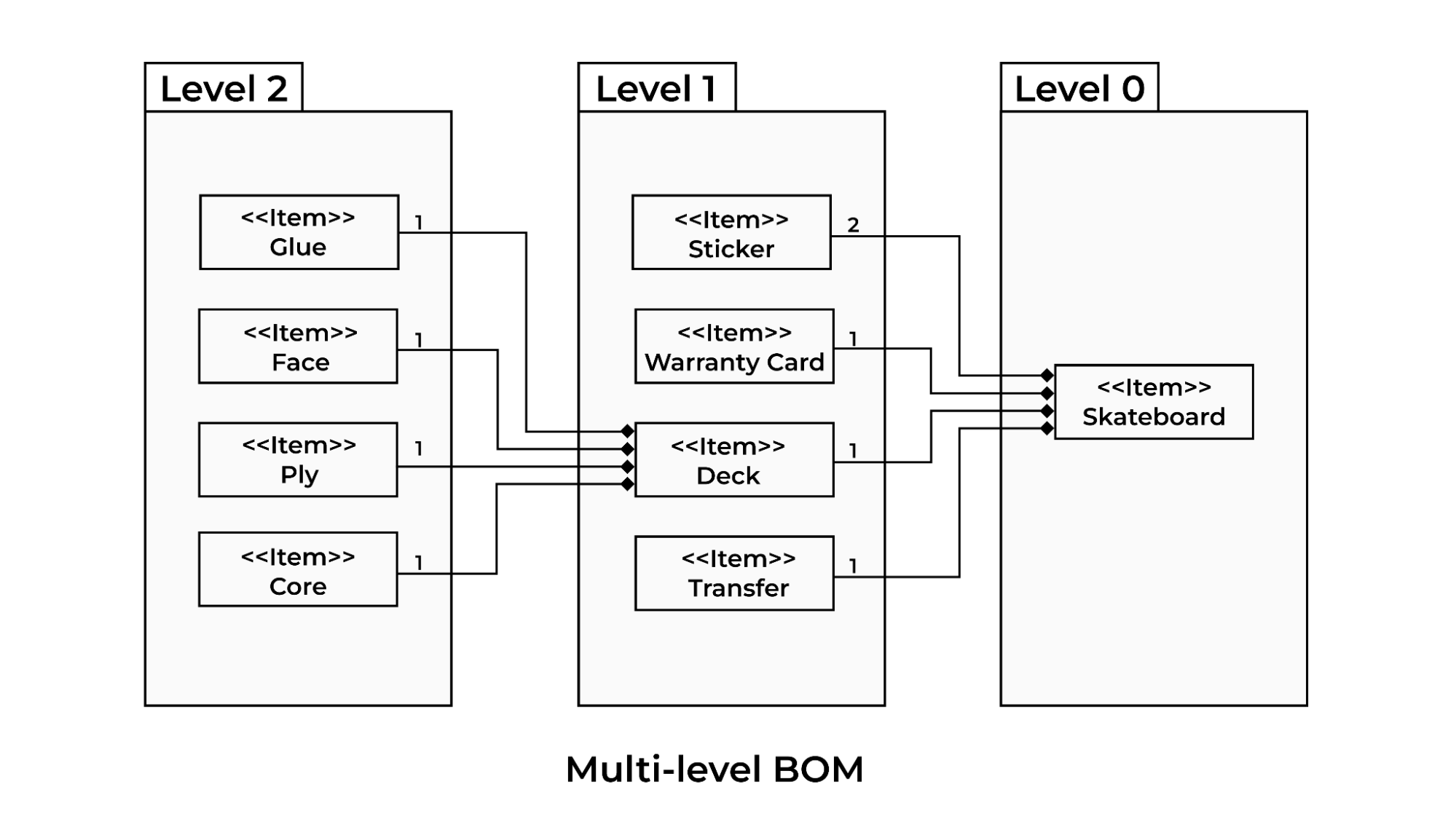
Fig. 1: Multi-level BOM for Skateboard
In this case, the Deck is an intermediate product made from Glue, Face, Ply, and Core. Once assembled, it is combined with other components (Sticker, Warranty Card, Transfer) to produce the skateboard.
This multi-level BOM structure simplifies production, improves traceability, and helps manage inventory. Sub-assemblies can also be sold separately or used in other products, offering flexibility.
Learn more about how to setup a multi-level BOM in Apache OFBiz here- How to Create a Bill of Materials for a Skateboard in Apache OFBiz in 4 Easy Steps.
Also learn more about: Setting Up Variant Products in Apache OFBiz with Virtual Product’s BOM: Skateboard Example
Operation
Description:
An operation refers to an activity or process that transforms, assembles, or moves items through various stages of the supply chain. It can include manufacturing steps, assembly processes, kitting, or any other value-adding task.
Each operation contributes to the production or movement of goods and typically exists as part of a broader routing plan, which outlines the complete set of steps needed to produce a finished or semi-finished product.
Apache OFBiz Term: Routing Task
Data Model(s):
- WorkEffort (used to represent and manage operations/tasks across manufacturing or service processes)
Explanation in Apache OFBiz Context:
In Apache OFBiz, an operation is modeled using the WorkEffort entity. The set of operations used to produce an item are grouped under a routing that represents the full process of manufacturing or assembling an item. Each WorkEffort entry specifies a single task (Routing Task), such as lamination or assembly, with associated resources, durations, and dependencies.
This framework enables businesses to plan, execute, and track each step of the production process efficiently.
Example – Operations for Manufacturing a Skateboard:
A skateboard is made up of multiple components and sub-components. Each stage of production involves specific operations structured under routings:
- Finished Product: Skateboard
- Components: Sticker, Warranty Card, Transfer, Deck (Sub-Assembly)
- Sub-Components (for Deck): Glue, Face, Ply, Core
In this case, the Deck is manufactured as an intermediate sub-assembly using operations such as lamination and shaping. Once the Deck is ready, it’s combined with other components in the final assembly operation.
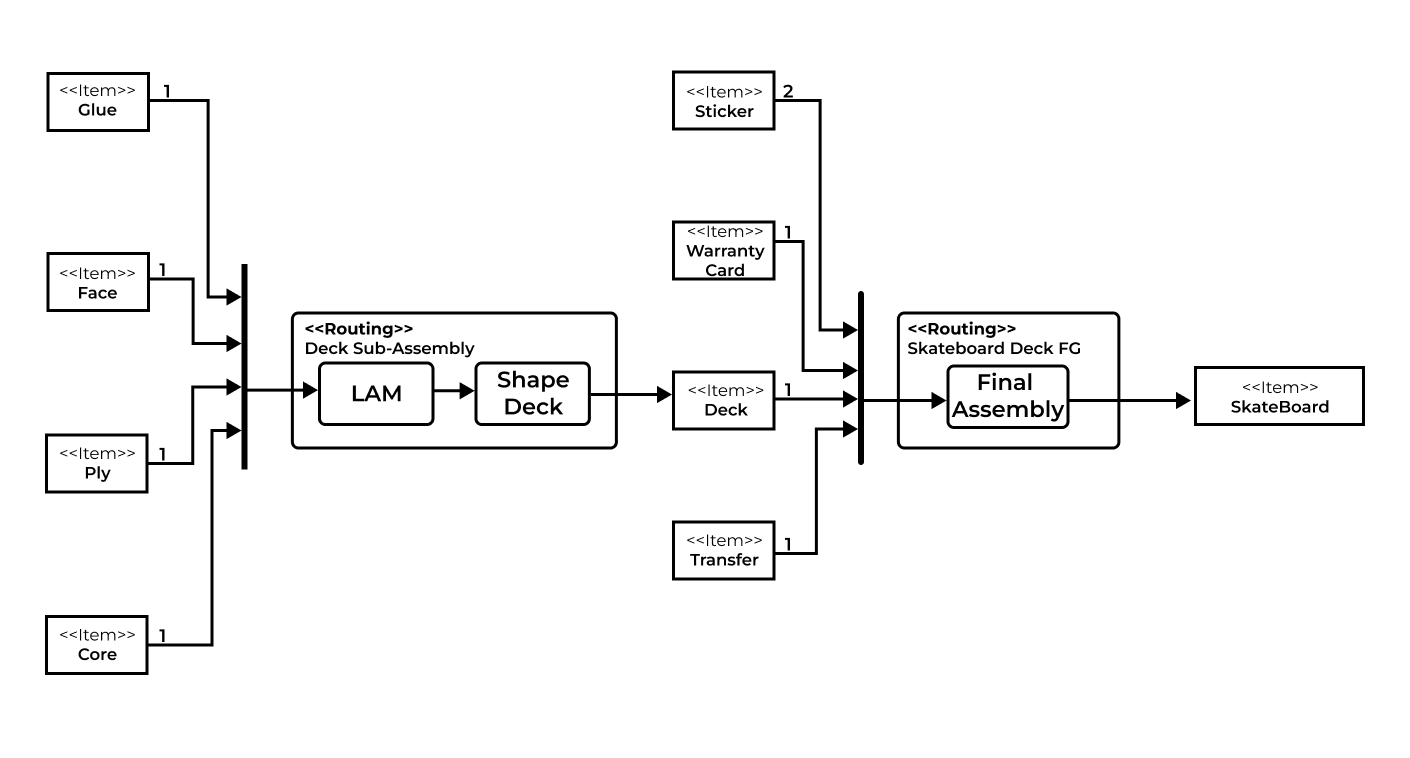
Fig. 2: Routing and Routing Tasks to Manufacture a Skateboard
Routing and associated Routing Tasks:
- Skateboard Deck FG – Routing for the finished skateboard
- Routing Task: Final Assembly
- Deck Sub-Assembly – Routing for the intermediate Deck
- Routing Task: LAM (Lamination)
- Routing Task: Shape Deck
These operations are managed using the WorkEffort model in Apache OFBiz, enabling detailed planning, scheduling, and tracking of production activities.
Routing
Description:
A routing is a predefined sequence of operations required to manufacture or assemble an item. It serves as a production blueprint, guiding the flow of operations and helping plan resources, time, and capacity effectively. Each routing outlines the necessary steps to convert raw materials or components into a finished product or sub-assembly.
Apache OFBiz Term: Routing
Data Model(s):
- WorkEffort – represents the routing itself
- WorkEffortGoodStandard – defines the product to be produced using the concerned routing
- WorkEffortAssoc – establishes the order and relationship between a routing and operation(s)
Explanation in Apache OFBiz Context:
In Apache OFBiz, a routing is modeled using the WorkEffort entity, which encapsulates the complete set of operations needed for production. The WorkEffortGoodStandard model connects the routing to the item it produces, while the WorkEffortAssoc model links each operation (task) in the correct order to ensure the intended production sequence is followed.
Example:
Following the same skateboard BOM (as displayed in Fig. 1 above), following are the routings:
- Routing for the finished skateboard- Skateboard Deck FG
- Routing for the intermediate Deck- Deck Sub-Assembly
Learn more about how to setup routing in Apache OFBiz here- A practical guide to setup Routing in Apache OFBiz for Manufactures in 4 easy Steps.
Buffer Stock and Safety Stock
Description:
Buffer Stock refers to the additional inventory maintained to handle unexpected increases in customer demand.
Safety Stock is extra inventory set aside to mitigate risks from supply chain uncertainties—such as supplier delays, production bottlenecks, or external disruptions.
Though often used interchangeably, both serve a common goal: to ensure product availability even when standard inventory levels are affected.
Apache OFBiz Term(s): Not explicitly named as “Safety Stock” or “Buffer Stock” in UI. Managed using inventory planning fields in ProductFacility
Data Model(s):
- ProductFacility – used to define inventory policies including safety stock levels at a facility for a product
Explanation in Apache OFBiz Context:
In Apache OFBiz, inventory policies related to buffer and safety stock are configured using the ProductFacility entity, which associates a product with a facility (e.g., plant, warehouse, store). Although the terms Safety Stock and Buffer Stock are not labeled explicitly in the UI, their functionality is represented through the following fields:
- minimumStock – The minimum quantity of the product that should be maintained in stock. This serves the purpose of safety stock to avoid stockouts.
- reorderPoint – The inventory level at which a replenishment action should be triggered.
- reorderQuantity – The default quantity to reorder once the reorder point is reached.
These values are configurable through the Apache OFBiz UI when setting up product-level policies at a facility, and they are used in planning, ATP (Available to Promise) logic, and auto-reorder workflows.
Example – Based on the Skateboard BOM:
- Buffer Stock:
The factory maintains 100 extra components—such as stickers, transfers, decks, and warranty cards—to quickly respond to spikes in customer orders. - Safety Stock:
To guard against supplier delays, 50 extra units of Ply are kept in inventory, ensuring deck sub-assembly and final skateboard production can continue uninterrupted.
Producing & Consuming Flow
Description:
In supply chain management, a flow represents the movement of items between an operation (routing task) and a buffer.
- Producing Flow: This type of flow moves items from an operation into a buffer. The related operation is referred to as the “Producing” or “Incoming” operation.
For example, when raw materials are assembled into a sub-assembly, the resulting output is pushed into a buffer, marking the completion of that operation.
- Consuming Flow: This type of flow moves items from a buffer into an operation. The related operation is called the “Consuming” or “Outgoing” operation.
For instance, when components are pulled from a buffer to start the next step in manufacturing, this movement represents a consuming flow.
Apache OFBiz Term(s): Not Applicable
Data Model(s):
(Conceptual only; not directly represented in a single model but can be derived from WorkEffort associations and inventory movements.)
Explanation in Apache OFBiz Context:
Producing and consuming flows can be inferred through the relationships between routing tasks (WorkEffort) and inventory (buffers). These flows help define how items move through the production process, supporting accurate planning and execution.
Example – Flow Representation:
- A routing task completes and pushes finished decks into a buffer → Producing Flow
- The next routing task starts and pulls decks from the buffer for final assembly → Consuming Flow
Resource
Description:
A resource refers to an asset or group of assets—such as a machine, tool, equipment, fixture, labor, or truck—that is used to transform or move an item through an operation in the manufacturing process.
For example, a machine used to assemble parts or a truck used to transport goods from one location to another are both considered resources essential for smooth operational flow.
Apache OFBiz Term(s): Resource
Data Model(s):
- FixedAsset
- Related: WorkEffort, WorkEffortFixedAssetStd, WorkEffortFixedAssetAssign
Explanation in Apache OFBiz Context:
In Apache OFBiz, resources are represented through the FixedAsset model. These can include physical items like machines, vehicles, or tools.To allocate and schedule these resources for production, they are linked to specific operations using the WorkEffort model. This ensures the right resource is available at the right time for the execution of routing tasks.
Example:
- A CNC machine (FixedAsset) is scheduled and assigned to the "Shape Deck" task (WorkEffort) during the deck sub-assembly process for a skateboard.
Load
Description:
Load refers to the portion of a resource’s available capacity that is allocated to perform specific tasks or operations. Resources can include machines, labor, or work centers. Managing load is essential to ensure that capacity is neither underutilized nor overcommitted.
For example, if a packaging line can handle 1,000 units per shift, and 600 units are scheduled for packaging, the load is 600 units, with 400 units of free capacity remaining.
Apache OFBiz Term(s): Not explicitly named “Load” in UI
- Concept modeled via resource scheduling and calendar structures
Data Model(s):
- WorkEffort
- WorkEffortPartyAssign
- WorkEffortFixedAssetAssign
- TechDataCalendar
Explanation in Apache OFBiz Context:
Apache OFBiz does not expose the term Load directly in the UI. However, the underlying concept is represented using a combination of work effort assignments and calendar definitions.
- WorkEffort: Represents tasks/operations (e.g., "Shape Deck") and includes estimated duration or required effort.
- TechDataCalendar: Defines the capacity of a resource—be it a person, a machine, or a facility.
- WorkEffortPartyAssign and WorkEffortFixedAssetAssign: Assign human or machine resources to work efforts for specific durations.
Together, these models allow Apache OFBiz to determine:
- What capacity is available for a resource during a specified time bucket.
- What portion of that capacity has been scheduled for work efforts (i.e., its current load).
- How much capacity remains unallocated.
Although Apache OFBiz doesn't offer visual load balancing tools in the UI, developers or implementers can use this data to calculate and present resource utilization or capacity planning dashboards.
Example:
A shaping machine mapped via FixedAsset, can process 16 units per day, then it could be defined using TechDataCalendar.
A "Shape Deck" operation mapped via WorkEffort, requires 6 units to be produced.
This machine is assigned to the operation via WorkEffortFixedAssetAssign.
In this case:
The machine’s load for the day is 6 units (from the assigned task).
The remaining capacity of 10 units is available for other operations.
Custom reporting or UI components can be built on top of this model to visualize machine or labor load for daily or weekly planning.
Job
Description:
A Job refers to the construct of a production order, production run, or work order initiated for the purpose of producing an item. It involves the execution and scheduling of a defined set of operations in a specific sequence as prescribed by the selected routing.
Apache OFBiz Term(s): Production Run
Data Model(s):
- WorkEffort
- WorkEffortAssoc
- WorkEffortGoodStandard
- WorkOrderItemFulfillment
Explanation in Apache OFBiz Context:
In Apache OFBiz, a job is represented through the WorkEffort model and serves as the instantiation of routing, operations, and the Bill of Materials (BoM) for the item being produced.
The sequence of operations is defined using the WorkEffortAssoc model, and the required materials are specified via the WorkEffortGoodStandard model. When a job is created in response to a sales order, it is linked using the WorkOrderItemFulfillment model.
Depending on the production strategy:
- Under Make to Stock (MTS), a job may be initiated to pre-build items based on forecasts, without direct linkage to a sales order.
- Under Make to Order (MTO), Configure to Order (CTO), or Assemble to Order (ATO), jobs are created in direct reference to sales orders, which may come from one or more customers.
Example:
A skateboard company receives a sales order for 50 skateboards.
- A Job is created as a production run to manufacture the 50 skateboards.
- Operations such as assembling the deck, attaching wheels, and applying stickers are executed in a defined sequence as per the routing.
- Components like decks, wheels, and stickers are consumed as per the BoM.
- Machines and labor are assigned to perform the operations, respecting the job schedule and resource availability.
Dependent Job
Description:
A Dependent Job refers to a job whose processing or completion depends on the start or finish of another job. This typically occurs in a multi-level Bill of Materials (BOM) setup, where an intermediate product produced by one job is required as an input for another job.
Apache OFBiz Term(s): Production Run
Data Model(s):
- WorkEffortAssoc
Explanation in Apache OFBiz Context:
- Dependent jobs are linked using the WorkEffortAssoc model.
- This association allows the output of a predecessor job to be used as input for a successor job, enabling coordinated production execution.
Example:
In the skateboard manufacturing process, the Deck is a sub-assembly made from Glue, Face, Ply, and Core.
- A Job is created to manufacture Decks — this is the predecessor job.
- Another Job is created to assemble the final Skateboards, which requires completed Decks — this is the dependent (successor) job.
The skateboard assembly job can only begin after the deck manufacturing job is completed.
Cost of Production
Description:
Cost of Production refers to the total cost incurred to complete a production job. It includes both direct costs (like materials, labor, and resource usage) and indirect costs (such as setup and overhead). These costs can be either fixed or variable, and they collectively define the true cost of producing an item.
Apache OFBiz Term(s): Cost Component
Data Model(s):
- CostComponent, CostComponentCalc
Explanation in Apache OFBiz Context:
In Apache OFBiz, the cost associated with a job is calculated via CostComponentCalc and represented via CostComponent model.
This cost is linked to the corresponding job and is transferred to the produced inventory, ensuring that the cost basis for each finished goods accurately reflects the job's resource and material consumption.
The total cost of production is determined as:
Total Cost of Production (TCP) = Fixed Cost (e.g., setup, overhead) + Variable Cost (e.g., material, labor)
Example:
A job produces 16 skateboards.
- Material cost: $1000.00
- Labor cost: 2 hours × $60.00/hour = $120.00
- Total Cost of Production (TCP) = $1000.00 + $120.00 = $1120.00
- Transferred Unit Cost = $1120.00 ÷ 16 = $70.00 per unit
This unit cost is recorded against the finished goods in inventory, providing accurate valuation and profitability insights.
Requirements Planning
Description:
Requirements Planning is a structured process in supply chain management used to balance and manage demand, supply, inventory, production, and logistics. It ensures that the right materials and resources are available at the right time to meet operational goals. This planning is both time-sensitive and dependent on material availability and resource capacity.
Apache OFBiz Term(s):
- Product Requirement
- Internal Requirement
Data Model(s):
- Requirement
Explanation in Apache OFBiz Context:
In Apache OFBiz, requirements planning is represented through the Requirement model. It helps determine the needs for both purchasing and production based on sales orders, inventory levels, and resource availability.
The output of requirements planning includes:
- Product Requirement: How much to purchase and when
- Internal Requirement: How much to produce and when
These requirements are used as inputs for subsequent planning and execution activities like job creation, purchasing, and inventory management, aligning the supply chain with overall business demand.
Material Requirements Planning (MRP)
Description:
Material Requirements Planning (MRP) is a system-driven approach used to create detailed and time-phased requirements plans based on actual demand and supply data. It ensures that materials are available for production and products are available for delivery while maintaining the optimal inventory levels.
Apache OFBiz Term(s):
- MRP Run
- Product Requirement
- Internal Requirement
Data Model(s):
- Requirement
Explanation in Apache OFBiz Context:
In Apache OFBiz, the MRP engine conducts a planning run that evaluates various demand- and supply-side elements to generate material requirements plans.
- Demand-side factors considered:
- Sales Orders
- Sales Forecasts
- Consuming Jobs
- Minimum or Safety Stock levels
- Supply-side factors considered:
- Current Quantity on Hand
- Existing Purchase Orders
- Active Producing Jobs
- Previously planned Product & Internal Requirements
Once generated, the requirements plans must be reviewed and approved by a planner. Upon approval:
- An Internal Requirement can be transformed into a job (production order).
- A Product Requirement can be transformed into a purchase order (PO).
This automated and data-driven process ensures timely availability of materials and efficient production planning.
Learn more about Internals of MRP Engine in Apache OFBiz - Understanding Internals of MRP Engine in Apache OFBiz.
Conclusion
Understanding the terminology behind the manufacturing process is essential for effectively using Apache OFBiz in real-world scenarios. This document bridges the gap between business processes and their technical implementation, enabling clearer communication across teams and more informed decision-making.
As you continue working with Apache OFBiz, refer back to these definitions to deepen your understanding, streamline implementation efforts, and ensure your configurations reflect accurate operational logic. Mastering these core concepts lays the groundwork for more advanced use of Apache OFBiz’s powerful manufacturing planning and execution capabilities.