The JUnit4OSGi framework: a simple test framework for OSGiJUnit4OSGi is a test framework executing JUnit tests on an OSGi runtime. JUnit4OSGi provides a JUnit++ environment specialized for OSGi, several runners and a maven plugin | Table of Contents |
|---|
| maxLevel | 4 |
|---|
| minLevel | 2 |
|---|
| class | toc |
|---|
|
Why JUnit4OSGi ? OSGi is a great technology to create modular and dynamic applications. However, creating modular applications raise the need of integration tests: How to be sure that all my modules/services... collaborate correctly. Unit test is great, but does not really check my whole system and the relation between my modules.
Junit4OSGi is a framework allowing the execution of JUnit tests in an OSGi environment . ! It stems from the fact that testing applications on top on OSGi is quite complex compared to classic Java unitary tests. With junit4osgi you will be able to test all your bundles together and check that everything works correctly. The goal of JUnit4OSGi is to provide the same mechanisms as unitary tests in an OSGi context. It allows using the JUnit concepts, although tests are run in an OSGi framework, using all of its distinctivenessesdistinctiveness. The JUnit4OSGi bundle framework allows you to : - Perform OSGi services tests.
- Test applications on different VMs, OSGi implementations.
- Test dynamism impact.
This pages describes also a tutorial. With the archive tutorial, a preconfigured version of Felix (with the test framework already installed) is provided. Working principles  Image Removed Image Removed
The goal of unitary tests in an OSGi context is to check that the bundles (the OSGi deployment units) to test are correctly deployed, that they expose the expected services and that these services work properly. Tests are placed in a bundle, which is deployed in the OSGi environment to test. Then, they can interact with the environment (more specifically bundles and services) to check that everything works well. Getting JUnit4OSGiThe JUnit4OSGi framework is available from the Felix trunk in the iPOJO folder. the JUnit4OSGi framework and the different launchers are built when you compile Felix. How to run test cases Once tests have been deployed on the OSGi framework, there are several way to run the tests - You can use the JUnit4OSGi immediate-runner, which run tests contained in all the test-bundles. The results are displayed in the framework console output.
- The JUnit4OSGi Felix Command (available only for the Apache Felix OSGi framework), allows you to run tests contained in a specific bundle. Test results are also displayed in the framework console output. The syntax of the command is very simple :
- To run tests contained in the bundle with the given id :{{
| No Format |
|---|
junit <bundle id> |
}} - To run tests contained in all the test-bundles installed in the framework :
junit all
- The JUnit4OSGi Swing GUI lets you select the test cases and test suites to execute and shows you graphically the result of the tests. You can double-click on a test case result to show its details.
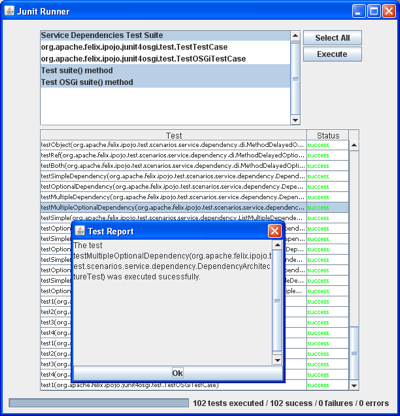 Image Removed Image Removed
TestCase, TestSuite A test case is an environment (made of conditions and variables) under which a tester will check that a requirement is satisfied. For JUnit, test cases are classes that define several test methods ; each test method tests an aspect of the targeted requirement. Test cases are often collected into test suites. A test suite aggregates several test cases (and even other test suites), including the notion of test hierarchy. Tests can be organized according to the different requirements they try to validate. The skeleton of a JUnit TestCase and TestSuite is shown just above : | Code Block |
|---|
/**
 * The skeleton of a JUnit test case
 */
public class MyTestCase extends junit.framework.TestCase {
    ...

 public void setUp() {
    // Performs actions BEFORE running any test case.
 }

 public void testSomething() throws AnyException {
    // A test method
    ...
    assertTrue(myTest);
    assertEquals(myValue, expectedValue);
    ...
 }

 public void testAnotherThing() {
    // Another test method
    ...
 }


 public void tearDown() {
    // Performs actions AFTER running all test cases.
 }
}
|
| Code Block |
|---|
/**
 * The skeleton of a JUnit test suite
 */
public class MyTestSuite extends junit.framework.TestSuite {
 /**
 * The skeleton of a JUnit test suite
 */
 public static Test suite() {
    TestSuite suite = new TestSuite("The name of the test suite");
    suite.addTestSuite(MyTestCase.class);
    suite.addTestSuite(AnotherTestCase.class);
    ...
    return suite;
 }
}
|
First, tests methods are declared in the test case. Their name must begin with "test", so JUnit will execute them on demand. The test are expressed in terms of JUnit assertions ; the assert*() methods causes JUnit test failure if the given assertion is false. The setUp() and tearDown() methods perform specific actions before and after test cases are run. Then, the test suite collect various test cases. It must implement the suite() method that returns the global (and organized) test suite to JUnit. OSGiTestCase and OSGiTestSuite An OSGi test case, is a test case that runs in an OSGi context. OSGiTestCase is the class that all the OSGi test cases you write must extend. This class is a kind of bridge between the JUnit TestCase class and the OSGi environment. The only thing the OSGiTestCase class adds is the access to the bundle context of the bundle containing tests, and some utility methods, giving an easy access to other bundles and services registered in the OSGi framework. The structure of an OSGiTestCase is exactly the same as a classic JUnit TestCase : | Code Block |
|---|
 /**
  * The structure of an OSGiTestCase
  */
 public class MyOSGiTestCase extends OSGiTestCase {
    public void setUp() {...}
    public void testSomething() {
        // You can access here the bundle context through
        // the 'getContext()' method
        getContext().getServiceReference(...);

        ...
    }
 public void testAnotherThing() {...}
 ...
 public void tearDown() {...}
 }
|
By extension, OSGi test suites are collections of OSGi test cases. But you can also add classic JUnit test cases inside your OSGiTestSuite. The skeleton of an OSGiTestSuite is globally the same as a TestSuite, except the fact that a reference to the bundle context is passed : | Code Block |
|---|
public class MyOSGiTestSuite {
 /**
  * This method returns the suite of tests to run.
 */
 public static Test suite(BundleContext bc) {
    OSGiTestSuite suite = new OSGiTestSuite("My OSGi test suite", bc);
    suite.addTestSuite(MyFirstTest.class);
    suite.addTestSuite(MySecondTest.class);
    ...
    // Here, we add a sub test suite in this test suite.
    suite.addTest(AnotherTestSuite.suite(bc));
    ...
    return suite;
 }
}
|
How to declare test suites This section explains how to declare your test suites in order to expose them to the JUnit4OSGi bundle. The written OSGi test suites must be declared by the bundle containing them. To do so, you define add the Test-Suite property in your bundle's header. The following snippets show you how to configure your bundle generation tool to add this property in the header. You can even declare test cases in it. The Junit4OSGi bundle will detect such an header in installed bundle (using the extender pattern) and execute contained tests on demand. With the maven-bundle-plugin, add the following lines in your project's pom : | Code Block |
|---|
| 