DUE TO SPAM, SIGN-UP IS DISABLED. Goto Selfserve wiki signup and request an account.

...
- Add Pipeline:AWS Steps plugin to Jenkins CI prod account
- Create bucket on S3 CI prod account
- Handling permissions
- Create a write policy specific for this bucket
Currently, we only want to write to this specific bucket. To make it secure, only "PutObject" permission is given to this specific bucket (via ARN) - Attach the policy to bucket
- Attach the policy to IAM Role
IAM Role : jenkins_slave_role
Policy Name : s3-ci-prod-upload-unit-test-artifact
Action: s3: Write
Resource connected (ARN of S3 bucket) : arn:aws:s3:::mxnet-ci-unittest-artifact-repository/*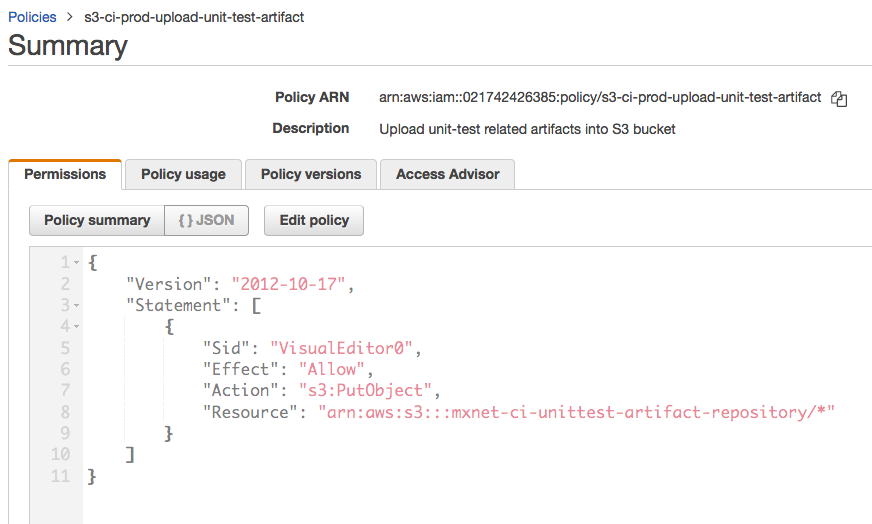
- Create a write policy specific for this bucket
- Set Global property on Jenkins console
Jenkins → Manage Jenkins → Configure System → Global Properties (helps setup global environment variables visible in every job)
Name : Value
MXNET_CI_UNITTEST_ARTIFACT_BUCKET: mxnet-ci-unittest-artifact-repository
- Call S3 upload with required parameters
- Functions:
- ci/Jenkinsfile_utils.groovy → collect_test_results_unix()
- ci/Jenkinsfile_utils.groovy → collect_test_results_windows()
- PR : https://github.com/apache/incubator-mxnet/pull/16336
- Functions:
Design Choices
S3 Upload will be triggered for every build
Instead of uploading unittest data to S3 only once per PR (PR-merge commit), we upload it for every commit on PR.
Why?
More data uploads → Increased sampling size → More basis for identifying the cause of unit-test slowdown
More data, better granularity and hence clarity.
Instead of uploading unittest data to S3 for every single PR, design choice was made to upload it only for PR-merge (when PR gets merged into the master i.e. commit made to master).
Why? Tracking for every commit of PRs would be unfeasible, and unstable. On the other hand, PR merges are generally stable and would be "relevant" to tracking health of the master build.
Context file
Context file would store context specific to this PR - user, source branch, target branch, timestamp, etc
FAQ
Q. Why upload to S3 instead of directly putting in CloudWatch?
...