...
Step | Example |
|---|
1. Navigate to the source downloads for a released version on SourceForge | |
2. Download the cTAKES-2.6.zip file.
Save the file to a temporary location on your machine. |  |
3.
Unzip (extract the contents of) the compressed file you downloaded into
a directory that you want to be the cTAKES install location.
For example, Windows: Linux: | Code Block |
|---|
| /usr/bin/cTAKES-2.6
|
This folder we will call <cTAKES_HOME>. You will need to refer to the directory later. | |
...
Step | Example |
|---|
1. Open a command prompt and change to the cTAKES_HOME directory.
Windows: Linux: | Code Block |
|---|
| cd /usr/bin/cTAKES-2.6
|
|
| Note |
|---|
| cTAKES_HOME must be your current directory unless you are skilled at setting paths on your machine. |
|
2. Start the CAS Visual Debugger by running this command:
Windows: | Code Block |
|---|
| runctakesCVD.bat
|
Linux: | Code Block |
|---|
| runctakesCVD.sh
|
The application may take a minute to start on slower hardware. | Image Removed |
3. An analysis engine (AE) needs to be loaded in order to process text.
Use the Run-> *Load AE*menu bar command. Navigate to the file
| Code Block |
|---|
| <cTAKES_HOME>/cTAKESdesc/cdpdesc/analysis_engine/AggregatePlaintextProcessor.xml
|
Click Open. | 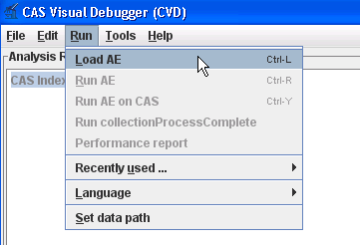 Image Modified Image Modified |
4. Copy the text in the example at the right (next cell) and paste the
contents into the Text section of CVD, replacing the text that is
already there.
This example file can also be found in test data:
| Code Block |
|---|
| <cTAKES_HOME>/testdata/cdptest/testinput/plaintext/testpatient_plaintext_1.txt
|
| Dr. Nutritious
Medical Nutrition Therapy for Hyperlipidemia
Referral from: Julie Tester, RD, LD, CNSD
Phone contact: (555) 555-1212
Height: 144 cm Current Weight: 45 kg Date of current weight: 02-29-2001
Admit Weight: 53 kg BMI: 18 kg/m2
Diet: General
Daily Calorie needs (kcals): 1500 calories, assessed as HB + 20% for activity.
Daily Protein needs: 40 grams, assessed as 1.0 g/kg.
Pt has been on a 3-day calorie count and has had an average intake of 1100 calories.
She was instructed to drink 2-3 cans of liquid supplement to help promote weight gain.
She agrees with the plan and has my number for further assessment. May want a Resting
Metabolic Rate as well. She takes an aspirin a day for knee pain. |
3. From the menu bar, click Run -> Run AggregatePlaintextProcessor.
You'll get a list of all the annotations in the Analysis Results frame. | 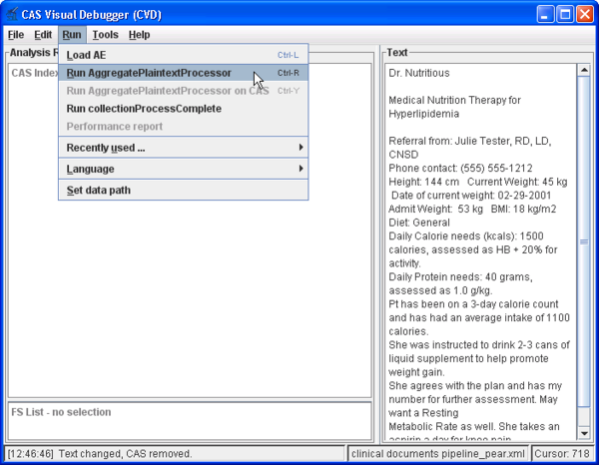 Image Modified Image Modified |
4. Named entities are now recognized in this clinical document.
Annotations of MedicationEventMention and EntityMention are created. To
find one, in the Analysis Results frame, click on the key in front of:
AnnotationIndex
uima.tcas.Annotation
edu.mayo.bmi.uima.core.type.textsem.IdentifiedAnnotation
edu.mayo.bmi.uima.core.type.textsem.EntityMention
and
edu.mayo.bmi.uima.core.type.textsem.EventMention
edu.mayo.bmi.uima.core.type.textsem.EventMention.MedicationEventMention
Then select edu.mayo.bmi.uima.core.type.textsem.EntityMention* or
*edu.mayo.bmi.uima.core.type.textsem.EventMention.MedicationEventMentionMedicationEventMention.
This
will show an Annotation Index in the lower frame. Select any
annotation in that lower frame and you will see the text discovered in
the Text frame on the right. You may close CVD if you wish. | Image Removed  Image Added Image Added |
Collection processing engine (CPE)
Step | Example |
|---|
1. Open a command prompt and change to the cTAKES_HOME directory:
Windows: | Code Block |
|---|
| cd C:\cTAKES2.6
|
Linux: | Code Block |
|---|
| cd /usr/bin/cTAKES2.6
|
|
| Note |
|---|
| Note that cTAKES_HOME must be your current directory unless you are skilled at setting paths on your machine. |
|
2. Start the collection processing engine by running this command:
Windows: | Code Block |
|---|
| runctakesCPE.bat
|
Linux: | Code Block |
|---|
| runctakesCPE.sh
|
The application may take a minute to start on slower hardware. | Image Removed |
3. This will bring up the Collection Processing Engine Configurator. In the Menu bar click File >Open CPE Descriptor | Image Removed 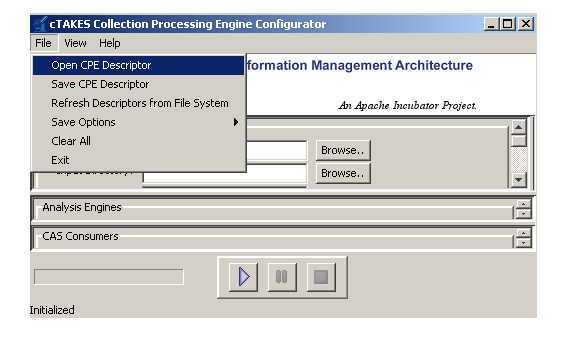 Image Added Image Added |
4. Navigate to the file | Code Block |
|---|
| <cTAKES_HOME>/cTAKESdesc/cdpdesc/collection_processing_engine/test_plaintext.xml
|
Click Open. | Image Removed |
5. Click the Play button (green/blue play arrow near the bottom). | Image Removed |
6. You should see that one document was processed. You did process a collection of documents. In this case the collection only contained one just to show how to do it. Close the results window. | Image Removed 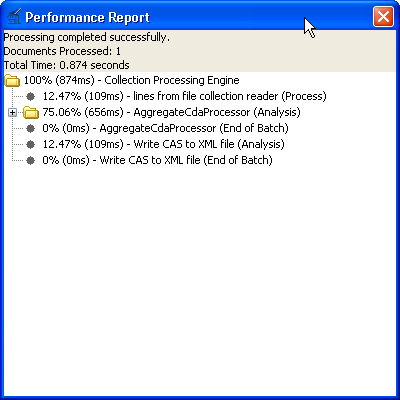 Image Added Image Added |
7. Close the CPE application. You may be prompted to save changes. Since this was just a test you may click the No button. | Image Removed |
8. Open a new command prompt and change to the <cTAKES_HOME> | No example. |
9. To test the results there is a comparison tool that will help show that the results match expectations with the following syntax: | Code Block |
|---|
| java -cp cTAKES.jar edu.mayo.bmi.utils.xcas_comparison.Compare
<First File> <Second File> <diff-html>
|
Where: <First File> is the first file to compare; <Second File> is the second file to compare; <diff-html> is where the results are written to
Copy and paste the example at the right (next cell) which has had our
example files already substituted into a command prompt to run. In this
case we have shipped an example of what the output should be for you to
compare against. | Windows:
| Code Block |
|---|
| java -cp cTAKES.jar edu.mayo.bmi.utils.xcas_comparison.Compare ^
"testdata\cdptest\testoutput\plaintext\sample_note_plaintext.xml" ^
"testdata\cdptest\testsampleoutput\plaintext\sample_note_plaintext.xml" ^
c:\stuff\diff-html.html
|
Linux:
| Code Block |
|---|
| java edu.mayo.bmi.utils.xcas_comparison.Compare \
"/usr/bin/cTAKES2.6/testdata/cdptest/testoutput/plaintext\sample_note_plaintext.xml" \
"/usr/bin/cTAKES2.6/testdata/cdptest/testsampleoutput/plaintext/sample_note_plaintext.xml" \
/tmp/diff-html.html
|
|
10. The resulting file will open for you. Look at the comparison to see the annotations resulting from this pipeline.
Windows: | Code Block |
|---|
| c:\stuff\diff-html.html
|
Linux: | Code Block |
|---|
| /tmp/diff-html.html
|
| Image Removed |
Using the same CVD and CPE programs in the manner described above, you can test all the other components. The analysis engines and collection processing engines shipped with cTAKES for some of the annotators are described in the following table.
...