...
ASA deployment model
Prereqs for ASA
- Nexus 1000v appliance is setup and configured in CS (when adding Vmware cluster)
- VNMC appliance is configured and added to CS (separate lifecycle commands will be provided for this)
...
After the ASA instance is powered on the VNMC needs to be registered from ASA console -
- ASA1000V(config)# vnmc policy-agent
...
- ASA1000V(config-vnmc-policy-agent)# registration host vnmc_ip_address
...
- ASA1000V(config-vnmc-policy-agent)# shared-secret key where key is the shared secret for authentication of the ASA 1000V connection to the Cisco VNMC
Guest network implement() logic
Guest n/w network gets implement implemented when 1st first guest VM is deployeda.
Guest network implementation
...
- VirtualRouterElement creates the VR for DHCP, userdata and metadata, password server
...
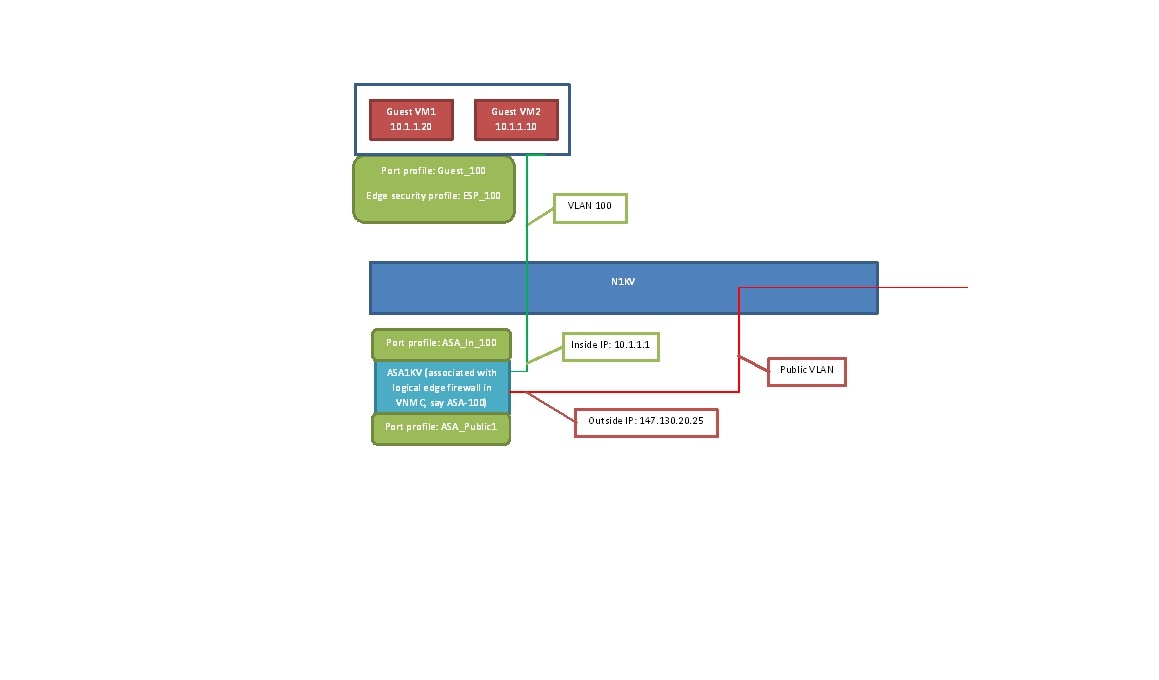
- CiscoVNMCElement::implement() does the following:
...
- Create tenant/edge_security_profile/logical_edge_firewall in VNMC. There will be helper methods in VnmcResource class for all these operations (currently assuming one VNMC appliance per zone. do we need to support multiple VNMCs per zone, in that case how to choose?)
...
...
...
...
- Create vservice_node, in_port_profile, out_port_profile for ASA in VSM for the Vmware cluster. This is done through VsmCommand class
...
- vservice_node (below commands for doing it on CLI)
...
- vservice node ASA-%vlanid% type asa
...
...
...
- adjacency l2 vlan %vlanid%
...
...
...
- port-profile type vethernet ASA-Inside-%vlanid
...
...
...
- switchport access vlan %vlanid%
...
...
...
...
- same as in_port_profile but with some vlan for public n/w
...
- Reconfigure in/out n/w interfaces for ASA appliance with in_port_profile and out_port_profile respectively (need to check what all need to be stored name, cluster, ip address for getting hold of vCenter reference for this VM so that reconfigure can be done)
...
- Associate ASA appliance with logical_edge_firewall (in VNMC). IP address of ASA is required for this. This is again done using VnmcResource
...
For guest VM the following change is required while creating the port profile in VSM
- Create port profile guest VM and associate logical_edge_firewall, edge_security_profile
...
- port-profile type vethernet Guest-%vlanid%
...
...
...
- switchport access vlan %vlanid%
...
...
- vservice node ASA-%vlanid% profile edge_security_profile
...
...
TODO:
- Currently ASA is manually setup and configured. Need to see if this can be automatically provisioned?
...
