Versions Compared

Key

  • This line was added.
  • This line was removed.
  • Formatting was changed.

...

Step

Example

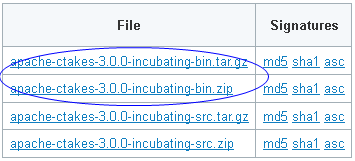
1. Navigate to the cTAKES downloads page on the Apache site and download the binary package. Select a mirror site and press the Change button to modify the URL to your desired mirror location before doing the download or accept the default.

Windows:
Download the ZIP file.
Linux:
Take the link for the file you want and use wget to obtain the *.TAR.GZ file.
wget <URL of the file>

Note

The download time will be commensurate with 700MB of data.


Warning

A release candidate is currently available at: http://people.apache.org/~chenpei/ctakes-3.0.0-incubating/rc7/target/Image Removed


Windows:

Linux:

Code Block
HTTP request sent, awaiting response... 200 OK
Length: 763500777 (728M) [application/x-gzip]
Saving to: `apache-ctakes-3.0.0-incubating-bin.tar.gz'

13% [===========>                                     ] 106,548,331 1.13M/s eta 11m 9s

2. (Optional but recommended) Verify the downloaded files against a file signature to ensure you have the proper and complete file.

No example

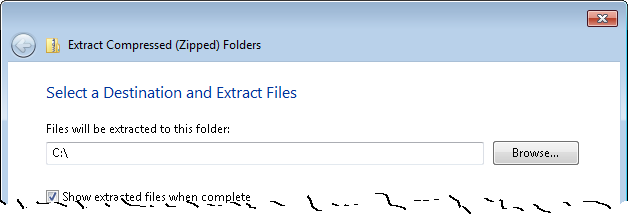
3. Unzip the file you downloaded into a directory that you want to be the cTAKES install location. The compressed files contain a single directory at the top level. This folder we will call <cTAKES_HOME>. You will need to refer to this directory later.

Windows:

Code Block
languagenone
C:\apache-ctakes-3.0.0-incubating

Linux:

Code Block
languagenone
/usr/local/apache-ctakes-3.0.0-incubating

Windows:

Linux:

Code Block
tar -xvf apache-ctakes-3.0.0-incubating-bin.tar.gz -C /usr/local 

4. Download UMLS and model resources...

Warning

The location of these resources is not prepared yet. Replace this box with instructions.

No example

...

Step

Example

1. Open a command prompt and change to the cTAKES_HOME directory.
Windows:

Code Block
languagenone
cd \apache-ctakes-3.0.0-incubating\bin

Linux:

Code Block
languagenone
cd /usr/local/apache-ctakes-3.0.0-incubating/bin


Note
titleNote

Note that <cTAKES_HOME>/bin must be your current directory unless you are skilled at setting paths on your machine.

2. Start the CAS Visual Debugger by running this command:
Windows:

Code Block
languagenone
runctakesCVD.bat

Linux:

Code Block
languagenone
runctakesCVD.sh

The application may take a minute to start on slower hardware.

No example

3. Copy the example text from the next cell in this table and paste the contents into the Text section of CVD, replacing the text that is already there.
This example file can also be found in test data:

Code Block
languagenone
<cTAKES_HOME>/testdata/cdptest/testinput/plaintext/testpatient_plaintext_1.txt


Warning

This file may not be in the binary distribution only src?


Code Block
langnone
Dr. Nutritious

Medical Nutrition Therapy for Hyperlipidemia
Referral from: Julie Tester, RD, LD, CNSD
Phone contact: (555) 555-1212
Height: 144 cm Current Weight: 45 kg Date of current weight: 02-29-2001
Admit Weight: 53 kg BMI: 18 kg/m2
Diet: General
Daily Calorie needs (kcals): 1500 calories, assessed as HB + 20% for activity.
Daily Protein needs: 40 grams, assessed as 1.0 g/kg.
Pt has been on a 3-day calorie count and has had an average intake of 1100 calories.
She was instructed to drink 2-3 cans of liquid supplement to help promote weight gain.
She agrees with the plan and has my number for further assessment. May want a Resting
Metabolic Rate as well. She takes an aspirin a day for knee pain.

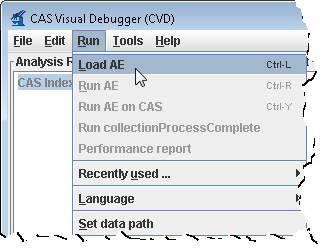
4. An analysis engine (AE) needs to be loaded in order to process text.
Use the Run-> Load AE menu bar command. Navigate to the file

Code Block
languagenone
<cTAKES_HOME>/desc/ctakes-clinical-pipeline/desc/analysis_engine/AggregatePlaintextProcessor.xml

Click Open.
Loading the analysis engine may take a minute. Once the analysis engine has successfully loaded you should see a tree in the Analysis Results frame:

Wiki Markup
CAS Index Repository \\
\* SofaIndex \[0\] \\
\* AnnotationIndex \[1\] \\  


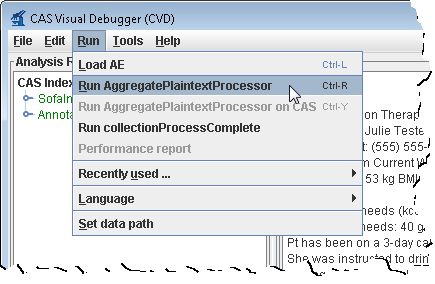
5. From the menu bar, click Run -> Run AggregatePlaintextProcessor.


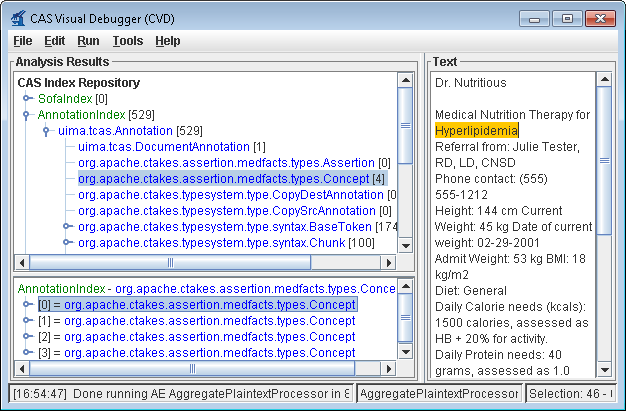
6. You'll get a list of all the annotations for this clinical document in the Analysis Results frame. Annotations such as concepts mentioned, division by sentence, etc from the pipeline are viewable. To see one, in the Analysis Results frame, click on the key in front of:

CAS Index Repository
* AnnotationIndex
 * uima.tcas.Annotation
  * org.apache.ctakes.medfacts.types.Concept

This will show an AnnotationIndex in the lower frame. Select any annotation in that lower frame and you will see the text discovered in
the Text frame on the right like the concept of the problem Hyperlipidemia.

For a medication example select this

CAS Index Repository
* AnnotationIndex
 * uima.tcas.Annotation
  * org.apache.ctakes.typsystem.type.textsem.IdentifiedAnnotation
   * org.apache.ctakes.typsystem.type.textsem.EventMention
    * org.apache.ctakes.typsystem.type.textsem.MedicationEventMention

Now select items in the lower frame to see the text being annotated.

You may close the CAS Visual Debugger (CVD) application if you wish.


...