DUE TO SPAM, SIGN-UP IS DISABLED. Goto Selfserve wiki signup and request an account.
| Wiki Markup |
|---|
{section}
{column:width=65%}
{panel:title=Contents of this Page}{toc:minLevel=2}{panel}
{column}
{column}{include:Menu cTAKES 3.0 to Include}{column}
{section}

These instructions are for end users. With these instructions you can install Apache cTAKES, configure it, and use it to process text (typically text associated with a medical record). If you were planning to expand, change, or modify the code within cTAKES, refer to the [cTAKES 3.0 Developer Guide|cTAKES:cTAKES 3.0 Developer Guide].

These instructions will cover installation and a test of the main product including trained models for sentence detection and tagging parts of speech, dictionaries from a subset of the UMLS, the LVG resource, etc. Optional components are described in the [Component Use Guide|CTAKES:cTAKES 3.0 Component Use Guide].

Once you have finished installing cTAKES and its separately-bundled resources, you will be able to see what cTAKES is capable of. .

h2. Prerequisites

|| Step || Example ||
| 1. Make sure you have Java 1.6 or higher. Most systems come with Java already installed. \\
\\
Run this command to check your version. \\
\\
*Windows* and *Linux*: {code:language=none}java -version{code} | *Windows:* {code:language=none} |
...
| Column | |||||||||
|---|---|---|---|---|---|---|---|---|---|
| |||||||||
|
...
These instructions are for end users. With these instructions you can install Apache cTAKES, configure it, and use it to process text (typically text associated with a medical record). If you were planning to expand, change, or modify the code within cTAKES, refer to the cTAKES 3.0 Developer Guide.
These instructions will cover installation and a test of the main product including trained models for sentence detection and tagging parts of speech, dictionaries from a subset of the UMLS, the LVG resource, etc. Optional components are described in the Component Use Guide.
Once you have finished installing cTAKES and its separately-bundled resources, you will be able to see what cTAKES is capable of. .
Prerequisites
...
Step
...
Example
...
| Code Block | ||
|---|---|---|
| ||
java -version |
Windows:
...
| language | none |
|---|
C:\>java -version
java version "1.6.0_20"
Java(TM) SE Runtime Environment (build 1.6.0_20-b02)
Java HotSpot(TM) Client VM (build 16.3-b01, mixed mode, sharing)
|
...
| language | none |
|---|
{code} \\ *Linux:* {code:language=none}tbleeker@system:/$ java -version java version "1.6.0_22" OpenJDK Runtime Environment (IcedTea6 1.10.1) (6b22-1.10.1-0ubuntu1) OpenJDK 64-Bit Server VM (build 20.0-b11, mixed mode) |
...
Install cTAKES
...
Step
...
Example
...
| Info |
|---|
The download time will be commensurate with ~165MB of data. |
Windows:
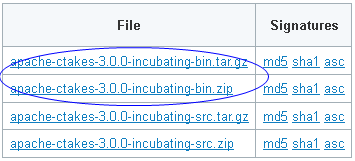
Linux:
...
{code} | h2. Install cTAKES || Step || Example || | 1. Navigate to the cTAKES [downloads page|http://incubator.apache.org/ctakes/downloads.html] on the Apache site and download the *binary* package. Select a mirror site and press the Change button to modify the URL to your desired mirror location before doing the download or accept the default. \\ \\ *Windows*: \\ Download the ZIP file. \\ *Linux*: \\ Use wget to obtain the \*.TAR.GZ file. \\ wget *<URL of the file from downloads>* \\ \\ {info}The download time will be commensurate with \~165MB of data.{info} | *Windows*: \\ !snap031.png!\\ *Linux*: \\ {code}HTTP request sent, awaiting response... 200 OK Length: 763500777 (728M) [application/x-gzip] Saving to: `apache-ctakes-3.0.0-incubating-bin.tar.gz' 13% [===========> ] 106,548,331 1.13M/s eta 11m 9s |
...
{code} | | 2. (Optional but recommended) [Verify the downloaded files|http://incubator.apache.org/ctakes/downloads.html#verifying-signatures] against a file signature to ensure you have the proper and complete file. |
...
| No |
...
example \\ | | 3. Unzip the file you downloaded into a directory that you want to be the cTAKES install location. The compressed files contain a single directory at the top level. This folder we will call *<cTAKES_HOME>*. You will need to refer to this directory later. |
...
| language | none |
|---|
\\ \\ *Windows*: {code:language=none}C:\apache-ctakes-3.0.0-incubating |
...
Linux:
...
| language | none |
|---|
{code}{*}Linux*: {code:language=none}/usr/local/apache-ctakes-3.0.0-incubating |
...
Windows:
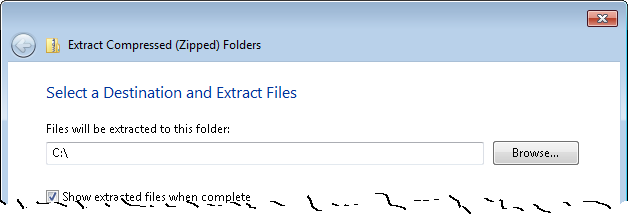
Linux:
...
{code} | *Windows*: \\ !snap033.png!\\ *Linux*: \\ {code}tar -xvf apache-ctakes-3.0.0-incubating-bin.tar.gz -C /usr/local |
...
{code} | | 4. Download [CTAKES:cTAKES 3.0 Dictionaries and models]. |
...
| Info |
|---|
Due to licensing considerations and easy of installability, one download from an external location was established with all the resources you will need. Licensing for these resources is found within the download. |
...
\\ {info}Due to licensing considerations and easy of installability, one download from an external location was established with all the resources you will need. Licensing for these resources is found within the download.{info} Go to [http://sourceforge.net/projects/ctakesresources/files/] and download the ZIP file with a matching version from the ctakesresources project. |
...
\\ Download time will be commensurate with 1GB of data. |
...
\\ Unzip the files into a temporary location. |
...
| *Windows*: |
...
| lang | none |
|---|
\\ {code:lang=none}C:\temp\ctakes-resources-3.0.1\resources |
...
{code} *Linux*: |
...
| lang | none |
|---|
\\ {code:lang=none}/tmp/ctakes-resources-3.0.1/resources |
...
{code} | | 5. Copy (or move) the resources to cTAKES_HOME. |
...
\\ Copy the contents of the temporary resources directory (and all sub-directories) to <cTAKES_HOME>/resources. |
...
| Info |
|---|
There may be conflicts while taking this action. Overwrite the cTAKES_HOME files with those in the resources download. |
Windows:
...
| lang | none |
|---|
\\ {info}There may be conflicts while taking this action. Overwrite the cTAKES_HOME files with those in the resources download.{info}\\ \\ | *Windows*: \\ {code:lang=none}xcopy /s C:\temp\ctakes-resources-3.0.1\resources C:\apache-ctakes-3.0.0-incubating\resources |
...
{code} *Linux*: |
...
| lang | none |
|---|
\\ {code:lang=none}cp /tmp/ctakes-resources-3.0.1/resources/* /usr/local/apache-ctakes-3.0.0-incubating/resources/* |
...
Process documents using cTAKES
This version allows you to test most components bundled in cTAKES in two different ways:
...
{code} | h2. Process documents using cTAKES This version allows you to test most components bundled in cTAKES in two different ways: # Using the bundled UIMA CAS Visual Debugger (CVD) to view the results stored as XCAS files or run the annotators # Using the bundled UIMA Collection Processing Engine (CPE) to process documents in cTAKES_HOME/testdata directory |
...
You will need a windowing environment on Linux to run these tools. |
...
h3. CAS Visual Debugger (CVD) |
...
Step
...
Example
...
1. Open a command prompt and change to the cTAKES_HOME directory.
| Note |
|---|
It is best if <cTAKES_HOME> is your current directory. The scripts will change directories, so being home to run the command is best. |
...
| language | none |
|---|
|| Step || Example || | 1. Open a command prompt and change to the cTAKES_HOME directory. \\ {note}It is best if <cTAKES_HOME> is your current directory. The scripts will change directories, so being home to run the command is best.{note} | \\ *Windows*:{code:language=none}cd \apache-ctakes-3.0.0-incubating |
...
Linux:
...
| language | none |
|---|
{code}{*}Linux*:{code:language=none}cd /usr/local/apache-ctakes-3.0.0-incubating |
...
2. Start the CAS Visual Debugger by running this command:
The application may take a minute to start on slower hardware.
Windows:
...
| language | none |
|---|
{code} | | 2. Start the CAS Visual Debugger by running this command: \\ The application may take a minute to start on slower hardware. | *Windows*:{code:language=none}bin\runctakesCVD.bat |
...
Linux:
...
| language | none |
|---|
{code}{*}Linux*:{code:language=none}bin/runctakesCVD.sh |
...
{code} | | 3. Copy the example text from the next cell in this table and paste the contents into the Text section of CVD, replacing the text that is already there. \\ \\ You can also download a copy of the file from [here|https://svn.apache.org/repos/asf/incubator/ctakes/branches/ctakes-3.0.0-incubating/ctakes-clinical-pipeline/src/test/data/plaintext/testpatient_plaintext_1.txt |
...
| lang | none |
|---|
]\\ | {code:lang=none}Dr. Nutritious Medical Nutrition Therapy for Hyperlipidemia Referral from: Julie Tester, RD, LD, CNSD Phone contact: (555) 555-1212 Height: 144 cm Current Weight: 45 kg Date of current weight: 02-29-2001 Admit Weight: 53 kg BMI: 18 kg/m2 Diet: General Daily Calorie needs (kcals): 1500 calories, assessed as HB + 20% for activity. Daily Protein needs: 40 grams, assessed as 1.0 g/kg. Pt has been on a 3-day calorie count and has had an average intake of 1100 calories. She was instructed to drink 2-3 cans of liquid supplement to help promote weight gain. She agrees with the plan and has my number for further assessment. May want a Resting Metabolic Rate as well. She takes an aspirin a day for knee pain. |
...
{code} | | 4. An analysis engine (AE) needs to be loaded in order to process text. |
...
\\ Use the *Run*\-> *Load AE* menu bar command. Navigate to the |
...
| language | none |
|---|
...
file \\ \\ {code:language=none}<cTAKES_HOME> /desc /ctakes-clinical-pipeline /desc /analysis_engine /AggregatePlaintextProcessor.xml |
...
{code} Click *Open*. \\ Loading the analysis engine may take a minute. Once the analysis engine has successfully loaded you should see a tree in the *Analysis Results frame*: \\ {quote}CAS Index Repository \\ \* SofaIndex \[0\] \\ \* AnnotationIndex \[1\] \\ |
...
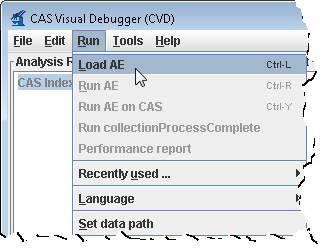
...
5. From the menu bar, click Run -> Run AggregatePlaintextProcessor.
...
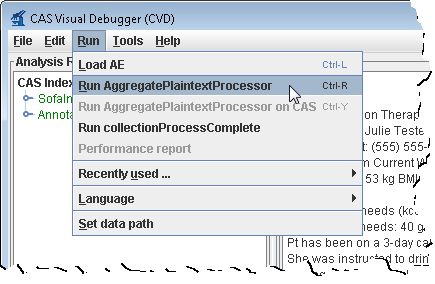
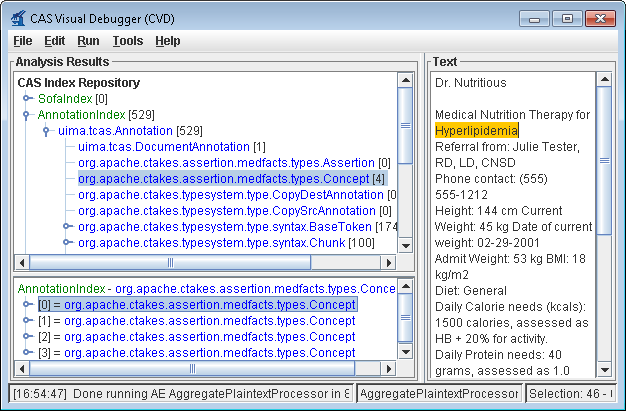
6. You'll get a list of all the annotations for this clinical document in the Analysis Results frame. Annotations such as concepts mentioned, division by sentence, etc from the pipeline are viewable. To see one, in the Analysis Results frame, click on the key in front of:
...
{quote} | !snap034.png!\\ | | 5. From the menu bar, click *Run* \-> *Run AggregatePlaintextProcessor*. \\ | !snap035.png!\\ | | 6. You'll get a list of all the annotations for this clinical document in the Analysis Results frame. Annotations such as concepts mentioned, division by sentence, etc from the pipeline are viewable. To see one, in the *Analysis Results* frame, click on the key in front of: \\ {quote}CAS Index Repository \\ \* AnnotationIndex \\ \* uima.tcas.Annotation \\ \* org.apache.ctakes.medfacts.types.Concept |
...
\\ {quote} This will show an AnnotationIndex in the lower frame. Select any annotation in that lower frame and you will see the text discovered in \\ the Text frame on the right like the concept of the problem Hyperlipidemia. \\ \\ For a medication example select this \\ {quote}CAS Index Repository \\ \* AnnotationIndex \\ \* uima.tcas.Annotation \\ \* org.apache.ctakes.typsystem.type.textsem.IdentifiedAnnotation |
...
\\ * org.apache.ctakes.typsystem.type.textsem.EventMention |
...
\\ * org.apache.ctakes.typsystem.type.textsem.MedicationEventMention |
...
{quote} Now select items in the lower frame to see the text being annotated. |
...
\\ \\ You may close the *CAS Visual Debugger (CVD)* application if you wish |
...
Collection Processing Engine (CPE)
...
Step
...
Example
...
1. Open a command prompt and change to the cTAKES_HOME directory:
| Note |
|---|
It is best if <cTAKES_HOME> is your current directory. The scripts will change directories, so being home to run the command is best. |
...
| language | none |
|---|
. | !snap036.png!\\ | h3. Collection Processing Engine (CPE) || Step || Example || | 1. Open a command prompt and change to the cTAKES_HOME directory: \\ {note}It is best if <cTAKES_HOME> is your current directory. The scripts will change directories, so being home to run the command is best.{note} | \\ *Windows*:{code:language=none}cd \apache-ctakes-3.0.0-incubating |
...
Linux:
...
| language | none |
|---|
{code}{*}Linux*:{code:language=none}cd /usr/local/apache-ctakes-3.0.0-incubating |
...
2. Start the collection processing engine by running this command:
The application may take a minute to start on slower hardware.
Windows:
| Code Block | ||
|---|---|---|
| ||
bin\runctakesCPE.bat
|
Linux:
| Code Block | ||
|---|---|---|
| ||
bin/runctakesCPE.sh
|
...
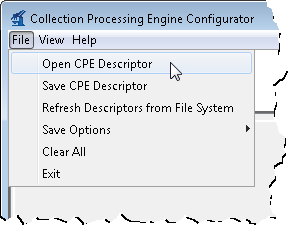
3. This will bring up the Collection Processing Engine Configurator. In the Menu bar click File >Open CPE Descriptor
...
...
4. Navigate to the file
| Code Block | ||
|---|---|---|
| ||
<cTAKES_HOME>/desc/ctakes-clinical-pipeline/desc/collection_processing_engine/test1.xml
|
Click Open.
...
No example
...
5. Click the Play button (green/blue play arrow near the bottom).
...

...
6. You should see that one document was processed. You did process a collection of documents. In this case the collection only contained one just to show how to do it. Close the results window.
...
7. Close the CPE application. You may be prompted to save changes. Since this was just a test you may click the No button.
...
...
8. Open a new command prompt and change to the <cTAKES_HOME>
...
...
9. To test the results there is a comparison tool that will help show that the results match expectations with the following syntax:
| Code Block | ||
|---|---|---|
| ||
java -cp ctakes-utils-3.0.0.jar org.apache.ctakes.utils.xcas_comparison.Compare
<First File> <Second File> <diff-html>
|
Where: <First File> is the first file to compare; <Second File> is the second file to compare; <diff-html> is where the results are written to
Copy and paste the example at the right (next cell) which has had our
example files already substituted into a command prompt to run. In this
case we have shipped an example of what the output should be for you to
compare against.
...
| Code Block | ||
|---|---|---|
| ||
java -cp ctakes-utils-3.0.0.jar org.apache.ctakes.utils.xcas_comparison.Compare ^
"testdata\cdptest\testoutput\plaintext\sample_note_plaintext.xml" ^
"testdata\cdptest\testsampleoutput\plaintext\sample_note_plaintext.xml" ^
c:\stuff\diff-html.html
|
...
| Code Block | ||
|---|---|---|
| ||
java -cp ctakes-utils-3.0.0.jar org.apache.ctakes.utils.xcas_comparison.Compare \
"/usr/bin/cTAKES3.0/testdata/cdptest/testoutput/plaintext\sample_note_plaintext.xml" \
"/usr/bin/cTAKES3.0/testdata/cdptest/testsampleoutput/plaintext/sample_note_plaintext.xml" \
/tmp/diff-html.html
|
10. The resulting file will open for you. Look at the comparison to see the annotations resulting from this pipeline.
Windows:
| Code Block | ||
|---|---|---|
| ||
c:\stuff\diff-html.html
|
Linux:
| Code Block | ||
|---|---|---|
| ||
/tmp/diff-html.html
|
...
Using the same CVD and CPE programs in the manner described above, you can test all the other components. The analysis engines and collection processing engines shipped with cTAKES for some of the annotators are described in the following table.
...
Annotator
...
Description
...
Abbreviated
...
Example Aggregate Analysis Engine (AE)
...
Example Collection processing Engine (CPE)
...
Clinical Document Pipeline
...
the complete cTAKES pipeline to obtain majority of cTAKES annotations
...
cdp
{code} | | 2. Create a directory for some test data. | *Windows*:mkdir testdata | | 3. Download this [sample file|https://svn.apache.org/repos/asf/incubator/ctakes/branches/ctakes-3.0.0-incubating/ctakes-clinical-pipeline/src/test/data/testpatient_cn_1.xml] and place it into the testdata directory. \\ | No example \\ | | 4. Start the collection processing engine by running this command: \\ The application may take a minute to start on slower hardware. | *Windows*:{code:language=none}bin\runctakesCPE.bat {code}{*}Linux*:{code:language=none}bin/runctakesCPE.sh {code} | | 5. This will bring up the Collection Processing Engine Configurator. In the Menu bar click *File* >*Open CPE Descriptor* | !snap037.png! | | 6. Navigate to the file {pre}<cTAKES_HOME>\\ /desc\\ /ctakes-clinical-pipeline\\ /desc\\ /collection_processing_engine\\ /test1.xml{pre}\\ Click *Open*. | No example \\ | | 7. Change the Collection reader input directory to testdata and the CAS Consumer output directory to testdata/output in the CPE fields \\ | 45 \\ | | 8. Click the Play button (green/blue *play arrow* near the bottom). \\ {info}What just happened? You placed a sample CDA document into the input of a pipeline. The pipeline was a file system reader that will process all files in a directory. The processing was accomplished by the chunker cTAKES component (noted by the descriptor that you opened). One resulting file for each input file was placed into the output directory. This output file is an XML file that annotates the noun phrases and verb phrases.{info} | !snap038.png! | | 9. You should see that one document was processed. You did process a collection of documents. In this case the collection only contained one just to show how to do it. Close the results window. | 44 \\ | | 10. Close the CPE application. You may be prompted to save changes. Since this was just a test you may click the *No* button. | No example \\ | Using the same CVD and CPE programs in the manner described above, you can test all the other components. The analysis engines and collection processing engines shipped with cTAKES for some of the annotators are described in the following table. || Annotator || Description || Abbreviated || Example Aggregate Analysis Engine (AE) || Example Collection processing Engine (CPE) || | Clinical Document Pipeline | the complete cTAKES pipeline to obtain majority of cTAKES annotations | cdp | cTAKES_HOME/desc/ctakes-clinical-pipeline/desc/analysis_engine/AggregatePlaintextProcessor.xml |
...
| cTAKES_HOME/desc/ctakes-clinical-pipeline/desc/collection_processing_engine/test1.xml |
...
Chunker
...
obtain cTAKES chunk annotations
...
chunker
...
NA
...
NA
...
Dependency Parser
...
obtain dependency parsing tree
...
dependency
| | Chunker | obtain cTAKES chunk annotations | chunker | NA | NA | | Dependency Parser | obtain dependency parsing tree | dependency | cTAKES_HOME/desc/ctakes-dependency-parser/desc/analysis_engine/ClearParserSRLTokenizedInfPosAggregate.xml |
...
| cTAKES_HOME/desc/ctakes-dependency-parser/desc/collection_processing_engine/ClearParserTestCPE.xml |
...
| | Drug NER |
...
| the annotator to obtain drug annotations |
...
drugner
| drugner | cTAKES_HOME/desc/ctakes-drug-ner/desc/analysis_engine/DrugAggregatePlaintextProcesor.xml |
...
| cTAKES_HOME/desc/ctakes-drug-ner/desc/collection_processing_engine/DrugNER_PlainText_CPE.xml |
...
| | Dictionary Lookup |
...
| mapping cTAKES annotations to dictionaries (e.g., SNOMED_CT |
...
dictionary
or RxNorm | dictionary | cTAKES_HOME/desc/ctakes-dictionary-lookup/desc/analysis_engine/TestAggregateTAE.xml |
...
NA
...
PAD Term Spotter
...
identifying terms related to PAD
...
padtermspotter
| NA | | PAD Term Spotter | identifying terms related to PAD | padtermspotter | cTAKES_HOME/desc/ctakes-pad-term-spotter/desc/analysis_engine/Radiology_TermSpotterAnnotatorTAE.xml |
...
| cTAKES_HOME/desc/ctakes-pad-term-spotter/desc/collection_processing_engine/Radiology_Sample.xml |
...
| | Relation Extractor |
...
| annotate certain relations between certain Event, Entity, and Modifier annotations |
...
| relation-extractor |
...
| cTAKES_HOME/desc/ctakes-relation-extractor/desc/analysis_engine/RelationExtractorAggregate.xml |
...
| N/A |
...
| | Smoking Status |
...
| the annotator to obtain document or patient-level smoking status |
...
smokingstatus
| smokingstatus | cTAKES_HOME/desc/ctakes-smoking-status/desc/analysis_engine/SimulatedProdSmokingTAE.xml |
...
| cTAKES_HOME/desc/ctakes-smoking-status/desc/collection_processing_engine/Sample_SmokingStatus_output_flatfile.xml |
...
| | Side Effect |
...
| the annotator to find side effect mentions and sentences from clinical documents |
...
sideeffect
| sideeffect | cTAKES_HOME/desc/ctakes-side-effect/desc/analysis_engine/SideEffectAggregateTAE.xml |
...
| cTAKES_HOME/desc/ctakes-side-effect/desc/collection_processing_engine/SideEffectCPE.xml |
...
Next Steps
...
| \\ h2. Next Steps The [cTAKES 3.0 Component Use Guide] will help you to understand, in great detail, each of the cTAKES components that have been installed. In some cases you can learn how to improve the components. |
...
Also, before you go on to process text in production you will want to consider +dictionaries+ and +models+. The models (within the separate resources download) have been trained on data that may not match your data well enough to be effective. In some cases you might want to [modify the dictionaries and train models|CTAKES:cTAKES 3.0 Dictionaries and models] on your own data. |