DUE TO SPAM, SIGN-UP IS DISABLED. Goto Selfserve wiki signup and request an account.
| Section | ||||||||||||||||||||||
|---|---|---|---|---|---|---|---|---|---|---|---|---|---|---|---|---|---|---|---|---|---|---|
|
These instructions are for end users. With these instructions you can install Apache cTAKES, configure it, and use it to process text (typically text associated with a medical record). If you were planning to expand, change, or modify the code within cTAKES, refer to the cTAKES 3.0 Developer Guide.
These instructions will cover installation and a test of the main product including trained models for sentence detection and tagging parts of speech, dictionaries from a subset of the UMLS, the LVG resource, etc. Optional components are described in the Component Use Guide.
Once you have finished installing cTAKES and its separately-bundled resources, you will be able to see what cTAKES is capable of. .
Prerequisites
...
Step | Example | |||||||||
|---|---|---|---|---|---|---|---|---|---|---|
1. Make sure you have Java 1.6 or higher. Most systems come with Java already installed.
| Windows:
|
|
...
|
...
Install cTAKES
Step | Example | |||||||
|---|---|---|---|---|---|---|---|---|
1. Navigate to the cTAKES downloads page on the Apache site and download the binary package. Select a mirror site and press the Change button to modify the URL to your desired mirror location before doing the download or accept the default.
| Windows:
|
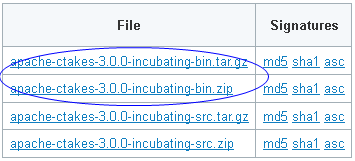
...
2. |
...
(Optional |
...
but |
...
recommended) |
...
...
...
...
files against a file signature to ensure you have the proper and complete file. | No example | ||||
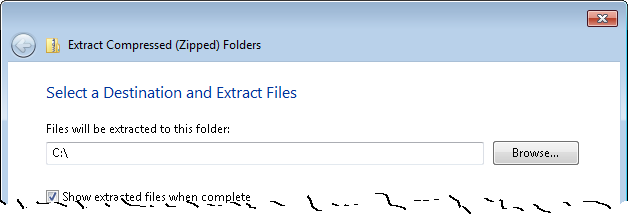
3. Unzip the file you downloaded into a directory that you want to be the cTAKES install location. The compressed files contain a single directory at the top level. This folder we will call <cTAKES_HOME>. You will need to refer to this directory later.
|
...
Linux:
|
...
Windows:
|
...
4. |
...
Download |
...
...
...
...
...
...
. |
...
Go to http://sourceforge.net/projects/ctakesresources/files/ |
...
and |
...
download |
...
the |
...
ZIP |
...
file |
...
with |
...
a |
...
matching |
...
version |
...
from |
...
the |
...
ctakesresources |
...
project. |
...
|
...
time |
...
will |
...
be |
...
commensurate |
...
with |
...
1GB |
...
of |
...
data. |
...
|
...
the |
...
files |
...
into |
...
a |
...
temporary |
...
location. |
...
Windows |
...
: |
...
|
...
Linux |
...
: |
...
|
...
5. |
...
Copy |
...
(or |
...
move) |
...
the |
...
resources |
...
to |
...
cTAKES_HOME. |
...
|
...
to |
...
<cTAKES_HOME>/resources. |
...
| Windows:
|
...
Linux |
...
: |
...
|
...
Process documents using cTAKES
This version allows you to test most components bundled in cTAKES in two different ways:
- Using the bundled UIMA CAS Visual Debugger (CVD) to view the results stored as XCAS files or run the annotators
- Using the bundled UIMA Collection Processing Engine (CPE) to process documents in cTAKES_HOME/testdata
...
- directory
...
You
...
will
...
need
...
a
...
windowing
...
environment
...
on
...
Linux
...
to
...
run
...
these
...
tools.
...
CAS
...
Visual
...
Debugger
...
(CVD)
...
Step | Example | |||||||
|---|---|---|---|---|---|---|---|---|
1. Open a command prompt and change to the cTAKES_HOME directory.
|
|
...
Linux:
|
...
2. |
...
Start |
...
the |
...
CAS |
...
Visual |
...
Debugger |
...
by |
...
running |
...
this |
...
command: |
...
|
...
application |
...
may |
...
take |
...
a |
...
minute |
...
to |
...
start |
...
on |
...
slower |
...
hardware. |
...
Windows |
...
: |
...
|
...
|
...
|
...
|
...
Linux:
|
...
3. |
...
Copy |
...
the |
...
example |
...
text |
...
from |
...
the |
...
next |
...
cell |
...
in |
...
this |
...
table |
...
and |
...
paste |
...
the |
...
contents |
...
into |
...
the |
...
Text |
...
section |
...
of |
...
CVD, |
...
replacing |
...
the |
...
text |
...
that |
...
is |
...
already |
...
there. |
...
|
|
...
4. |
...
An |
...
analysis |
...
engine |
...
(AE) |
...
needs |
...
to |
...
be |
...
loaded |
...
in |
...
order |
...
to |
...
process |
...
text. |
...
|
...
the |
...
Run |
...
-> |
...
Load |
...
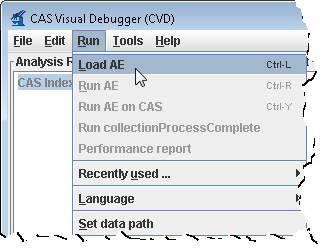
AE |
...
menu |
...
bar |
...
command. |
...
Navigate |
...
to |
...
the |
...
file
|
...
Click Open.
|
...
| ||
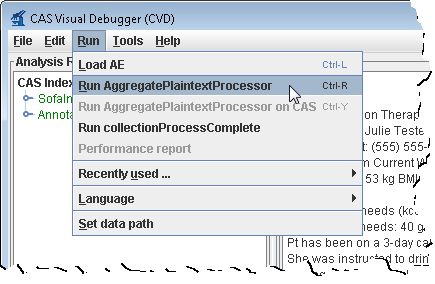
5. From the menu bar, click Run -> Run AggregatePlaintextProcessor. | | |
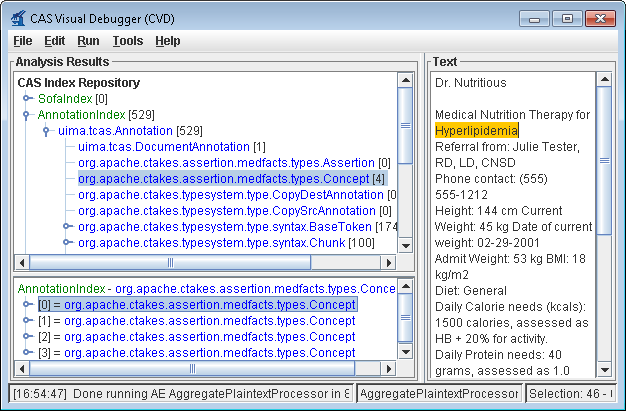
6. You'll get a list of all the annotations for this clinical document in the Analysis Results frame. Annotations such as concepts mentioned, division by sentence, etc from the pipeline are viewable. To see one, in the Analysis Results frame, click on the key in front of:
|
...
This will show an AnnotationIndex in the lower frame. Select any annotation in that lower frame and you will see the text discovered in
|
...
|
...
|
...
Now |
...
select |
...
items |
...
in |
...
the |
...
lower |
...
frame |
...
to |
...
see |
...
the |
...
text |
...
being |
...
annotated. |
...
|
...
application |
...
if |
...
you |
...
wish. |
...
|
Collection Processing Engine (CPE)
Step | Example | ||||||||||||
|---|---|---|---|---|---|---|---|---|---|---|---|---|---|
1. Open a command prompt and change to the cTAKES_HOME directory:
|
Linux:
|
...
| ||||||
2. Create a directory for some test data. | Windows:mkdir testdata | |||||
3. Download this sample file and place it into the testdata directory. | No example | |||||
4. Start the collection processing engine by running this command: | Windows:
|
...
Linux:
|
...
5. |
...
This |
...
will |
...
bring |
...
up |
...
the |
...
Collection |
...
Processing |
...
Engine |
...
Configurator. |
...
In |
...
the |
...
Menu |
...
bar |
...
click |
...
File |
...
> |
...
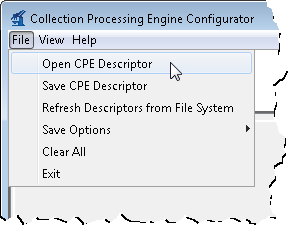
Open |
...
CPE |
...
Descriptor | | ||||
6. Navigate to the file
|
...
|
...
|
...
|
...
|
...
Open |
...
. |
...
No |
...
example |
7. |
...
Change |
...
the |
...
Collection |
...
reader |
...
input |
...
directory |
...
to |
...
testdata |
...
and |
...
the |
...
CAS |
...
Consumer |
...
output |
...
directory |
...
to |
...
testdata/output |
...
in |
...
the |
...
CPE |
...
fields | 45 |
8. Click the Play button (green/blue |
...
play |
...
arrow |
...
near |
...
the |
...
bottom). |
...
|
...
|
...
|
...
|
...
|
...
|
...
|
...
|
...
|
...
|
...
|
...
|
...
|
...
|
...
|
...
|
...
|
...
|
...
|
...
|
...
|
...
|
...
|
...
|
...
|
...
|
...
|
...
|
...
|
...
|
...
|
...
|
...
|
...
|
...
|
...
|
...
|
...
|
...
|
...
|
...
|
...
|
...
|
...
|
...
|
...
|
...
|
...
|
...
|
...
|
...
|
...
|
...
|
...
|
...
|
...
|
...
|
...
|
...
|
...
|
...
|
...
|
...
|
...
|
...
|
...
|
...
|
...
|
...
|
...
|
...
|
...
|
...
| ||
9. |

...
You |
...
should |
...
see |
...
that |
...
one |
...
document |
...
was |
...
processed. |
...
You |
...
did |
...
process |
...
a |
...
collection |
...
of |
...
documents. |
...
In |
...
this |
...
case |
...
the |
...
collection |
...
only |
...
contained |
...
one |
...
just |
...
to |
...
show |
...
how |
...
to |
...
do |
...
it. |
...
Close |
...
the |
...
results |
...
window. |
...
44 | |
10. |
...
Close |
...
the |
...
CPE |
...
application. |
...
You |
...
may |
...
be |
...
prompted |
...
to |
...
save |
...
changes. |
...
Since |
...
this |
...
was |
...
just |
...
a |
...
test |
...
you |
...
may |
...
click |
...
the |
...
No |
...
button. |
...
No |
...
example |
Using the same CVD and CPE programs in the manner described above, you can test all the other components. The analysis engines and collection processing engines shipped with cTAKES for some of the annotators are described in the following table.
Annotator | Description | Abbreviated | Example Aggregate Analysis Engine (AE) | Example Collection processing Engine (CPE) |
|---|---|---|---|---|
Clinical Document Pipeline | the complete cTAKES pipeline to obtain majority of cTAKES annotations | cdp | cTAKES_HOME/desc/ctakes-clinical-pipeline/desc/analysis_engine/AggregatePlaintextProcessor.xml |
...
cTAKES_HOME/desc/ctakes-clinical-pipeline/desc/collection_processing_engine/test1.xml |
...
Chunker | obtain cTAKES chunk annotations | chunker | NA | NA |
Dependency Parser | obtain dependency parsing tree | dependency | cTAKES_HOME/desc/ctakes-dependency-parser/desc/analysis_engine/ClearParserSRLTokenizedInfPosAggregate.xml |
...
cTAKES_HOME/desc/ctakes-dependency-parser/desc/collection_processing_engine/ClearParserTestCPE.xml |
...
Drug |
...
NER |
...
the |
...
annotator |
...
to |
...
obtain |
...
drug |
...
annotations |
...
drugner | cTAKES_HOME/desc/ctakes-drug-ner/desc/analysis_engine/DrugAggregatePlaintextProcesor.xml |
...
cTAKES_HOME/desc/ctakes-drug-ner/desc/collection_processing_engine/DrugNER_PlainText_CPE.xml |
...
Dictionary |
...
Lookup |
...
mapping |
...
cTAKES |
...
annotations |
...
to |
...
dictionaries |
...
(e.g., |
...
SNOMED_CT |
...
or |
...
RxNorm |
...
dictionary | cTAKES_HOME/desc/ctakes-dictionary-lookup/desc/analysis_engine/TestAggregateTAE.xml |
...
NA | |||
PAD Term Spotter | identifying terms related to PAD | padtermspotter | cTAKES_HOME/desc/ctakes-pad-term-spotter/desc/analysis_engine/Radiology_TermSpotterAnnotatorTAE.xml |
...
cTAKES_HOME/desc/ctakes-pad-term-spotter/desc/collection_processing_engine/Radiology_Sample.xml |
...
Relation |
...
Extractor |
...
annotate |
...
certain |
...
relations |
...
between |
...
certain |
...
Event, |
...
Entity, |
...
and |
...
Modifier |
...
annotations |
...
relation-extractor |
...
cTAKES_HOME/desc/ctakes-relation-extractor/desc/analysis_engine/RelationExtractorAggregate.xml |
...
N/A |
...
Smoking |
...
Status |
...
the |
...
annotator |
...
to |
...
obtain |
...
document |
...
or |
...
patient-level |
...
smoking |
...
status |
...
smokingstatus | cTAKES_HOME/desc/ctakes-smoking-status/desc/analysis_engine/SimulatedProdSmokingTAE.xml |
...
cTAKES_HOME/desc/ctakes-smoking-status/desc/collection_processing_engine/Sample_SmokingStatus_output_flatfile.xml |
...
Side |
...
Effect |
...
the |
...
annotator |
...
to |
...
find |
...
side |
...
effect |
...
mentions |
...
and |
...
sentences |
...
from |
...
clinical |
...
documents |
...
sideeffect | cTAKES_HOME/desc/ctakes-side-effect/desc/analysis_engine/SideEffectAggregateTAE.xml |
...
cTAKES_HOME/desc/ctakes-side-effect/desc/collection_processing_engine/SideEffectCPE.xml |
...
Next Steps
The cTAKES 3.0
...
...
...
...
will
...
help
...
you
...
to
...
understand,
...
in
...
great
...
detail,
...
each
...
of
...
the
...
cTAKES
...
components
...
that
...
have
...
been
...
installed.
...
In
...
some
...
cases
...
you
...
can
...
learn
...
how
...
to
...
improve
...
the
...
components.
...
Also,
...
before
...
you
...
go
...
on
...
to
...
process
...
text
...
in
...
production
...
you
...
will
...
want
...
to
...
consider
...
dictionaries
...
and
...
models
...
.
...
The
...
models
...
(within
...
the
...
separate
...
resources
...
download)
...
have
...
been
...
trained
...
on
...
data
...
that
...
may
...
not
...
match
...
your
...
data
...
well
...
enough
...
to
...
be
...
effective.
...
In
...
some
...
cases
...
you
...
might
...
want
...
to
...
...
...
...
...
...
...
on
...
your
...
own
...
data.