DUE TO SPAM, SIGN-UP IS DISABLED. Goto Selfserve wiki signup and request an account.
...
In this billing example, the cost would decrease about 67K per quarter. BTW: if our topic is local:1 day + remote: 7 days . the saving part will be about 10% (27K)
so it mean that if you set 1 day local + 3-7 days remote. the cost-saving for TimedStorage-ByteHrs will range from 25% to 10%..
Note: You can also refer to Amazon S3 Cost to know more information.
However, this optimization is offered as a topic level optional configuration rather than the default behavior based on followed scenarios:
(1) Some users/topics rely on remote storage for real-time analytics based on remote storage directly and need the latest data to be available as soon as possible (In fact, it only tries to stay as up-to-date as possible,
because it still can’t include the latest data because the active segment always hasn’t been uploaded yet.).
(2) Some topics may set a very high ratio for remote-to-local retention time. The cost savings amount will be small, so it is mainly to avoid waste. Users may think it is not worth enabling the feature for the topics
| Code Block | ||||
|---|---|---|---|---|
| ||||
Considering the latency or risk of remote storage, the local retention period won’t be set too short for me.
For example, in our production environment, we keep one day of local data alongside 3-7 days in remote storage,
Keeping one day of data in local storage ensures that Kafka users have enough time to handle unexpected consumption issues while maintaining good latency, and it also reduces the risk of relying on remote storage.
so there’s still one day of redundancy for my case.
What’s more, even if you configure a very short local retention time, you may need to extend it when certain issues occur. The more local retention time you keep, the more cost savings you achieve. |
(3) Kafka admin want to reduce the expansion times for local disk when remote storage down for a long time. after all. The already uploaded segments are eligible for deletion from broker when not enable the feature for topic.
You can check the follow picture to understand the logic:
if the remote storage outage for a short time: no matter if you enable the feature. it don't have difference.
if the remote storage outage for a medium-term time: you will need one extra expansion: the max size is the your saving cost's part. You can think you return back the redundancy by expansion.
if the remote storage outage for a long time: no matter if you enable the feature. you should keep doing expansion.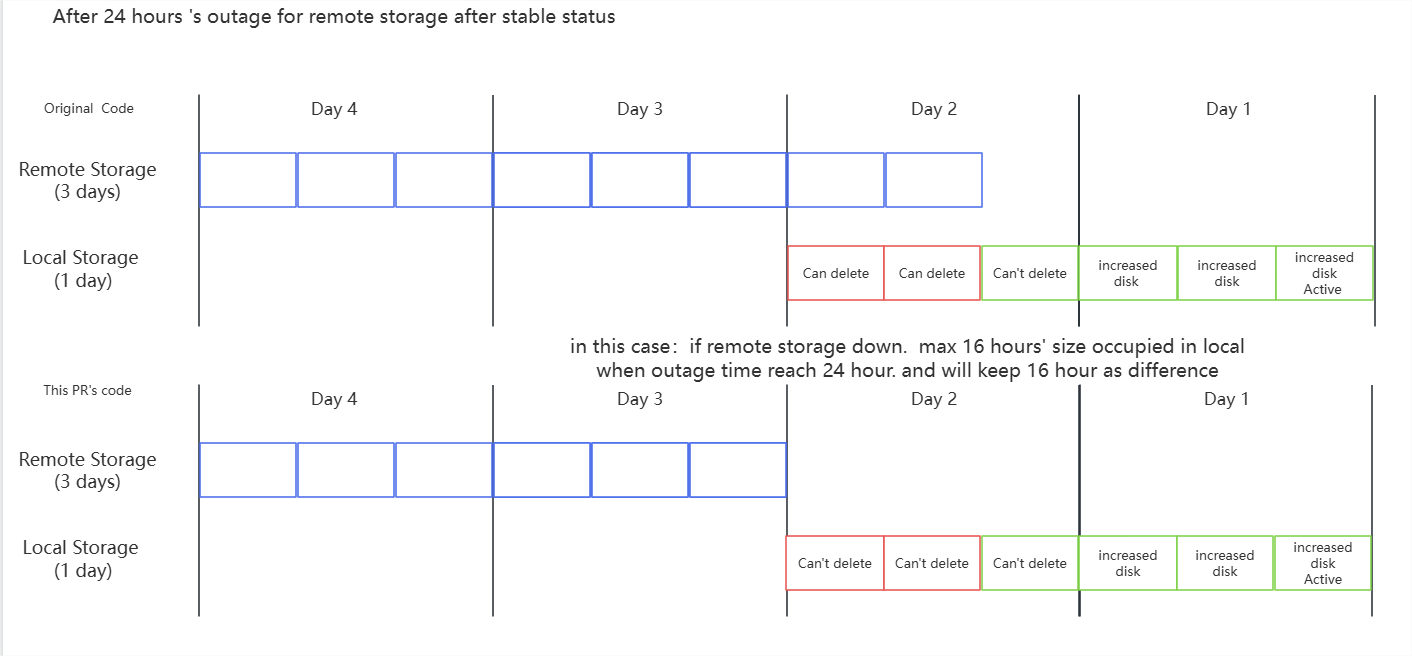
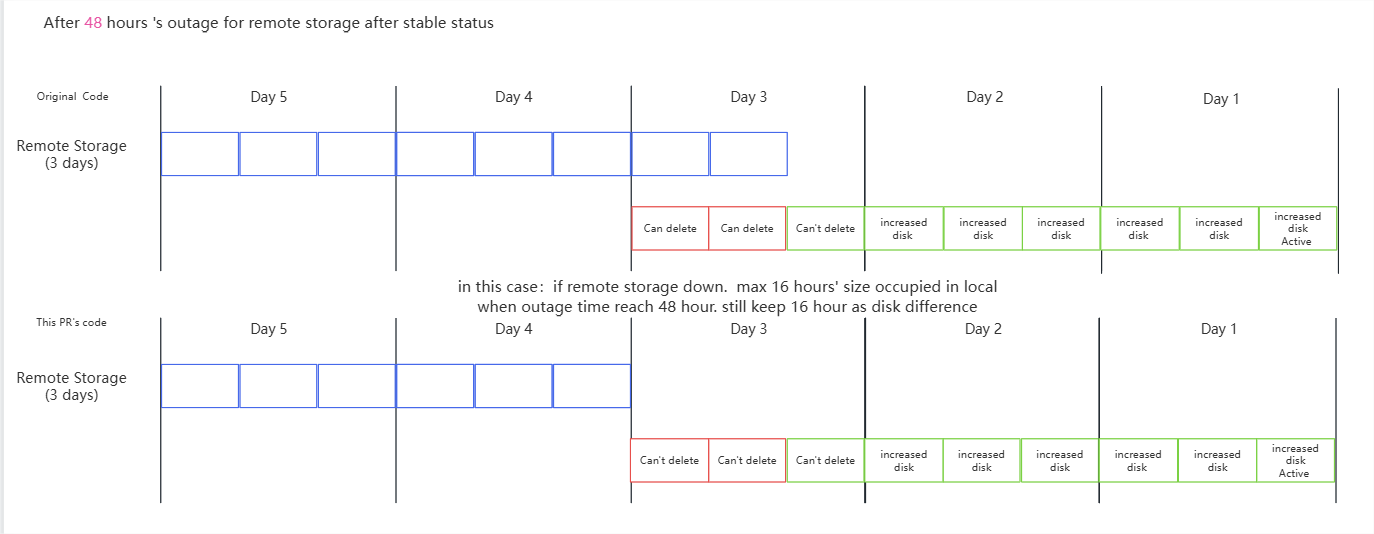
...
- Local files won’t be deleted until they’ve been uploaded to the remote storage, so this change is very safe
You don’t need to worry about files being cleaned up before they be upload to the remote.Considering the latency of remote storage, the local retention period won’t be set too short.
For example, in our production environment, we keep one day of local data alongside 3-7 days in remote storage,
Keeping one day of data in local storage ensures that Kafka users have enough time to handle unexpected consumption issues while maintaining good latency, and it also reduces the risk of relying on remote storage.
so there’s still one day of redundancy.
Compatibility, Deprecation, and Migration Plan
...