DUE TO SPAM, SIGN-UP IS DISABLED. Goto Selfserve wiki signup and request an account.

DUE TO SPAM, SIGN-UP IS DISABLED. Goto Selfserve wiki signup and request an account.
CLOUDSTACK-....
...
template-upload branch off master
To register a Cloudstack accepts only urls to add a template/volume. If the user has a downloaded template/upload volume available, one needs he has to host it either on dropbox etc. or run apache server so as to get downloadable url.
This feature some where as cloudstack only accepts a url. This eliminates that and enables the user to quickly directly upload a the template/volume to cloudstack and eliminates the dependency on an external http server.
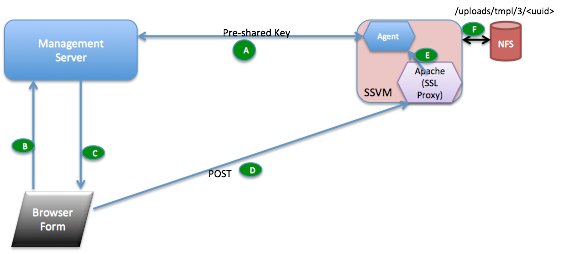
volume upload api
| Parameter Name | Description | Required |
| type | volume or template upload | true |
| format | the format for the volume. Possible values include QCOW2, OVA, and VHD. | true |
| name | the name of the volume | true |
| zoneid | the ID of the zone the volume is to be hosted on | true |
| account | an optional accountName. Must be used with domainId. | false |
| checksum | the MD5 checksum value of this volume | false |
| domainid | an optional domainId. If the account parameter is used, domainId must also be used. | false |
| imagestoreuuid | Image store uuid | false |
| projectid | Upload volume for the project | false |
| Parameter Name | Description | Required |
| type | volume or template upload | true |
| displaytext | the display text of the template. This is usually used for display purposes. | true |
| format | the format for the template. Possible values include QCOW2, RAW, and VHD. | true |
| hypervisor | the target hypervisor for the template | true |
| name | the name of the template | true |
| ostypeid | the ID of the OS Type that best represents the OS of this template. | true |
| zoneid | the ID of the zone the template is to be hosted on | true |
| account | an optional accountName. Must be used with domainId. | false |
| bits | 32 or 64 bits support. 64 by default | false |
| checksum | the MD5 checksum value of this template | false |
| details | Template details in key/value pairs. | false |
| domainid | an optional domainId. If the account parameter is used, domainId must also be used. | false |
| isdynamicallyscalable | true if template contains XS/VMWare tools inorder to support dynamic scaling of VM cpu/memory | false |
| isextractable | true if the template or its derivatives are extractable; default is false | false |
| isfeatured | true if this template is a featured template, false otherwise | false |
| ispublic | true if the template is available to all accounts; default is true | false |
| isrouting | true if the template type is routing i.e., if template is used to deploy router | false |
| passwordenabled | true if the template supports the password reset feature; default is false | false |
| projectid | Register template for the project | false |
| requireshvm | true if this template requires HVM | false |
| sshkeyenabled | true if the template supports the sshkey upload feature; default is false | false |
| templatetag | the tag for this template. | false |
name=lxc1
displayText=lxc1
zoneid=-1
format=TAR
isextractable=false
passwordEnabled=false
isdynamicallyscalable=false
osTypeId=1b510c30-3352-11e4-aaca-a5c7f57670d0
hypervisor=LXC
requireshvm=false
...