...
- Management Server generates a unique pre-shared key (PSK) on install and shares it with the SSVM agent. Nobody else has access to this key of course.
- New API request "GetUploadParamsgetUploadParams" encoded the usual CloudStack API way using api keys. Request parameters include format, hypervisor, md5 sum
- Management Server response to (b) returns post url to upload the file along with signature generated using PSK and a params json which is to be sent while uploading the file.
- API user makes a POST request over HTTPS to the URL obtained in (c)
- The Apache web server on the SSVM matches the url, decrypts and passes on to the SSVM java agent as plain HTTP. The SSVM agent checks the signature against the params using the key PSK1. Once the params are verified, it writes to the NFS storage to the location encoded in the URL.
- Once the upload completes, the MD5 checksum is compared (if available from step c).
API changes
A new
...
API getUploadParams which takes all the params as the registertemplate/uploadvolume except for URL and which returns all the required params plus a post URL to be used to uploadVolume/registerTemplate
volume upload api
...
...
...
- : required
- params while uploading a volume
...
- : the format for the volume. Possible values include QCOW2, OVA, and VHD
...
...
...
...
...
- : the ID of the zone the volume is to be hosted
...
...
- : an optional accountName. Must be used with domainId.
...
...
- : the MD5 checksum value of this volume
...
...
- : an optional domainId. If the account parameter is used, domainId must also be used.
...
...
...
...
- : Upload volume for the project
...
...
- params while uploading a tempalte
...
- the display text of the template. This is usually used for display purposes
...
...
- : the format for the template. Possible values include QCOW2, RAW, and
...
...
- : the target hypervisor for the
...
...
...
- template : required
- ostypeid
...
- : the ID of the OS Type that best represents the OS of this
...
- template : required
- zoneid:
...
- the ID of the zone the template is to be hosted
...
...
- : an optional accountName. Must be used with domainId.
...
...
- : 32 or 64 bits support. 64 by default
...
...
- : the MD5 checksum value of this template
...
...
- : Template details in key/value pairs.
...
...
- : an optional domainId. If the account parameter is used, domainId must also be used.
...
...
- : true if template contains XS/VMWare tools inorder to support dynamic scaling of VM cpu/memory
...
...
- : true if the template or its derivatives are extractable; default is
...
...
- : true if this template is a featured template, false otherwise
...
...
- : true if the template is available to all accounts; default is true
...
...
- : true if the template type is routing i.e., if template is used to deploy router
...
...
- : true if the template supports the password reset feature; default is false
...
...
- : Register template for the project
...
...
- : true if this template requires HVM
...
...
- : true if the template supports the sshkey upload feature; default is false
...
...
- : the tag for this template.
...
...
name=lxc1
displayText=lxc1
zoneid=-1
format=TAR
isextractable=false
passwordEnabled=false
isdynamicallyscalable=false
osTypeId=1b510c30-3352-11e4-aaca-a5c7f57670d0
hypervisor=LXC
requireshvm=false
...
...
- (key in the postURL would be generated using PSK initially shared between agent and Management Server.)
- params: params to be sent in the post request Ex: params:{"store":{"com.cloud.agent.api.to.NfsTO":"nfs://10.147.28.7/export/home/rajani/lxc/secondary"}, "hvm":false,"description":"lxc1","maxDownloadSizeInBytes":53687091200,"id":207,"resourceType":"TEMPLATE","installPath":"template/tmpl/2/207", "format":"TAR","accountId":2,"name":"207-2-09c78adc-065f-3dc8-9621-9e7a036d7dc9"}
...
POST url to post the data on to SSVM. This post url is returned from the getUploadParams api call Ex: https://ssvmpublicip/upload/key
...
- Request: (this is a POST request)
- params: json string of params returned from previous getUploadParams api call file: file to upload
...
- file: the location of the template/volume to be posted a multipart/form-data
- Response:
- '200 OK' on successful upload
...
...
- ' incase the signature key validation or any other validation failed
- '500 internal server' incase the file upload fails
...
At any point while this post is active, the api user should be able to call the listtemplates/listvolumes api to get the upload status of it
Sequence Diagram
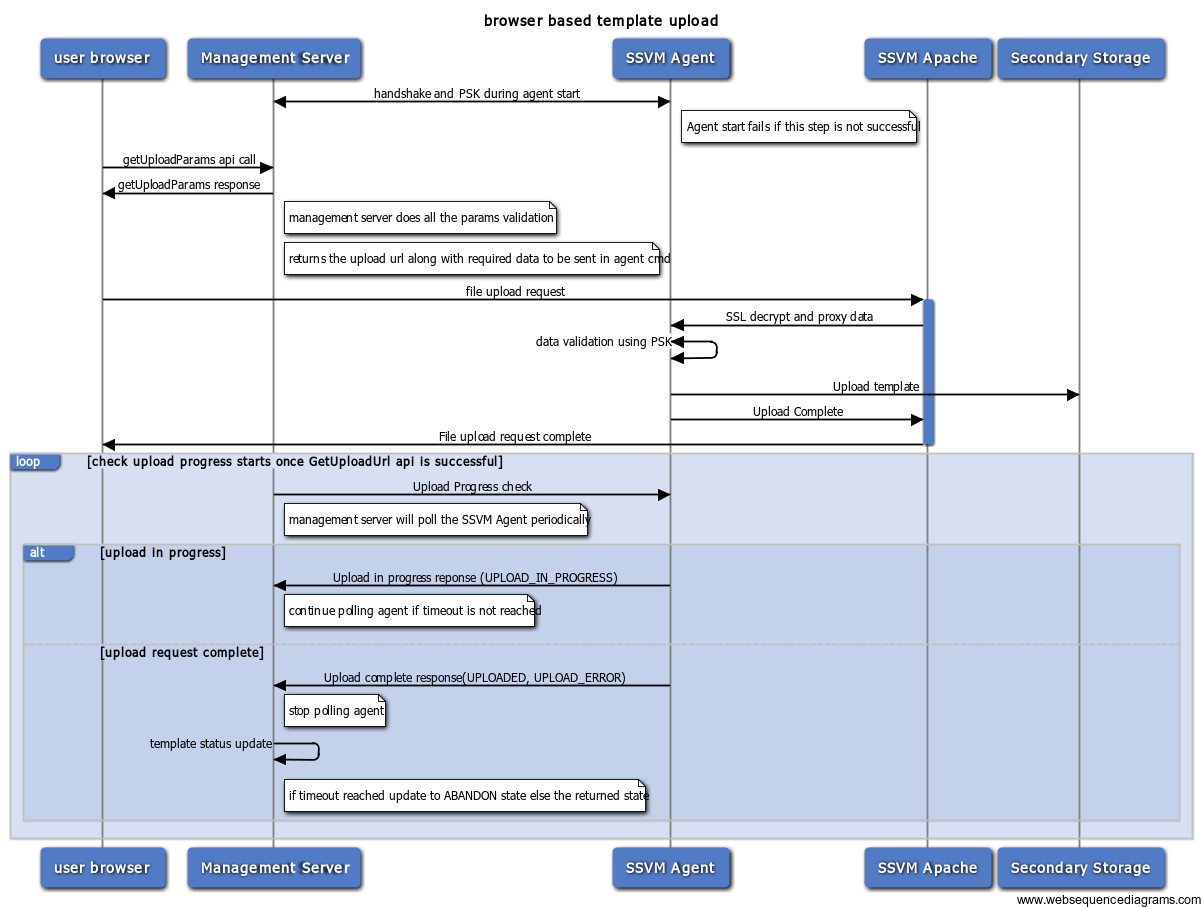
- failure at any point during the form upload to ssvm apache would return error to the user and DOWNLOAD_ERROR when the management server pings for download status.
- polling starts after the success of GetUploadParamsgetUploadParams
- current polling interval is 10000 ms
- currently it polls thrice to check the status. We may need to increase this. (is the current value 5 or 3?)
...
Template/Volume states
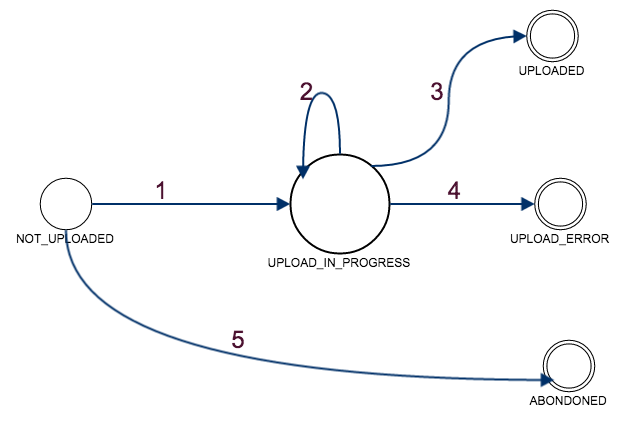
States:
NOT_DOWNLOADED: GetUploadParams getUploadParams API was successful and the template is registered. But, upload hasnt started yet
...
- Browser UI requests the upload form by doing the GetUploadParams getUploadParams api call.
- Management Server returns a upload url, params json string which should be passed on to the upload url while doing the upload
- UI shows an upload dialog with a way to browse and upload file.
- User chooses a file and posts on the url.
- The post request completes once the template is downloaded/errored.
- The user can close the dialog(Post request should still be active) and use list page to check the status of it.
...
