Versions Compared

Key

  • This line was added.
  • This line was removed.
  • Formatting was changed.

...

At any point while this post is active, the api user should be able to call the listtemplates/listvolumes api to get the upload status of it
Sequence Diagram

Image Modified


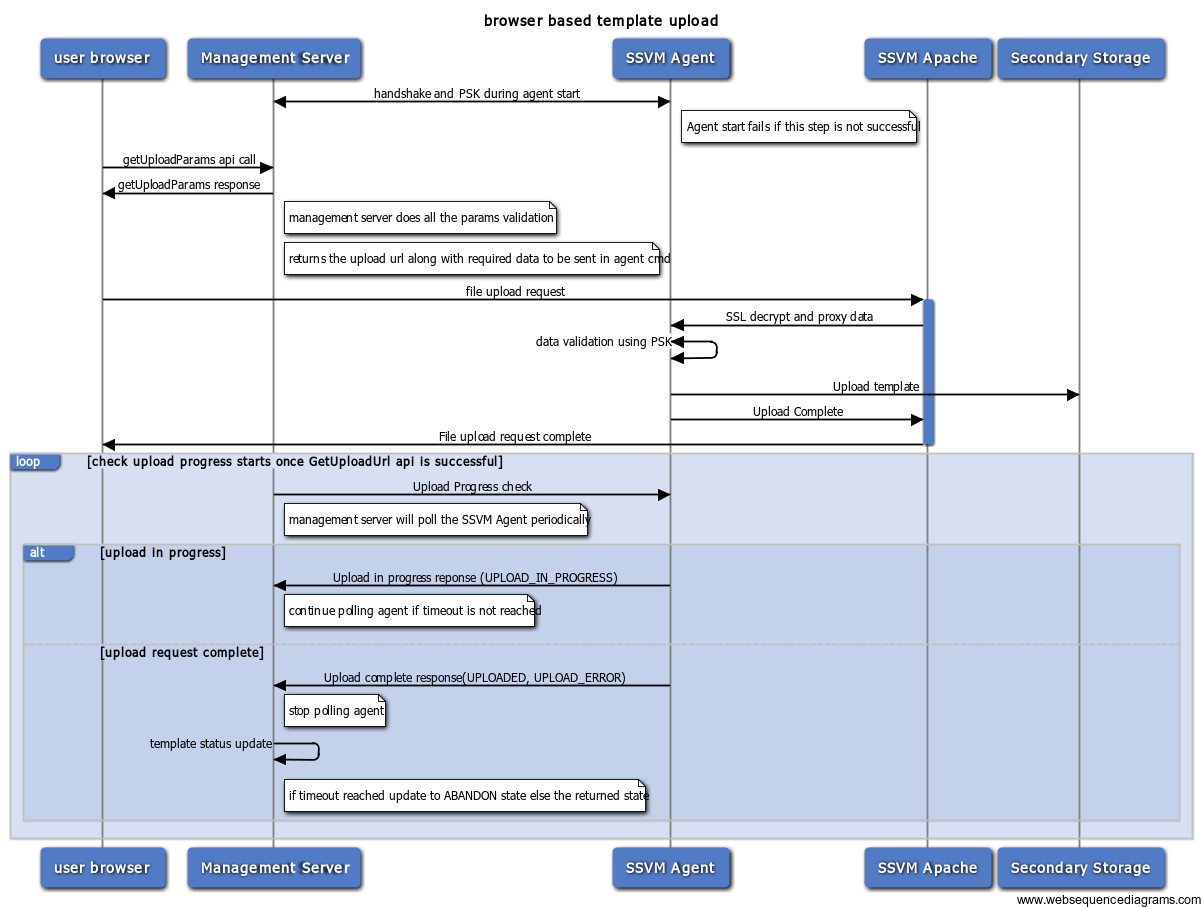
  1. failure at any point during the form upload to ssvm apache would return error to the user and DOWNLOAD_ERROR when the management server pings for download status.
  2. polling starts after the success of getUploadParams
  3. current polling interval is 10000 ms 
  4. currently it polls thrice to check the status. We may need to increase this. (is the current value 5 or 3?)

...

State Diagram

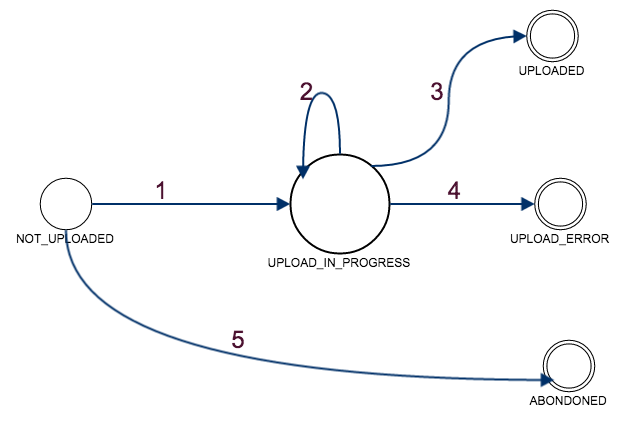
Template/Volume states

Image Modified

States:

NOT_DOWNLOADEDUPLOADED: getUploadParams API was successful and the template is registered. But, upload hasnt started yet

DOWNLOADUPLOAD_IN_PROGRESS: User has initiated the POST request SSVM Apache and the validation/download is in progress

DOWNLOADEDUPLOADED: SSVM Agent successfully Downloaded the template to secondary storage

DOWNLOADUPLOAD_ERROR: Any Failure in between user initiating a post request and template being downloaded

...

  1. Upload progress to the user (http://creativejs.com/tutorials/advanced-uploading-techniques-part-1/ )
  2. split upload and join in apache so as to not hit browser timeouts
  3. post url should be active only for one time call - return proper error message on subsequent calls - how do we determine if its already used?

  4. Admin to list all the uploads happening and cancel any if required?

  5. Partial data upload and template cleanup (can be due to SSVM to agent restart or network error)
  6. a new global param to limit the max upload size

Questions

  1. Multipart form data - Can this go in multiple connections? - NO

  2. SSVM storage issue. What should we tell the user? How can we notify the admin to recover from it?

  3. Should there be an unencrypted HTTP version of the post?  No for now
  4. No. of parallel uploads SSVM can handle? - a default value should be provided to tune the apache to handle those many parallel connections. These should be determined based on the CPU RAM of SSVM - a proper error message to the user on reaching this limit

  5. SSL CA certificates - what kind of certificates will be used?


check download template/volume code to see how the below scenarios are handled


  1. multiple SSVMs. Which agent should handle the upload? 

  2. cross zone template upload - file to be uploaded to one zone and then copied to all the other zones
  3. system vm template upload - same as the current. will be differentiated using the filename.
  4. default timeouts and configurable values - updated default values. There are no configurable values
  5. multiple management servers with the one monitoring the download crashed (How is the template status updated? A. when the download hasnt started yet. B. upload in progress C. upload done) - Template status wont be updated unless the SSVM is restarted and is connected to new management server
  6. How does the agent return template status for DownloadProgressCommand? - in memory hashmap of in progress items. during a restart or crash, its starts the wget download again.

OPEN

  1. SSVM storage issue. What should we tell the user? How can we notify the admin to recover from it?

  2. SSL CA certificates - what kind of certificates will be used?
  3. multiple SSVMs. Which agent should handle the upload?