...
This feature enables the users to directly upload the template/volume to CloudStack and eliminates the dependency on an external http server. This will be a complementary functionality and users can continue to register template/volume with URL as well.
The browser-based uploading process will have three steps:
- api to get post url
- retrieve post url from the api response
- post the volume to through http POST request to port url obtained from the 2nd step
use cases
- A user, who wants to upload a template and launch a vm with it on cludstack
- A user, who want to upload a volume and attach it to a vm on cloudstack
Design
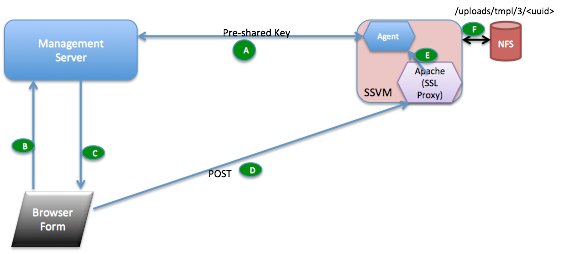
- Management Server generates a unique pre-shared key (PSK) and shares it with the SSVM agent.
- key is saved in encrypted form in the configuration tables as hidden configuration with name upload.secret.key
- on start of management server, if the key doesnt exist, it generates one using sha1 and stores it in db
- when the management server sends StartCommand to SSVM agent, it shares this key with it.
- SSVM agent stores this key in a file at /etc/cloudstack/agent/ms-psk.
- New API request "getUploadParams" encoded the usual CloudStack API way using api keys. Request parameters include format, hypervisor, md5 sum etc.
- Management Server response to (b) returns post url to upload the file, params to send to the url while uploading the file and a SHA1 signature generated using PSK and params json.
- User should upload the file over https POST request to the url obtained in (c). The signature and params returned in (c) should be passed as is.
- The Apache web server on the SSVM matches the url, decrypts and passes on to the SSVM java agent as plain HTTP. The SSVM agent checks the signature against the params using the key PSK and SHA1. Once the params are verified, it writes to the NFS storage to the location encoded in the URL.
- Once the upload completes, the MD5 checksum is compared (if available from step c).
...
To increase the number of parallel uploads, multiple SSVMs needs to be created. This will be handled automatically by the management server using the system.vm.auto.reserve.capacity, secstorage.capacity.standby and secstorage.session.max configuration variables.
API changes
The browser-based uploading process will have three steps:
- api call to get 'post url'
- retrieve post url from the api response
- post the volume/template to through http POST request to port url obtained from the 2nd step
A new API getUploadParams which takes all the params as the registertemplate/uploadvolume except for URL and which returns all the required params plus a post URL to be used to uploadVolume/registerTemplate
...
