...
At any point while this post is active, the api user should be able to call the listtemplates/listvolumes api to get the upload status of it.
DB Changes
No db changes.
Sequence Diagram
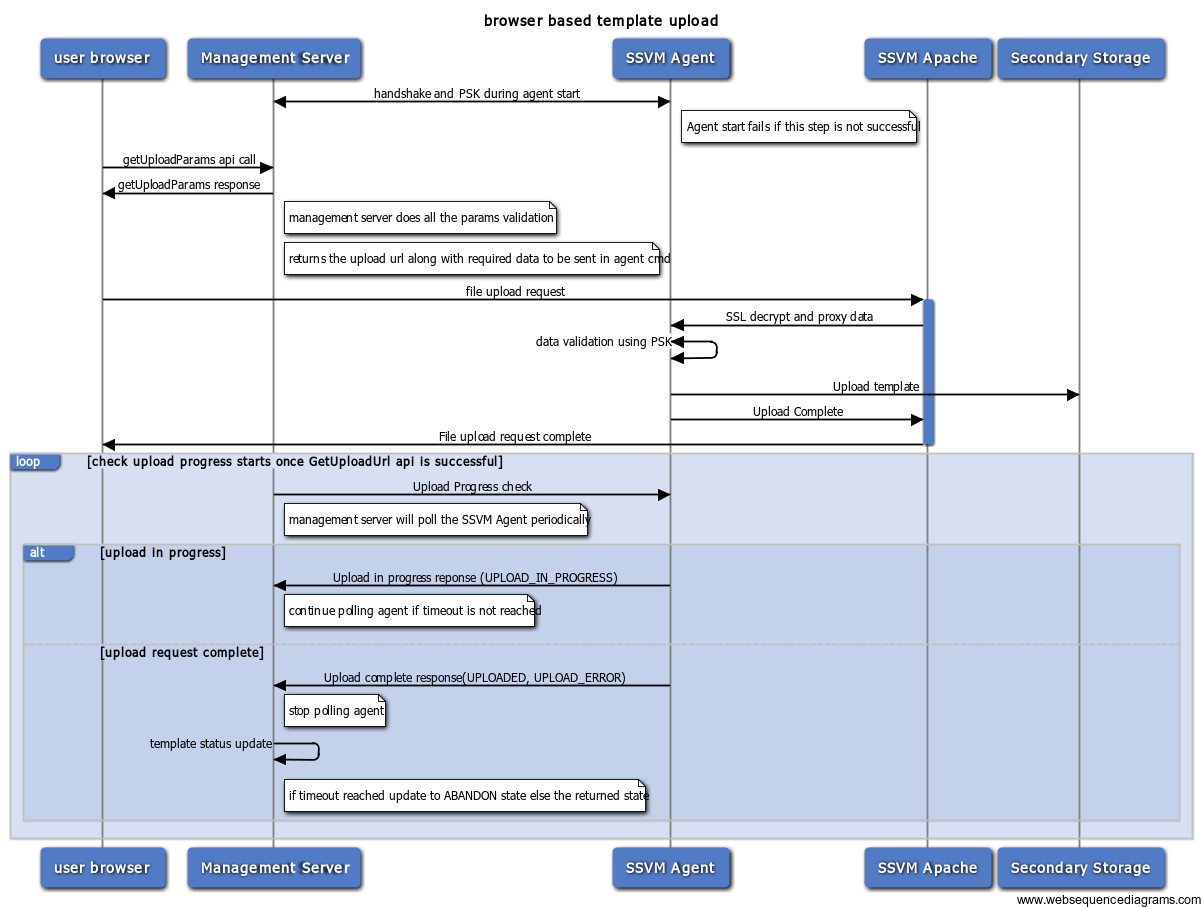
- failure at any point during the form upload to ssvm apache would return error to the user and DOWNLOAD_ERROR when the management server pings for download status.
- polling starts after the success of getUploadParams
- current polling interval is 10000 ms
- currently it polls thrice to check the status. We may need to increase this. (is the current value 5 or 3?)
...
- how does management server decide which SSVM to pick
- how does management server decide which NFS server to store
- if there is enough load on the SSVM, will management server try launch new SSVM
- how does the admin the outstanding browser based uploads
- how does the use know the state of browser based upload
- how does the management server know download complete
- how does the management server know the % of download
- how does the management server know the failed upload
- where does the management server persist the state & percentage of upload
fault scenarios & recovering failed uploads
...
- Browser UI requests the upload form by doing the getUploadParams api call.
- Management Server returns a upload url, params json string which should be passed on to the upload url while doing the upload
- UI shows an upload dialog with a way to browse and upload file.
- User chooses a file and posts on the url.
- The post request completes once the template is downloaded/errored.
- The user can close the dialog(Post request should still be active) and use list page to check the status of it.
DB Changes
No db changes.
...
Future Enhancements
- Upload progress to the user (http://creativejs.com/tutorials/advanced-uploading-techniques-part-1/ )
- split upload and join in apache so as to not hit browser timeouts
post url should be active only for one time call - return proper error message on subsequent calls - how do we determine if its already used?
Admin to list all the uploads happening and cancel any if required?
- Partial data upload and template cleanup (can be due to SSVM to agent restart or network error)
- a new global param to limit the max upload size
...
