...
Multipart form data - Can this go in multiple connections? - NO
- Should there be an unencrypted HTTP version of the post? No for now
No. of parallel uploads SSVM can handle? - a default value should be provided to tune the apache to handle those many parallel connections. These should be determined based on the CPU RAM of SSVM - a proper error message to the user on reaching this limit
- cross zone template upload - file to be uploaded to one zone and then copied to all the other zones
- system vm template upload - same as the current. will be differentiated using the filename.
- default timeouts and configurable values - updated default values. There are no configurable values
- multiple management servers with the one monitoring the download crashed (How is the template status updated? A. when the download hasnt started yet. B. upload in progress C. upload done) - Template status wont be updated unless the SSVM is restarted and is connected to new management server
- How does the agent return template status for DownloadProgressCommand? - in memory hashmap of in progress items. during a restart or crash, its starts the wget download again.
Design
This section will explain how the feature shall be implemented in CloudStack
process flow
The browser-based uploading process will have four main steps:
- Upload progress to the user (http://creativejs.com/tutorials/advanced-uploading-techniques-part-1/ )
- split upload and join in apache so as to not hit browser timeouts
post url should be active only for one time call - return proper error message on subsequent calls - how do we determine if its already used?
Admin to list all the uploads happening and cancel any if required?
Design
This section will explain how the feature shall be implemented in CloudStack
process flow
The browser-based uploading process will have four main steps:
- management server and SSVM will establish a pre-shared key between them, which shall be used for generating signature management server and SSVM will establish a pre-shared key between them, which shall be used for generating signature with SHA1
- api call to get 'post url'
- retrieve post url from the api response
- post the volume/template to through http POST request to port url obtained from the 2nd step
...
response:
200 OK
DB Changes
No db changes.
Sequence Diagram
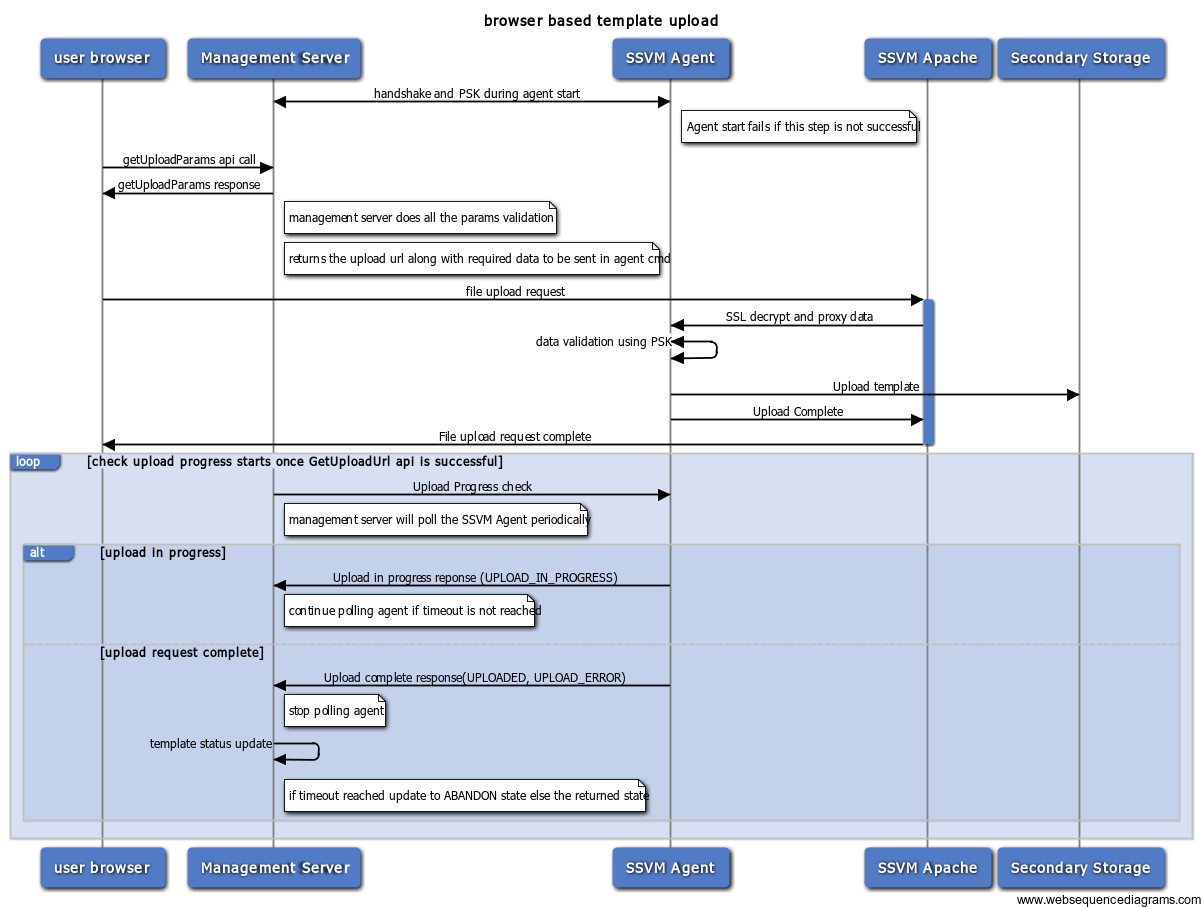 Image Removed
- failure at any point during the form upload to ssvm apache would return error to the user and UPLOAD_ERROR when the management server pings for download status.
- polling starts after the success of getUploadParams
- current polling interval is 10000 ms
- currently it polls thrice to check the status. We may need to increase this. (is the current value 5 or 3?)
Agent Commands
- DownloadProgressCommand will be used the check the download progress (from Management server to Agent)
- DownloadCommand will be used to start the download(SSVM Apache to SSVM Agent)
template/volume upload task life cycle management
This section shall describe how the request to upload a volume is handled by management server.
changes.
Sequence Diagram
Image Added
- failure at any point during the form upload to ssvm apache would return error to the user and UPLOAD_ERROR when the management server pings for download status.
- polling starts after the success of getUploadParams
- current polling interval is 10000 ms
- currently it polls thrice to check the status. We may need to increase this. (is the current value 5 or 3?)
Agent Commands
- DownloadProgressCommand will be used the check the download progress (from Management server to Agent)
- DownloadCommand will be used to start the download(SSVM Apache to SSVM Agent)
template/volume upload task life cycle management
This section shall describe how the request to upload a volume is handled by management server.
- how does management server decide which SSVM to pick?
- SSVM in the zone will be selected
- how does management server decide which NFS server to store?
- if there is enough load on the SSVM, will management server try launch new SSVM
- YES. This will be handled automatically by the management server using the system.vm.auto.reserve.capacity, secstorage.capacity.standby and secstorage.session.max configuration variables.
- how does the admin see the outstanding browser based uploads?
- how does the user know the state of browser based upload?
- user should be able to call the listtemplates/listvolumes api to get the upload status of it.
- how does the management server know download complete?
- by sending DownloadProgressCommand to the SSVM agent
- how does the management server know the % of download
- it is in the response of DownloadProgressCommand
- how does the management server know the failed upload
- it is in the response of DownloadProgressCommand
- where does the management server persist the state & percentage of upload
- in the db(template_store_ref)
- How does the agent return template status for DownloadProgressCommand?
- in memory hashmap of in progress items. during a restart or crash, its starts the wget download again.
- multiple management servers with the one monitoring the download crashed (How is the template status updated? A. when the download hasnt started yet. B. upload in progress C. upload done)
- Template status wont be updated unless the SSVM is restarted and is connected to new management server
- cross zone template upload - file to be uploaded to one zone and then copied to all the other zones
- system vm template upload - same as the current. will be differentiated using the filename.
- how does management server decide which SSVM to pick?
- SSVM in the zone will be selected
- how does management server decide which NFS server to store?
- if there is enough load on the SSVM, will management server try launch new SSVM
- YES. This will be handled automatically by the management server using the system.vm.auto.reserve.capacity, secstorage.capacity.standby and secstorage.session.max configuration variables.
- how does the admin see the outstanding browser based uploads?
- how does the user know the state of browser based upload?
- user should be able to call the listtemplates/listvolumes api to get the upload status of it.
- how does the management server know download complete?
- by sending DownloadProgressCommand to the SSVM agent
- how does the management server know the % of download
- it is in the response of DownloadProgressCommand
- how does the management server know the failed upload
- it is in the response of DownloadProgressCommand
- where does the management server persist the state & percentage of uploadin the db(template_store_ref)
fault scenarios & recovering failed uploads
...
- Transition1: This state transition happens, when the user initiates the post request
- Transition2: Post request is active SSVM agent is downloading validation or downloading the template but, not done yet
- Transition3: on successful completion of template installation to secondary storage
- Transition4: This can happen in multiple ways
- pre validation errors
- SSL handshake failed
- params validation with PSK failed
- post validation error
- file downloaded is not of the type specified (for ex: if the template is said to be of type tar, the actual downloaded file is not if this type)
- max upload limit crossed
- http errors can be caught through appropriate event handlers: exception,timeout,closed (http://hc.apache.org/httpcomponents-core-ga/tutorial/html/nio.html)
- user stopped/canceled the post request before completion
- uploading the template failed due to a network issue
- browser request timed out
- browser crashed
- SSVM apache down/restarted
- application errors will be caught through appropriate exceptions from the other services
- secondary storage is not accessible
- there isn't enough space in secondary storage and hence agent cant write to it.
- timeout reached and the management server will not poll anymore
- interruptions
- SSVM is down/restarted
- SSVM agent is down/restarted
All these errors will result in the same state for the template/volume as there isnt any way to recover from them or the handling isnt different for these. Additional error information will be provided in the form of a message for respective errors.
- Transition5: The post request hasn't happened and the timeout has reached
Cleanup
Of the error categories defined above,
- pre validation errors will not result in any download and hence no cleanup is required.
- post validation errors, template/volume will be cleaned
- http errors shall be caught in the appropriate events and the partially downloaded file will be cleaned.
- application errors and interruptions: template/volume sync will handle these when the SSVM is restarted.
recovery mechanisms
There isnt any recovery or retry mechanism as this is a POST request. Once errored, template/volume will remain in the error state and admin will be able to troubleshoot it based on the appropriate log messages in management server log, agent log, apache access/error log files.
Security
SSVM public ip will be given to the end user in the response to getUploadParams. This is required as it is the location to which the template/volume has to be uploaded.
The NFS Store url, path and some other information are exposed to the end user in the response to getUploadParams. This is done so that agent gets all the information required to download the template with the POST request.
UI Changes
A new register template and upload volume UI which should be able to accept "browse and upload" file.
UI flow:
- Browser UI requests the upload form by doing the getUploadParams api call.
- Management Server returns a upload url, params json string which should be passed on to the upload url while doing the upload
- UI shows an upload dialog with a way to browse and upload file.
- User chooses a file and posts on the url.
- The post request completes once the template is downloaded/errored.
- The user can close the dialog(Post request should still be active) and use list page to check the status of it.
Future Enhancements
- Upload progress to the user (http://creativejs.com/tutorials/advanced-uploading-techniques-part-1/ )
- split upload and join in apache so as to not hit browser timeouts
post url should be active only for one time call - return proper error message on subsequent calls - how do we determine if its already used?
Admin to list all the uploads happening and cancel any if required?
Open Issues
...
- timed out
- browser crashed
- SSVM apache down/restarted
- application errors will be caught through appropriate exceptions from the other services
- secondary storage is not accessible
- there isn't enough space in secondary storage and hence agent cant write to it.
- timeout reached and the management server will not poll anymore
- interruptions
- SSVM is down/restarted
- SSVM agent is down/restarted
All these errors will result in the same state for the template/volume as there isnt any way to recover from them or the handling isnt different for these. Additional error information will be provided in the form of a message for respective errors.
- Transition5: The post request hasn't happened and the timeout has reached
Cleanup
Of the error categories defined above,
- pre validation errors will not result in any download and hence no cleanup is required.
- post validation errors, template/volume will be cleaned
- http errors shall be caught in the appropriate events and the partially downloaded file will be cleaned.
- application errors and interruptions: template/volume sync will handle these when the SSVM is restarted.
recovery mechanisms
There isnt any recovery or retry mechanism as this is a POST request. Once errored, template/volume will remain in the error state and admin will be able to troubleshoot it based on the appropriate log messages in management server log, agent log, apache access/error log files.
Security
SSVM public ip will be given to the end user in the response to getUploadParams. This is required as it is the location to which the template/volume has to be uploaded.
The NFS Store url, path and some other information are exposed to the end user in the response to getUploadParams. This is done so that agent gets all the information required to download the template with the POST request.
UI Changes
A new register template and upload volume UI which should be able to accept "browse and upload" file.
UI flow:
- Browser UI requests the upload form by doing the getUploadParams api call.
- Management Server returns a upload url, params json string which should be passed on to the upload url while doing the upload
- UI shows an upload dialog with a way to browse and upload file.
- User chooses a file and posts on the url.
- The post request completes once the template is downloaded/errored.
- The user can close the dialog(Post request should still be active) and use list page to check the status of it.
Open Issues
- SSL CA certificates - what kind of certificates will be used?multiple SSVMs. Which agent should handle the upload?
Bug Reference & Branch
CLOUDSTACK-....
...
