Versions Compared

Key

  • This line was added.
  • This line was removed.
  • Formatting was changed.

...

Polling starts after the successful return of the getUploadParams. The polling starts after an initial delay of 100ms and in intervals of 1000ms. The management server polls 5 times before it changes the state to ERROR. (we may need to add new configurations to handle this polling)

If the management server itself goes down during the upload, if the timeout hasnt crossed, it will poll for the status once its up. Otherwise the state of the template will be transitioned to ERROR.

status update

detecting failures

successful completion

State machine 

Template/Volume go through below state machine state transitions, when it goes through the browser based upload.
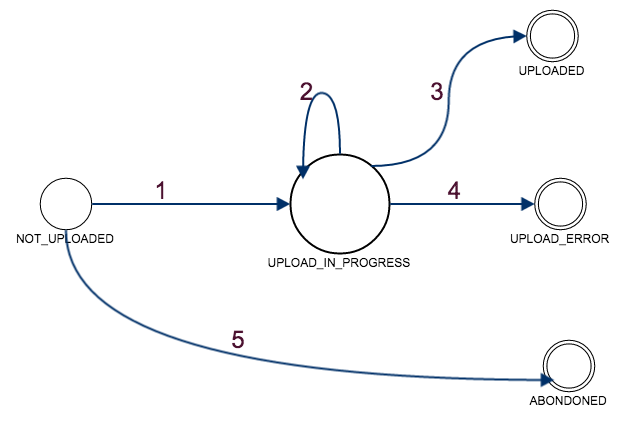
Image Removed

States:

NOT_UPLOADED: getUploadParams API was successful and the template is registered. But, upload hasnt started yet

UPLOAD_IN_PROGRESS: User has initiated the POST request SSVM Apache and the validation/download is in progress

UPLOADED: SSVM Agent successfully Downloaded the template to secondary storage

UPLOAD_ERROR: Any Failure in between user initiating a post request and template being downloaded

ABANDONED: the post request isnt called in the stipulated time (check sequence diagram point 4)

State Transitions:

The below failures can happen while the agent is receiving the template. When management server asks for the status of the tempalte/volume, if any of these below errors happen, the agent returns ERROR state and management server updates the state accordingly.

  • pre validation errors
    • SSL handshake failed
    • params validation with PSK failed
  • post validation error
    • file downloaded is not of the type specified (for ex
  • Transition1: This state transition happens, when the user initiates the post request
  • Transition2: Post request is active SSVM agent is downloading validation or downloading the template but, not done yet
  • Transition3: on successful completion of template installation to secondary storage
  • Transition4: This can happen in multiple ways 
    • pre validation errors
      • SSL handshake failed
      • params validation with PSK failed
    • post validation errorfile downloaded is not of the type specified (for ex: if the template is said to be of type tar, the actual downloaded file is not if this type)
    • max upload limit crossed
  • http errors can be caught through appropriate event handlers: exception,timeout,closed (http://hc.apache.org/httpcomponents-core-ga/tutorial/html/nio.html)
    • user stopped/canceled the post request before completion
    • uploading the template failed due to a network issue
    • browser request timed out
    • browser crashed
    • SSVM apache down/restarted
  • application errors will be caught through appropriate exceptions from the other services
    • secondary storage is not accessible
    • there isn't enough space in secondary storage and hence agent cant write to it.
    • timeout reached and the management server will not poll anymore 
  • interruptions
    • SSVM is down/restarted
    • SSVM agent is down/restarted
    • user stopped/canceled the post request before completion
    • uploading the template failed due to a network issue
    • browser request timed out
    • browser crashed
    • management server crashed and hence the upload request is cancelled by the browser.
    • SSVM apache down/restarted
  • application errors will be caught through appropriate exceptions from the other services
    • secondary storage is not accessible
    • there isn't enough space in secondary storage and hence agent cant write to it.
    • timeout reached and the management server will not poll anymore 
  • interruptions
    • SSVM is down/restarted
    • SSVM agent is down/restarted

successful completion

If the template install is successful within the polling timeout, when the management server asks for the status of it, agent returns a success state and it is updated by the management server accordingly.

State machine 

Template/Volume go through below state machine state transitions, when it goes through the browser based upload.

Image Added

States:

NOT_UPLOADED: getUploadParams API was successful and the template is registered. But, upload hasnt started yet

UPLOAD_IN_PROGRESS: User has initiated the POST request SSVM Apache and the validation/download is in progress

UPLOADED: SSVM Agent successfully Downloaded the template to secondary storage

UPLOAD_ERROR: Any Failure in between user initiating a post request and template being downloaded

ABANDONED: the post request isnt called in the stipulated time (check sequence diagram point 4)

State Transitions:

  • Transition1: This state transition happens, when the user initiates the post request
  • Transition2: Post request is active SSVM agent is downloading validation or downloading the template but, not done yet
  • Transition3: on successful completion of template installation to secondary storage
  • Transition4: This can happen in multiple ways outlined in the failures section above.

All these errors will result in the same state for the template/volume as there isnt any way to recover from them or the handling isnt different for these. Additional error information will be provided in the form of a message for respective errors. 

...

Of the error categories defined in the failures above,

  • pre validation errors will not result in any download and hence no cleanup is required.
  • post validation errors, template/volume will be cleaned
  • http errors shall be caught in the appropriate events and the partially downloaded file will be cleaned.
  • application errors and interruptions: existing template/volume sync will handle these when the SSVM is restarted.

...

  •  (TODO: add ref to the documentation of tempalte/volume sync)

recovery mechanisms

...

There isnt any recovery or retry mechanism as this is a POST request. Once errored, template/volume will remain in the error state and admin will be able to troubleshoot it based on the appropriate log messages in management server log, agent log, apache access/error log files.

...