...
- On start of management server, if the key doesn't exist, it auto-generates one using SHA1 and stores it in db
- Key is saved in encrypted form (db encryption is enabled) in the configuration table as hidden configuration with name upload.secret.key
- During SSVM start-up, the key is passed on to it by management server
- SSVM stores this key in a file at /etc/cloudstack/agent/ms-psk
- If the key sharing fails SSVM agent would shut itself down
- Updating the PSK would involve the following:
- Delete the upload.secret.key config from configuration table in db
- Restart the MS, so that it gets regenerated again
- Destroy all the existing SSVMs
- When the new SSVMs starts up the key is copied to it
- There will be a window when the key is not in sync between management server and SSVMs
Sequence Diagram
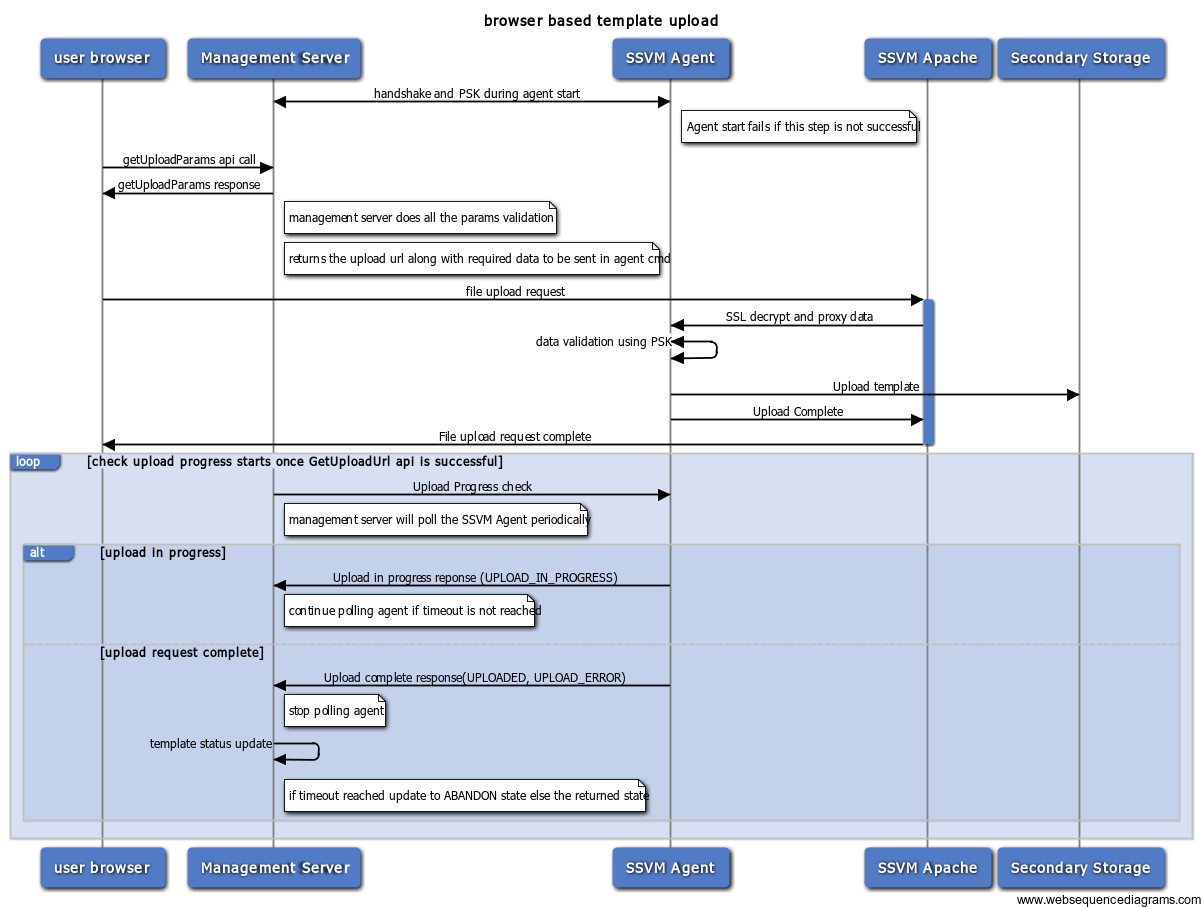
Management server and SSVM agent interaction
...
{"serverDuration": 100, "requestCorrelationId": "de288ae55722fd9b"}
