...
- Management Server generates a unique pre-shared key (PSK) and shares it with the SSVM agent.
- New API request "getUploadParams" encoded the usual Cloudstack API way using api keys. Request parameters include format, hypervisor, md5 sum etc.
- Management Server response to (b) returns post url to upload the file, params encrypted payload to send to the url while uploading the file and a SHA1 signature generated using PSK and params json.
- User should upload the file over https POST request to the url obtained in (c). The signature and params payload returned in (c) should be passed as is.
- The Apache web server on the SSVM matches the url, decrypts and passes on to the SSVM java agent as plain HTTP. The SSVM agent checks the signature against the params decrypted payload using the key PSK and SHA1. Once the params are payload is verified, it writes to the NFS storage to the location encoded in the URL.
- Once the upload completes, the MD5 checksum is compared (if available from step c).
...
- Response
- postURL: POST url to upload the file to. e.g. "https://ssvmpublicip/upload/uuid". The URL has the uuid to query the status using listtemplate/volumes API subsequently
- jsonDatapayload: parameters payload to be sent in the POST request in JSON format e.g.: params:{"store":{"com.cloud.agent.api.to.NfsTO":"nfs://10.147.28.7/export/home/rajani/lxc/secondary"}, "hvm":false,"description":"lxc1","maxDownloadSizeInBytes":53687091200,"id":207,"resourceType":"TEMPLATE","installPath":"template/tmpl/2/207", "format":"TAR","accountId":2,"name":"207-2-09c78adc-065f-3dc8-9621-9e7a036d7dc9"}
- signature: signature is SHA1 key generated using PSK based on 'jsonData' in the response.
- signature: signature is SHA1 key generated using PSK based on 'jsonData' in the response.
POST URL to post the data on to SSVM. This post url is returned from the getUploadParams api call Ex: https:/POST URL to post the data on to SSVM. This post url is returned from the getUploadParams api call Ex: https://ssvmpublicip/upload/uuid
- Request: (this is a POST request)
- jsonDatapayload: JSON string of parameters returned from getUploadParams API call
- file: the location of the template/volume to be posted as multipart/form-data
- signature: signature returned from getUploadParams API call
- Response:
- '200 OK' on successful upload
- '401 authorization error' incase the signature key validation or any other validation failed
- '500 internal server error' incase the file upload fails with clear error message
- '409 conflict' incase there is already another upload with same params in-progress/success/error
...
This section covers when and how the pre-shared key is generated by management server, how is it stored, how is it passed to SSVM
- On start of management server, if the key doesn't exist, it auto-generates one using SHA1 and stores it in db
- Key is saved in encrypted form (db encryption is enabled) in the configuration table as hidden configuration with name upload.secret.key
- During SSVM start-up, the key is passed on to it by management server
- SSVM stores this key in a file at /etc/cloudstack/agent/ms-psk
- If the key sharing fails SSVM agent would shut itself down
- management server, if the key doesn't exist, it auto-generates one using SHA1 and stores it in db
- Key is saved in encrypted form (db encryption is enabled) in the configuration table as hidden configuration with name upload.secret.key
- During SSVM start-up, the key is passed on to it by management server
- SSVM stores this key in a file at /etc/cloudstack/agent/ms-psk
- If the key sharing fails SSVM agent would shut itself down
- Updating the PSK would involve the following:
- Delete the upload.secret.key config from configuration table in db
- Restart the MS, so that it gets regenerated again
- Destroy all the existing SSVMs
- When the new SSVMs starts up the key is copied to it
- There will be a window when the key is not in sync between management server and SSVMs
encryption and decryption of payload
The PSK will also be used to encrypt and decrypt the payload data sent from the management server in the api response and received on the SSVM agent in the api request.
- jasypt library with PBEWITHSHA1ANDDESEDE algorithm and the initial PSK will be used to encrypt and decrypt the payload data.
- Management server, encrypts the payload data using the method in 1. and returns the ecrypted string in the response
- SSVM Agent, after receiving the payload, decrypts using the method in 1 and then does signature validation.Updating the PSK would involve the following:
- Delete the upload.secret.key config from configuration table in db
- Restart the MS, so that it gets regenerated again
- Destroy all the existing SSVMs
- When the new SSVMs starts up the key is copied to it
There will be a window when the key is not in sync between management server and SSVMs
Sequence Diagram
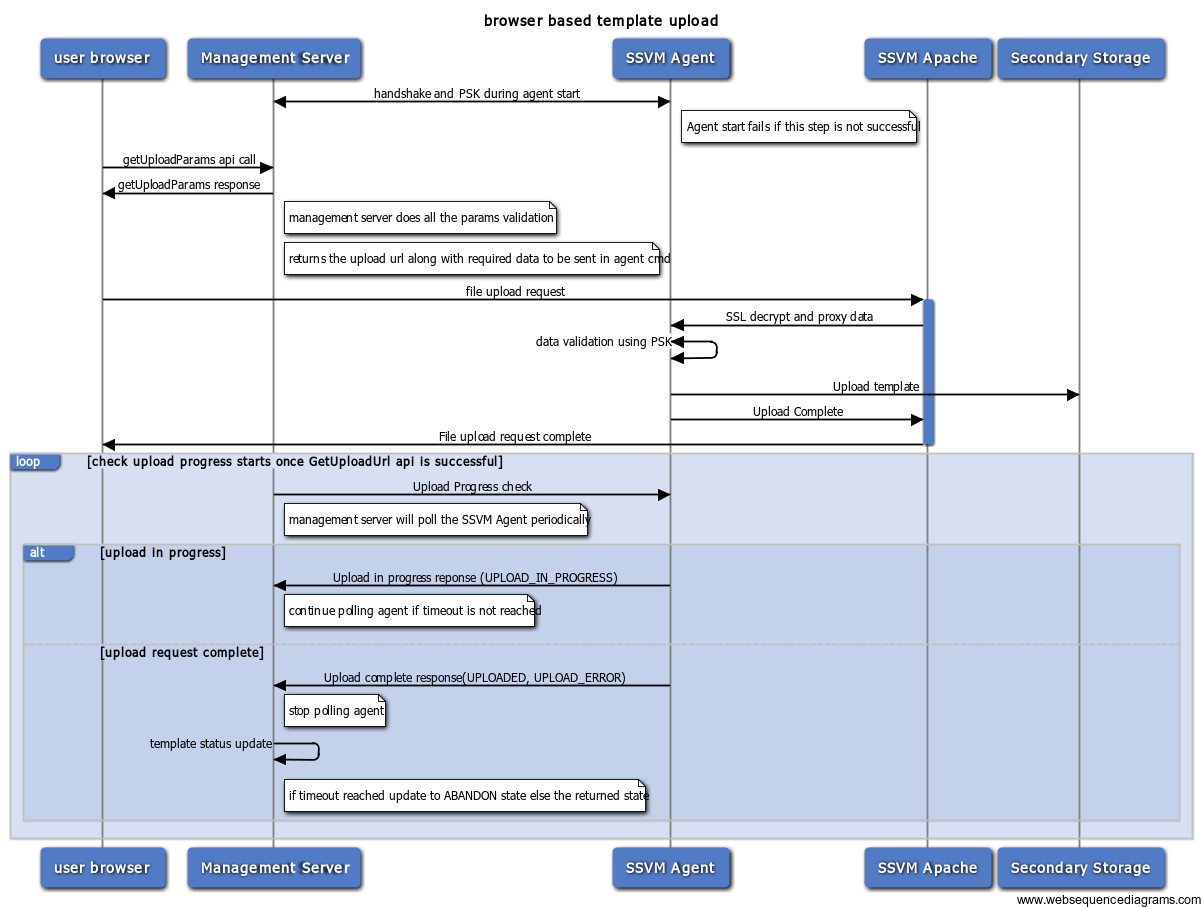
Management server and SSVM agent interaction
...
