DUE TO SPAM, SIGN-UP IS DISABLED. Goto Selfserve wiki signup and request an account.

Updating a Release System with ELF Programs – With Symbol Tables
You can easily extend the firmware in your released, embedded system using ELF program provide via a file system. For example, an SD card or, perhaps, downloaded into on-board SPI FLASH. In order to support such post-release update, your released firmware would have to support execution of ELF programs loaded into RAM (see, for example, apps/examples/elf) and symbol tables also provided provide via the file system.
The files shown in this Wiki page can be downloaded here
Creating a Symbol Table
There are several ways to create an application symbol table. Only two are compatible with the example provided here: First, you can build a symbol table into the base firmware with a symbol table added to your board-specific bring-up logic(Normally this technique would only be used in the KERNEL build mode when CONFIG_USER_INITPATH=y. In that case, the system start up is not performed by a C call to a main function like nsh_main(). Rather, the system starts up with an init ELF program (much the way that Linux does). CONFIG_EXECFUNCS_SYMTAB_ARRAY then solves that problem by initializing the system to provide the basic symbols needed by the init program and nothing more. The init program would probably call boardctl() to put the final symbol table in place. We do things this way here just for simplicity.). To use this method, you would need to (a) enable support for this feature via CONFIG_EXECFUNCS_HAVE_SYMTAB=y and (b) provide a symbol table with the global name CONFIG_EXECFUNCS_SYMTAB_ARRAY with the variable name CONFIG_EXECFUNCS_NSYMBOLS_VAR that holds the number of symbol entries. The symbol table name defaults to g_symtab.
...
In this example, we will assume the former. Let's illustrate this using an STM32F4-Discovery configuration. We will assume that you have modified the boards/arm/stm32/stm32fdiscovery/src/stm32_bringup.c file, adding the following:
| Code Block |
|---|
#include <stdio.h> #include <nuttx/binfmt/symtab.h> |
| Code Block |
const struct symtab_s g_symtab[] = { {"printf", (FAR void *)printf} }; |
| Code Block |
int g_nsymbols = 1;
|
That is a simple symbol table containing only the symbol string "printf" whose value is the address of the function printf().
There is, of course, a lot more that could be said about generating symbol tables. There are specialized tools in the NuttX tools/ directory and instructions elsewhere for generating more extensive symbol tables. But let's not get too distracted from the subject at hand.
Creating the Export Package
At the time that you release the firmware, you should create and save an export package. The export packet is all that you need to create post-release, add-on modules for your embedded system. Let's use the STM32F4-Discovery network NSH configuration which assumes that you have the STM32F4DIS-BB baseboard (This demonstration assumes that you also have support for some externally modifiable media in the board configuration. The could be removable media such as SD card or a USB FLASH stick, an internal file system that is remotely accessible via USB MSC, FTP, or whatever, or a remote file system (NFS). The networking NSH configuration uses the SD card on the STM32 baseboard for this demonstration. Other NSH configurations could be used provided that you supply the necessary file system support in some fashion.)(No baseboard? You can add support file system support to the basic STM32F4-Discovery board following these instructions: USB FLASH drive or SD card).
...
| Code Block |
|---|
nuttx-export-x.x |- arch/ |- build/ |- include/ |- libs/ |- startup/ |- System.map `- .config |
The Add-On Build Directory
In order to create the add-on ELF program, you will need (1) the export package, (2) the program build Makefile, and (3) a linker script used by the Makefile. That Makefile is discussed in a following paragraph(NOTE that these example files implicitly assume a GNU tool chain. A non-GNU tool chain would probably require a significantly different Makefile and linker script).
Hello Example
To keep things manageable, let's use a concrete example Suppose the ELF program that we wish to add to the release code is the since source file hello.c:
| Code Block |
|---|
#include <stdio.h>
|
| Code Block |
int main(int argc, char **argv) { printf("Hello from Add-On Program!\n"); return 0; } |
Let's say that we have a a directory called addon and contains the hello.c source file, a Makefile that will create the the ELF program, and a linker script called gnu-elf.ld needed by the Makefile.
Building the ELF Program =
The first step in creating the ELF program is the unzip the Export Package. We start with out addon directory containing the following:
...
Then we have a new directory called nuttx-export-7.25 that contains all of the content from the released NuttX code that we need to build the ELF program.
The Makefile
The ELF program is e created simply as:
...
This is the Makefile that I used to create ELF program:
| Code Block |
|---|
include nuttx-export-7.25/build/Make.defs
|
| Code Block |
# Long calls are need to call from RAM into FLASH
|
| Code Block |
ARCHCFLAGS += -mlong-calls ARCHWARNINGS = -Wall -Wstrict-prototypes -Wshadow -Wundef ARCHOPTIMIZATION = -Os -fno-strict-aliasing -fno-strength-reduce -fomit-frame-pointer ARCHINCLUDES = -I. -isystem nuttx-export-7.25/include |
| Code Block |
CFLAGS = $(ARCHCFLAGS) $(ARCHWARNINGS) $(ARCHOPTIMIZATION) $(ARCHINCLUDES) -pipe
|
| Code Block |
CROSSDEV CROSSDEV = arm-none-eabi- CC = $(CROSSDEV)gcc LD = $(CROSSDEV)ld STRIP = $(CROSSDEV)strip --strip-unneeded |
| Code Block |
# Setup up linker command line options
|
| Code Block |
LDELFFLAGS = -r -e main LDELFFLAGS += -T gnu-elf.ld |
| Code Block |
# This might change in a different environment
|
| Code Block |
OBJEXT ?= .o
|
| Code Block |
# This is the generated ELF program
|
| Code Block |
BIN = hello
|
| Code Block |
# These are the sources files that we use
|
| Code Block |
SRCS = hello.c OBJS = $(SRCS:.c=$(OBJEXT)) |
| Code Block |
# Build targets
|
| Code Block |
all: $(BIN) .PHONY: clean |
| Code Block |
$(OBJS): %$(OBJEXT): %.c $(CC) -c $(CFLAGS) $< -o $@ |
| Code Block |
$(BIN): $(OBJS) $(LD) $(LDELFFLAGS) -o $@ $^ $(STRIP) $(BIN) |
| Code Block |
clean: rm -f $(BIN) rm -f *.o |
The Linker Script
The linker script that I am using in this example, gnu-elf.ld, contains the following:
| Code Block |
|---|
SECTIONS { .text 0x00000000 : { _stext = . ; *(.text) |
...
*(.text.*) |
...
*(.gnu.warning) |
...
*(.stub) |
...
*(.glue_7) |
...
*(.glue_7t) |
...
*(.jcr) |
...
| Code Block |
|---|
_etext = . ; } |
| Code Block |
.rodata : { _srodata = . ; *(.rodata) |
...
*(.rodata1) |
...
*(.rodata.*) |
...
*(.gnu.linkonce.r*) |
...
| Code Block |
|---|
_erodata = . ; } |
| Code Block |
.data : { _sdata = . ; *(.data) |
...
*(.data1) |
...
*(.data.*) |
...
*(.gnu.linkonce.d*) |
...
| Code Block |
|---|
        _edata = . ;
      }
|
| Code Block |
.bss : { _sbss = . ; *(.bss) |
...
*(.bss.*) |
...
*(.sbss) |
...
*(.sbss.*) |
...
*(.gnu.linkonce.b*) |
...
*(COMMON) |
...
| Code Block |
|---|
_ebss = . ; } |
| Code Block |
/* Stabs debugging sections. */
|
| Code Block |
.stab 0 : { *(.stab) } .stabstr 0 : { *(.stabstr) } .stab.excl 0 : { *(.stab.excl) } .stab.exclstr 0 : { *(.stab.exclstr) } .stab.index 0 : { *(.stab.index) } .stab.indexstr 0 : { *(.stab.indexstr) } ..comment 0 : { *(.comment) } .debug_abbrev 0 : { *(.debug_abbrev) } .debug_info 0 : { *(.debug_info) } .debug_line 0 : { *(.debug_line) } .debug_pubnames 0 : { *(.debug_pubnames) } .debug_aranges 0 : { *(.debug_aranges) } } |
Replacing an NSH Built-In Function
Files can be executed by NSH from the command line by simply typing the name of the ELF program. This requires (1) that the feature be enabled with CONFIG_NSH_FILE_APP=y and (2) that support for the PATH variable is enabled with CONFIG_BINFMT_EXEPATH=y and CONFIG_PATH_INITIAL set to the mount point of the file system that may contain ELF programs.
...
After we do add our custom hello to the file system, when NSH attempts to run the program call hello from the file system it will run successfully. The built-in version will be ignored. It has been replaced with the version in the file system.
Tightly Coupled Memories
Most MCUs based on ARMv7-M family processors support some kind of Tightly Coupled Memory (TCM). These TCMs have somewhat different properties for specialized operations. The . Depending on the bus matrix of the processor, you may not be able to execute programs from the TCM. For instance, the STM32 F4 supports similar Core Coupled Memory (CCM). It is important to not that you cannot execute programs from CCM!, but since it is tied directly to the D-bus, cannot be used to execute programs! On the other hand, the STM32F3 has a CCM that is accessible to both the D-Bus and the I-Bus, in which case it should be possible to execute programs from this TCM.
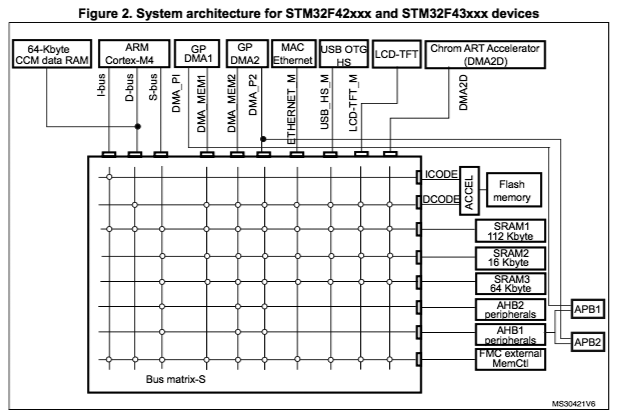
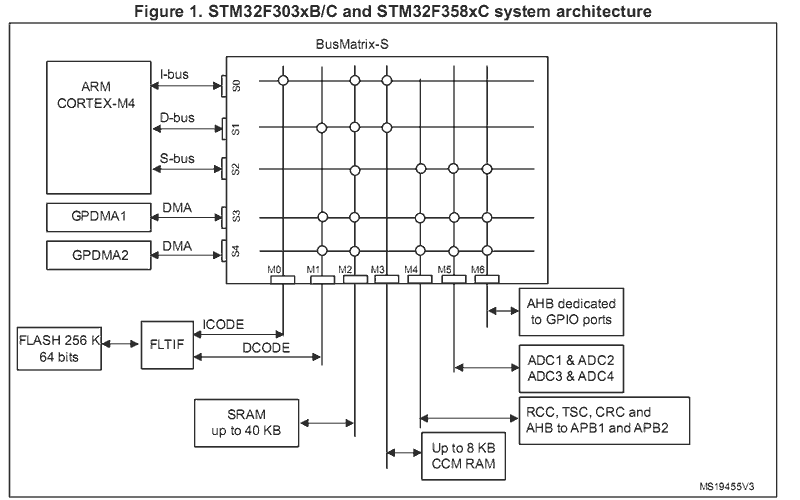
When ELF programs are loaded into memory, the memory is allocated from the heap via a standard memory allocator. By default with the STM32 F4, the CCM in included in HEAP and will typically be allocated first. If CCM memory is allocate to hold the ELF program in memory, then a hard-fault will occur immediately when you try to execute the ELF program in memory.
...