Problem
There are many ISVs, SaaS/PaaS vendors providing value-added products and services on IaaS clouds. Unlike public cloud hosting providers such as Amazon and Rackspace, CloudStack is not deployed by a single entity. There are multiple deployments of CloudStack by service providers, enterprises and individuals. It becomes a challenge for ISVs, SaaS/PaaS vendors to make their products visible and easily consumable by various CloudStack-based clouds. It also becomes a challenge for anyone who deploys CloudStack to know whose products and services work with CloudStack and how to get a hold of them.
Proposal
This proposal is to introduce a new component feature called CloudStack Marketplace. It enables ISVs and SaaS/PaaS vendors to list their product and service offerings which can be viewed and easily consumed by any CloudStack deployments. The functionalities are broken down into two parts: version 1.0 (minimum viable product) and future enhancements.
Version 1.0
The goal is to release version 1.0 with the subsequent release of CloudStack following v4.0. Below are core components of version 1.0:
- Source code for the Marketplace client, which will be included in Apache CloudStack. Marketplace client is can be installed along with CloudStack management server and provides the Marketplace UI to the admins and users. The Marketplace client points to various listing repositories specified by the admin. Through the Marketplace UI, admins and users can see which products and services they can consume with their CloudStack deployment.
- Listing repositories contain product listings . An Apache listing repository contains listings contributed by the vendors to Apache CloudStackcontributed by vendors including ISVs, SaaS and PaaS providers, etc. There will not be an Apache CloudStack hosted and managed listing repository based on the community feedback. Any third party can set up its own private or public listing repositories.
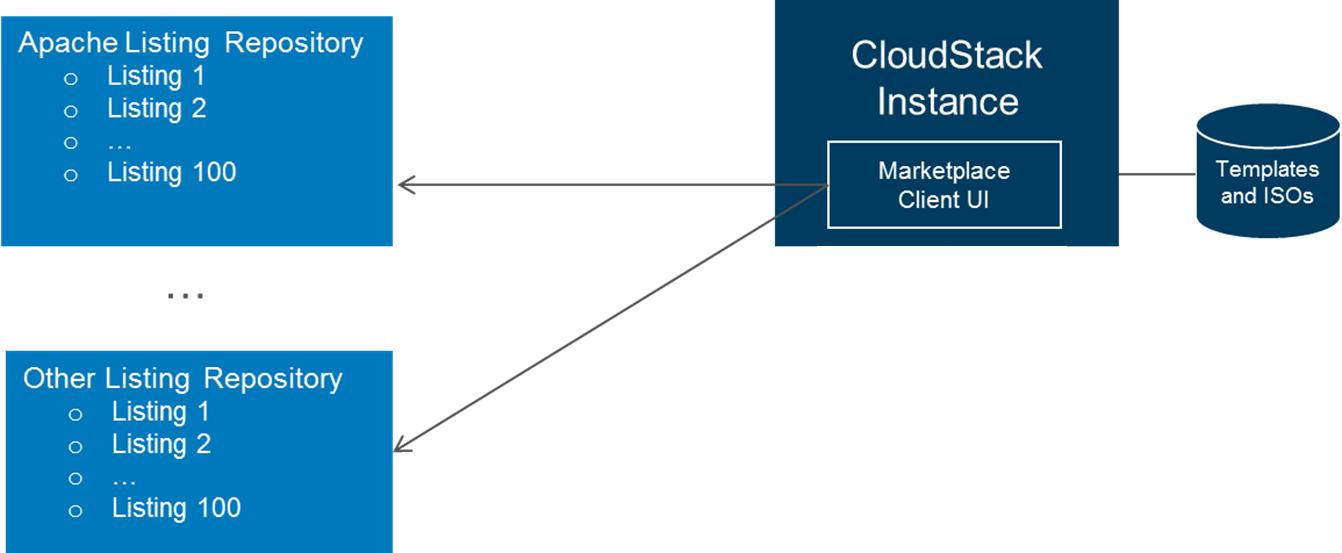 Image Removed
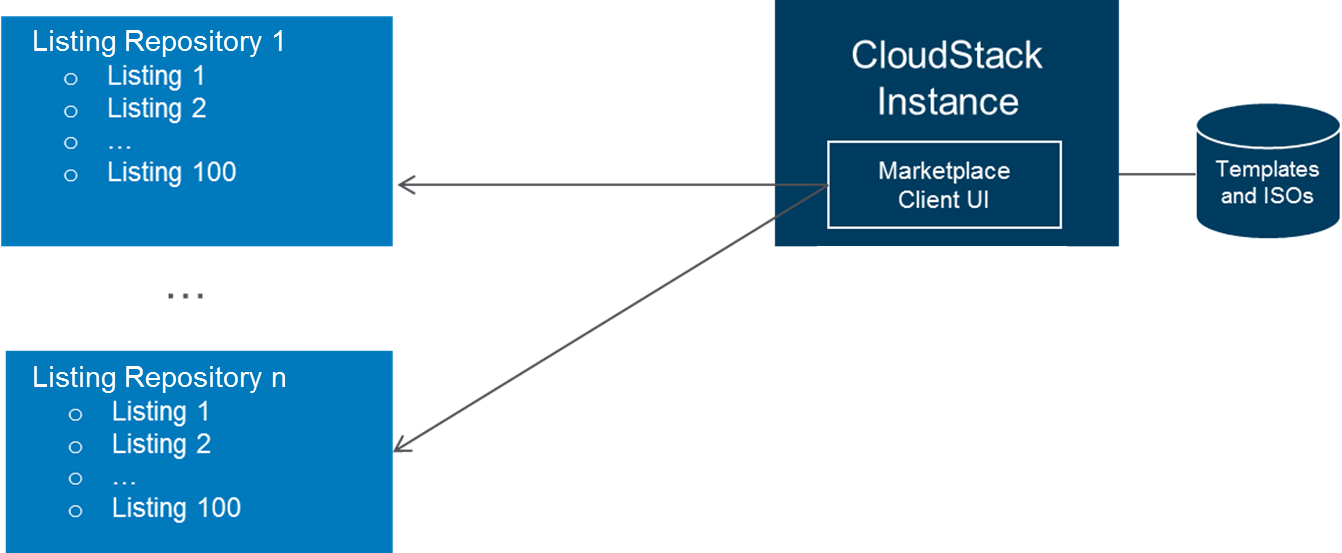 Image Added
Use Cases
Version 1.0 will support vendor products and services distributed in the forms of image templates, bootable ISOs, non-bootable ISOs, and SaaS/PaaS offerings.
...
- Create a listing folder for its product in the listing repository.
- Create a listing.js file and place it in the folder. The listing.js file includes metadata for the listing:
- Product name
- Vendor name
- A brief description
- Location of the graphics
- Metadata for associated templates and ISOs. Templates and ISO metadata should include location of where the actual image template and ISO data file. Multiple template and ISO metadata can be included in the same product listing to cover multiple hypervisor support and multiple product versions.
- Tags (TBD)
- (Optional) Place any supporting files such as graphics and image template/ISO data files into the listing folder. Note that these files can be located in other places. In the case of the Apache Listing Repository, image template/ISO data files should be located outside of the listing repository and hosted by the vendor itself or third party.
- Add an entry to the config.js file for the listing.
...
CloudStack Marketplace client is can be installed along with CloudStack management server. After installation, admins can see all listings in the listing repository specified. Admins can configure the following global settings for the Marketplace client:
- Marketplace Enabled – When Marketplace is enabled, both admins and users can access it. Default setting is "TRUE" (i.e. enabled). By defaultOnce Marketplace is enabled, image template and ISO listings are enabled (i.e. accessible) to users when Marketplace is enabled, and SaaS and PaaS listings are not. Each SaaS and PaaS listing needs to be "enabled" by admin manually.
- Location and property of listing repositories – Admin can specify location of the listing repository and its property. When a listing repository is specified and "property" is set to "enabled", both admins and users can access listings from the repository. When a listing repository is specified and "property" is set to "disabled", only admin can access listings from the repository. Multiple listing repositories are supported.
...
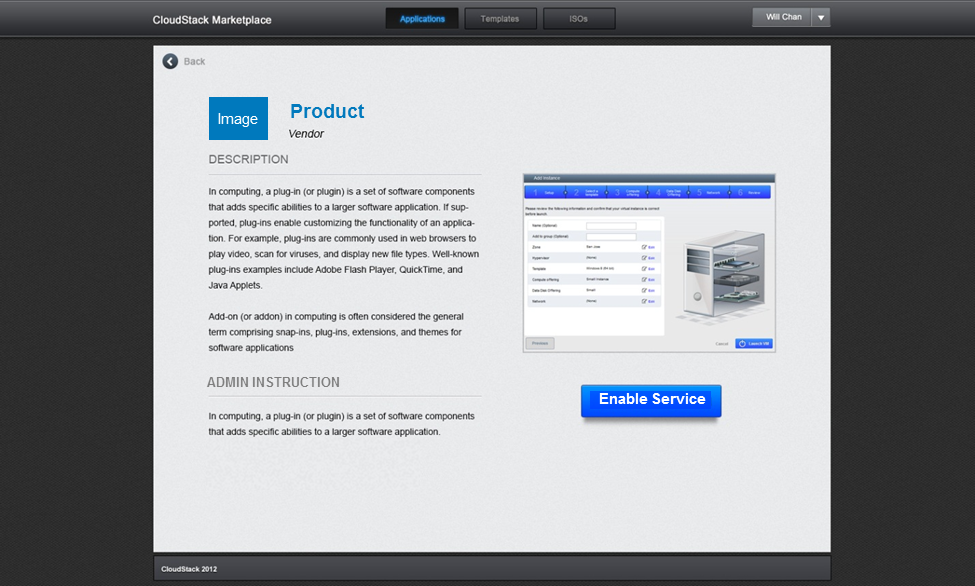
- Admin perspective - Admin will see the admin instruction on how to set up the service. Admin will follow the instruction to set up the service. Admin will click on the the button "Enable Service" to make the listing visible to users.
- User perspective - User will not see admin instruction, and will see an action button "Use Service". What happens when "Use Service" is clicked is defined by the vendor.
Design Choices
Where to host Apache Listing Repository?
There have been some discussions on the cloudstack-dev mailing list on where to host the Apache Listing Repository a few months ago. Given that additional resources will be required to create a separate governance body for a community managed listing repository, hosting the Apache Listing Repository within CloudStack source code tree for v1.0 seems to be a more viable option. The following is an analysis of pros and cons for each option.
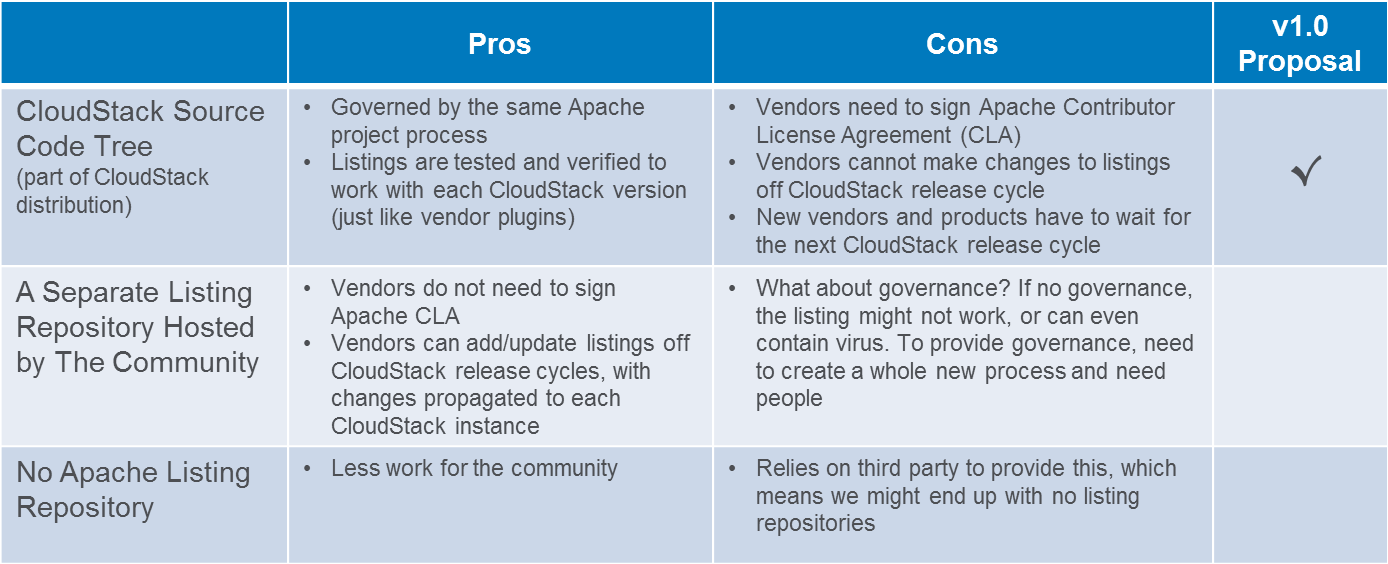 Image Removed
What should be the name of this new component?
This has been discussed on the cloudstack-dev mailing list. There has not been overwhelming response to any of the names.
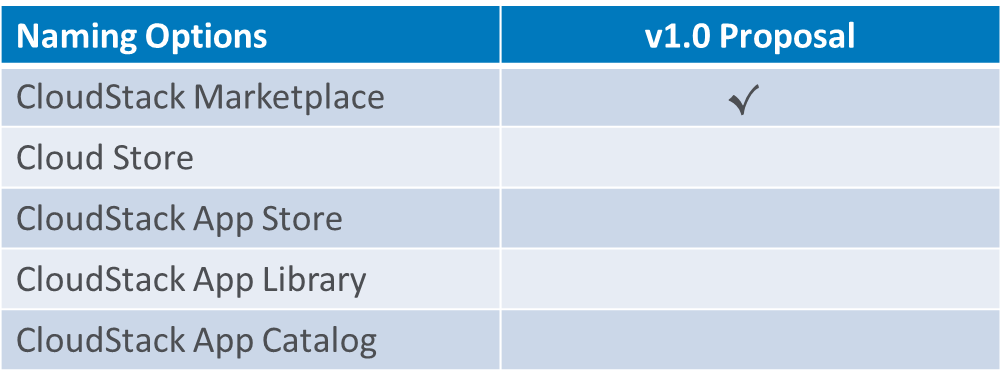 Image Removed
Future Enhancement
The following are potential future enhancements:
...
- Workflow for cloud admins to choose which listings are enabled, and for which users
- A portal for vendors to publish listings
- User reviews and ratings
- Listing version and update notification
- Usage tracking
...
This proposal was presented at the CloudStack Collaboration Conference. Major changes have been made to the proposal after further discussion on the mailing list post the conference. Presentation slides for the conference (out dated) can be found at: http://www.slideshare.net/buildacloud/cloudstack-marketplace-v10. Here is a list of frequently asked questions from attendees at the presentation and the conference in general.
- How does software licensing work for listings in Apache Listing Repository? Software licensing is handled outside of the CloudStack Marketplace. If the software delivery formats are image templates or ISOs, the image files should be made available for download. Software licensing can be enforced by the vendor application itself once user launches the VM and application. This is similar to how traditional software licensing is handled today. For SaaS and PaaS, licensing will be handled by the vendor.
- How do vendor specify pricing for its software? Vendors can put pricing information in the listing description, which will be visible to both admins and users viewing the listing details.
- If Apache Listing Repository is part of the CloudStack source code, does this mean vendors' software is open sourced (for vendors who contributed listing)? No, only the listing itself is open sourced. Vendors' software is not automatically open sourced.
- If Apache Listing Repository is part of the CloudStack source code, can the image templates and ISOs be updated off release cycle? Yes. The listing will include location to the image templates and ISOs. The actual content of the image templates and ISOs can be updated off released cycle. When admins and users create an image template or ISO within CloudStack after the update, they will get the new image files.
- How does CloudStack Marketplace work with UI plugins? When the UI plugin framework becomes available, vendors have two options to provide CloudStack UI plugins. Option 1 is to place it in the CloudStack source code tree plugins folder. Option 2 is to place it externally and provide a link in the Marketplace listing to instruct the admin to download the plugin and configure it. UI plugin can be installed and configured independent of the CloudStack Marketplace.
- How does admin track usage of a listing? v1.0 of the CloudStack Marketplace will not provide built-in usage tracking. Admin can list VM by template or ISO ID to track usages for each template and ISO. Admin can also use web stats tools to track the views and clicks on each listing.
- Can we align the listing file format with other open source cloud marketplace? The marketplace feature is implemented (or plan to be implemented) a little differently by each open source cloud community. We will align as much as we can. In addition, we will enable tags to the listing to make it easier for other marketplace to consume our listings.
