DUE TO SPAM, SIGN-UP IS DISABLED. Goto Selfserve wiki signup and request an account.
Translations available for: Asturianu (ast) | Bulgarian (bg) | Deutsch (de) | Ελληνικά (el) | Español (es) | Galego (gl) | Italiano (it) | Nederlands (nl) | Русский (ru) | 简体中文 (zh-CN) | 正體中文 (zh-TW)
| Table of Contents | ||
|---|---|---|
|
...
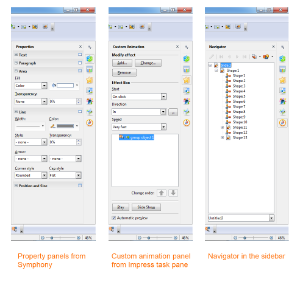
面板来自 Symphony、旧版 Impress 任务栏、 OpenOffice 窗口(从左至右)。您可调整侧边栏的宽度。控制面板的大小也会作出相应调整。如果您需要更多空间,还可以将侧边栏分离出来——可以将它移动到另一个视图窗口——或者将其调整缩小至标签栏。单击其中一个图标,侧边栏即可恢复。
您可调整侧边栏的宽度。控制面板的大小也会作出相应调整。如果您需要更多空间,还可以将侧边栏分离出来-----可以将它移动到另一个视图窗口-----或者将其调整缩小至标签栏。单击其中一个图标,侧边栏即可恢复。
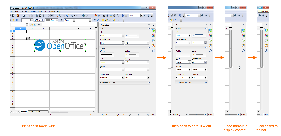
侧边栏的不同宽度:最大宽度、默认宽度、太窄而无法显示内容、缩至标签栏(从左至右)。
...
欲了解更多信息,请访问OpenOffice wiki。
Interoperability Improvements
互操作性的改进
逼真度和互操作性的改进是 Apache OpenOffice 的持久目标。同样,新版本中有许多改进。以下概述了自Apache Fidelity and interoperability improvement is an ongoing goal for Apache OpenOffice. And there are many improvements going in to the new version. Here an overview of some of the major fidelity improvements since the Apache OpenOffice 3.4.1 release, including features, enhancements and defect fixes.
Text Documents
发布以来一些主要的逼真度改进,包括新特性、改进和缺陷修复。
文本文档
描述 | 原版 | Description | Original | AOO 3.4.1 | AOO 4.0 |
|---|---|---|---|---|---|
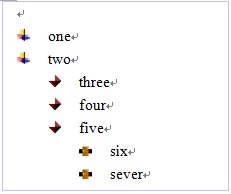
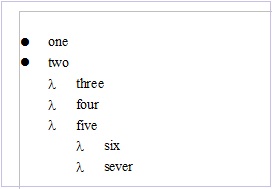
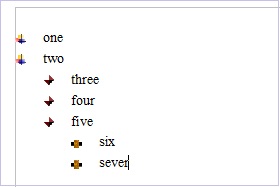
Support of Graphic Bullets in MS word 2003 支持微软 Word 2003 的图片项目符号 | | | | ||
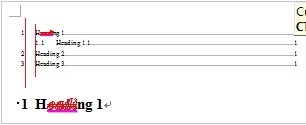
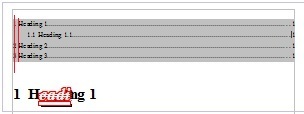
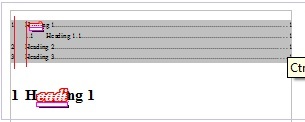
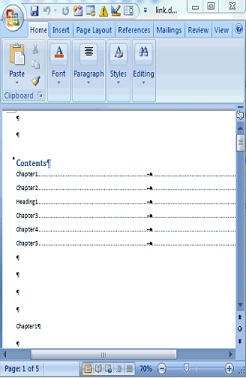
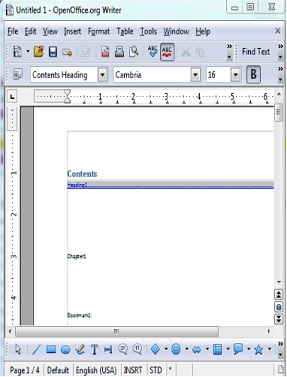
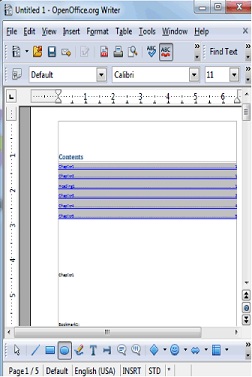
Table of Content fidelity improvement with MS 微软 Word 2003 (tabs, attributes & jump目录逼真度改进(标签、属性 & 跳转...) ) | | | | ||
Bookmark reference to normal numbering 引用正常编号的书签 | | | | ||
&bullets attributes determined by the paragraph end mark in MS Word 微软 Word 中段落结束标记决定的编号&项目编号属性 | | | |
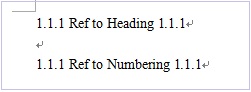
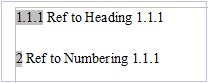
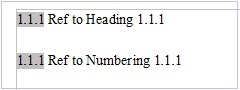
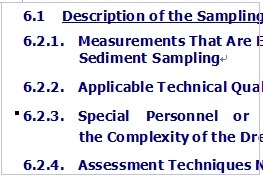
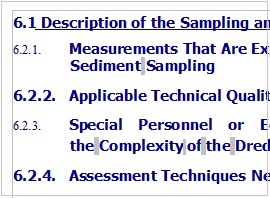
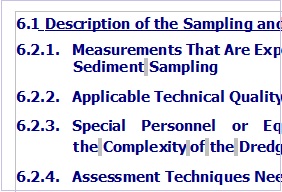
...
演示文档
Description 描述 | Original 原版 | AOO 3.4.1 | AOO 4.0 |
|---|---|---|---|
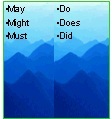
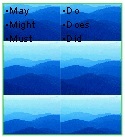
Keep special numbering when saving or opening a ppt file 保存或打开 ppt 文件时保留特殊编号 | | | |
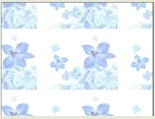
special tiled fill (picture size covers master page) background to be exported into ppt file 支持可导入 ppt 文件的特殊平铺填充(图片大小覆盖母版页)背景 | | | |
fill attribute of graphic background in table can be display correctly when loading ppt file 加载 ppt 文件时,表格中图片背景的填充属性可正确显示 | | | |
of a connector that is connected to PPT table 支持连接至 PPT 表格的连接符 | | crash in AOO 3.4.1 | |
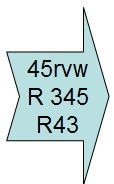
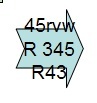
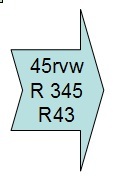
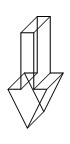
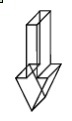
Right notched arrow with "Fit shape to text" property can be imported correctly 可以正确导入带有“图形适应文本大小”特性的右凹箭头 | | | |
Keep 3D effects when import line 导入线条时保留 3D 效果 | | | |
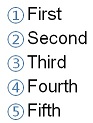
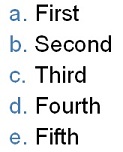





...
电子表格
Description | Original | AOO 3.4.1 | AOO 4.0 |
|---|---|---|---|
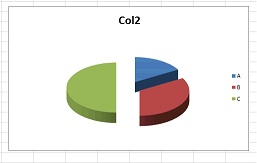
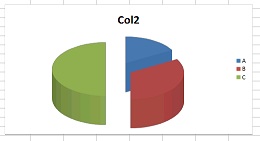
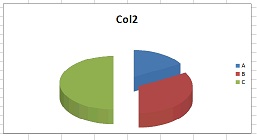
Keep Pie chart height when open Excel file 打开 Excel 文件时保留饼状图高度 | | | |
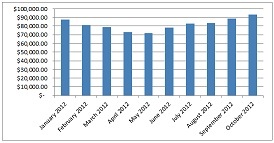
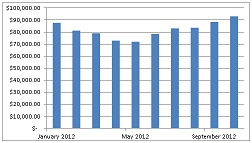
Support the range specified by a reference formula or name range as chart data 支持作为图表数据参考公式或名称域的指定域 | | | |
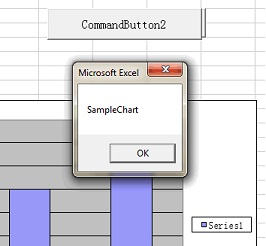
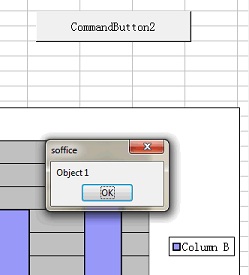
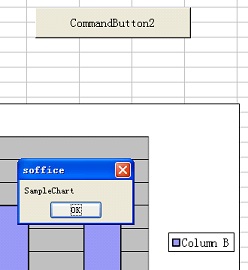
Show chart name through 通过 VBA API by clicking a button 单击按钮即可显示图表名称 | | | |
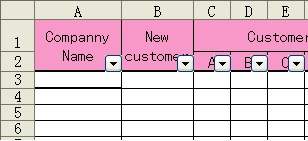
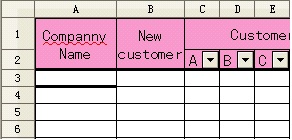
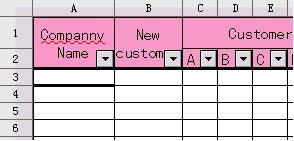
Support data filter function on merged cells 支持合并单元格的数据过滤功能 | | | |
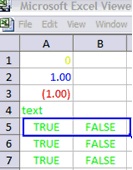
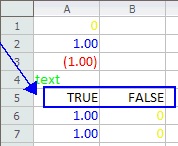
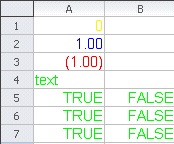
user-defined format code in xls when cell value is TRUE or FALSE 单元格的值为 TRUE 或 FALSE 时都可支持 excel 中用户定义的格式代码 | | | |
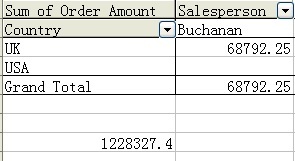
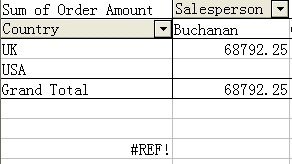
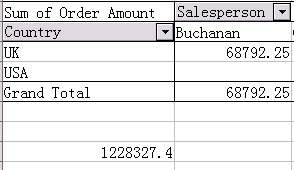
Support 支持 Excel 中的 GETPIVOTDATA in Excel | | | |
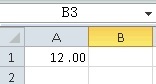
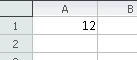
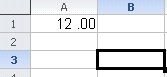
Support format code 支持格式代码 "0_;.00" | | | |
OOXML
...
概览
Description 描述 | Original 原版 | AOO 3.4.1 | AOO 4.0 |
|---|---|---|---|
Support 支持 Docx outline level 格式文件中的大纲层级 | | | |
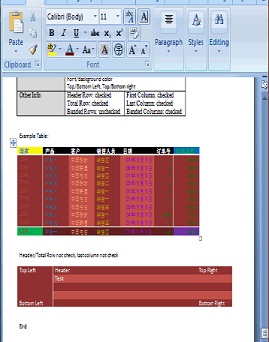
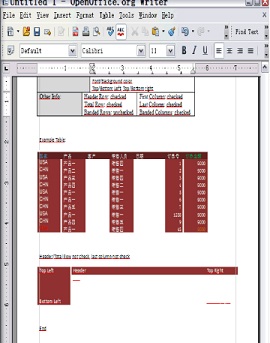
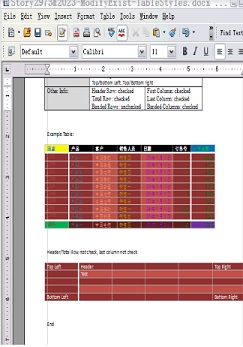
table background color from table style in docx file 支持 docx 格式文件中表格样式的表格背景颜色 | | | |
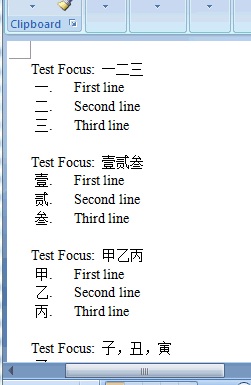
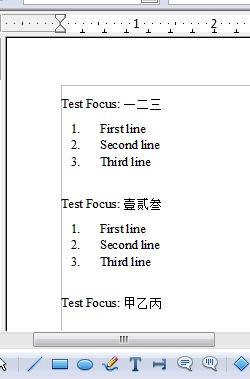
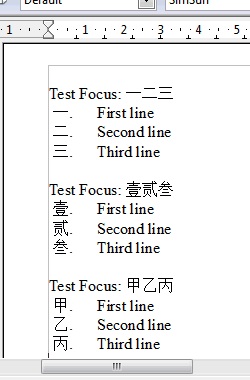
more Numbering&bullet types in docx 支持 docx 格式文件中更多的编号&项目编号类型 | | | |
Support font color in table in pptx 支持 pptx 格式文件中表格的字体颜色 | | | |
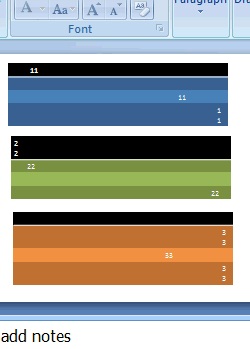
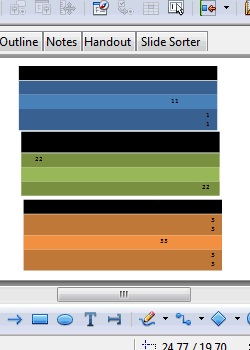
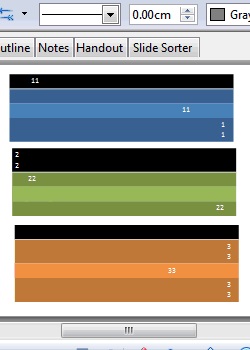
...
绘图对象的改进/
...
完善
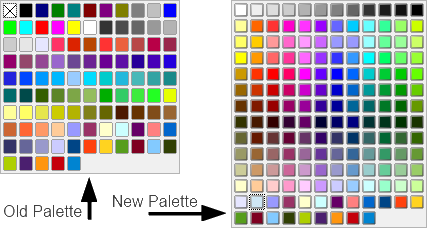
New Color Palette
The Color Palette is enhanced and extended with a selection of more useful colors, arranged in a new scheme to make finding colors simpler.
The new Palette is a mix of the Lotus Symphony Palette combined with the most useful original colors.
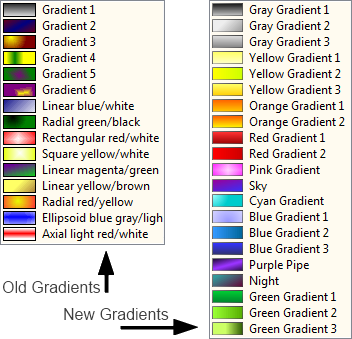
New Gradients
The Gradients are enhanced and extended with new, more useful ones, mainly taken from Lotus Symphony. The old ones are kept, but moved to the end of the list (not in the picture). These Gradients create much nicer fills for uses such as Slide Backgrounds.
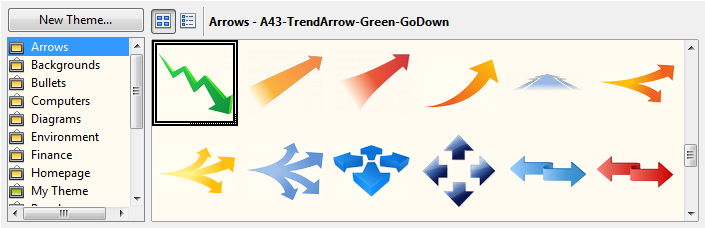
New Gallery Themes and Gallery enhancements
Gallery themes added from Symphony.
- Arrows
- Bullets (extended)
- Computers
- Diagrams
- Environment
- Finance
- People
- School & University
- Symbols
- Textshapes
- Transport
Enhancements to existing Gallery
- Old themes are kept and sometimes extended
- Gallery is now able to store and use SVG graphics
- Many new graphics are now in SVG format, which saves space on your computer and gives the user the highest quality vector format
- Ability to add your own SVG and Metafile format graphics
- Can now be oriented horizontally or vertically and will adapt it's layout automatically
- Now also available anytime in the new Sidebar
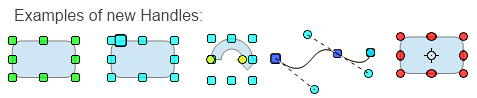
Refined the Selection Handles User Interface
- Selection Handles were reworked to be more distinguishable.
- Transparency was added to give a slight 'clue' when the Handles cover something, but only for the Handle's fill (not their outlines) to not make them harder to view as necessary.
- The design was slightly rounded.
- Colors were tweaked a little bit for better identification (mainly when Handles are selected).
- When Keyboard-travelling over handles (CTRL-TAB) yellow handles used for CustomShapes now blink as the other handles to visualize the active handle correctly.
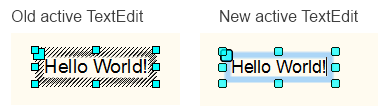
Refined Selection Visualization
- For many occasions the selection of objects or multiple objects got enhanced using the selection color from the system.
- Usage and fetching of that system-wide SelectionColor was unified to guarantee it for all selections on all Systems.
- A slight blinking was added to identify objects where text can be added by starting to type or pressing return.
This is used in various places such as; Objects with TextEdit mode, highlighting of objects as Drag&Drop target or object manipulation (dashed black/white lines were used before).
Better Print Preview
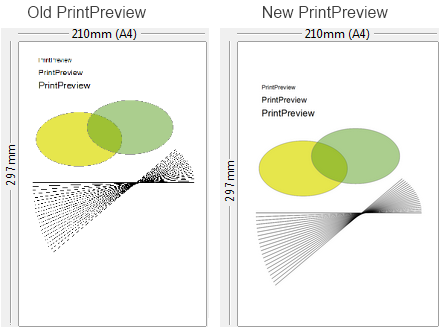
The PrintPreview in the Print dialog is now fully AntiAlialised. The previous version was not, thus thin lines could vanish or produce missing parts.
Enhanced conversion to Bitmap Graphics
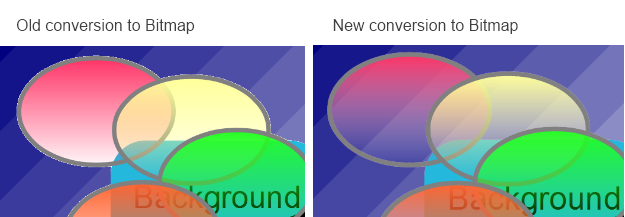
The conversion to Bitmap graphics is greatly enhanced for all kinds of draw objects, including chart OLEs and others. This is not only useful for internally converting objects to bitmaps, but also used for exports where bitmaps are needed, and the system clipboard. It works with single objects as well as multiple selections. Transparencies of the object and AntiAliasing on its edges are perfect now.
Enhanced FillType 'Bitmap'
All DrawingObjects which can have a Bitmap filling can now profit from the new, greatly enhanced Bitmap FillType:
- The new Bitmap FillType preserves Transparency, the old version was not capable of this and always added a white background.
- It allows the use of vector graphics which stay vector graphic when processed (especially useful in e.g. printing, PDF and other exports).
- It supports SVG and Metafile as FillData, no longer restricted to BitmapData.
- Tiling, AutoFit, Size, Position and Offset settings are fully supported (in Area dialog).
- Animated GIF's are now allowed as FillTypes.
Examples of this include:
- Self-create a scaling-independent fill by drawing anything anytime using DeawObjects
- convert it to Metafile
- create a FillStyle based on it
- Use a SVG or import a vector format (WMF) to define a new FillStyle.
Think about the possibilities for filling the Backgrounds of Pages, Chart bars or other items. This will be used as vector data when printing or at PDF export.

Enhanced Copy/Paste
All applications now support transparent and anti-aliased versions of, for example, DrawObjects in the selection to be exchanged with external applications. This is a result of the enhanced conversion to Bitmap and adding the PNG graphic format to the supported clipboard formats.
Non-Graphic objects are converted on-demand, and graphic objects are copied with full transparency and AntiAliasing support.
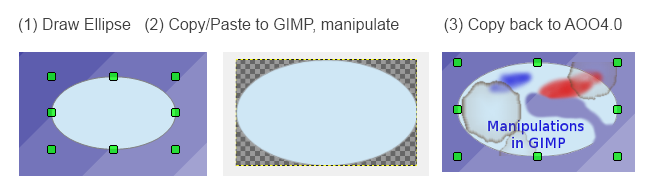
It is now possible to Copy/Paste any object to an external PixelGraphic application, modify it as needed, and copy it back to any OpenOffice Application without quality loss. This allows everyone easy and complete image manipulation outside the Office with the tool of his choice and the capabilities he needs.
Enhanced Drag&Drop
Drag&Drop has been enhanced by an 'internal' mode. It is now possible to Drag&Drop anything 'onto' an existing DrawObject to change it's graphic or fill style when holding CTRL+SHIFT (Ctrl+Cmd on Mac) during Drag&Drop.
As visual control, the target object for the Drag&Drop is visualized using the new Selection Visualization and a unique MouseCursor.
- Drag&Drop from external: change FillStyle to Bitmap (including transparence), use e.g. SVG or metafile
- Drag&Drop internal (klick on the source object(s), wait a second until MousePointer changes, start dragging, hold CTRL+SHIFT)
- when source is a DrawObject: Styles are copied (LineStyle, FillStyle, etc.)
- when source is a GraphicObject: FillStyle is adapted to source's geometry content
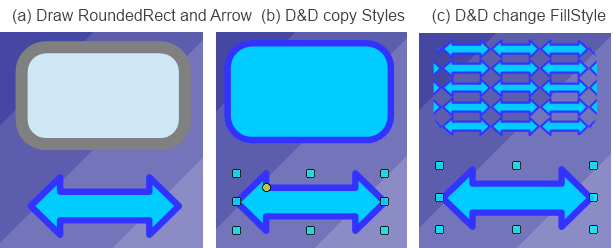
Here is an example:
(a) Draw an object, e.g. a rounded rectangle with an outline, Draw an arrow object, choose fill and line style for it.
(b) If you Drag&Drop onto the target object, it copies FillStyle and LineStyle.
(c) If you convert the arrow to metafile (e.g. using context menu), Drag&Drop onto the target object, it gets filled with the arrow's vector data.
This comes in very handy if you need to quickly define an object FillStyles or want to copy the GraphicStyles of one object to others.
Also very useful:
- You can use the Gallery as in-betwen space for DrawObjects or GraphicObjects used for that purpose.
- You can directly Drag&Drop from there onto DrawObjects.
- You can Drag&Drop from external sources onto DrawObjects.
Adapt LineStart/End to LineWidth
It is practical when you change the LineWidth of an Object which has ArrowHeads defined at its start/end when the ArrowHeads used get adapted to your LineWidth change; else you have to adapt these by your own. This was already done for Draw and Impress. This is now unified and centralized and works in all OpenOffice applications.
SVG Export enhancements
Some enhancements for SVG export were added to avoid some quality losses. More improvements are planned in this area for future releases.
SVG/Metafile Break improvements
If an imported SVG/metafile is manipulated, it needs to be broken up into DrawObjects. This code was improved in this release. More improvements are planned in this area for future releases.
SVG Import improvements
Enhancements and bug fixes were made in the SVG Import code . Thanks to all Users who were reporting issues and providing test documents for SVG. If you have a SVG file which looks different than it should, do not hesitate to attach it to an issue in the Apache OpenOffice Bugzilla.
Picture Crop mode offers preview
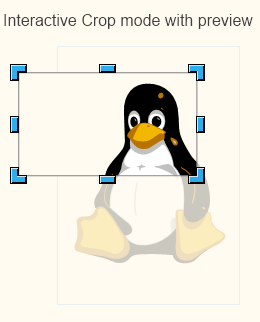
When working on a GraphicObject it is allowed to set a Crop region for it. When using the interactive mode for that, the new version shows the non-visible part of the Graphic content (the croppped part) as transparent and surrounds it with a light border. This way you no longer have to guess where or how big the cropped data is.
This example shows cropping in an SVG graphic:
Unified visualization of ColorPalette popups
All places where a ColorPalette popup is shown (the form where the colors are organized in a raster) are overhauled and made to use the same sizes and width. The width (12 columns) was adapted to the new designed ColorPalette. For a picture see 'New Color Palette'
Transparency support for pixel formats (PNG)
When exporting selected drawing objects to formats that support transparency, e.g., PNG, OpenOffice now uses a transparent background by default. This allows to further use graphics created in other applications or for further processing.
Connectors support rotation
Connectors no longer disable rotation or shear tools when selected. While this is a small benefit with single connectors, it is very useful when selecting a number of graphic objects and wanting to rotate them. This was requested in the OpenOffice Community Forum, where a user wanted to rotate a drawing made of many draw objects and many connectors by 90 degrees. This is now possible without the inconvenience of deselecting all of the connectors.
Corrected Hatch fill style visualization
When zooming out or in small visualizations (e.g. Page Previews) objects or pages using a hatch fill style were poorly visualized since too many hatch lines were shown in a small area. The Hatch Fill Style now uses a minimal line distance to make it look good for visualizations in Edit Views. This was already the case in older office versions, but was lost in the redesign of the visualization.
Better gradient support in metafiles
Gradients in metafiles are rotated and sheared (slanted) together with the metafile and so behave similar to bitmap graphics. Start color and end color are included in those gradients now. This improvement becomes visible if you use a small number of gradient steps. All gradients are now shown in presentation mode the same as they are shown in edit mode.
Calc and Chart Improvements/Enhancements
Support relative Pie Chart Height:
For Pie charts imported from other formats, the Height attribute was not supported. This is added now and makes Pie Charts look more like the original.
New Functions
Calc now supports the spreadsheet functions: AVERAGEIFS, COUNTIFS, and SUMIFS. These functions allow you to combine several conditions.
Calc now supports the function XOR. The function completes the already available set of Boolean functions.
Calc now supports the functions LEFTB, RIGHTB, LENB, and MIDB. These functions are special versions for DBCS (double byte character set) languages.
Calc's RAND function was reimplemented to use the Mersenne-Twister algorithm.
Extensions Improvements/Enhancements
New Toolbar management
新的调色板
调色板得到改进,并添加选用了更多有用的颜色,我们采用全新的配色方案,更易找到颜色。
新的调色板利用 Lotus Symphony 调色板并配以最有用的原始颜色。
新的渐变色
渐变色得到改进,并新增了主要来自 Lotus Symphony 更有用的渐变色。我们将旧版颜色移至列表底部(未在图片中显示)。这些渐变色可用于创建更好的填充效果,如幻灯片背景。
剪贴画库主题更新和库的改进
来自 Symphony 的新增剪贴画库主题。
- 箭头
- 项目符号(扩展)
- 计算机
- 图形
- 环境
- 财务
- 人物
- 学校&大学
- 符号和图标
- 文本形状
- 运输
对当前剪贴画库的改进
- 保留旧版主题或得到扩展
- 剪贴画库现在可以储存并使用 SVG 图形
- 现在许多新图形的格式为 SVG,可节省您计算机的空间,给用户带来最高质量的矢量图。
- 您能够自定义添加 SVG 和元文件格式的图形
- 剪贴画库能够横向或纵向显示,同时将会调整适应横向布局
- 同样,剪贴画库也可以随时显示在新的侧边栏上
完善选择控点用户界面
- 选择控点得到修正,更加清晰可辨。
- 控点覆盖时增加透明度提示,但仅用于控点填充(而非轮廓)以便必要时更易查看。
- 设计略微呈圆形。
- 颜色稍微扭曲以更好识别(主要在选择控点时)。
- 使用键盘操作控点(CTRL-TAB)时,原来用于自定义调节形状的黄色控点现在呈闪动状态,以便准确将活动控点可视化。
完善选择可视化
- 多数情况下使用系统的颜色选择时,对象或多个对象的选择得到改进。
- 统一系统内颜色选择的用法和调取,确保整个系统内所有选择的实现。
- 增加轻微闪烁的效果,以便在开始输入或退格时就能识别能够添加文本的对象。
此改进应用于多处,例如,文本编辑模式下的对象、高亮显示作为拖拽目标的对象或移动的对象(之前使用的是黑/白虚线)。
优化打印预览
现在,打印对话框中的打印预览可以实现完全反走样。而旧版则不能,所以才会造成无法打印出过细线条或内容的部分缺失。
转换成位图功能的改进
将各种绘图对象转换成位图的功能得到了极大的改进,包括图表 OLE 和其它对象。这个改进有助于对象内部转换成位图,同时也可用于将其导出到需要位图的地方以及系统剪贴板。现在,对象的透明度和其边缘反走样的效果堪称完美。
填充类型“位图”的改进
现在,具有位图填充功能的绘图对象可增加全新改进的位图填充类型:
- 全新的位图填充类型保持透明度效果,旧版则不能而且总是白色背景。
- 可以使用矢量图,同时在处理过程中保持矢量图效果(尤其适用于,如打印、PDF和其它导出过程)。
- 支持将 SVG 和元文件作为填充数据,不再局限于位图数据。
- 全面支持平铺、自动适合、大小、位置和偏移设置(在区域对话框中)。
- 现在,动态 GIF 图可作为填充类型。
示例包括:
- 使用绘图对象随时绘制时自定义独立缩放填充
- 将其转换成元文件
- 基于此文件创建填充样式
- 使用 SVG 或导入矢量格式(WMF)以定义新的填充样式
考虑到可能会填充页面、条状图表或其它对象的背景。在打印或以 PDF 导出时,可将这些填充内容作为矢量数据。
复制/粘贴功能的改进
现在,所有应用可支持透明和反走样版本,例如,用于与外部应用交换的绘图对象。这是因为转换成位图的功能得到改进,以及能够向可用的剪贴板格式中添加 PNG 图片格式。
可即时转换非图形对象,同时在复制图形对象时,可完全支持透明和反走样效果。
现在,您可以复制/粘贴对象到外部的图片像素应用,根据需要进行修改,并复制回到 OpenOffice 应用而不影响像素质量。此改进可以让用户利用所需功能和所选工具在 Office 应用外部轻松实现对图像的操作。
拖拽功能改进
“内部”模式下的拖拽功能得到改进。现在,您可以拖拽任何对象到当前的绘图对象上,拖拽过程中按住 CTRL+SHIFT(在 Mac 上为 Ctrl+Cmd)以更改图形或填充样式。
作为可视控点,在使用新的可视选择和独特的鼠标指针时,您可以看见拖拽目标对象。
- 从外部应用进行拖拽:更改填充样式为位图(包括透明度),使用,例如 SVG 或元文件
- 内部拖拽(点击源对象,稍等直到鼠标指针改变,开始拖拽,按住 CTRL+SHIFT)
- 源对象为绘图对象时:可复制样式(线条样式、填充样式等等)
- 源对象为图形对象时:填充样式可适用于源对象的几何图形
示例如下:
(a) 绘制对象,例如,一个轮廓为圆角矩形的对象,绘制一个箭头对象,为此对象选择填充和线条样式。
(b) 如果您拖拽到目标对象,填充样式和线条样式可被复制。
(c) 如果您将箭头转换为元文件(例如,使用上下文菜单),拖拽到目标对象,箭头的矢量数据会填充到该对象中。
如果您需要迅速指明对象的填充样式或想要把某个对象的图形样式复制到另一个对象,这个改进就会非常有用。
同样非常有用:
- 您可以使用剪贴画库作为用于此目的的绘图对象或图形对象的内部和之间的空格。
- 您可以直接在内部将其拖拽至绘图对象。
- 您可以从外部资源将其拖拽至绘图对象。
调整线条端点以适应线条宽度
您在更改对象(其端点处有箭头)的线条宽度时,箭头也会适应该线条宽度的改变;否则您只能自己手动调整。
目前此功能已在绘制和信封对象中得到实现。我们统一此改进并实现将其适用于所有的 OpenOffice 应用。
导出功能的改进
我们为 SVG 导出功能增加了一些改进以避免某些像素质量的降低。同时,在未来发布的版本中,我们计划对该部分进行更多的改进。
SVG/元文件拆分的改进
如果要对导入的 SVG/元文件进行操作,需要将其拆分成绘图对象。我们在这次发布版本中改进了此代码。在未来发布的版本中,我们计划对该部分进行更的多改进。
SVG 导入功能的改进
在 SVG 导入代码中我们进行了改进和漏洞修复。我们感谢所有提出缺陷报告和提供SVG 测试文档的用户。如果您有异常的 SVG 文件,请直接连同问题报告发送给 Apache OpenOffice Bugzilla。
图片裁剪模式支持预览
在图形对象下进行操作时,您可以设置裁剪区域。使用交互模式时,新版本可以将图形内容的非可见部分(裁剪部分)以透明效果显示,剪切部分周围的边框颜色略浅。这样,您无需再猜测所剪切数据的位置和大小。
剪切 SVG 图形的示例如下:
调色板弹出框的统一可视
显示调色板弹出框的位置(以光栅排列颜色的表格)经检查可适应相同的大小和宽度。宽度(12 栏)经过调整后可适应新设计的调色板。参见“新的调色板”以查看图片。
像素格式(PNG)的透明度支持
将所选绘图对象导出成可支持透明度的格式,例如,图片格式为 PNG 时,OpenOffice 会默认使用透明背景。这样可以进一步使用其它应用创建的图形或未来需要处理的图形。
连接符支持旋转
选定的连接符可支持旋转或剪切工具。尽管这是单个连接符的小改进,但是在选择一组图形对象并要进行旋转时就会非常有用。目前在 OpenOffice 社区论坛有这种请求,用户想要将由多个绘图对象和连接符组成的图像旋转 90 度。现在您就可以避免取消选定所有连接符所带来的不便了。
修正窗口填充样式可视化
当缩小或在小可视化页面(如“页面预览”)时,使用窗口填充样式的对象或页面可视化程度很低,因为小范围内显示了太多窗格线。现在“窗口填充样式”使用最小线距,以使其在“编辑视图” 中能很好地直观显示。以前的 office 版本中就是如此,但在重新设计可视化时没有采用。
元文件中更好的渐变支持
元文件的渐变随着元文件一起旋转和修剪(倾斜),因此与位图的行为相似。现在起始颜色和终止颜色包含在渐变中。如果使用少量渐变步骤,这一改进则可视。目前所有渐变以呈现模式显示,与其在编辑模式中的显示一样。
计算和图表的改进/增强
支持相关饼形图高度:
对从其他格式导入的饼形图来说,不支持其高度属性。现在添加了这项支持,使饼形图更像原始图形。
新功能
计算现在支持电子表格的函数:AVERAGEIFS、COUNTIFS 和 SUMIFS。你可以使用这些函数合并数个条件。
计算现在支持 XOR 函数。该函数完善了当前可用的一系列布尔函数。
计算现在支持 LEFTB、RIGHTB、LENB 和 MIDB 函数。这些函数是用于 DBCS(双字节字符集)语言的特殊版本。
计算的 RAND 函数被重新执行以使用 Mersenne-Twister 算法。
扩展程序改进/增强
新工具栏管理
现在扩展程序使用新工具栏管理,参见 Extensions now use a new Toolbar management, see https://issues.apache.org/ooo/show_bug.cgi?id=121577 ; at the moment, Extensions for ;目前使用废弃机制的 3.x that are using the deprecated mechanism will have to be updated to work with 扩展程序必须进行更新,以与 OpenOffice 4.0 . Many popular extensions, including dictionaries, are not affected by the change.
Unified menu API
协作。包括词典在内的许多通用扩展程序不受此变更影响。
统一的菜单 API
菜单 API 已经统一,这使其更清晰,更具备 API 用户用好性。以下界面已经弃用被替换:css.awt.XMenuExtended、css.awt.XMenuExtended2、cssThe Menu API has been unified, making it more clear and API-user-friendly. The following interfaces have been deprecated and replaced: css.awt.XMenuExtended, css.awt.XMenuExtended2, css.awt.XMenuBarExtended , 和 css.awt.XPopupMenuExtended. See XPopupMenuExtended。详细信息请访问https://issues.apache.org/ooo/show_bug.cgi?id=121542#c2 for details.
Note: extension authors who require more information on the above changes are encouraged to post their questions to our API mailing list.
Performance Improvements/Enhancements
Many resource leaks were fixed.
Many resource leaks were fixed, reducing memory requirements and improving application stability.
Speedup of Graphic Rendering
More Rendering speedups are used (on systems supporting it, system-dependent)
- Bitmaps with transparency are painted directly
- Bitmaps which are transformed (rotated/sheared/mirrored) are painted directly
- Lines with LineWidth and/or transparence are painted directly
- Geometry and Pixel data is buffered in system-dependent formats
For example, this allows even animated GIFs to be used as object fill style for any object and to transform these in real time (when supported on the system). It also greatly enhances visualization geometry during editing (in the EditViews) when supported.
Additional Language Support
New translations available in Apache OpenOffice 4.0 include:
- Greek
- Portuguese
- Tamil
Updated translations include:
- Asturian
- Czech
- German
- British English
- Spanish
- Finnish
- French
- Scottish Gaelic
- Galician
- Hungarian
- Italian
- Japanese
- Korean
- Dutch
- Brazilian Portuguese
- Russian
- Slovak
- Slovenian
- Simplified Chinese
For a complete list of available languages and language packs see this detailed download page.
。
注意:鼓励需要更多上述变更信息的扩展程序设计者在我们的 API 邮件列表上发布问题。
性能提高/增强
许多资源漏洞已经修复。
许多资源漏洞已经修复,降低了内存需求,提高了应用程序的稳定性。
图形绘制加速
使用更多的绘制加速(在支持的系统上,系统相关)
- 直接绘制具备透明度的位图
- 直接绘制转换(旋转/修剪/镜像)的位图
- 直接绘制有线宽和/或透明度的线
- 几何图形和像素数据以系统相关的格式缓冲
例如,这甚至允许动画 GIF 作为任何对象的对象填充样式,(当系统支持时)进行实时转换。如果支持,(在“编辑视图”中)编辑时,它还会大大改善可视化几何图形。
其他语言支持
Apache OpenOffice 4.0 新的可用翻译版本包括:
- 希腊语
- 葡萄牙语
- 泰米尔语
更新的翻译版本包括:
- 阿斯图里亚斯语
- 捷克语
- 德语
- 英国英语
- 西班牙语
- 芬兰语
- 法语
- 苏格兰盖尔语
- 加里西亚语
- 匈牙利语
- 意大利语
- 日语
- 朝鲜语
- 荷兰语
- 巴西葡萄牙语
- 俄语
- 斯洛伐克语
- 斯洛维尼亚语
- 简体中文
所支持语言与可用语言包的完整列表参见详细下载页面。
注意:另外几种语言的版本正在翻译中,完成后将会发布。如果你的语言不在列表中,而且你想帮助翻译用户界面,我们将非常欢迎所有志愿者参与进来。 Note: Several other language translations are in-progress and will be released when available. If your language is not listed above, and you want to help translate the user interface, we welcome any and all volunteers.
改进的质量管理工具
新的自动化测试框架
Apache OpenOffice 4.0 有基于 JUNIT 的新的自动化测试框架,用于以下领域的测试
...
不再支持 StarOffice 遗留文件格式(扩展名为 .sdw, .sdc, .sdd 等的文件)。移除这一代码更易于 OpenOffice 代码库的维护。这些遗留格式从未是 OpenOffice 任一版本的默认格式。建议有 StarOffice 遗留文件的用户*在升级*至 Apache OpenOffice 4.0 之前,将文件重新保存为 ODF 格式(.odt, *.ods, *.odp 等)。该操作可在 OpenOffice 3.x 上通过“文件”(File) - “向导”(Wizards) - “文件转换器”(Document Converter) 实现,仍支持 上通过“文件 - 向导 - 文件转换器”实现,仍支持 OpenOffice 3.x 的文件(*.sxw, *.sxc, *.sxi)。
更新了 Python
...
支持
PyUNO is now compatible with the latest 现在与最新的 C-Python 3.x but in order to reduce the impact for existing applications, support for 兼容,但是为了减少对当前应用程序的影响,依然支持 C-Python 2.x has been preserved and remains the default. The internal Python, used by default in the Windows and 并且保留其默认值。Windows 和 MacOS-X ports, has now been upgraded with version 端口默认使用内部 Python,它现已升级至 2.7.5 which fixes hundreds of bugs and has important performance improvements but is still compatible with previous versions. Existing scripts may require minor adjustments but will normally just continue working as before.
...
版本,可修复成百上千的漏洞而且性能大大提升,但仍兼容以前版本。当前脚本可能需要微调,但依然会像以前一样正常运行。
支持 C++ STL
...
系统
按照 C++ 标准的 TR1 报告,stlport4 模板库已过时,已废弃不用且不再维护。Apache OpenOffice 4 转移至系统本地标准的模板库,因此用 C++ 写的扩展程序需要用 The stlport4 template library was obsoleted with the TR1 report of the C++ standard and was deprecated and no longer maintained. Apache OpenOffice 4 switches to the system's native standard template library, so extensions written in C++ need to be recompiled with the Apache OpenOffice 4 SDK .重新编译。
Bug Fixes
As of July 17th 2013 there were 498 verified issues that have been resolved.
This list can be found at: VERIFIED or CLOSED
(An OpenOffice Bugzilla login will enable you to search for any bugs that may interest you.)
Important bug fixes have been made in these areas:
漏洞修复
截至 2013 年 7 月 17 日,已解决了 498 个证实的问题。
问题列表可参阅: VERIFIED 或 CLOSED
(登录 OpenOffice Bugzilla 可以搜索你感兴趣的任何漏洞。)
以下方面已进行了重大的漏洞修复:
恢复对 Java 7 和在 JRE 1.7u6 及以后版本上执行的 Support for Java 7, and the Java Access Bridge v2.0.3 implemented in JRE 1.7u6 and later has been restored. Windows OS users requiring Accessibility support for Assistive Technology tools can now use current Oracle releases of the 的支持。要求获得辅助技术工具使用支持的 Windows OS 用户现在可以在 Windows 上使用 Java SE 7 Runtime Environment and the 和 Java Accessibility API on Windows.
...
当前的 Oracle 版本。
QA 团队也在跟踪额外的修复。了解其完整报告请访问:
http://wiki.services.openoffice.org/wiki/QA/Report/WeeklyReport
...
已知问题
- Apache OpenOffice 4.0.0 will be flagged by the new Gatekeeper facility in 将在 Mac OS X Mountain Lion . This is a new feature to help guard against malware on Mac systems. There is a procedure laid out at the following link to allow applications not installed from the Mac App store to run. See the article at Mac support at 中由新的 Gatekeeper 设备进行标记。这是 Mac 系统上抵制恶意软件的一个新特性。下列链接列出的步骤可以使非 Mac 应用商店安装的应用程序运行。了解 Mac 的支持文章请访问 http://support.apple.com/kb/HT5290.。
- Apache OpenOffice 4.0.0 supports 支持 Java 7, which is the recommended configuration; but (especially on 64-bit Windows) you might receive warnings about the Java version being defective. In that case, download and install the 为建议配置;但(尤其是在 64 位 Windows 系统上),你可能会收到关于有缺陷的 Java 版本的警告。在这种情况下,下载并安装 Microsoft Visual C++ 2010 Redistributable Package. If you still have problems, install the most current JRE 6 version. Make sure you get the file 。如果仍有问题,安装最新的 JRE 6 版本。确保得到 "Windows x86 Offline (32 -bit)". Then configure OpenOffice to use it at "Tools - Options - OpenOffice - Java". See this forum topic for more information.位)" 文件。然后配置 OpenOffice,通过“工具 – 选项 - OpenOffice – Java”来使用。更多信息参见论坛主题。
- Apache OpenOffice 4.0.0. has got a new color palette. If you have migrated your "personal data" from a previous version, the old color palette is migrated too: you won't see the new palette and (if you are using a non-English version) some of the color names will appear in English only. To get the new palette close Apache OpenOffice and its quickstarter, search for the file “standard.soc” in your Apache OpenOffice user folder and rename the file, to “standard_AOO341.soc” for example. With the next start of Apache OpenOffice the new color palette is transferred to your user folder and is available.
Upgrading/Installation
- 有一个新调色板。如果你的“个人资料”从以前版本转移而来,则以前的调色板也会转移:你看不见新调色板,而且(如果你在使用非英语版本)有些色彩名称只显示英文。要使新调色板关闭 Apache OpenOffice 和快速启动,在你的 Apache OpenOffice 用户文件夹中搜索并重命名 "standard.soc" 文件,例如重命名为 "standard_AOO341.soc"。再次启动 Apache OpenOffice 时,新调色板将转移至用户文件夹而且可以使用。
升级/安装
在已装有OpenOffice When installing Apache OpenOffice 4.0.0 on a machine that already has OpenOffice 3.4.1 or 3或3.4.0 installed on it, the user will be prompted on whether they would like "personal data" from the previous version migrated over to the new version. This includes information like custom spell checking words, dictionaries, extensions, etc. By default this migration is enabled, but the user can disable it via the checkbox.的机器上安装 Apache OpenOffice 4.0.0 时,会提示用户是否要将以前版本的“个人资料”转移至新版本。这些信息包括自定义拼写检查单词、词典、扩展程序等。该转移默认执行,但用户可以通过复选框禁用此功能。
在某些情况下,用户执行包含个人资料转移的升级后首次启动 In some cases, when the user first launches Apache OpenOffice 4.0 after an upgrade that included personal data migration, the user will see a dialog like this: 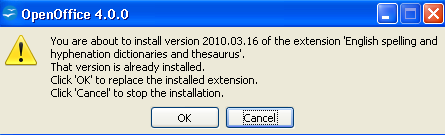
It is safe to click OK on this dialog.
After an upgrade is completed, there may be some files related to the older version of OpenOffice still on your machine. These can be safely deleted:
时,将看到如下对话框:
在该对话框中安全单击 OK。
升级完成后,一些与OpenOffice 旧版本相关的文件可能依然存在于机器上。这些文件可安全删除:
- 空文件目录:CThe empty directory: C:\Program Files\OpenOffice.org 3\share\uno_packages\cache\uno_packages
- 安装以前版本的文件目录(通常在 Desktop 上),文件名如下: Install files directories from previous versions, often on your Desktop, with names like:
- OpenOffice.org 3.4.1 (en-US) Installation Files
- OpenOffice.org 3.4 (en-US) Installation Files
- OpenOffice.org 3.3 (en-US) Installation Files
For additional upgrade/installation information, please see the Install Guide.
Stay informed about Apache OpenOffice
了解更多升级/安装信息,请参阅《安装指南》。
即时了解 Apache OpenOffice 的最新信息
建议您订阅 Apache OpenOffice 公告邮件列表,以接收产品更新和安全补丁等重要通告。如需订阅请发邮件至: You are encouraged to subscribe to the Apache OpenOffice announcement mailing list, to be receive important notifications such as product updates and security patches. To subscribe you can send an email to: announce-subscribe@openoffice.apache.org.。
您还可以关注 Twitter、Facebook 和 Google+ 上的项目。You can also follow the project on Twitter, Facebook and Google+.