DUE TO SPAM, SIGN-UP IS DISABLED. Goto Selfserve wiki signup and request an account.
Translations available for: Asturianu (ast) | Bulgarian (bg) | Deutsch (de) | Ελληνικά (el) | Español (es) | Galego (gl) | Italiano (it) | Nederlands (nl) | Русский (ru) | 简体中文 (zh-CN) | 正體中文 (zh-TW)
| Table of Contents | ||
|---|---|---|
|
...
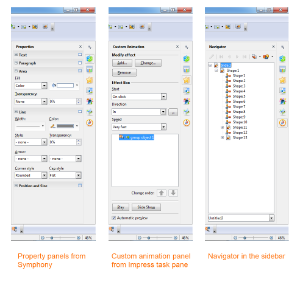
面板来自 Symphony、旧版 Impress 任务栏、 OpenOffice 窗口(从左至右)。您可调整侧边栏的宽度。控制面板的大小也会作出相应调整。如果您需要更多空间,还可以将侧边栏分离出来——可以将它移动到另一个视图窗口——或者将其调整缩小至标签栏。单击其中一个图标,侧边栏即可恢复。
您可调整侧边栏的宽度。控制面板的大小也会作出相应调整。如果您需要更多空间,还可以将侧边栏分离出来-----可以将它移动到另一个视图窗口-----或者将其调整缩小至标签栏。单击其中一个图标,侧边栏即可恢复。
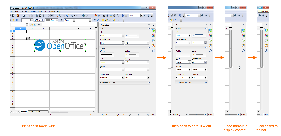
侧边栏的不同宽度:最大宽度、默认宽度、太窄而无法显示内容、缩至标签栏(从左至右)。
...
- 保留旧版主题或得到扩展
- 剪贴画库现在可以储存并使用 SVG 图形
- 现在许多新图形的格式为 SVG,可节省您计算机的空间,给用户带来最高质量的矢量图。
- 您能够自定义添加 SVG and Metafile 格式的图形和元文件格式的图形
- 剪贴画库能够横向或纵向显示,同时将会调整适应横向布局
- 同样,剪贴画库也可以随时显示在新的侧边栏上
...
如果您需要迅速指明对象的填充样式或想要把某个对象的图形样式复制到另一个对象,这个改进就会非常有用。
Also very useful:
- You can use the Gallery as in-betwen space for DrawObjects or GraphicObjects used for that purpose.
- You can directly Drag&Drop from there onto DrawObjects.
- You can Drag&Drop from external sources onto DrawObjects.
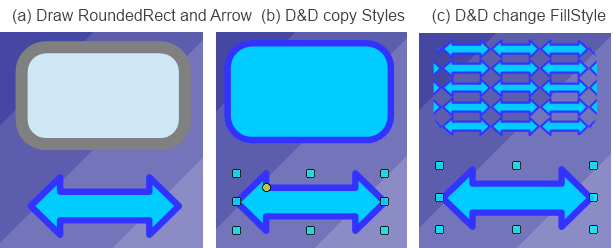
Adapt LineStart/End to LineWidth
It is practical when you change the LineWidth of an Object which has ArrowHeads defined at its start/end when the ArrowHeads used get adapted to your LineWidth change; else you have to adapt these by your own. This was already done for Draw and Impress. This is now unified and centralized and works in all OpenOffice applications.
SVG Export enhancements
Some enhancements for SVG export were added to avoid some quality losses. More improvements are planned in this area for future releases.
SVG/Metafile Break improvements
If an imported SVG/metafile is manipulated, it needs to be broken up into DrawObjects. This code was improved in this release. More improvements are planned in this area for future releases.
SVG Import improvements
Enhancements and bug fixes were made in the SVG Import code . Thanks to all Users who were reporting issues and providing test documents for SVG. If you have a SVG file which looks different than it should, do not hesitate to attach it to an issue in the Apache OpenOffice Bugzilla.
Picture Crop mode offers preview
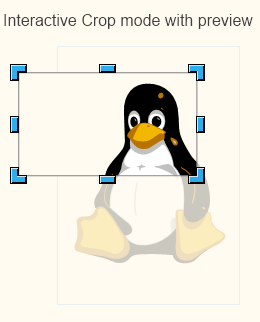
When working on a GraphicObject it is allowed to set a Crop region for it. When using the interactive mode for that, the new version shows the non-visible part of the Graphic content (the croppped part) as transparent and surrounds it with a light border. This way you no longer have to guess where or how big the cropped data is.
This example shows cropping in an SVG graphic:
Unified visualization of ColorPalette popups
All places where a ColorPalette popup is shown (the form where the colors are organized in a raster) are overhauled and made to use the same sizes and width. The width (12 columns) was adapted to the new designed ColorPalette. For a picture see 'New Color Palette'
Transparency support for pixel formats (PNG)
When exporting selected drawing objects to formats that support transparency, e.g., PNG, OpenOffice now uses a transparent background by default. This allows to further use graphics created in other applications or for further processing.
Connectors support rotation
同样非常有用:
- 您可以使用剪贴画库作为用于此目的的绘图对象或图形对象的内部和之间的空格。
- 您可以直接在内部将其拖拽至绘图对象。
- 您可以从外部资源将其拖拽至绘图对象。
调整线条端点以适应线条宽度
您在更改对象(其端点处有箭头)的线条宽度时,箭头也会适应该线条宽度的改变;否则您只能自己手动调整。
目前此功能已在绘制和信封对象中得到实现。我们统一此改进并实现将其适用于所有的 OpenOffice 应用。
导出功能的改进
我们为 SVG 导出功能增加了一些改进以避免某些像素质量的降低。同时,在未来发布的版本中,我们计划对该部分进行更多的改进。
SVG/元文件拆分的改进
如果要对导入的 SVG/元文件进行操作,需要将其拆分成绘图对象。我们在这次发布版本中改进了此代码。在未来发布的版本中,我们计划对该部分进行更的多改进。
SVG 导入功能的改进
在 SVG 导入代码中我们进行了改进和漏洞修复。我们感谢所有提出缺陷报告和提供SVG 测试文档的用户。如果您有异常的 SVG 文件,请直接连同问题报告发送给 Apache OpenOffice Bugzilla。
图片裁剪模式支持预览
在图形对象下进行操作时,您可以设置裁剪区域。使用交互模式时,新版本可以将图形内容的非可见部分(裁剪部分)以透明效果显示,剪切部分周围的边框颜色略浅。这样,您无需再猜测所剪切数据的位置和大小。
剪切 SVG 图形的示例如下:
调色板弹出框的统一可视
显示调色板弹出框的位置(以光栅排列颜色的表格)经检查可适应相同的大小和宽度。宽度(12 栏)经过调整后可适应新设计的调色板。参见“新的调色板”以查看图片。
像素格式(PNG)的透明度支持
将所选绘图对象导出成可支持透明度的格式,例如,图片格式为 PNG 时,OpenOffice 会默认使用透明背景。这样可以进一步使用其它应用创建的图形或未来需要处理的图形。
连接符支持旋转
选定的连接符可支持旋转或剪切工具。尽管这是单个连接符的小改进,但是在选择一组图形对象并要进行旋转时就会非常有用。目前在 OpenOffice 社区论坛有这种请求,用户想要将由多个绘图对象和连接符组成的图像旋转 90 度。现在您就可以避免取消选定所有连接符所带来的不便了。Connectors no longer disable rotation or shear tools when selected. While this is a small benefit with single connectors, it is very useful when selecting a number of graphic objects and wanting to rotate them. This was requested in the OpenOffice Community Forum, where a user wanted to rotate a drawing made of many draw objects and many connectors by 90 degrees. This is now possible without the inconvenience of deselecting all of the connectors.
修正窗口填充样式可视化
当缩小或在小可视化页面(如“页面预览”)时,使用窗口填充样式的对象或页面可视化程度很低,因为小范围内显示了太多窗格线。现在“窗口填充样式”使用最小线距,以使其在“编辑视图” 中能很好地直观显示。以前的 office 版本中就是如此,但在重新设计可视化时没有采用。
...