DUE TO SPAM, SIGN-UP IS DISABLED. Goto Selfserve wiki signup and request an account.
| Table of Contents |
|---|
Status
Current state: DiscussionAccept
Discussion thread: here or here (sometimes. the mail thread can't show all the mails. so I provided two links here)
Vote thread: here here
JIRA: KAFKA-19893
PR: https://github.com/apache/kafka/pull/20913
...
This KIP proposes an optional , topic-level feature that provides an opportunity for cost savings on remote storage when the scenario is suitable to use.
Currently, Kafka's tiered storage implementation uploads all non-active local log segments to remote storage immediately, even when they are still within the local retention period.
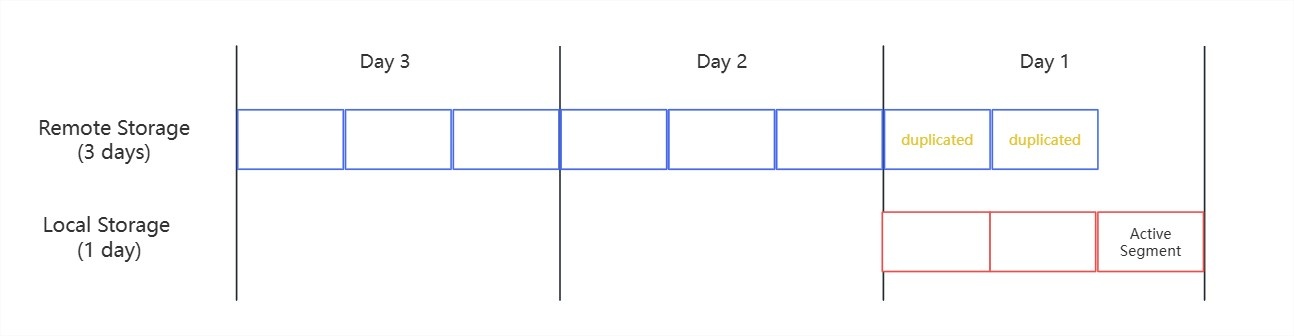
This results in redundant storage of the same data in both local and remote tiers.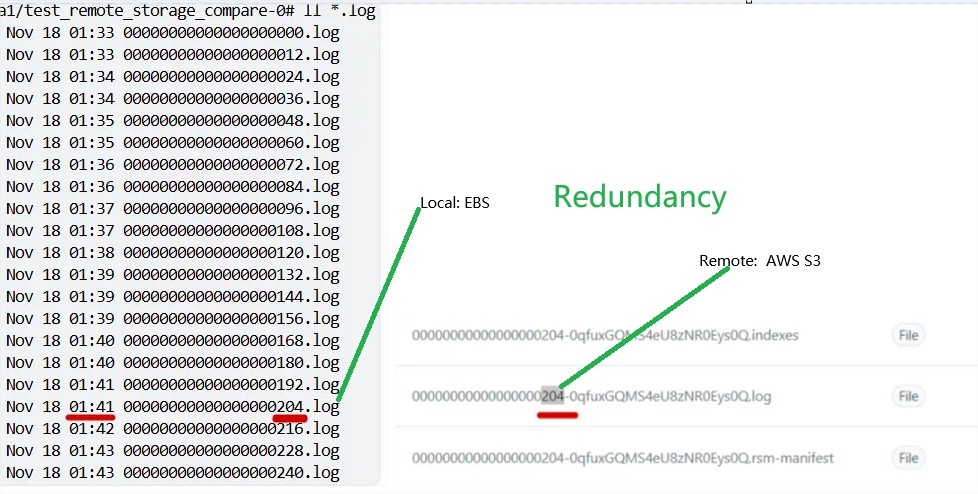
We can see the one real redundancy example in the following picture. (I just highlight only one segment.)
Whenthere is no requirement for real-time analytics or immediate consumption based on remote storage directly. It has the following drawbacks:
1. Wastes storage capacity and costs: The same data is stored twice during the local retention window
2. Provides no No immediate benefit: During the local retention period, reads prioritize local prioritize local data, making the remote copy unnecessary
...
Data is stored in both tiers for the first day, resulting in about 16 hours of redundant storage. This can leads to cost waste.
So we can reduce the tiered this storage redundancy for cost saving. In this case, it will save about 25% cost payment for total size of disk.
...
We can take an AWS S3 billing example (last 3 months) to show the cost saving detail: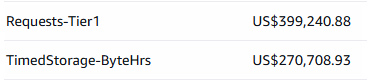
AWS S3 has two main cost items items for Kafka usage (normally, Kafka deployed machines and the remote storage/S3 bucket are placed in the same region so that we can ignore the network transfer cost).
The cost item TimedStorage-ByteHrs represents the storage part which costs are based on the stored object’s lifetime.
In above case, each remote segment lives for about 64 hours. thus, with the new optional solutionfeature, each will live for about 48 hours, resulting in approximately 25% cost savings.
In this billing example, the cost would decrease from about 67K per quarter. BTW: if our topic is local:1 day + remote: 7 days . the saving part will be about 10% (27K)
so it mean that if you set 1 day local + 3-7 days remote. the cost-saving for TimedStorage-ByteHrs will range from 25% to 10%..
Note: You can also refer to Amazon S3 Cost to know more information.
However, this optimization is offered as a topic level optional configuration rather than the default behavior based on followed scenarios:
(1) Some users/topics rely on remote storage for real-time analytics based on remote storage directly and need the latest data to be available as soon as possible (In fact, it only tries to stay as up-to-date as possible,
but because it still can’t include the latest data because the active segment always hasn’t been uploaded yet.).
(2) Some topics may set a very high ratio for remote-to-local retention time. The cost savings amount will be small, so it is mainly to avoid waste. Users may think it is not worth enabling the feature for the topics
| Code Block | ||||
|---|---|---|---|---|
| ||||
Considering the latency or risk of remote storage, the local retention period won’t be set too short for me.
For example, in our production environment, we keep one day of local data alongside 3-7 days in remote storage,
Keeping one day of data in local storage ensures that Kafka users have enough time to handle unexpected consumption issues while maintaining good latency, and it also reduces the risk of relying on remote storage.
so there’s still one day of redundancy for my case.
What’s more, even if you configure a very short local retention time, you may need to extend it when certain issues occur. The more local retention time you keep, the more cost savings you achieve. |
(3) Kafka admin want to reduce the expansion times for local disk when remote storage down for some a long time. after all. The already uploaded segments are eligible for deletion from broker when not enable the feature for topic.
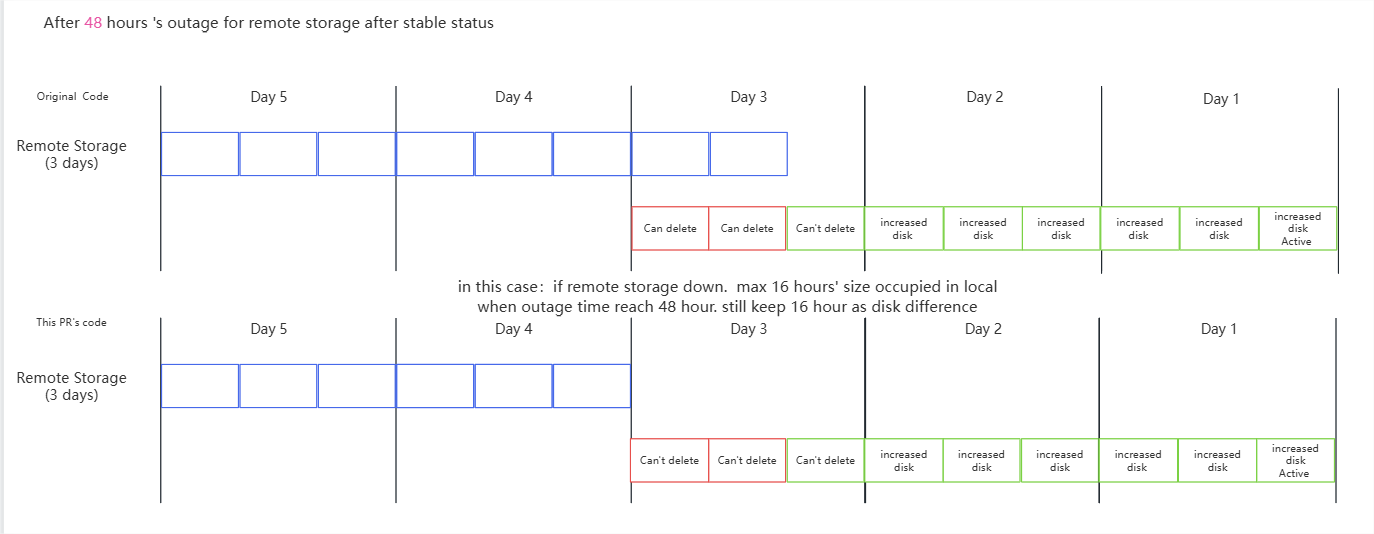
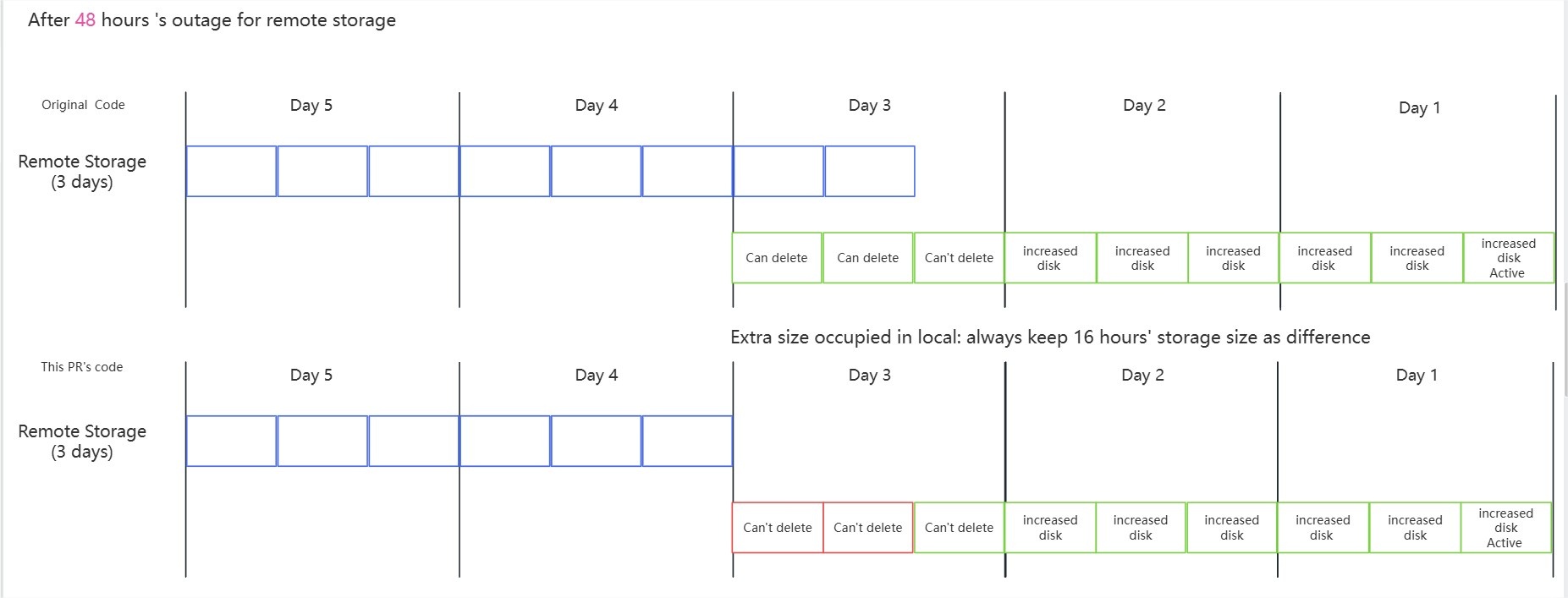
You can check the follow picture ( Configure: 1 day local + 3 day remote. and set the delay to max value: the local retention time/size) to understand the logic:
if (a) If the remote storage outage for a short time: no matter if if you enable the feature. it don't have difference. (So if you don't set the delay to max value. you have more time to avoid expansion)
if (b) If the remote storage outage for a medium-term time : you
You will need one extra expansion: the max size is the your saving cost's part. You can think you should return back the save part/redundancy by expansion.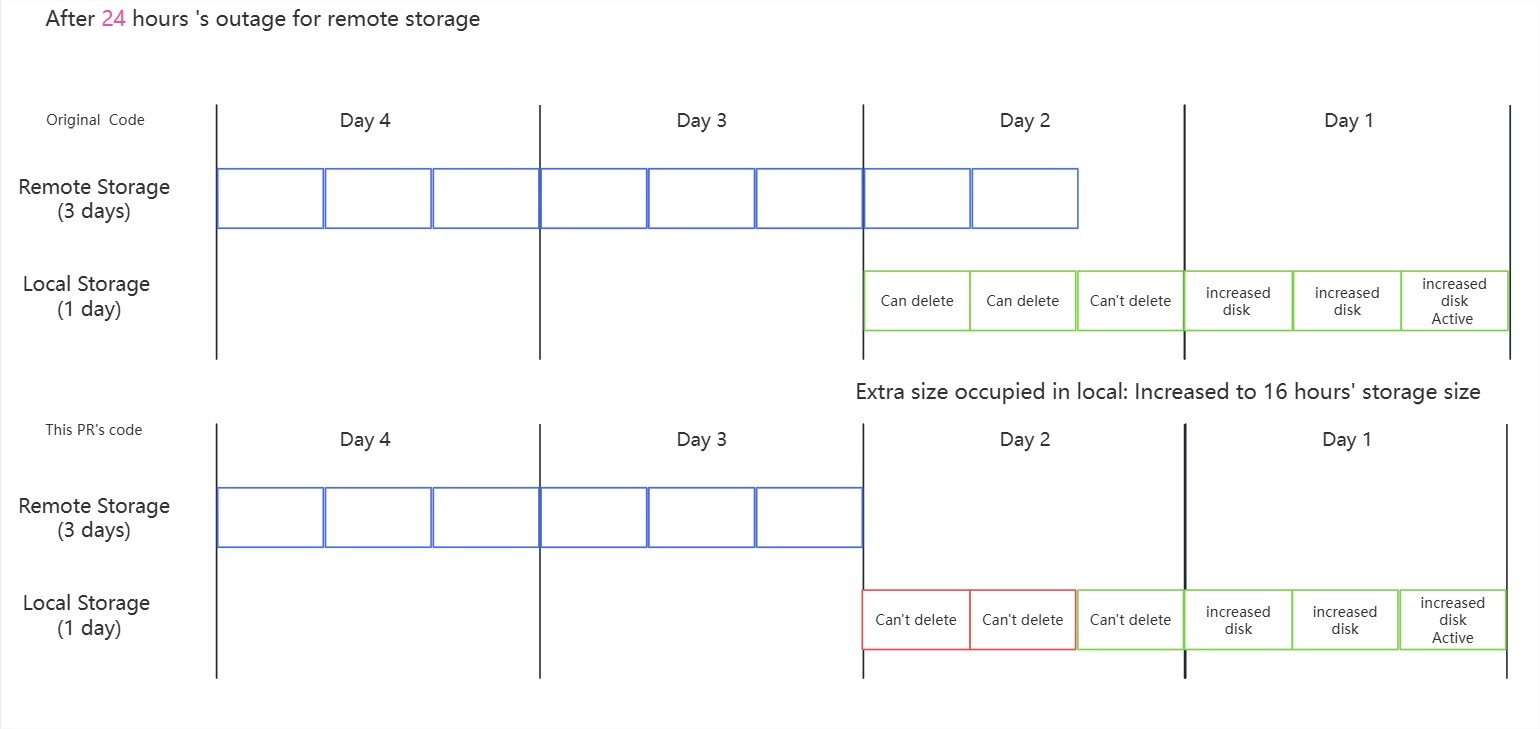 if (c) If the remote storage outage for a long time : no matter if (check the 48 hours' outage example in picture)):
No matter if you enable the feature. you should keep do doing expansion due to remote upload failed.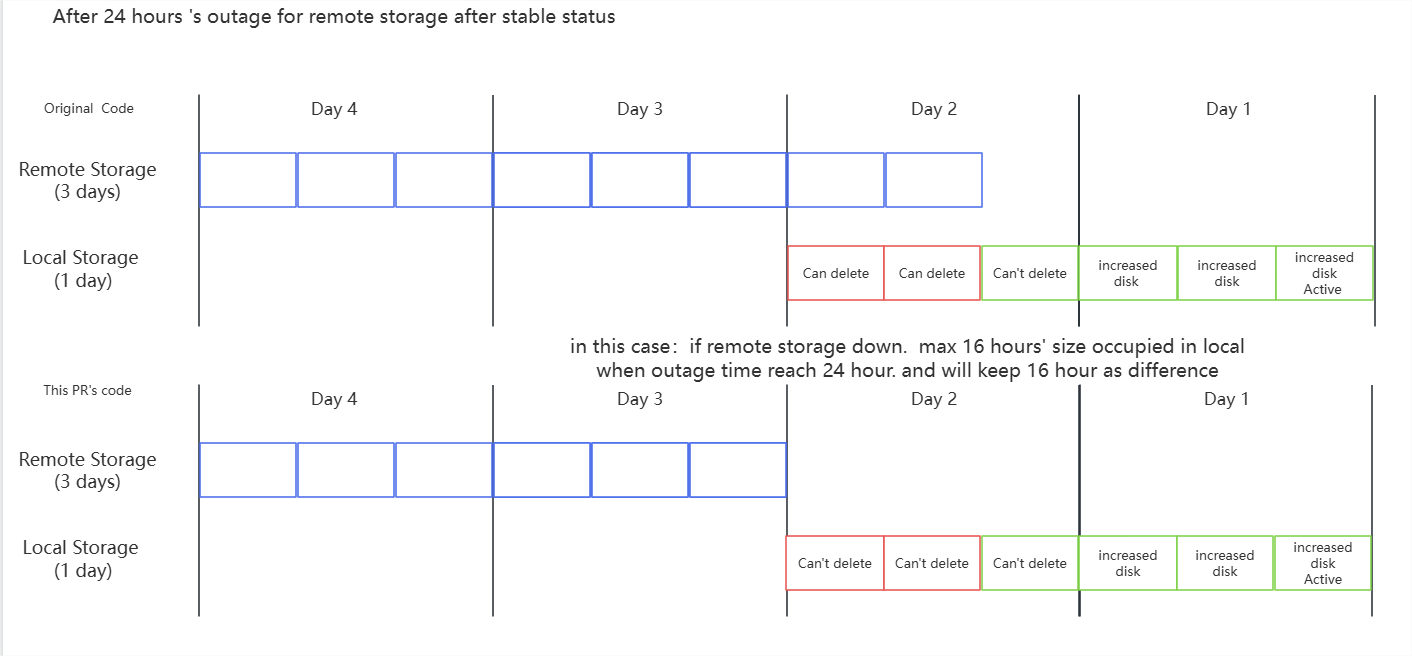
Public Interfaces
This KIP introduces one :
(1) Two new topic configuration item: remote.log.keep.latest items: remote.copy.lag.ms and remote.copy.lag.bytes
BTW: topic's remote storage feature already had some others configure items such as remote.log.delete.on.disable/, remote.log.copy.disable, etc.
Considering that if we need to keep the same style. the configure name shoud be remote.log.copy.lag.ms/bytes. thus. the broker configure will be log.remote.log.copy.lag.ms/bytes. so that it look strange with duplicated "log". So decide to use this name style without "log".
| Code Block | ||||||
|---|---|---|---|---|---|---|
| ||||||
public static final String REMOTE_COPY_LAG_MS_DOC = "Controls how long to delay uploading segments to remote storage. " + "When set to 0, immediate upload without any delay check. " + "When set to a positive value (ms), a segment can't become eligible for upload until the time since the latest record in the segment reaches the value. " + "The value should not exceed the real local retention ms except the latter is retained indefinitely (-1). " + "When set to -1, resolves to the real local retention ms as maximum delay. " + "For how the real local retention time is computed, see <code>local.retention.ms</code>."; public static final String REMOTE_LOGCOPY_LATESTLAG_ENABLEBYTES_CONFIG = "remote.logcopy.latestlag.enablebytes"; public static final String REMOTE_LOGCOPY_LATESTLAG_ENABLEBYTES_DOC = "DeterminesControls whethersize-based todelay uploadfor alluploading segments to remote storage including the latest ones within local retention. " + "When set to 0, immediate upload without any delay check. " + "When set to a positive truevalue (defaultbytes), all committed segments will be uploaded without checking local retention constraints a segment can't become eligible for upload until the total bytes of log data after the segment reach the value. " + "The value should not exceed the real local retention bytes except the latter is retained indefinitely (-1). " + "When set to false, only segments beyond-1, resolves to the real local retention bytes as maximum delay. " + "For how the real local retention size is computed, see <code>local.retention.bytes</code>."; |
(2) Two new dynamic server configuration items: log.remote.copy.lag.ms and log.remote.copy.lag.bytes
If a user wants to enable the lazy copy behavior for all the topics (including the new ones), then they can set these broker-level dynamic configs. Otherwise,
it will be hard for the user to create the new topics with these configs set when remote storage is enabled.
| Code Block | ||||
|---|---|---|---|---|
| ||||
public static final String LOG_REMOTE_COPY_LAG_MS_PROP = "log.remote.copy.lag.ms"; public static final String LOG_REMOTE_COPY_LAG_BYTES_PROP = "log.remote.copy.lag.bytesperiod will be uploaded to remote storage."; |
The default value is true are 0 so that the whole remote storage module keeps the original behavior when topic don't set it to false.
Proposed Changes
You can refer to https://github.com/apache/kafka/pull/20913 for the detailed changes.
We change the RemoteLogManager.RLMCopyTask#candidateLogSegments's logic for decide one segment if need to upload to remote:
The left part is old logic. The right part is new logic with new extra judgement (yellow color) added
Note: When any segment is delayed. All segments after it will also be delayed. This followed the original design of retention policy without any change.
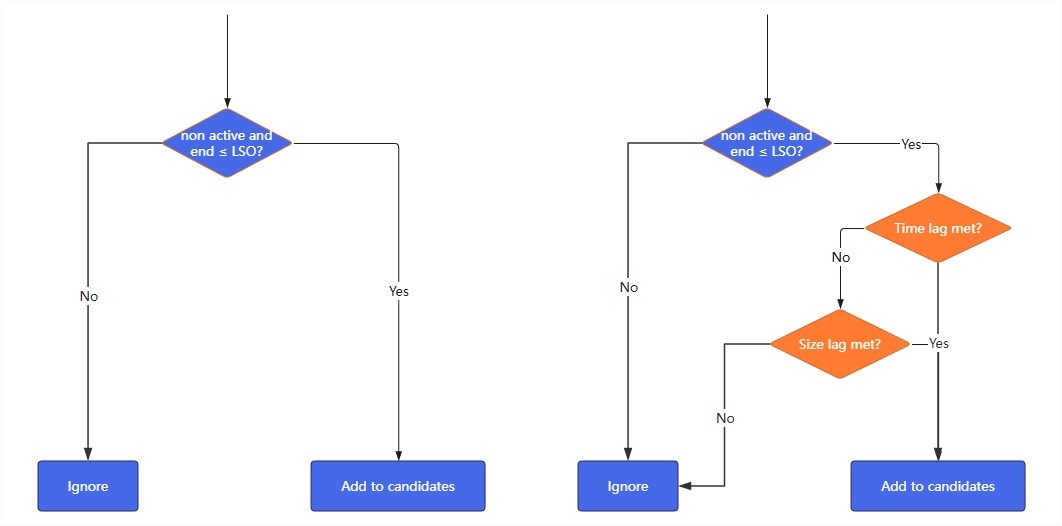
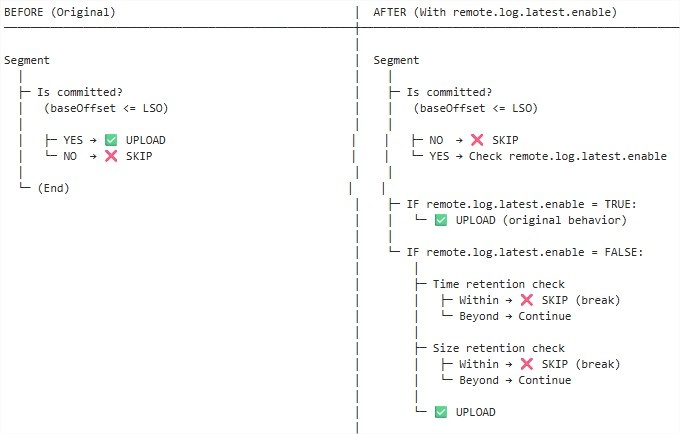
You can see the uploading will be delayed if the configure remoteLogKeepLatest is false items set with non default value. And After the change, the remote tiered storage redundancy will be reduced with delayed upload.
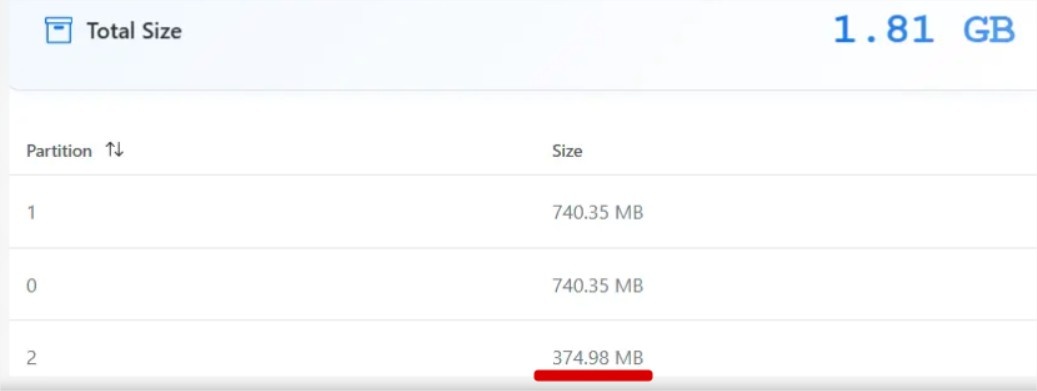
You can refer to the test case and result: https://github.com/apache/kafka/pull/20913#issuecomment-3547156286
The storage compare in my test: Partition 2 (host on the machine with the delay upload feature) is about 50% of Partition 0 or Partition 1.
BTW: Here are some additional thoughts/considerations.
- Local files won’t be deleted until they’ve been uploaded to the remote storage, so this change is very safe
You don’t need to worry about files being cleaned up before they be upload to the remote.Considering the latency of remote storage, the local retention period won’t be set too short.
For example, in our production environment, we keep one day of local data alongside 3-7 days in remote storage, so there’s still one day of redundancy. When local and complete retention values are set to the same. What is the behavior if the delay lag is set to local retention?
This is corner case. So keep same as the existing behaviour; the segment will be uploaded to remote, then allowed for local-log deletion.Code Block language plain title Note Note: Actually, this is a valid case because local retention only not allow to > remote retention in current code. If they are equal, it is better to skip the update, since the segment would be immediately deleted after being uploaded to remote storage when you also set the lag to max one (local rentention configure value) However, if we do not upload it to remote storage, the local segment will not be deleted because it waits for the highest offset in remote storage to be updated after the upload. Moreover, if we skip the upload but directly update the highest offset in remote storage, it becomes ambiguous whether the segment has already been uploaded or not. Therefore, We can skip the upload and update the LogStartOffset. The demo PR is: https://github.com/apache/kafka/pull/21361, Considering this is a corner case and this solution also helps address another issue: if the remote storage service is unavailable for a long time, local segments may never get deleted forever even it over the retention time. It means that it isn't special case for this KIP. So I just list this thought here.
Compatibility, Deprecation, and Migration Plan
Backward Compatibility
This change is fully compatible:
Backward compatible: Default configures' value (true) maintains current behavior
Forward compatible: Older clients unaware of this config these configs will ignore it- Deprecation
N/A - Migration for Existing Deployments
N/A. The feature is optional with topic level.
Test Plan
We can use follow tests to cover the change:
Type\Configure | Case Id | local retention time | local retention size | lag time | lag size | Expect result | Notes |
Special cases which can help to understand the basic rule for code review
| 1 | * | * | 0 (default value) | * | No lag | |
2 | * | * | * | 0 (default value) | No lag | ||
3 | * | -1 | * | -1 | No delay check on size. check the time configure as final result | For the case: 4 configures are -1. The final result is not upload. | |
4 | -1 | * | -1 | * | No delay check on time. check the size configure as final result | ||
Typical user cases which can test with deployment
| 5 | 7 days
| -1
| 0 (default value) | 0 (default value) | No lag | 7days + No size limit is If you want time lag delay. you need to set time lag to real value and size lag to -1 |
1 day | -1 | lag: 1 day | |||||
-1 | -1 | lag: 7 days | |||||
6 | -1 | 3 GB | 0 (default value) | 0 (default value) | No lag | ||
-1 | 1 GB | lag: 1 GB | |||||
-1 | -1 | lag: 3 GB | |||||
7 | 7 days | 3 GB | 0 (default value) | 0 (default value) | No lag | ||
1 day | 1 GB | lag: 1 day or 1 GB | |||||
-1 | -1 | lag: 7 days or 3 GB | |||||
8 | 7 days | 3 GB | 1 day | 0 (default value) | No lag |
Unit Tests:
- Test upload eligibility logic with delay enabled/disableddifferent configure values
- Test configuration validation for topic
...
Reason for rejection: Some users require real-time remote analytics and need data uploaded as soon as possible. Breaking their use case would be unacceptable. after all it is the default behavior before this change.
Alternative 2: Global broker-level configuration only1: Using one flag(true/false) configure to choose: No delay or Delay with max value.
The current configuration covers flag/boolean-type configure's feature (0: No delay/-1: Max delay) and provides additional flexibility, allowing the total size or time of local segments to stay within local limits for a much longer period when remote storage is unavailable.
Reason for rejection: Different topics have different requirements. Topic-level granularity is essential.