DUE TO SPAM, SIGN-UP IS DISABLED. Goto Selfserve wiki signup and request an account.

...
- CPU must support at least SSSE3
- Minimum Memory: 8GBmemory: 16GB
- Hard disk space: 120GB (for the test data)
Supported Operating Systems
Linux
- Ubuntu 14.04, 15.0416.04, 18.04, 20.04
- CentOS 7
- See bootstrap_development.sh for other supported versions (this wiki page may be stale).
OS X
Not supported
Windows
Not supported
Installing and Configuring Impala
Install prerequisites
...
| language | bash |
|---|---|
| theme | Emacs |
Option 1 - Building Impala (for developing Impala)
This will also load all the test data, i.e. on HDFS, Kudu and HBase and for all formats (text/parquet/orc) and compressions (none/gzip/snappy etc.) which usually takes hours. If you just need some simple test data (e.g. TPCH data set), try Option 2 below.
| Code Block |
|---|
git clone https:// |
...
gitbox.apache.org/repos/asf/impala.git ~/Impala
cd ~/Impala
export IMPALA_HOME=`pwd`
bin/bootstrap_development.sh |
Option 2 - Building Impala without Test Data (for manually testing Impala)
If you have some test data in hand, or you just need a subset of the test data (e.g. TPCH tables in parquet format), you can try this.
| Info |
|---|
If you are running on a platform that is not supported by the above script, you will have to install prerequisites and set up your machine manually. Impala Build Prerequisites has some information that can guide you. |
Clone the Impala git repo and change to the new Impala directory.
...
| language | bash |
|---|---|
| theme | Emacs |
| Code Block |
|---|
git clone https:// |
...
gitbox.apache.org/repos/asf/ |
...
impala.git ~/Impala cd |
...
Set the following environment variables in your `.bashrc` or elsewhere:
...
| language | bash |
|---|---|
| theme | Emacs |
...
~/Impala export IMPALA_HOME= |
...
Build Impala.
| Code Block | ||||
|---|---|---|---|---|
| ||||
# Build Impala and prepare the local mini-cluster (the first time only)
${IMPALA_HOME}/buildall.sh -noclean -skiptests -build_shared_libs -format |
| Info |
|---|
You may hit an error here in bootstrap_toolchain.py if you are building Impala on an operating system for which prebuilt toolchain binaries are not available. In that case you will need to build native-toolchain from scratch then retry this step. |
| Info | ||
|---|---|---|
| ||
Doing a full build of Impala can take quite a while! While you wait, check out Tips for Faster Impala Builds. |
Start supporting services.
...
| language | bash |
|---|---|
| theme | Emacs |
...
`pwd` bin/bootstrap_system.sh source ./bin/impala-config.sh # Format the test cluster and start Impala and dependent services ./buildall.sh -noclean -notests - |
...
format -start_minicluster |
...
 -start_impala_cluster

# Load some test data (skip this if you don't need them)
# Example 1: Load functional test data in parquet format. Note that you need the text tables since parquet tables are generated from them.
bin/create_testdata.sh
bin/load-data.py -e core -w functional-query --table_formats=text/none,parquet/none
# Example 2: Load TPCH test data in parquet format.
bin/load-data.py -e core -w tpch --table_formats=text/none,parquet/none
# Example 3: Load TPCDS test data in parquet format.
bin/load-data.py -e core -w tpcds --table_formats=text/none,parquet/none |
Rebuilding after initial build
...
Start the Impala cluster.
| Code Block | ||||
|---|---|---|---|---|
| ||||
source ${IMPALA_HOME}/bin/impala-config.sh # You must source this in your shell before most of the below commands will work.

# The following command will start an Impala cluster with 3 Impala demons, one
# Statestore and one Catalog demon.
${IMPALA_HOME}/bin/start-impala-cluster.py |
...
Check that everything works correctly.
| Code Block | ||||
|---|---|---|---|---|
| ||||
source ${IMPALA_HOME}/bin/impala-config.sh # If you didn't already source impala-config.sh in this shell

impala-shell.sh -q "SELECT version()"
Starting Impala Shell without Kerberos authentication
Connected to localhost:21000
Server version: impalad version 2.2.0-INTERNAL DEBUG (build 47c90e004aecb928a37b926080098d30b96b4330)
Query: select version()
+---------------------------------------------------------------------------------------+
| version()                                                                             |
+---------------------------------------------------------------------------------------+
| impalad version 2.2.0-INTERNAL DEBUG (build 47c90e004aecb928a37b926080098d30b96b4330) |
| Built on Sun, Mar 22 15:22:57 PDT 2015                                                |
+---------------------------------------------------------------------------------------+
Fetched 1 row(s) in 0.05s |
...
Recompile and restart the Impala cluster for your changes to take effect.
| Code Block | ||||
|---|---|---|---|---|
| ||||
# Rebuild both backend and frontend
${IMPALA_HOME}/buildall.sh -skiptests - |
...
noclean # Rebuild with optimized release binaries ${IMPALA_HOME}/buildall.sh -skiptests -noclean -release # Incremental builds source ${IMPALA_HOME}/bin/impala-config.sh # If you didn't already source impala-config.sh in this shell # Optional: |
...
Rebuild the impala |
...
binary only |
...
make -j$IMPALA_BUILD_THREADS impalad # Optional: Build the Java-side frontend only |
...
make -j$IMPALA_BUILD_THREADS java # Restart the Impala cluster ${IMPALA_HOME}/bin/start-impala-cluster.py |
...
See Tips for Faster Impala Builds for more tips on how to do incremental builds.
FAQ
Q: The build is stuck at 100% progress for a while (as the screenshot shows). What's going on there?
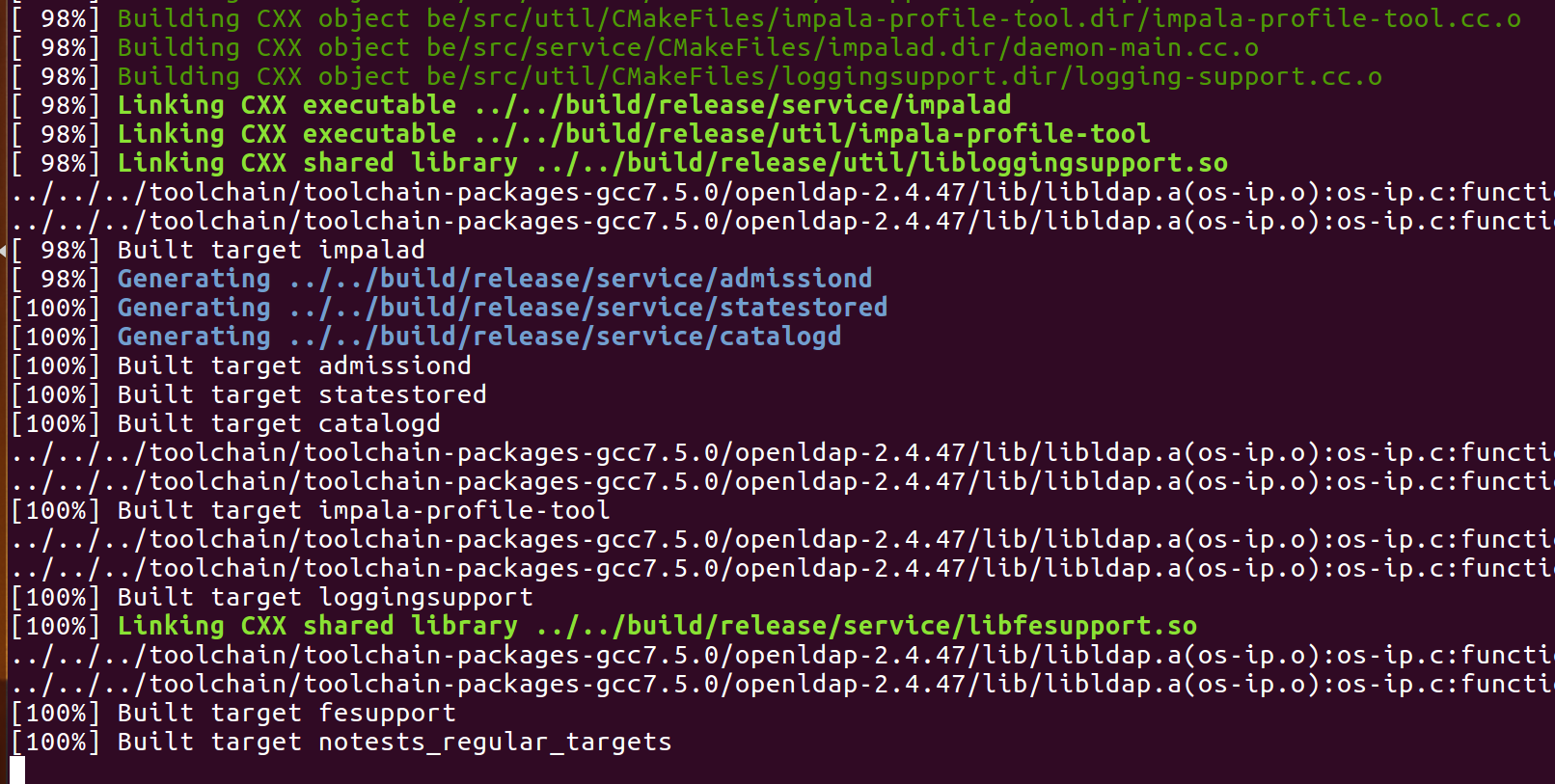
A: Usually the FE compilation is still running. Maven downloads a lot of artifacts. So you will see slow progress there if your internet connection is slow. You can check the logs at ${IMPALA_HOME}/logs/mvn/mvn.log