Introduction
This documents gives an overview to the design and functional implementation for Internal Load Balancing on VPC tiers.
Feature developers:
- APIs and Business logic - Alena Prokharchyk
- Backend - TBA
- UI - TBA
Glossary
- Internal LB - the load balancing between internal (guest) cloudStack networks
- Internal LB Rule- Load balancer rule with the front end IP from Internal (Guest) cloudStack network.
- Internal LB VM - cloudStack system vm managing internal LB Rules
Use case
There are 2 tiers in the VPC - Web tier and Application tier. Traffic to Web tier is balanced on the VPC VR on the public side. User wants traffic coming from Web to the App tier to be balanced as well. Load balancing on the App tier will be covered by the Internal LB feature.
Internal LB can be handled by 2 1 network providersprovider:
- InternalLBVm - have to add support for this provider first.Netscaler VPX
The pic below is for the case when InternalLBVm is used as a provider for the LB service on internal tier:
- Public LB rule for 72.52.125.10 Public IP, public port 80 and private port 81. It enables LB for traffic coming from the internet to the vms on the Web tier. The LB rule is configured on the VPC VR.
- Internal LB rule #1 for 10.10.10.4 guest IP, loadBalancerPort 23 and instancePort 25. The LB rule is configured on InternalLBVM1.
- Internal LB rule #2 for 10.10.10.4 guest IP, loadBalancerPort 45 and instancePort 46. The LB rule is configured on InternalLBVM1.
- Internal LB rule #3 for 10.10.10.6 guest IP, loadBalancerPort 23 and instancePort 25. The LB rule is configured on InternalLBVM2.

General flow
1) Enable Internal LB on VPC tier
In order to have Internal Load Balancing support on VPC tier, the tier has to be created from the network offering with:
- Service=LB, Provider=InternalLBVm.
or
- Service=LB, Provider=Netscaler, InternalLbVm, LB service capability "scheme=Internal"."lbSchemes" with the value "Internal"
- Before creating the network, enable InternalLbVm element/provider on the physical network using configureInternalLoadBalancerElement and updateNetworkServiceProvider APIs. The cloudStack UI will enable the element/provider automatically as a part of physical network creation, so these instructions are only for the case when APIs are called directly, omitting the UI.
Java code changes
- Network.java interface - add new capability for the LB service - supportedLbSchemeslbSchemes. It will have 2 values - Internal and Public.
- Existing Netscaler Service Provider will support both values - Internal and Public - for the supportedLbSchemes capability as it can act as a provider for Public and Internal Load Balancing.
- Introduce new Network Element - InternalLBVm. This provider supports only 1 service - LB, and its supportedLbMode capability can be Internal only. We need a new network element because Internal LB Vm will have different number of nics from the regular CS system vm (Guest and Control only); and its lifecycle will be different as well. The Vm will be started not when network gets implemented, but when the new IP gets acquired from the Guest Network for the Load Balancer rule.
- Introduce new classes InternalLBNetworkApplianceManager/InternalLBNetworkApplianceService/InternalLBNetworkApplianceManagerImpl - for managing Internal Load Balancer vms.
Backend changes
TBD. We might need a separate template/set of scripts for Internal LB VM, or we can re-use the existing VR template.Existing VR template will be used by the Internal LB vm. The same HA proxy settings as on the regular VR, will be setup on the Internal LB vm.
Web Services API
Changes to existing Apis: list/createNetworkOffering APIs will return new parameter parameters in the response - "internal_lb" and public_lb:. The parameter parameters' type is Boolean
...
DB changes
...
No changes
2) Create Load Balancer Rule
Problems to address:
* LB can be created for public ip address only, and it always references the ip by its db id (in WebServices API/DB/Everywhere in the code). As we maintain diff types of network ip addresses in separate datastructures and planning to support LB for different types of cloudStack ip addresses, we can no longer use this model.
* Web services LB API use "publicIpId"/"publicIp" namings in Request/Response parameters to address LB sourceIpAddress. As we are adding up new LB models - Internal in this release, perhaps some other mode in the future - we can't overload existing APIs with more parameters and split its logic based on the LB type as it will be too confusing for the API user.
* Currently LoadBalancer inherits from FirewallRule interface along with PF/StaticNat/Firewall/NetworkACL; all the rules are kept in the same datastructure. The rules are tight to the publicIpAddress. Changing LB to use ip/ipNetworkId, can affect other cloudStack rule types.
Refactoring:
* Separate LoadBalancer from the FirewallRule. The LB will no longer inherit from FirewallRule, will be maintained in the separate datastructure, and will be managed by the LoadBalancingRulesManagerImpl only. FirewallManager is not responsible for LB rules anymore.
Advantages - LB code changes will not affect other Network Rules and vice versa.
* Replace publicIpAddressId reference in the LB with sourceIp/sourceIpNetworkId pair.
Advantages - opens the possibility to create LB rule for IP address of any cloudStack network.
* Introduce new set of Web Services APIs for the Load Balancing. The APIs can be used for both Public/Internal lb creation. "Scheme" - Internal/Public - parameter will reflect the type of the LB,all the rest of the parameters will be the same for all types of the LB (sourceIp, sourcePort, instancePort, etc). The new APIs are listed in the Internal lb FS:https://cwiki.apache.org/confluence/display/CLOUDSTACK/Internal+Load+Balancing+between+VPC+tiers
Advantages - if in the future we decide to support new type of LB - Elastic for example - all you have to change in the API is to add new supported value to "Scheme" parameter. On the backend, the scheme choice will determine the LB rule lifecycle and management.
Old LB APIs accepting publicIpId, will still be maintained by the cloudStack.
...
Problems to address
...
- LB can be created for public ip address only, and it always references the ip by its db id (in WebServices API/DB/Everywhere in the code). As we maintain diff types of network ip addresses in separate datastructures and planning to support LB for different types of cloudStack ip addresses, we can no longer use this model.
- Web services LB API use "publicIpId"/"publicIp" namings in Request/Response parameters to address LB sourceIpAddress. As we are adding up new LB models - Internal in this release, perhaps some other mode in the future - we can't overload existing APIs with more parameters and split its logic based on the LB type as it will be too confusing for the API user.
- Currently LoadBalancer inherits from FirewallRule interface along with PF/StaticNat/Firewall/NetworkACL; all the rules are kept in the same datastructure. The rules are tight to the publicIpAddress. Changing LB to use ip/ipNetworkId, can affect other cloudStack rule types.
...
Refactoring to be done
...
- Separate LoadBalancer from the FirewallRule. The LB will no longer inherit from FirewallRule, will be maintained in the separate datastructure, and will be managed by the LoadBalancingRulesManagerImpl only. FirewallManager is not responsible for LB rules anymore.
Advantages - LB code changes will not affect other Network Rules and vice versa.
- Replace publicIpAddressId reference in the LB with sourceIp/sourceIpNetworkId pair.
Advantages - opens the possibility to create LB rule for IP address of any cloudStack network.
- Introduce new set of Web Services APIs for the Load Balancing. The APIs can be used for both Public/Internal lb creation. "Scheme" - Internal/Public - parameter will reflect the type of the LB,all the rest of the parameters will be the same for all types of the LB (sourceIp, sourcePort, instancePort, etc).
Advantages - if in the future we decide to support new type of LB - Elastic for example - all you have to change in the API is to add new supported value to "Scheme" parameter. On the backend, the scheme choice will determine the LB rule lifecycle and management.
...
boolean.
New APIs:
Api Name | Request Parameters | Response parameters | Available to regular user |
|---|
createInternalLoadBalancerElement
| nspid(required) - network service provider UUID | - id
- nspid
- enabled
- type (always has value of internal_lb_vm)
| no |
configureInternalLoadBalancerElement
| - id (required) - id of the element
- enabled(required, boolean)
| the same response as of createInternalLoadBalancerElement | no |
listInternalLoadBalancerElements
| | the same response as of createInternalLoadBalancerElement | no |
| no
|
...
DB changes
...
- New fields to network_offerings table - "internal_lb" and "public_lb". Not null, default value is 0.
- Changes to unique key in ntwk_service_map table. The unique key is service/provider/network_id instead of service/network_id. Now network have multiple providers for the same service - LB - as in the future we might support public/internal LB service handled by the separate providers on the same network
2) Create Load Balancer Rule
Java code changes
- Add new manager - InternalLoadBalancerManagerImpl (name is TBD) ApplicationLoadBalancerManagerImpl. This class will be responsible for managing Internal LB rules in this release. In the future it will support Public lb rules as well.
- The LBRule can be created with or without specifying the source IP address. If no source IP address is specified, the new one will get acquired automatically from the sourceIpNetworkId specified in createLoadBalancer command
If provider is InternalLBVM:
- A new InternalLBVM should be spanned as soon as new source IP address is acquired by the LB rule. This code should be handled by InternalLBNetworkApplianceManagerInternalLoadBalancerVMManager. See more details on the VM in "InternalLBVM management and life cycle" section.
- There is going to be 1 Internal LB vm spanned per guest IP address participating in the Internal Load Balancing. If more rules are added for the same IP, they will be managed on the same InternalLBVM.
If LB provider is Netscaler VPX:
- TBDNetscaler VPX is not supported as Internal LB provider in this release. It will be supported only as a Public LB provider.
Backend changes
TBD. For InternalLBVM, have to put Internal LB vm: the same HA proxy management/ configuration details here
...
Web Services API
...
In the current code Load Balancer and Load Balancing Rule concepts are mixed up. We always represent it as a LoadBalancingRule to the end user, and Load Balancing Rule contains information about the load balancer itself - source LB Ip, name; and the actual LB rule (sourcePort/instancePort/protocol combination). With the new changes we are going to change the way we represent the LB to the end user. Here are the key elements:
1) Load Balancer - the container for the load balancer rules. Has properties:
- sourceIpAddress - the address to access the load balancer
- name - unique LB name
- algorithm
2) Load Balancer Listener - the listener inside the load balancer, listening for a specific source/instancePort. Has properties:
- sourcePort - Specifies the Load Balancer port
- instancePort - Specifies the TCP port on which the instance is listening
3) Load Balancer Instance
VM instance registered inside the load balancer. Once the instance is a part of the load balancer, it starts receiving requests coming to the LB source Ip/Lb listener(s) source port(s): 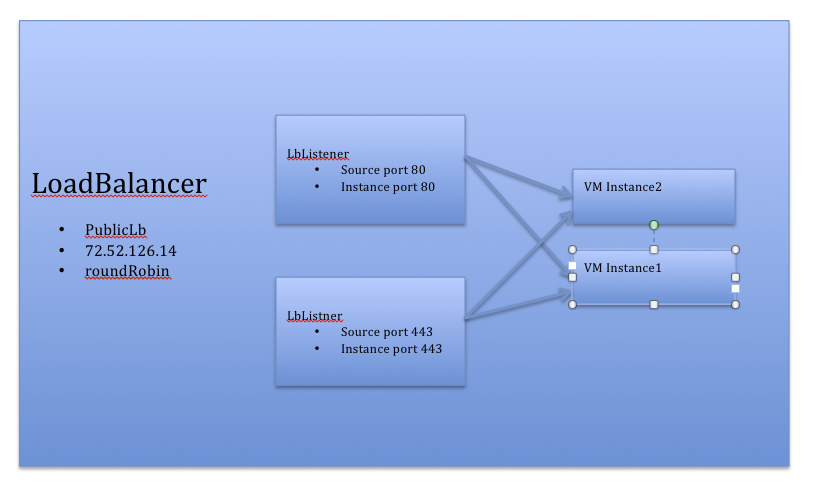 Image Removed
as on the regular VR, will be used on the Internal LB vm. QA, use the same methods for verifying if the LB rules are set on the backend as you do when test VR.
...
Web Services API
...
Introduce new New APIs
API Name | Request Parameters | Response parameters | Available to regular user |
|---|
createLoadBalancer
| - name (required, unique) - name of the LB
- displayText (required) - display text of the LB
- networkId (required) - the guest network id the Load Balancer belongs to.
- sourceIpAddressNetworkId (required) - the Guest network Id where sourceIp address of the LB belongs to.
- sourceIpAddress (optional) - source IP address. Has to be specified with sourceIpNetworkId. If not specified, the IP address will be required from the network
- scheme (required) - supported values Internal/Public
- algorithm (required)
- sourcePort (optionalrequired)
- instancePort (optionalrequired)
| LoadBalancer object:
* id - name
- displayText
- networkId
- algorithm
- sourceIpAddressNetworkId
- sourceIpAddress
- scheme (Public/Internal)
- list of LoadBalancerListener LoadBalancerRules objects
- list of LoadBalancerInstance objects
LoadBalancerListener LoadBalancerRule object: - sourcePort
- instancePort
LoadBalancerInstance object:
- instanceId
- instanceName
| yes |
listLoadBalancers deleteLoadBalancer | - id (required) - load balancer id
| | yes |
listLoadBalancers | - id
- name
- displayText
- networkId
- sourceIpAddressNetworkId
- sourceIpAddress
- scheme
| list of LoadBalancer objects (see the structure in createLoadBalancer command description) | yes | createLoadBalancerListener | loadBalancerIdsourcePort (required)instancePort (required)protocol (required)
The listener is uniquely identified in the load balancer by its source port
Returns the Load Balancer object with this just created listener attached. See the structure of LoadBalancer Object in createLoadBalancer command description | yes |
deleteLoadBalancerListener | - loadBalancerId(required) - the id of the LB where the listener belongs to
- sourcePort(required) - the source port of the listener.
| | yes |
attachInstancesToTheLoadBalancer | - loadBalancerId (required) - the LB id where instance(s) is being attached to
- instanceIds (required) - list of vm instance ids separated by coma
| | Returns the Load Balancer object where the instance got attached to. See the structure of LoadBalancer Object in createLoadBalancer command description
| detachInstancesFromTheLoadBalancer | - loadBalancerId (required) - the LB id where instance(s) is being detached from
- instanceIds (required) - list of vm instance ids separated by coma
| | |
DB changes
...
DB changes
- Added new fields to load_balancing_rules table: source_ip_address, source_ip_address_network_id, scheme (accepts Internal and Public values)
- DB upgrade: for all existing LB rules, fields source_ip_address and source_ip_address_network_id fields remain null. "scheme" should be updated with Public value
3) Attach VM to the Load Balancer
Existing API are going to be used to assign/remove vm to/from the load balancer
assignToLoadBalancerRule
assignToLoadBalancerRule
Internal Load Balancing rules management in Network
For Public LB rule, whenever a new LB rule is created, we re-send all the existing LB rules for the network, to the network elements. It would be a bit different when it comes to managing Internal LB rules.
- When new Public LB rule is created, only Public LB rules for the network should be resend to the network elements. Internal Lb rules are managed separately.
- During the network restart, we first resend all the Public LB rules, and then Internal
- When internal Lb rule is created for IP1, we resend only all the rules for IP1 to the internal lb element. Internal LB rules for other IPs in the network, are not being re-send.
How to list Guest IP addresses allocated for LB purpose
At the moment, cloudStack doesn't expose any API for listing IP addresses from the guest network. Adding a new one to serve this purpose:
API Name | Request Parameters | Response Parameters | Available to regular user |
|---|
listIpAddresses | - ipAddress
- networkId
- purpose
| list of ip Addresses, each IP object having parameter:
- ipAddress
- networkId
- purpose (can have value "LB" at this point)
- state (Free/Allocated)
| true |
In 4.2 this API will return only Allocated IP addresses.
You see all the ip addresses allocated by the load balancers by executing the following command:
listLoadBalancers&scheme=Internal&networkId=<Id of the network the load balancer belongs to>
Internal Load Balancing Vm management and life cycle
1) The InternalLBVM will be created with 2 interfaces: eth0 - linkLocal (private in VMWare case), eth1 - the IP address of the LB rule. The vm will get created from the Virtual Router template and Service offering named "System Offering For Internal LB VM". If you want to use another service offering for internal lb creation, change the global config "internallbvm.service.offering" from NULL value to not NULL valid service offering id.
23) InternalLBVM will be managed by InternalLBNetworkApplianceManagerInternalLoadBalancerVMManager
23) InternalLBVM life cycle:
- Create: InternalLBVM gets created when the first Load Balancing Rule is created for User VM gets assigned to any of the Load Balancer of the IP address
- Destroy: InternalLBVM gets destroyed when the last Load Balancer is removed for the IP address
- RebootStop/Start: InternalLBVM can be rebooted as a regular system vm using RebootSystemVm API.stopped/started using new APIs stopInternalLoadBalancerVM/startInternalLoadBalancerVM
- List: InternalLBVM can be listed with ListSystemVMs API
4) To stop/start/list internal lb vm, use new stop/start/listInternalLoadBalancer API commands.
...
Web Services API
...
ApiName | RequestParameters | ResponseParameters | AvailableToRegularUser |
|---|
stopInternalLoadBalancerVM
| id(required)
force(optional, defaulted to false if not specified) | internalloadbalancervm object having parameters (the same parameters regular VR vm has):
id
zoneId
zoneName
zoneType
dns1
dns2
networkdomain
name
podid
hostId
state
account/domainId
serviceOfferingId/serviceOfferingName | no |
startInternalLoadBalancerVM
| id(required) | the same as the above | no |
listInternalLoadBalancerVMs
| id - list by id
name - list by name
podId - list by podId the internal LB vm belongs to
hostId - list by hostId where internal LB VM runs
state - list by state
zoneId - list by zoneId
vpcId - list by VPC id
forVpc (boolean) - list only internal LB vms that belong to vpc | the same as the above | no |
...
DB Changes
...
As a part of the DB upgrade, following needs to be done:
- new service offering with unique name "System Offering For Internal LB VM" should get inserted to the DB
- new global config paramter "internallbvm.service.offering" should be inserted with NULL value.
Limitations
- Internal and Public Lb are mutually exclusive on a network/tier. If the tier has LB on the public side, then it can't have the Internal LB
- Supported just on VPC networks in 4.2 release.
- Only InternalLB vm can act as Internal LB provider in 4.2 release
- Network upgrade is not supported from the network offering with Internal LB to the network offering with PublicLb.
UI
TBD
