DUE TO SPAM, SIGN-UP IS DISABLED. Goto Selfserve wiki signup and request an account.
| Table of Contents |
|---|
Status
Current state: VotingAccept
Discussion thread: here or here (sometimes. the mail thread can't show all the mails. so I provided two links here)
...
We can see the one real redundancy example in the following picture. (I just highlight only one segment.)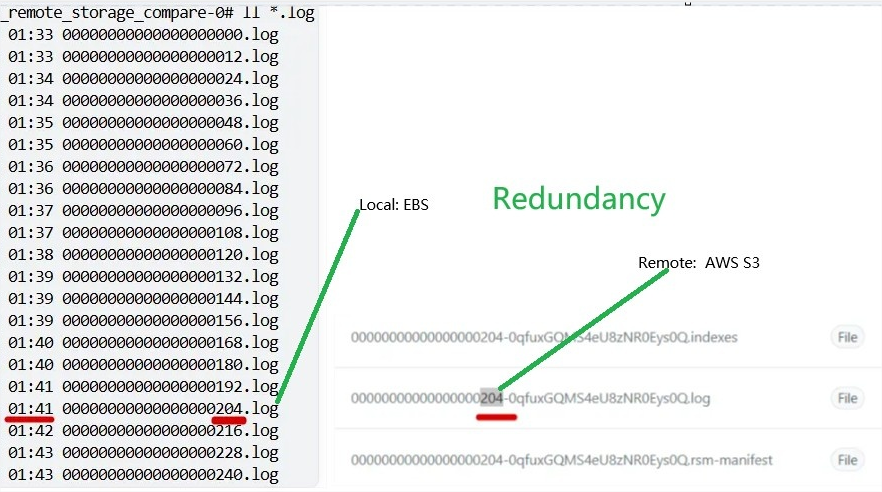
Whenthere is no requirement for real-time analytics based on remote storage directly. It has the following drawbacks:
...
| Code Block | ||||
|---|---|---|---|---|
| ||||
public static final String REMOTE_COPY_LAG_MS_CONFIG = "remote.copy.lag.ms"; public static final String REMOTE_COPY_LAG_MS_DOC = "Controls how long to delay uploading segments to remote storage. " + "When set to 0 (default), segmentsimmediate areupload uploadedwithout asany soondelay ascheck. they are eligible (no delay check). " +" + "When set to a positive value (ms), a segment can't become eligible for upload utiluntil the time since the latest record in the segment reaches the value. " + "The value should not exceed the real local retention ms except the latter is retained save foreverindefinitely (-1). " + "When set to -1, resolves to the real local retention ms (maximum delay, or no delay check when the retention is save forever)as maximum delay. " + "For how the real local retention time is computed, see <code>local.retention.ms</code>."; public static final String REMOTE_COPY_LAG_BYTES_CONFIG = "remote.copy.lag.bytes"; public static final String REMOTE_COPY_LAG_BYTES_DOC = "Controls size-based delay for uploading segments to remote storage. " + "When set to 0 (default), segmentsimmediate areupload uploaded as soon as they are eligible (nowithout any delay check). " + "When set to a positive value (bytes), a segment can't become eligible for upload utiluntil the total bytes of log data after the segment reach the value. " + "The value should not exceed the real local retention bytes except the latter is retained save foreverindefinitely (-1). " + "When set to -1, resolves to the real local retention bytes as (maximum delay, or no delay check when the retention is save forever). " + "For how the real local retention size is computed, see <code>local.retention.bytes</code>."; |
...
| Code Block | ||||
|---|---|---|---|---|
| ||||
public static final String LOG_REMOTE_COPY_LAG_MS_PROP = "log.remote.copy.lag.ms"; public static final String LOG_REMOTE_COPY_LAG_BYTES_PROP = "log.remote.copy.lag.bytes"; |
...
We change the RemoteLogManager.RLMCopyTask#candidateLogSegments's logic for decide one segment if need to upload to remote:
The left part is old logic. The right part is new logic with new extra judgement (yellow color) added
Note: When any segment is delayed. All segments after it will also be delayed. This followed the original design of retention policy without any change.
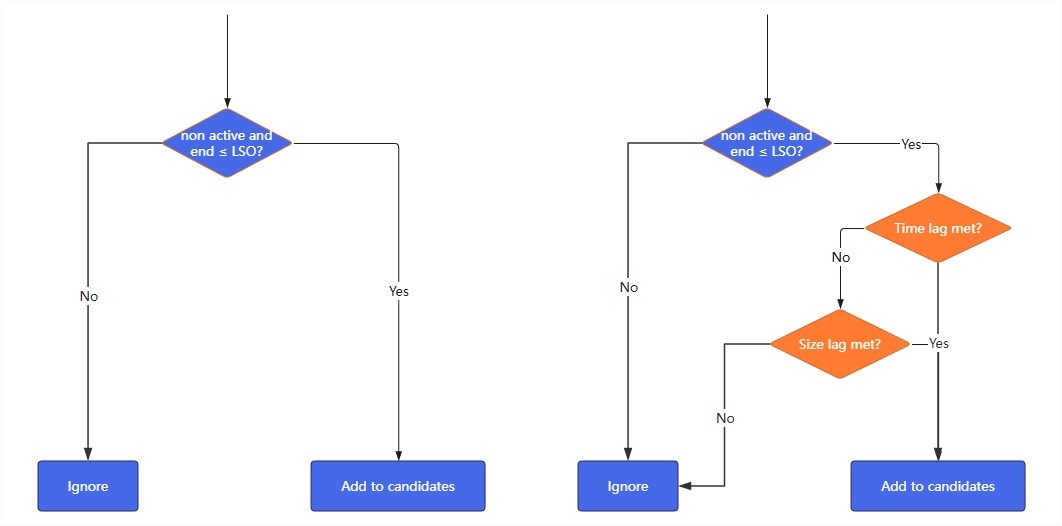
You can see the uploading will be delayed if the configure items set with non default value. And After the change, the remote tiered storage redundancy will be reduced with delayed upload.
You can refer to the test case and result: https://github.com/apache/kafka/pull/20913#issuecomment-3547156286
...
We can use follow tests to cover the change:
Type\Configure | Case Id | local retention time | local retention size | lag time | lag size | Expect result |
Notes |
|
|
0
-1
-1
1 day
1 GB
3 day
-1
0
0
-1
-1
1 day
1 GB
-1
3 GB
0
0
Special cases which can help to understand the basic rule for code review
| 1 | * | * | 0 (default value) | * | No lag | |
2 | * | * | * | 0 (default value) | No lag | ||
3 | * | -1 | * | -1 | No delay check on size. check the time configure as final result | For the case: 4 configures are -1. The final result is not upload. | |
4 | -1 | * | -1 | * | No delay check on time. check the size configure as final result | ||
Typical user cases which can test with deployment
| 5 | 7 days
| -1
| 0 (default value) | 0 (default value) | No lag | 7days + No size limit is If you want time lag delay. you need to set time lag to real value and size lag to -1 |
1 day | -1 | lag: 1 day | |||||
-1 | -1 | lag: 7 days | |||||
6 | -1 | 3 GB | 0 (default value) | 0 (default value) | No lag | ||
-1 | 1 GB | lag: 1 GB | |||||
-1 | -1 | lag: 3 GB | |||||
7 | 7 days | 3 GB | 0 (default value) | 0 (default value) | No lag |
-1
-1
1 day | 1 GB | lag: 1 day |
| or 1 GB |
3 day
3 GB
0
0
-1 | -1 | lag: |
| 7 days or 3 GB | |||
8 | 7 days | 3 GB | 1 day |
0 (default value) | No lag |
Unit Tests:
- Test upload eligibility logic with different configure values
- Test configuration validation for topic
...