DUE TO SPAM, SIGN-UP IS DISABLED. Goto Selfserve wiki signup and request an account.

DUE TO SPAM, SIGN-UP IS DISABLED. Goto Selfserve wiki signup and request an account.
...
Ticket to track the feature implementation: https://issues.apache.org/jira/browse/CLOUDSTACK-5920
Note: IAM feature cannot be put in to current 4.5 codebase due to API gap and limitations found and documented here: https://cwiki.apache.org/confluence/display/CLOUDSTACK/API+changes
...
Other than that, customer should be able to define customized policies by grant or deny permission to customize permissions for the group. So far, for cross-account permission grant, we are currently supporting the following 3 types of granting/denying:
Here are list of entity types supported by IAM model:
A policy consists of set of Permissions. A Permission is a A policy consists of set of Permissions. A Permission is a way of defining access control.
Using Permission, customer defines what actions are allowed or denied, on what resources, under which account or domain.
...
For APIs not listed above, response will be the same for all the users(root admin, domain admin, normal user) as usual, by default, it is full response view.
New API's
CloudStack currently has a domain-tree based implementation of access checks, namely com.cloud.acl.DomainChecker. This implementation is based on an adapter interface of Cloudstack - org.apache.cloudstack.acl.SecurityChecker that defines the basic ACL interface to check ownership and access control to objects within the account/ domain.
The IAM plugin will provide another implementation 'PolicyBasedAccessChecker' of the SecurityChecker interface. We will also have to add to this interface some more methods or change some signatures to facilitate group, policy and api name (action) based access control.
In Phase1, these new IAM APIs are only limited to root admin.
CloudStack currently has a domain-tree based implementation of access checks, namely com.cloud.acl.DomainChecker. This implementation is based on an adapter interface of Cloudstack - org.apache.cloudstack.acl.SecurityChecker that defines the basic IAM interface to check ownership and access control to objects within the account/ domain.
The IAM plugin will provide another implementation 'PolicyBasedAccessChecker' of the SecurityChecker interface. We will also have to add to this interface some more methods or change some signatures to facilitate group, policy and api name (action) based access control.
| Code Block |
|---|
/**
* SecurityChecker checks the ownership and access control to objects within
*/
public interface SecurityChecker extends Adapter {

...

/**
* Checks if the account can access the object.
*
* @param caller
* account to check against.
* @param entity
* object that the account is trying to access.
* @param accessType
*
* @param action
*
* @return true if access allowed. false if this adapter cannot provide permission.
* @throws PermissionDeniedException
* if this adapter is suppose to authenticate ownership and the check failed.
* |
| Code Block |
/**
* SecurityChecker checks the ownership and access control to objects within
*/
public interface SecurityChecker extends Adapter {

...

/**
* Checks if the account can access the object.
*
* @param caller
* account to check against.
* @param entity
* object that the account is trying to access.
* @param accessType
*
* @param action
*
* @return true if access allowed. false if this adapter cannot provide permission.
* @throws PermissionDeniedException
* if this adapter is suppose to authenticate ownership and the check failed.
*/
boolean checkAccess(Account caller, ControlledEntity entity, AccessType accessType, String action) throws PermissionDeniedException;

....
}
|
The implementation will check if a given user is permitted to invoke the given 'action' on the given resource by looking at the account's groups and the associated policies of those groups.
For given user, resource and given api name, default permission is 'deny', then run through this:
...
/**
* Enumeration type for AccessType
*/
public enum AccessType {
	ModifyProject,
    OperateEntry,
    UseEntry,
	ListEntry
} |
Example: A domainAdmin registers a template T and allows a regular user of the domain to launch a VM using that template.
Entity: TemplateT
Principal1: domainAdmin, Access allowed: OperateEntry (operate access since he can invoke delete/updatepermissions operations on the template)
Principal2: normal domain user, Access allowed: UseEntry (the user can only list the template and use it for launching VM)
The IAM implementation will check if a given user is permitted to invoke the given 'action' / 'accesstype' on the given resource by looking at the account's groups and the associated policies of those groups.
In phase I, all the permissions attached to any policy are by default explicit 'Allow' permissions. As of now 'Deny' permissions cannot be added.
Thus For given user, resource and given api name/accessType, default permission is 'deny', then run through this:
...
...
| Code Block |
|---|
/**
* QuerySelector returns granted domain, or account or resources for caller.
*/
public interface QuerySelector extends Adapter {

...

/**
* List granted domains for the caller, given a specific entity type.
*
* @param caller account to check against.
* @param entityType entity type
* @param accessType access type
* @return list of domain Ids granted to the caller account.
*/
List<Long> getAuthorizedDomains(Account caller, String entityType, AccessType accessType);

/**
* List granted accounts for the caller, given a specific entity type.
*
* @param caller account to check against.
* @param entityType entity type
* @param accessType access type
* @return list of domainaccount Ids granted to the caller account.
*/
List<Long> getAuthorizedAccounts(Account caller, String entityType, AccessType accessType);


/**
* List granted resources for the caller, given a specific entity type.
*
* @param caller account to check against.
* @param entityType entity type
* @param accessType access type
* @return list of domainresource Ids granted to the caller account.
*/
List<Long> getAuthorizedResources(Account caller, String entityType, AccessType accessType);

/**
 * Check if this account is associated with a policy with scope of ALL
 * @param caller account to check
 * @param action action.
 * @param accessType access type
 * @return true if this account is attached with a policy for the given action of ALL scope.
 */
boolean isGrantedAll(Account caller, String actionString action, AccessType accessType);

/**
 * List of ACLIAM group the given account belongs to
 * @param accountId account id.
 * @return ACLIAM group names
 */
List<String> listAclGroupsByAccountlistIAMGroupsByAccount(long accountId); |
By invoking these QuerySelector APIs, CloudStack API engine can pre-construct proper SQL where clause to achieve proper row filter for accessibility control.
...
...
Currently CloudStack provides different response views for Root admin and non-root user, some response fields are only visible to root admin. Basically we have provided two static response views (Full view and Restricted view), domain admin will also have a User view. With new IAM service introduced, we should ideally also allow customers to be able to specify what view should be applied to the new Acl group each API when they are creating a new customized Acl group, for example, customer care groupgranting each API action to an IAM policy. To achieve that, we will implement as follows:
We will separate all current both admin and user allowed API commands to two classes: API for admin and API for user. For example, previous ListVMsCmd will be splitted into two classes: ListVMsCmdByAdmin and ListVMsCmd.
| Code Block |
|---|
@APICommand(name = "listVirtualMachines", description = "List the virtual machines owned by the account.", responseObject = UserVmResponse.class, responseView = ResponseView.Restricted,
entityType = { IAMEntityType.VirtualMachine })
public class ListVMsCmd extends BaseListTaggedResourcesCmd {
......
}

@APICommand(name = "listVirtualMachines", description = "List the virtual machines owned by the account.", responseObject = UserVmResponse.class, responseView = ResponseView.Full)
public class ListVMsCmdByAdmin extends ListVMsCmd {
    /////////////////////////////////////////////////////
    //////////////// API parameters /////////////////////
    /////////////////////////////////////////////////////

    @Parameter(name=ApiConstants.HOST_ID, type=CommandType.UUID, entityType=HostResponse.class,
            description="the host ID")
    private Long hostId;

    @Parameter(name=ApiConstants.POD_ID, type=CommandType.UUID, entityType=PodResponse.class,
            description="the pod ID")
    private Long podId;

    @Parameter(name=ApiConstants.STORAGE_ID, type=CommandType.UUID, entityType=StoragePoolResponse.class,
            description="the storage ID where vm's volumes belong to")
    private Long storageId;
}
|
Note that ListVMsCmdByAdmin and ListVMsCmd are sharing the same API name "listVirtualMachines". From client perspective, this is transparent to them, CloudStack API client will still just invoke previous listVirtualMachine API, and CloudStack API server will internally consult with IAM plugin to determine the group associated with the invoking user and then determine which internal Cmd class to be invoked. There is a new attribute "responseView" introduced for @APICommand annoation, which can be used to instruct CloudStack to generate different response view. By separating the command class into admin cmd class and user cmd class, we can also restrict valid input parameters for different account. For example, in this case, when Admin invokes listVirtualMachine api, he/she can pass hostId, podId and storageId, which parameters are not applicable for end user.
...
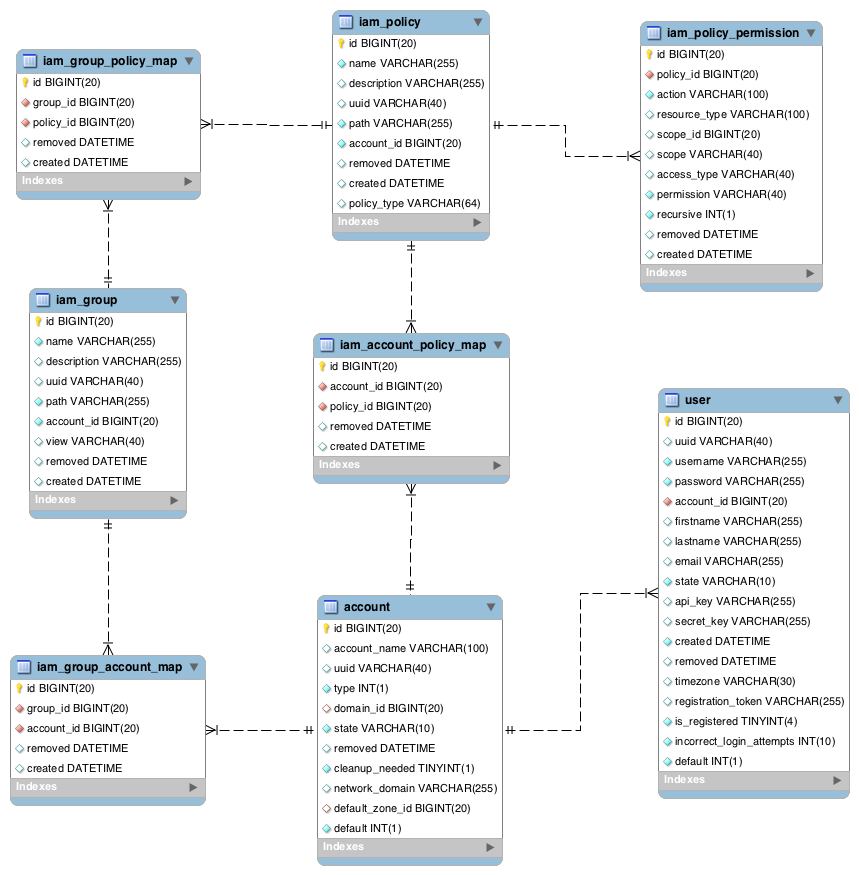
When user creates a customized policy, he can specify a source policy from list of default policies. Then we will create new mapping between these default policy permission entries and the new policy in acliam_policy_permission_map table.
...
id | account_name | uuid | domain_id |
|---|---|---|---|
2 | admin | 1c5afd64-482b-11e3-86f3-8118f47f9f9f | 1 |
3 | domainAdmin | 929d172c-b95e-4b86-9474-9789072c9bdb | 2 |
4 | domainUserA | f96ddb47-d3c0-4360-a9cd-613d631c8333 | 2 |
acliam_group
id | name | description | uuid | path | removed | created |
|---|---|---|---|---|---|---|
1 | REGULAR_USER | Domain user group | d283d4f0-31f0-11e3-ad37-80f85ce25918 | / | NULL | 2013-10-10 14:13:34 |
2 | ADMIN | Root admin group | d283de28-31f0-11e3-ad37-80f85ce25918 | / | NULL | 2013-10-10 14:13:34 |
3 | DOMAIN_ADMIN | Domain admin group | d283e6e8-31f0-11e3-ad37-80f85ce25918 | / | NULL | 2013-10-10 14:13:34 |
acliam_group_account_map
id | group_id | account_id | removed | created |
|---|---|---|---|---|
2 | 2 | 2 | NULL | 2013-10-10 14:13:34 |
3 | 3 | 3 | NULL | 2013-10-11 00:14:54 |
4 | 1 | 4 | NULL | 2013-10-11 00:19:55 |
acliam_policy
id | name | description | uuid | path | removed | created | policy_type |
|---|---|---|---|---|---|---|---|
1 | REGULAR_USER | Domain user role | d2838dce-31f0-11e3-ad37-80f85ce25918 | / | NULL | 2013-10-10 14:13:34 | Static |
2 | ADMIN | Root admin role | d2839c56-31f0-11e3-ad37-80f85ce25918 | / | NULL | 2013-10-10 14:13:34 | Static |
3 | DOMAIN_ADMIN | Domain admin role | d283a7f0-31f0-11e3-ad37-80f85ce25918 | / | NULL | 2013-10-10 14:13:34 | Static |
6 | RESOURCE_OWNER | Resource owner role | d283c794-31f0-11e3-ad37-80f85ce25918 | / | NULL | 2013-10-10 14:13:34 | Dynamic |
acliam_group_policy_map
id | group_id | policy_id | removed | created |
|---|---|---|---|---|
1 | 1 | 1 | NULL | 2013-10-10 14:13:34 |
2 | 2 | 2 | NULL | 2013-10-10 14:13:34 |
3 | 3 | 3 | NULL | 2013-10-10 14:13:34 |
acliam_permission
id | action | resource_type | scope_id | scope | access_type | permission | removed | created |
|---|---|---|---|---|---|---|---|---|
1 | startVirtualMachine | VirtualMachine | NULL | ALL | NULL | Allow | NULL | 2013-10-10 14:13:34 |
2 | startVirtualMachine | VirtualMachine | $domainId | Domain | NULL | Allow | NULL | 2013-10-10 14:13:34 |
3 | startVirtualMachine | VirtualMachine | $accountId | Account | NULL | Allow | NULL | 2013-10-10 14:13:34 |
acliam_policy_permission_map
id | policy_id | permission_id | removed | created |
|---|---|---|---|---|
1 | 61 | 3 | NULL | 2013-10-10 14:13:34 |
2 | 2 | 1 | NULL | 2013-10-10 14:13:34 |
3 | 3 | 2 | NULL | 2013-10-10 14:13:34 |
...
| Code Block |
|---|
@APICommand(name = "startVirtualMachine", responseObject = UserVmResponse.class, description = "Starts a virtual machine.", entityType = { IAMEntityType.VirtualMachine }) public class StartVMCmd extends BaseAsyncCmd { public static final Logger s_logger = Logger.getLogger(StartVMCmd.class.getName()); private static final String s_name = "startvirtualmachineresponse"; // /////////////////////////////////////////////////// // ////////////// API parameters ///////////////////// // /////////////////////////////////////////////////// @ACL(action="startVirtualMachine") @ACL @Parameter(name = ApiConstants.ID, type = CommandType.UUID, entityType=UserVmResponse.class, required = true, description = "The ID of the virtual machine") private Long id; |
...
A Domain Admin 'domainAdmin' calls this command for a VM in his domain:
...
...
Consider following example:
A Domain admin wants to create a 'Service Desk' group for his domain and allow 'ready only' access to the group for all VMs and Volumes within the Domain.
Steps:
What should be the method of ‘creating a custom Policy/Role’?NOTE:
For this release, creating a custom policy/group is supported through API only. For further releases, we can provide either a UI or a config file + policy language mechanism to facilitate the custom policy/group creation.