DUE TO SPAM, SIGN-UP IS DISABLED. Goto Selfserve wiki signup and request an account.

DUE TO SPAM, SIGN-UP IS DISABLED. Goto Selfserve wiki signup and request an account.
This enhancement backs NFS secondary storage with an S3-compatible object store. Periodically, a reaper thread synchronizes the templates, ISOs, and snapshots stored on a NFS secondary storage mount with a configured S3 object store. In addition to permitting the use of commodity or IaaS storage solutions for static assets, it provides a means of automatically synchronizing template and ISO assets across multiple zones.
This document describes the S3-backed secondary storage functional behavior and technical design in support of enhancement ticket CLOUDSTACK-509.
Author |
Description |
Date |
|---|---|---|
John Burwell |
Initial Revision |
11/17/2012 |
AWS: Amazon Web Service – an IaaS offering from amazon.com
S3: AWS' Simple Storage Service. Highly available object storage exposed via a REST interface structured in terms of buckets and contained key/value pairs. It permits the storage objects up to 5 TB in size.
Riak CS: An S3-compatiable object storage solution built by Basho atop its highly available Riak key-value store.
Asset: A template, ISO, or snapshot stored in secondary storage
Back NFS secondary storage of templates, ISOs, and snapshots with an S3-compatible object store. The initial integration of this feature is based on the following limitations and assumptions:
Currently, multipart uploads are not utilized by the integration in order to support the widest range of S3-compatible storage solutions. This limitation impacts the S3 integration operations as follows:
As support for multipart uploads broadens across S3 implementations, this feature may be enhanced to utilize this capability. The S3Utils#putFile and S3Utils#putDirectory operations explicitly isolate single and multi-object put operations – permitting the transperant implementation of multipart uploads without impact to client code.
The current implementation of S3-backed secondary storage synchronizes files from NFS-based secondary storage to an object store. The primary reason for this approach is that there is no provision for global (i.e. cross zone) secondary storage. Currently. the design of the secondary storage resource management facilities are under re-design. In order to support direct access to an object store, it would beneficial if a simple object store SPI was introduced that met the following requirements:
When this architectural redesign is completed, then this feature can be modified to directly access the object store. Such an enhancement would greatly simplify the implementation and deployment of S3-backed secondary storage. It would also allow users of S3-backed secondary storage to realize significant cost savings by removing redundant storage capacity for NFS volumes in each zone.
When using S3-backed seconadry storage, each zone's secondary storage must have enough available disk space to house all global assests in the instance. In order to reduce the latency of assest propogation across zones, bandwidth between the secondary storage virtual machines and the object store should be maximized.
The S3 synchronization process logs all the success of download operations to INFO, all exceptions/failures to ERROR, and all synchronization checks to DEBUG. It also provides DEBUG logging of connection parameters, and bucket/key information for all S3 operations.
In addition to log file analysis, administrators can compare the contents of NFS volumes to the S3 bucket associated with the instance. All assets stored in the object store use the same path convention as the file system. Therefore, visual comparison using a tool such as s3cmd or Transit can quickly identify differences between an NFS volume and the object store. Future enhancements may provide the ability to delete the synchronization record in the database – forcing re-synchronization of an assets in a secondary storage NFS volume.
This feature provides no additional JMX interfaces or audit events.
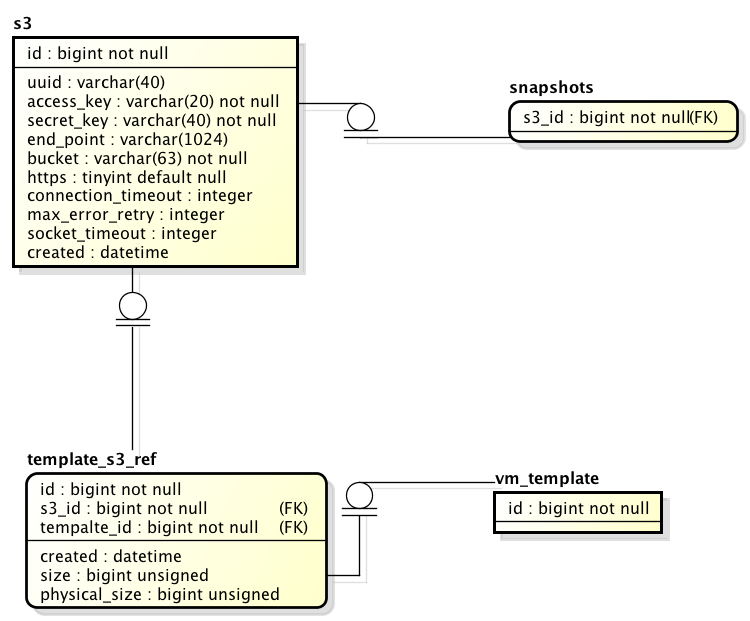
While a template, ISO, or snapshot is being transferred to/from the object store, a global lock is obtained to ensure long running operations complete before further actions are taken. All templates and ISOs in the object store are tracked in a table, template_s3_ref, which drives the determination of when a file needs to uploaded or downloaded from the object store.
This capability has no fallback mechanisms. In the event of lost connectivity to the object store, the object store will retry operations every 60 seconds until connectivity is regained.
Assets are downloaded from the object store on demand. For example, when a global template is uploaded to Zone 1's secondary storage, it is pushed to the object store. On the first request for this template in another zone, it will download the asset from the object store to that zone's secondary store NFS volume to fulfill the request. All objects are downloaded to a temporary file. Upon successful completion of the transfer, the temp file is moved to the permanent location in secondary storage. In the event of a incomplete download, partial/corrupted files will not be present in the secondary storage volume. Finally, all temporary files are marked for deletion on JVM exit to avoid collecting garbage temporary files.
Assets are pushed to the object store by a synchronization thread every sixty (60) seconds. Upon successful completion of the upload, a row is created in the template_s3_ref table reflecting the presence of the file in the object store and in the originating zone's NFS volume.
When a template or ISO is being uploaded to the object store, a global lock is placed on the template. Given the size of templates and ISOs and the potential for limited bandwidth, transfers to the object store may exceed sixty (60) seconds. This lock prevents multiple attempts to upload the same file.
In event of a failure, the row will not be written to template_s3_ref table and the lock will be released. The S3 PUT specification states that files will not be made available in bucket until they are completely transfered. Therefore, the object store will discard the partial/corrupted file transfer. These conditions will make the template eligible for transfer on the next execution of synchronization thread. This process will repeat until the transfer is successful or the management server is stopped.
Asset deletion requires removal of the file(s) from the NFS volume, deletion of the associated object(s) in the object store, and remove rowsfrom the associated tables. Since the file operatons can nt be wrapped in a transaction, the following order of operations is followed to maintain a consistent state for CloudStack:
While this approach establishes a consistent view for CloudStack, it may create garbage on either the file system or object store.
This enhancement introduces the "enable.s3.secondary.storage" global configuration option. When enabled, a background reaper thread is started to upload files from the secondary store NFS volumes to the object store.
Upload/Download performance is largely dependent on the available bandwidth between the secondary storage virtual machines and the object store. Multi-threaded synchronization will permit mechanisms to reduce the latency of assest propogation across multiple zones.
This enhancement has no impact on branding.
The operation and performance of S3-backed secondary storage is largely dependent on the available bandwidth between the secondary storage virtual machines and the object store. There is a slight memory/cpu overhead for background upload/download operations, as well as, a single database query executed by the reaper every 60 seconds to detect new templates and ISOs in secondary storage. Aside from storage for assets downloaded from the object store, this enhancement requires no additional disk space.
S3-backed secondary storage is not dependent on any specific operation system or release. The initial implementation only supports snapshot storage for Xen and Xenserver. Further revisions will expand support to the other hypervisors supported by CloudStack.
For CloudStack users using Amazon's S3 service, they must configure outbound Internet connectivity for all secondary storage virtual machines.
S3-backed secondary storage does not add any system-level requirements to CloudStack.
The following are the prerequisites for S3-backed secondary storage:
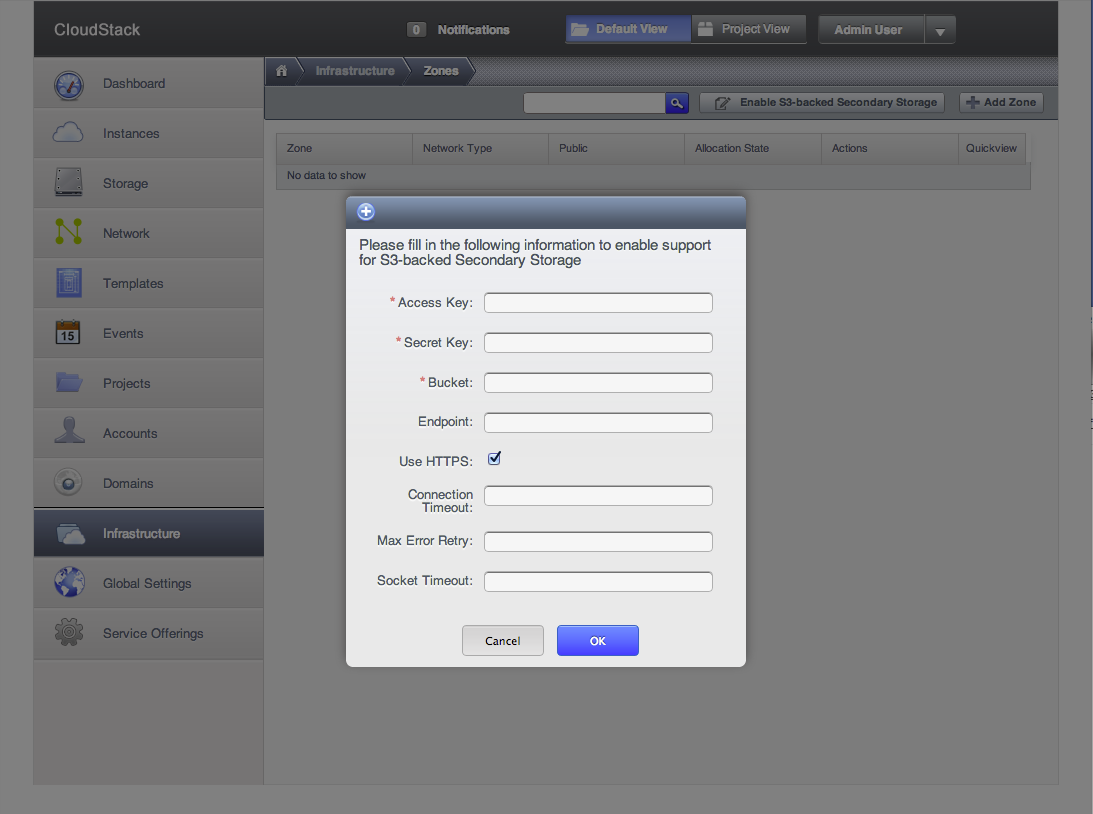
A global configuration option, s3.enable, is then enabled and following a restart of the management server(s), the administrator can configure the object store's connection parameters.
Existing CloudStack implementations can enable S3-backed secondary storage on existing stores. Upon restart of the management server(s), the assets will be synchronized to the object store and across all zones.
This implementation of this feature will utilize CloudStack's exisitng localization mechanisms.
This feature has no impact to users that do not enable S3-backed secondary storage. When enabled, a single thread executes a database query every sixty (60) seconds to determine which assests, if any, need to be uploaded to the object store. Since transfers between the object store and secondary store virtual machines are I/O bound, these threads have minial CPU overhead.
The object store's secret key is stored unencrypted in the CloudStack database. To minimize the impact of an information breach, users of S3-backed secondary storage should create a access key/secret key pair that only has read/write access to the bucket used by CloudStack.
This feature most benefits multi-zone CloudStack implementations and/or users seeking to utilize commodity hardware to
The primary use case for this feature is the propogation of assets stored in secondary storage across multiple zones. Single zone configurations may also benefit from utilizing commodity hardware or an external IaaS provider to provide data reliability for assests in secondary storage.
The design of this feature is based on the approach taken for the Swift integration. As such, this feature requires an NFS volume in each zone as a cache for assets. This approach was selected due to a lack of support for global secondary storage. If the secondary storage re-design permits global storage and integration points compatible with an object store, then this approach may be re-evaluated.
Template and ISO upload to the object store is facilitated by a thread which compares the contents of the NFS volume and the object store. Each element that is not present in the object store is uploaded to the object store. Currently, this process is single threaded whereby one assest is uploaded at a time. This approach simplifies the synchronization process, but may introduce measurable latency when a number of large files need to pushed to the object store.
Snapshot upload occurs synchronously following the creation of the snapshot in the NFS volume. For the Xen hypervisor, a Python-based plugin is provided to perform the upload. The S3 interactions required by the plugin are extremely basic (i.e. single object put, get, and delete) and do not justify the complexity and dependency maitainence of a third-party dependency. Therefore, the plugin directly accesses Amazon S3 REST API rather than a client library such as Boto or command line tool such as s3cmd.
Template, snapshot, and ISO download from the object store occur on-demand in each zone. Therefore, when an asset is request in a zone where it is not present in the zone's NFS secondary storage volume, there may be measurable lag while the asset is downloaded from the object store.
The following UML class diagram depicts a static view of the classes impacted by the implementation of this feature (due to the image size, a separate download may be required to properly view it):
The following ERD depicts the tables added or changed by implementation of this feature:
The following APIs support this feature:
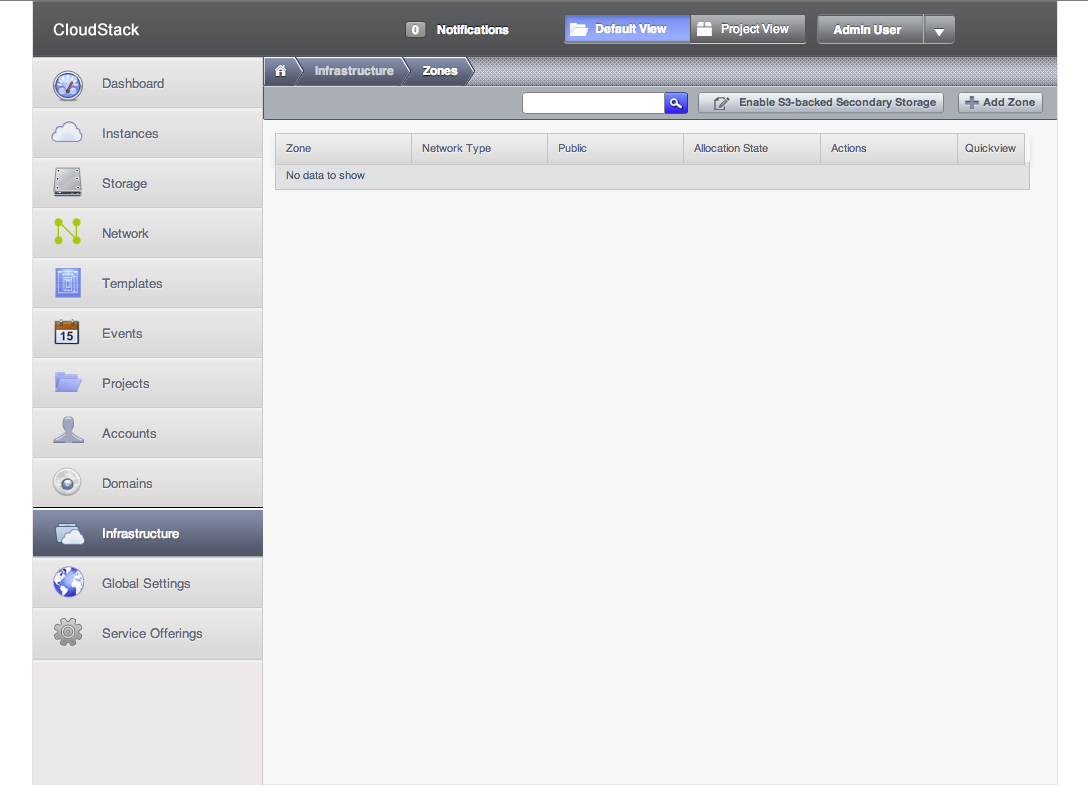
The following screenshot depicts the menu item displayed in the zone tab when S3-backed Secondary Storage is enabled:
The following screenshot depicts the detail entry form displayed after invoking the menu previously depicted to configure an S3-compatible object store: