Current state:
Discussion thread: here
JIRA:
Released: 0.6.0
A feature to snapshot a Hudi dataset and export the latest records to a set of external files (e.g., plain parquet files).
The existing org.apache.hudi.utilities.HoodieSnapshotCopier performs a Hudi-to-Hudi copy that serves for backup purpose. To broaden the usability, the Copier could be potentially extended to perform exporting features to data formats, like plain parquet files, other than Hudi dataset.
The proposed class is org.apache.hudi.utilities.HoodieSnapshotExporter , which serves as the main entry for snapshotting related work.
To snapshot is to get the records from a Hudi dataset at a particular point in time. Note that the data exported from MOR tables may not be the most up-to-date as RO query is used for retrieval, which omits the latest data in the log files.
| Description | Remark | ||
|---|---|---|---|
| --source-base-path | Base path for the source Hudi dataset to be snapshotted | required | |
| --target-output-path | Output path for storing a particular snapshot | required | |
| --output-format | Output format for the exported dataset; accept these values: json|parquet|hudi | required; When "hudi", behaves the same as HoodieSnapshotCopier ; may support more data formats in the future | |
| --output-partition-field | A field to be used by Spark repartitioning | optional; Ignored when "HUDI" or when The output dataset's default partition field will inherent from the source Hudi dataset. When this argument is specified, the provided value will be used for both in-memory Spark repartitioning and output file partition.
In case of more flexibility needed for repartitioning, use | |
| --output-partitioner | A class to facilitate custom repartitioning | optional; Ignored when "hudi" |
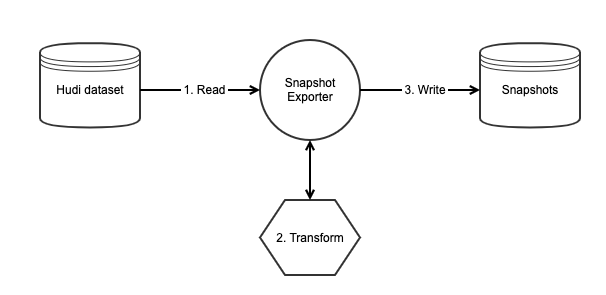
org.apache.hudi.common.table.view.HoodieTableFileSystemView to perform RO query for readHoodieSnapshotCopier doesHoodieSnapshotCopier doesHoodieSnapshotCopier as deprecated and suggest user to switch to this tool, which provides equivalent copying features.HoodieSnapshotCopier