Status
The JIRA issue is optional, but if there is already one that is relevant link to it here. Using the Jira issue macro is preferred.
|
Problem
Within Airflow, data pipelines are represented by DAGs and these DAGs change over time as business needs evolve. A key challenge faced by Airflow users today is with looking at how a DAG was run in the past, when it has been replaced by a newer version of the DAG. This is because within Airflow today, only the current (latest) version of the DAG is represented within the user interface, without any reference to prior versions of the DAG.
However, this is a complex problem, since the current behavior within Airflow of a DAG is “a DAG is a DAG” without any historical or prior version references has served it well in a majority of common use cases.
The scope of this AIP to make sure that the visibility behavior of Airflow is correct, without changing the execution behaviour which will continue to be based on the most recent version of the DAG.
Scenarios
The main scenarios considered and relevant to this proposal are outlined below.
Scenario 1: View logs from a no longer existing task instance
First version of the DAG has three tasks: Task A, Task B, and Task C. This DAG has been deployed, scheduled, and run. There are no issues at this time and the data engineer has looked at the logs of all three tasks within the Airflow UI.
Second version of DAG has two tasks: Task A and Task C only. This second version is now deployed, scheduled, and run. While debugging this DAG, the data engineer decides to look at the logs for the previous runs, which were based on the first version. However, because of the change in structure, the Airflow UI can only show logs for tasks A and C even for the older runs of the DAG, and historical logs for task B are no longer accessible easily in the Webserver.
This is the primary scenario driving the need for this improvement proposal.
In this context, the definition of “deployed” is that the DAG file is made available to Airflow to read, so is available to the Airflow Scheduler, Web server, and workers. Whether it is available on the local file system or through a shared volume such as S3, is assumed to be immaterial for the purpose of this document.
Scenario 2: DAG updated prior to any tasks being run
First version of the DAG has three tasks: Task A, Task B, and Task C. This DAG has been deployed and scheduled, resulting in a DAG run having been created.
However, before this DAG is ever run, a second version of the DAG with two tasks: Task A and Task C is created. This second version of the DAG is deployed, scheduled, and run.
Airflow handles this scenario cleanly today without any issues i.e. Airflow does not run Task B since the task no longer exists.
Scenario 3: Structural DAG change during a DAG run
First version of the DAG has three tasks: Task A, Task B, and Task C. This DAG has been deployed and scheduled.
This DAG is currently being run:
- Task A is completed
- Tasks B and C are queued.
Second version of this DAG with two tasks: Task A and Task C is now deployed.
Airflow handles this situation based on the latest version of the DAG. The DAG run continues with task B (from the previous version) being skipped and task C now being run.
There is a school of thought that an alternative behaviour of:
- The first version of the DAG including all scheduled tasks i.e. tasks B and C from the first version should run to completion.
- And the second version of the DAG should be independent of the first version.
Though this was considered, this is a significant change to the current run-time behaviour of Airflow and not in the scope of the stated goal of this proposal.
In this proposal, the run-time behaviour of Airflow will stay the same as it is today.
However, the ability to look at the history of the first version of the DAG will be enhanced, similar to the goal of scenario 1 above.
In addition, this Airflow user interface will be enhanced to display the history for this run of the DAG which spans versions. During the rest of this proposal, this is referred to as a “mixed version DAG”.
Scenario 4: Non-code DAG change during a DAG run
First version of the DAG has three tasks: Task A, Task B, and Task C. This DAG has been deployed and scheduled.
This DAG is currently being run:
- Task A is completed
- Tasks B and C are queued.
The same DAG file is re-deployed, without any code changes within the Python file. However, non-code changes such as file timestamps or source code of the Operators referenced within the DAG could have changed.
In Airflow currently, there is no change in the processing of this DAG. There will be no change in behaviour as part of this proposal.
Scenario 5: Non-structural DAG change during a DAG run
First version of the DAG has three tasks: Task A, Task B, and Task C. This DAG has been deployed and scheduled.
This DAG is currently being run:
- Tasks A and B are completed
- Task C is queued.
The new version of the DAG is re-deployed, with a code change to Task C.
Airflow handles this situation based on the latest version of the DAG. The DAG run continues with task C from the latest version being run. As part of this proposal, there is no change to the execution behaviour of the DAG.
However, the Airflow UI will currently show the new code of task C for older historical runs of the DAG.
As part of this proposal, the Airflow user interface will be enhanced to display the history for this run as a “mixed version DAG”. Additionally, historical runs of the DAG will show the code for the older version of the task C, but the current run and future runs will show the code for task C based on the new version.
Proposed Airflow User Interface changes
DAG Version Badge
This pattern will be used for identification of a DAG version. Using the iconography paired with the “DAG” prefix wherever possible—establishing a recognizable pattern that will persist throughout various views in the UI. The underlined hash will suggest to the user that it is clickable. The link will go to the Code View with the hash parameterized as described in the “Code View” below. Icon and color scheme subject to change.

Tree View
Update: All task instance status boxes within the timeline will have an outline added around them. This will add contrast, especially to the white “no status” boxes. As depicted below, runs where a task (in a given tree) did not/will not exist, no box will be shown.
Add: Within the selected timeline, tree structures that changed will now be displayed. Their task name will be grayed out to indicate that the structure only existed for a portion of the given timeline. Note: there may be changes too complex to render, in which case we’ll need to add an indicator that some changes are not visible.
Illustrated in the example below: A failure occurred in the sixth run of this DAG. To remedy, the delete_tag task was removed from the structure branching off of search_catalog. The new DAG version replaced that downstream branch of tasks (grayed out) with a new branch structure (below it). That version ran successfully five times. A subsequent version of the DAG added the delete_entry task to the tip of that branch and is anticipated to execute in the next two (future) DAG runs. If delete_entry were then to be removed prior to running, it would just be removed completely instead of being grayed out.

Graph View
Add: For the selected DAG run, DAG Version Badges will be displayed in the legend area above the graph chart. If a given run consisted of more than one version, each version will be listed. Similar to the other items in the legend, hovering over the version will reveal on the chart which tasks are associated with the version (non-associated tasks temporarily fade out).
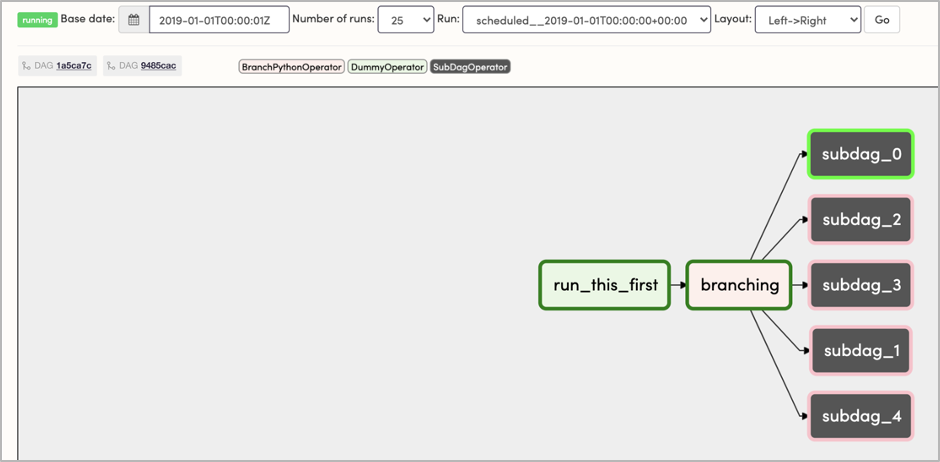
Add: DAG Version will be displayed within tooltips when hovering over the task instances within the chart.
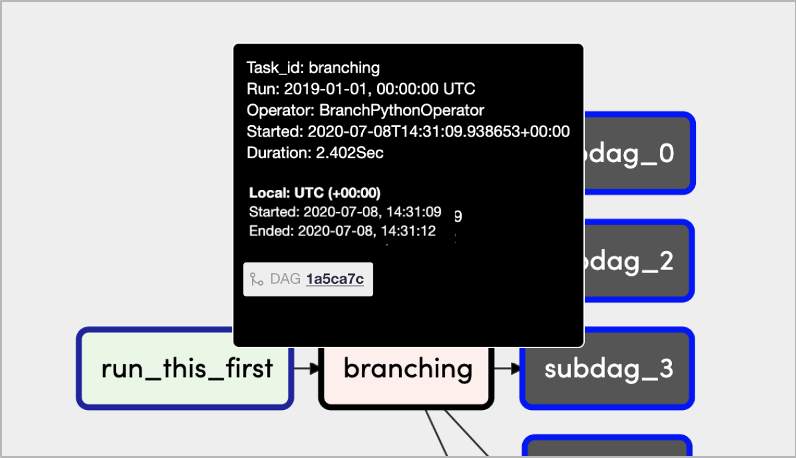
Task Instance Details
Update: The task code block should yield what the task looked like during that specific instance. Currently, it yields the latest version of the task’s code. Note: If we are unable to retrieve the task from serialization, a label should be displayed to indicate that the “latest” version of the task code is being displayed instead.
Add: DAG Version row within the “Task Instance Attributes” table. Links to code view.

Gantt View
Add: DAG Version will be displayed within tooltips when hovering over the task instances within the chart.
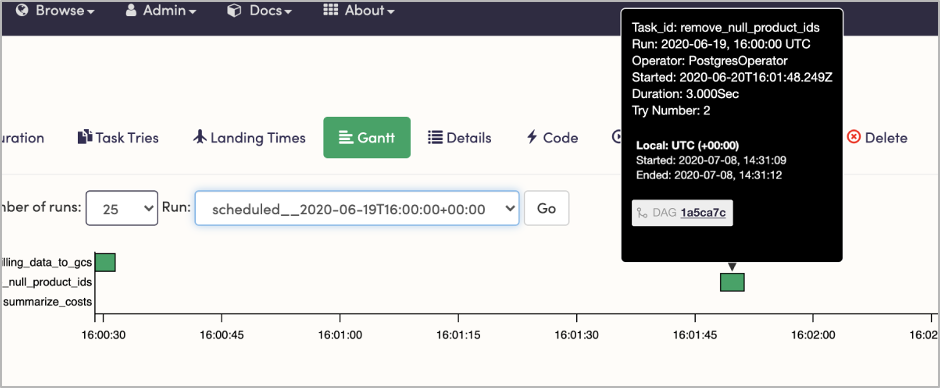
DAG Details
Add: “Latest Version” row to table. Links to code view.
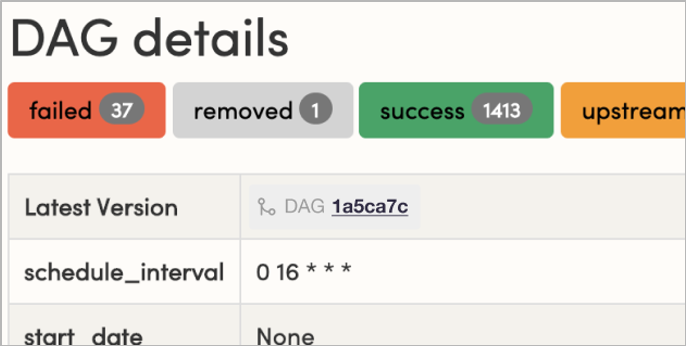
Code View
Add: Accept a URL parameter to pre-select which version of the DAG will be shown. When the parameter is not present, the latest version will be shown.
/code?dag_id=gcp_billing_to_pg&dag_v=1a5ca7c |
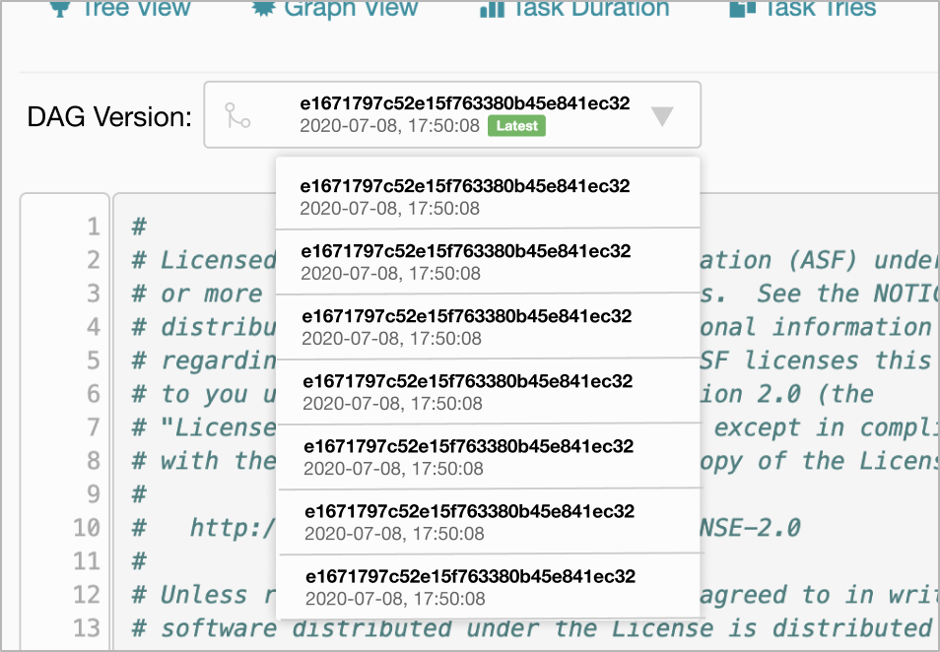
Add: DAG Version selector—a drop down menu with a historical listing of the DAG’s versions. Versions will be listed with their timestamps and displayed in reverse chronological order. Note: date-range filtering may be required if the results become out of hand.
Proposed back-end changes
Here are the core elements:
- The concept of a DAG version, referenced above as the “DAG Version Badge”:
- A DAG version is to be included with every DAG run.
- An end user viewable form of this DAG version, referenced above as the “DAG Version Badge” will be used for external representation including in the UI and API to be able to converse about the version of the DAG which was run. There is no implication here of semantic or calendar versioning or other forms of versioning.
- If possible, also add a Git hash (optionally) with a DAG version, for reference back to a Git repository.
- Current DAG version: Generally very simple and references to the current version of the DAG which is deployed within Airflow.
- A new DAG version: Which is in the process of being deployed and scheduled.
- Mixed version DAG: When a new DAG version is deployed, while the DAG is being run, it is possible that some tasks are run based on the “old version of the DAG” and other tasks are run based on the “new version of the DAG”. We are referring to this as a “Mixed version DAG”, which will incorporate multiple DAG versions.
- Concept of a DAG fingerprint - needed for DAG version change detection:
- The definition here is around “what constitutes a new version of a DAG” vs. “What does not constitute a new version”. Another way of representing this is what is a material change to a DAG from the perspective of scheduling, execution, and rendering. This “DAG fingerprint” is NOT intended to be an externally viewable entity, but an internal concept for identifying changes.
- Does not constitute a change:
- File timestamp
- Non code changes in the DAG file
- Changes to included imports
- Changes to Variables used in the DAG
- Constitutes a version change:
- Addition or deletion of tasks
- Changes in task ordering
- One definition is: “Any change in serialized representation of the DAG constitutes a change”
- A key element which is not yet nailed down completely is the degree of change which would break the “Tree View” display referenced above. At this point in time, task additions to the end of the DAG are expected to be compatible, but changes to task structure within the DAG may cause the tree view not to incorporate “old” and “new” in the same view.
- Concept of a Task fingerprint: This may not actually be needed for this AIP to be completed. We have considered and included this as an option.
- The definition here is around “what constitutes a change to a task within an existing DAG”, when a new version of a DAG is deployed. This is to enable DAG execution continuation, so that already run / unchanged tasks don’t have to be rerun.
- Does not constitute a change:
- No code changes to Task, including input parameter changes
- Constitutes a change:
- Code changes to Task
- Concept of a DAG manifest - needed for UI representation of DAG history. This would be a new database table which includes:
- DAG Id
- DAG version
- DAG fingerprint (one for each version)
- Deployed date
Note: Versions are an intrinsic concept of the system and not something under direct user control (i.e. a User won't be able to tell the Scheduler directly that this is a new version). When a DAG fingerprint changes, Scheduler would mark and store it as a different version.