Create a NiFi flow with an Input Port. Double-click the Input Port, and note its ID (1342ea64-018d-1000-a5cf-7bda6830909b in the screenshot.)
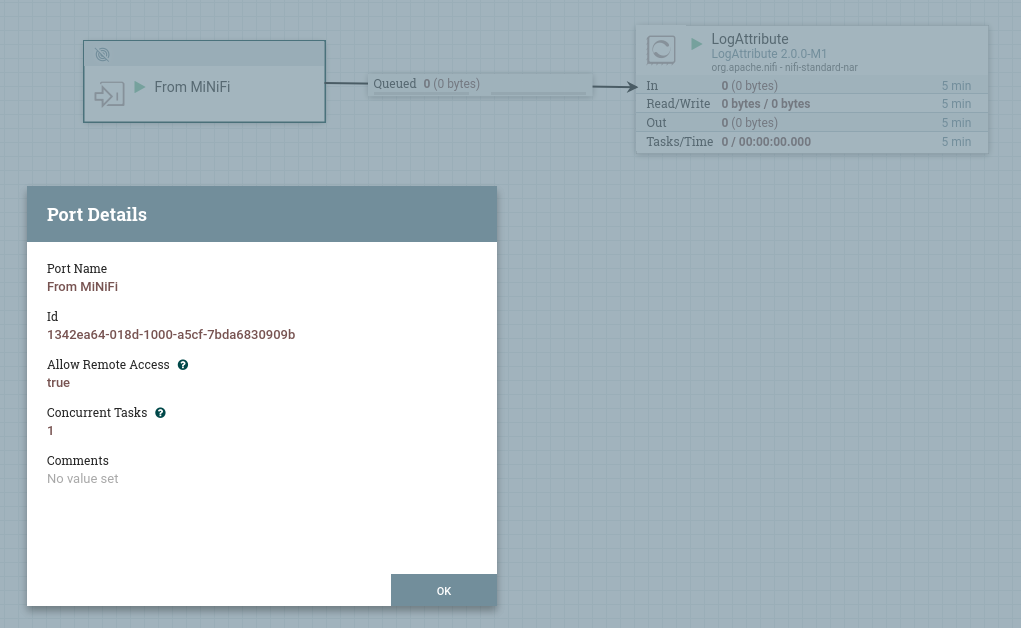
Remote Processing Groups/Input Ports/idandConnections[0]/idto the Input Port ID from NiFi, andRemote Processing Groups/Input Ports/urlto the NiFi URL you use to access NiFi in your browser.
Add the following settings to your NiFi installation's nifi.properties file:
# Site to Site properties nifi.remote.input.host=localhost nifi.remote.input.secure=true nifi.remote.input.socket.port=7777 nifi.remote.input.http.enabled=true |
Note that the port you configure here, 7777 in this example, will be used internally by the site-to-site communication, but in the MiNiFi config.yml file, you should use the same NiFi address you use in your browser, NOT this site-to-site port.
Export the NiFi certificate from the NiFi trust store, and import the MiNiFi agent certificate into the NiFi trust store:
keytool -exportcert -alias nifi-cert -rfc -keystore truststore.p12 > /opt/certs/nifi-cert.pem keytool -importcert -alias agent-cert -file /opt/certs/agent-cert.pem -keystore truststore.p12 |
keytool will prompt you for the truststore password; you can get this from the nifi.properties file.
Add the agent ID (which is the CN of the agent certificate) as the "Initial User Identity 1" value in the "userGroupProvider" section of authorizers.xml in your NiFi installation:
    <userGroupProvider>
        <identifier>file-user-group-provider</identifier>
        <class>org.apache.nifi.authorization.FileUserGroupProvider</class>
        <property name="Users File">./conf/users.xml</property>
        <property name="Initial User Identity 1">my-agent-ID</property>
</userGroupProvider> |
and restart NiFi; it will create a new user in users.xml which looks like this:
<tenants>
    <groups/>
    <users>
        <user identifier="9a889e09-6e86-360a-a324-8f3ee341842a" identity="my-agent-ID"/>
    </users>
</tenants> |
Add authorizations for your user in authorizations.xml in your NiFi installation, copying the user identifier from users.xml:
<authorizations>
    <policies>
        <policy identifier="1f6ae57a-08bc-11eb-9242-bf69163fde10" resource="/site-to-site" action="R">
          <!-- copy the user identifier from users.xml -->
          <user identifier="9a889e09-6e86-360a-a324-8f3ee341842a"/>
        </policy>
        <policy identifier="282818e0-08bc-11eb-8508-2b51c9d70d42" resource="/site-to-site" action="W">
          <user identifier="9a889e09-6e86-360a-a324-8f3ee341842a"/>
        </policy>

        <!-- copy the port identifier from the Input Port in NiFi into the resource string -->
        <policy identifier="f512f796-7afb-4c9f-ab68-b5eaf6d5d0cf" resource="/data-transfer/input-ports/c171f9da-689f-41e2-98c4-9d785c59c306" action="R">
          <user identifier="9a889e09-6e86-360a-a324-8f3ee341842a"/>
        </policy>
        <policy identifier="b4e836ee-d526-4e16-8bf3-ee1d8fa3d5e6" resource="/data-transfer/input-ports/c171f9da-689f-41e2-98c4-9d785c59c306" action="W">
          <user identifier="9a889e09-6e86-360a-a324-8f3ee341842a"/>
        </policy>

        <!-- you will also need a pair of policies for resource="/data-transfer/output-ports/..." if you want S2S data transfer from NiFi to MiNiFi -->
   </policies>
</authorizations> |
Restart NiFi again, and test that you can connect to it using https:
# This should give a large HTML response curl -k --key /opt/certs/agent-key.pem --cert /opt/certs/agent-cert.pem https://<hostname>:8443/nifi/ # This should give a JSON response curl -k --key /opt/certs/agent-key.pem --cert /opt/certs/agent-cert.pem https://<hostname>:8443/nifi-api/site-to-site/ |
Finally, configure MiNiFi to use secure site-to-site:
nifi.remote.input.secure=true nifi.security.need.ClientAuth=true nifi.security.client.certificate=/opt/certs/agent-cert.pem nifi.security.client.private.key=/opt/certs/agent-key.pem nifi.security.client.pass.phrase=<key passphrase if any> nifi.security.client.ca.certificate=/opt/certs/nifi-cert.pem # These are not needed #nifi.rest.api.user.name= #nifi.rest.api.password= |