Status
The JIRA issue is optional, but if there is already one that is relevant link to it here. Using the Jira issue macro is preferred.
|
Motivation
While the Airflow UI did receive a recent facelift for the 2.0 release, the changes merely made it look like a modern web application, but not function as one. The current application has served Airflow well and continued to evolve in functionality with the maturation of the product. We’ve reached a point where the expectations of a modern SaaS product have grown immensely since Airflow’s inception and emerging competitors are better positioned to fulfill those expectations by being built upon newer foundations.
We will reimagine the Airflow UI foundation with modern principles and technologies to continue to grow the appeal and adoption of Airflow with the following resulting outcomes:
- Decoupled Architecture - Drive the maturation and utility of the API by building a client fully dependent on it.
- Reassess Information Architecture (IA) and User Experience (UX) - This will provide an opportunity to take a holistic approach to organizing and presenting the overall product experience. We can take into better account features such as Plugins and determine a thoughtful approach for providing extensibility.
- Modernized Design System - Building the UI with a componentized system of building blocks that ensures a uniform and accessible experience throughout the application now and upon further evolution by the community. Hello dark mode. The current system is an aged version of Bootstrap we’re tethered to as a dependency of a dependency (Flask AppBuilder).
- Community Interest - We hope to attract more creativity and front-end/UX specialists to the project by using modern, industry preferred technologies with a clear (and documented) framework for contributing.
- Maintainability - Removing the CRUD view templates generated by Flask Application Builder (FAB) would give us much more control of the end-to-end experience across the app. Everything being in JavaScript allows improved linting and testing across the entire app whereas today it is difficult in our mixed technology environment.
- Enables building a Real-time UI - No more manually refreshing. Present the underlying data-in-motion dynamically—as it deserves (and users have come to expect). An actual real-time UI is not part of this AIP (as it requires more serious backend support to achieve efficiently).
Technology
Proof of Concept
We’ve produced a POC that demonstrates how the resulting product may look and feel, using the technologies we seek to adopt. It fully utilizes the API of a remote Airflow instance.
A demo of the POC can be accessed at: nova.astronomer.io (login: demo/demo)
Note: This demo is a very simplified example of the final application’s scope and does not reflect any design decisions (see IA & Design section below).
The source code for this POC is viewable at: https://github.com/astronomer/airflow-ui
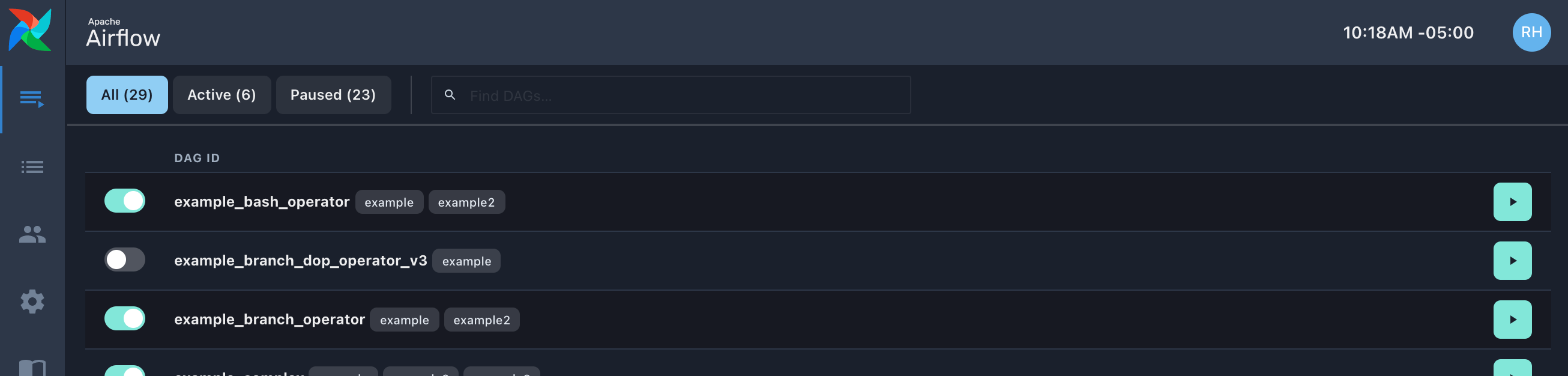
Primary Technologies
React - a JavaScript library for building user interfaces (more about this choice below)
TypeScript - extends JavaScript by adding types. React components will all utilize typing of internal functions as well as typing of their external props. Global model related typings will reside in a shared interfaces file.
Neutrino - lets you build web and Node.js applications with shared presets or configurations. This carries a very lightweight footprint in the codebase with all the configuration in a single file. This project is not being used now (and caution, neutrino has been archived and the docs domain has been taken over so careful clicking through from GitHub!)
Chakra UI - a simple, modular and accessible component library that gives you all the building blocks you need to build React applications. This will allow us to have a strong base of reusable components and theming so people can focus on features instead of styles. One notable aspect of this system is that it utilizes styled-system, a CSS-in-JS methodology of writing styles as props instead of traditional stylesheets (see examples in POC source code). A small learning curve to this, but the properties/naming are identical so it’s easy to pick up.
React Testing Library (RTL) & Jest- Jest is the standard built-in tool for testing JavaScript. RTL is a lightweight framework specifically for React components. It emphasizes best practices of testing how our software is used vs implementation details that don’t affect a user. In this example from the POC, we can test a flow for a DAGs view: show a loading indicator when fetching data -> DAGs render -> clicking on a switch changes makes a DAG active/paused with a modal confirming the update. All of this is driven by what a user sees and does and not the underlying code itself.
React Query - powerful async data handler that will manage all of our API requests. Advanced async logic like caching, background updates, optimistic updates, and refetching come out-of-the-box and are easy to configure. Far more lightweight than other boilerplate-heavy state management solutions. They are simple functions that can be dropped into any component that needs API data
ESLint - adopt standard linting rules (Airbnb) to maintain code style. This is already incorporated into the existing UI, it has just yet to be enforced by pre-commit. It currently has its own configuration file, but we will be able to leverage the existing one once we merge the codebases.
Why React?
React is the most widely used UI framework being used today. That gives us a few key advantages over Flask AppBuilder and other modern options.
- Ease-of-contribution: There are plenty of developers with prior experience, and learning resources for other developers to easily get up-to-speed
- Community support: There are well-supported 3rd-party libraries for just about every aspect of an app (testing, async communication, state management, etc)
- Cross-platform compatible: React works on every modern browser on all operating systems from desktops to mobile devices.
- Flexible: React’s modular structure creates an environment that’s efficient to maintain and is scalable at enterprise levels saving time and money in the long run.
- Improved testing: We will be able to have more test coverage in React than we have today in our current mess-of-JS-and-HTML set up.
Code Organization
The codebase for the POC illustrates the simple file structure by which the code will be organized. Eventually all living within a new airflow/www/ui/ directory in the apache/airflow repository.
test/- contains tests for all of our componentssrc/views/- these are the different pages of the app that show up in their own urls. Often have a main index.js file as an entry point and various components specific to that viewsrc/containers/- include the navigation sections that appear in every page of the appsrc/components/- components that may be shared across the whole appsrc/api/- contains all the functions to import into a component when needing to do an API requestsrc/interfaces/- Global TypeScript types to be used throughout the appsrc/utils/- Separate out some common logic that can be imported into any necessary componentsrc/index.tsx- Starting point of the app, mainly contains the various providers that give all child components access our style, auth, data, and routing statessrc/App.tsx- Defines all the url routes in the app and which component should render for each route
API Needs
There will be many different API requirements that will be uncovered during development. We’ve already begun running into these limitations during the POC development. Ultimately this will yield a much more robust (and documented) API for Airflow.
Plugins Evolution
Currently, Plugins allow for developers to incorporate a custom Webserver view into the application via inclusion of a Flask template. They have been a valuable part of Airflow but haven’t gotten the attention they deserve. In a new UI, there is an opportunity to create a better developer experience and enable increased extensibility of one’s Airflow instance.
- Backwards Compatibility - We will add a new plugins API endpoint to support rendering existing plugins in both the current and new UIs. When viewed in the new UI, we will simply be rendering the existing view in an iframe. We’ll append the iframe’s src URL with a boolean parameter that will indicate that it should be rendered without the global header and footer (since those will be provided by the new UI).
- New Path Forward - Before becoming the de facto UI, we will update the framework and documentation for Plugins to create Flask view templates that are no longer dependent on FAB’s legacy Bootstrap (sub) dependency. This will include a new top-level parent template for the custom views to inherit. Additionally, we plan on replacing the Bootstrap styles that Plugin developers currently rely on, with a very similar (but modernized) Tailwind CSS library. Chakra’s (our proposed React component system) theming configuration was inspired by Tailwind’s, so it should be easy to design a cohesive system that spans both toolsets.
Future of Extensibility (Future AIP) - We would like to bring all the benefits of an upgraded frontend tech stack to plugins too and pull in common patterns, components and styles to create a seamless integration. If we were to model a solution similar to New Relic’s “New Relic One Applications”, we could enable generating boilerplate Plugins from the CLI that provide “the stack” including the same UI tooling utilized by the rest of the application.
Information Architecture & Design Process
When building (or re-building) any application from the ground up, it is a unique opportunity to make a holistic assessment of the Information Architecture (IA) and the overall User Experience (UX). Given the continual evolution of Airflow since its inception, it has not had this opportunity prior to now.
The current POC is a tech demo and exploration; no design decisions have been made. In order to capture a broad and diverse range of community use cases we will form a UI SIG to engage in the process. We will make an invitation to the Dev list to garner participation.
This process will involve a range of exercises that will include (but not be limited to):
- Audit/assessment of existing IA and UX.
- Competitive analysis.
- Research and development of User Personas that will be ongoing guides for design decisions.
- Sorting exercises to identify logical groupings and relationships that will inform navigational groupings. These groupings will likely generate guidance on how we can evolve Documentation organization in the future as well.
- Formation of an ideal Information Architecture that will define navigation and flows
- Wireframing of individual views to scope the functionality required to accomplish given user goals.
We envision this process to take roughly 4-5 weeks to complete. This will consist of a progression of weekly meetings where findings will be reported and discussed within the SIG. Feedback will be collected and iterations will be reviewed in each subsequent meeting. The entire process and decision-making process will be documented.
The proposed Introduction Path (below) creates an ideal structure by which to collect feedback and make informed assessments of any changes resulting from the design process. This will also provide the confidence needed when ultimately deciding to promote the new UI as the default (and deprecate/remove the old one).
Introduction Path (to end-users)
Introduce new UI side-by-side (opt-in, easily switch between at a per-user level) with the current at minor version release. Remove/replace the current UI completely at a subsequent major version release.
Pros
- Unlike the introduction of the RBAC UI, users won’t have to choose one feature set over another. Prioritizing minimal pain for the end users.
- Will have an extended period of beta testing—optimal for quality feedback loops
- Can start releasing at MVP instead of meeting a feature parity—will start shipping earlier
Cons
- Will have to maintain two UIs for a period of time. (though we could discourage new features being PR'ed for old UI once MVP is released. Limit the old UI to bug fixes at some point.

Other Paths Considered
- Wholesale replacement of current UI in single release
- Pros
- No prolonged maintenance of two applications
- Cons
- Feature/reliability parity requirements are too high, and have a high potential for becoming a blocker for upgrading
- Start receiving feedback much later in the development process
- Modernize view-by-view (render react components within existing Flask shell)
- Pros
- Release of code doesn’t have to be tied to a single (likely major) release
- Can delay solving harder problems.
- Cons
- Lose the opportunity to reassess IA and holistic user experience
- Disjointed UX by mixing aged Bootstrap UI with modern design system UI components
- Lose broader benefits have having a truly modern application
- Fast transitions between views
- Inconsistent mix of real-time, not real-time views
- System-wide features such as dark/light/color-accessibility modes, time-zone switching
Proposed Process
- AIP Feedback
- AIP Acceptance
- Begin design process with UI SIG (process expected to take 4-5 weeks)
- Continued development of POC until pre-determined feature set MVP
- API requirements will be specified in apache/airflow/issues
- Results of design process will be incorporated into the application
- Code mainlined into apache/airflow repo
- Requisite development environment integrations added
- We will include a “React for Airflow devs” part of the documentation to help people quickly understand the code and can contribute.
- Contribution support added (documentation, linting via pre-commit, etc.)
- UI mechanisms for switching between old and new UIs will be added to both
- All dependencies and assets will remain isolated from the old application’s dependencies to ease the transition once the old UI is removed
- New UI MVP will be shipped in a minor release alongside existing UI
- Open channels to direct feedback about the beta (feedback form, GitHub issue +labeling, dedicated Slack channel)
- Fully flesh out/build Plugins solution. Ship in subsequent minor release to allow Plugin owners to make compatible
- Incorporate feedback/fixes/additional features into each subsequent minor release
- Remove old UI in major release
Airflow 3 Update: 7-11-2024
From Airflow 2.3 - 2.10, we took a different turn. Instead of developing an MVP and loading two separate UIs. We went forward with building a small React app that can be loaded inside of the existing FAB UI. We now load 3 different react apps, DAG details, Datasets and Cluster Activity. This has enabled us to improve the UX and support new features, but has had a few drawbacks from a page load and project complexity perspective.
For Airflow 3, we should take advantage of the opportunity to break things and fully migrate to a full React UI. These sub-AIPs will help us achieve this:
Outstanding pages
- DAG list homepage
- Manually trigger a DAG run
- Banners
- Scheduler not running
- DAG parse errors
- DAG resumed or run triggered
User Profile
Admin
Variables
- Configurations
- Connections
- Plugins (see AIP-68)
- Providers
- Pools
- XComs
Security (this is handled by the auth manager and not the React UI)
- Browse pages
- DAG Runs
- Jobs
- Task Instances
- Audit Logs
- Task Reschedules
- Triggers
- SLA Misses
We will try to take advantage of these updates and continue to improve upon the UX at the same time as rewriting these pages. Fortunately, many of the remaining pages are just table views which should be relatively easy to build well once an reuse across each of those pages. The most complex project will be to redo the DAG list page. UI development progress can also be sped up with implementing a UI REST API as proposed in AIP-84, as more boilerplate can be auto-generated with more type-checking.