| Target release | Release name or number |
|---|---|
| Document status | |
| Document owner |
|
Parameter Contexts give NiFi flows powerful configurability and portability. But what if their parameters could be provided by external values or services? Stateless NiFi already uses the concept of a Parameter Provider – this could also be applied to Parameter Contexts in NiFi. An EnvironmentVariableParameterProvider would be a natural fit for a containerized NiFi, and a HashiCorpVaultParameterProvider can be envisioned for providing sensitive values. This feature proposal walks through some of the details required in adding support for integrating Parameter Providers into NiFi's Parameter Contexts.
Parameter Providers would be introduced at the Controller Settings level as a way to fetch parameters from an external source. These could be selectable in the Add/Update Parameter Context view under the SETTINGS tab. Two new drop-down fields would be added on this tab:

If a Parameter Provider was previously unset and the user selects one, a warning should be displayed indicating that existing values with that sensitivity will be overwritten.
Some Parameter Provider implementations would require configuration themselves in order to function. Taking the HashiCorpVaultParameterProvider as an example, you can imagine the following configuration properties:
Parameter Providers would be configured in the Controller Settings view. Here are the tabs of this view at the time of this writing:

A fifth tab, "PARAMETER PROVIDERS", could be added, containing a list of Parameter Providers as well as a "+" button to add one. This would bring up an Add Parameter Provider view, which would be configurable with Properties, much like Controller Services, Reporting Tasks, and other similar components.
Some requirements for Parameter Provider configuration include:
The underlying technology of certain Parameter Provider implementations may allow parameter values to be changed external to NiFi (for example, if an administrator rotates a password in a HashiCorp Vault server). This introduces the problem of how to handle external parameter updates in order to protect the integrity of the NiFi flow configuration. This necessitates the use of a cache for external values, as well as a mechanism for fetching values.
In the PARAMETER PROVIDERS list tab, a "Fetch Parameters" button could be available on each Parameter Provider, which would cause it to pull all available parameters and values from the external source, based on the current configuration. These would be cached in the Parameter Provider as a set of proposed changes, but not actually persisted yet. Next, a Apply Fetched Parameters view should pop up, which initiates the application of the new values to the flow, similar to when a Parameter Context is updated today:
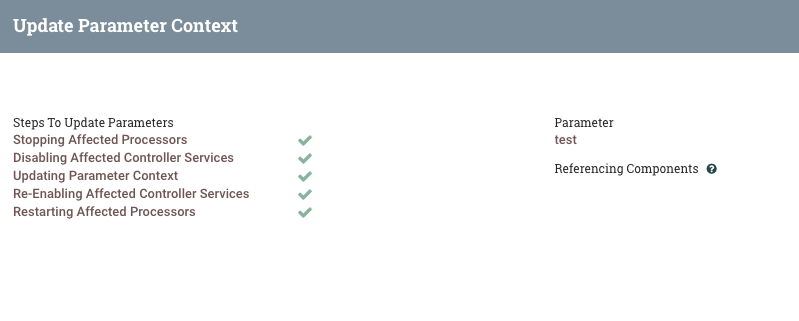
It would also be possible to have both an APPLY and an APPLY AND FETCH button in the Add Parameter Provider view. The former would apply the configuration changes and close the dialog, and the latter would apply the changes, close the dialog, and then launch the fetch/apply sequence described above.
To remove the need for manually refreshing Parameter Providers in order to apply external changes (as in the case of password rotation), an auto-refresh feature could be configured on the Add/Update Parameter Provider view. This should be disabled by default, and a clear warning should be displayed when enabled, indicating that an updated value would automatically stop and start processors and controller services in the flow.
Since different Parameter Provider implementations could have very different dependencies, the NAR pattern should be used to separate their ClassLoaders. Therefore, you might have a nifi-hashicorp-vault-nar that contains a HashiCorpVaultParameterProvider and its associated dependencies, and a nifi-aws-nar that contains an AWSSecretsManagerParameterProvider. With this design:


Parameter Providers and their configuration would be serialized in the flow.xml.gz, with sensitive property values encrypted.
Because Parameter Provider configuration is very likely system-dependent, they should be serialized much like external Controller Services (ones outside of the downloaded process group):
Here is an example of externalControllerServices being referenced as today:
     "properties": {
        "HTTP Context Map": "09ca4ec5-d271-35bc-9791-c2c3d4b1048b"
} |
  "externalControllerServices": {
    "09ca4ec5-d271-35bc-9791-c2c3d4b1048b": {
      "identifier": "09ca4ec5-d271-35bc-9791-c2c3d4b1048b",
      "name": "StandardHttpContextMap"
    }
} |
While it may seem natural to display parameters provided by the Parameter Providers in the Parameter Contexts, this could needlessly complicate the user's experience. Rather, these parameters should be implicit and only discoverable via Auto-complete when referencing a parameter. If a Parameter Context has a Sensitive Parameter Provider selected, the user would only be able to see and create non-sensitive parameters. Likewise the inverse if only a Non-sensitive Parameter Provider is selected. If both types of Parameter Provider are selected, the PARAMETERS tab could even be omitted.
This would be the least distracting approach to displaying provided parameters. Consider the case of a HashiCorpVaultParameterProvider, which may contain some secrets needed by the data flow, but many others that are unrelated. If all secrets from the Vault instance were fetched as parameters, the user would see a host of parameters in their Parameter Context, only a few of which they needed.
Depending on the technology backing the Parameter Provider, parameter names in the external service may not be what is desired inside the data flow.
User-defined properties could be added to the configuration of the Parameter Provider. A user could add a dynamic property like this:

The property name ("SFTP Password" here) would be the Parameter Name used in the data flow, and the property value ("external.password" here) would be the parameter name from the external service. In this example, the property would be referenced via the #{SFTP Password} notation. If no mapping property is supplied, the parameter name from the external service would be used. Any naming conflicts between mapped property names and external service property names could be detected by the Parameter Provider framework and prevented.
At the time of this writing, there are two access policies related to Parameter Contexts: "access parameter contexts" of subtype "view" and "modify". The "modify" policy would be applicable for the Fetch Parameters operation, since this would potentially update parameters.
Stateless currently implements a simpler version of a Parameter Provider, which is currently called ParameterProvider. This implementation allows a provider to return a value, given a Parameter Context name and Parameter Name. While it achieves a similar purpose to the feature described above, it focuses on providing only the value, and not the entire Parameter. Therefore, the existing ParameterProvider in Stateless should be renamed to ParameterValueProvider, and the NiFi framework core API will create a new ParameterProvider interface for the feature described above.