JEST facilities are available as a HTTP servlet, org.apache.openjpa.persistence.jest.JESTServlet.
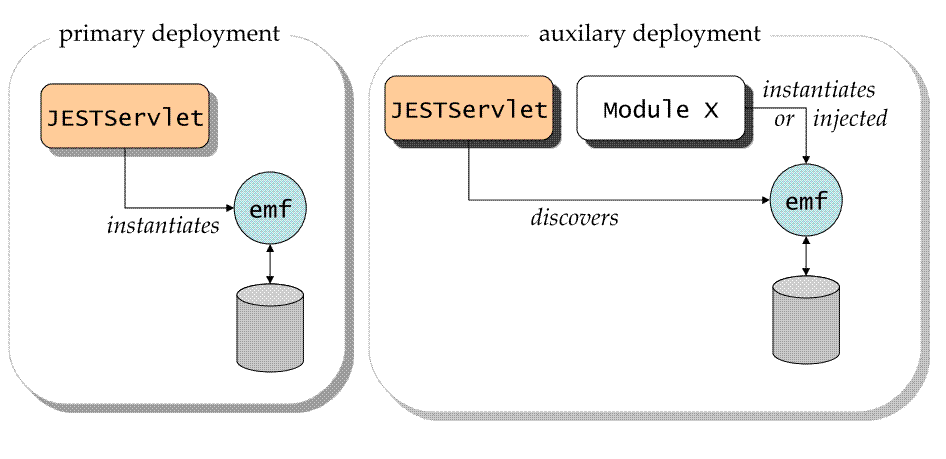
JESTServlet can be deployed in a servlet container e.g. Tomcat in two possible modes: primary or auxiliary.
In primary mode, the JESTServlet itself instantiates a persistence unit during initialization.
In auxiliary mode, the JESTServlet discovers a persistence unit used by another component X.
The sibling component X must satisfy the following for JEST to discover its persistent unit
X and JESTServlet must belong to the same deployment unit.X must activate OpenJPA's native EntityManagerFactory pool. The pool is activated by switching on openjpa.EntityManagerFactoryPool configuration property to true. This property is available only via runtime configuration. The following code example ensures that OpenJPA's native EntityManagerFactory pool is active.
  Map<String,Object> props = new HashMap<String, Object>();
  props.put("openjpa.EntityManagerFactoryPool", "true");
  EntityManagerFactory emf = Persistence.createEntityManagerFactory("myPU", props);
|
JESTServlet accepts following initial configuration parameters
Property |
Description |
|---|---|
persistence.unit |
Name of the persistent unit. Must be specified. |
standalone |
true implies primary mode. Defaults to false. |
debug |
true implies verbose tracing of HTTP requests. Defaults to false. |
The following deployment descriptor WEB-INF/web.xml deploys JESTServlet in auxiliary mode
<web-app version="2.4"
         xmlns="http://java.sun.com/xml/ns/j2ee"
         xmlns:xsi="http://www.w3.org/2001/XMLSchema-instance"
         xsi:schemaLocation="http://java.sun.com/xml/ns/j2ee http://java.sun.com/xml/ns/j2ee/web-app_2_4.xsd">
  <display-name>Demo Application with JEST Servlet</display-name>
  <welcome-file-list>
	<welcome-file>index.html</welcome-file>
  </welcome-file-list>
  <description>
    An example of deploying a simple web application with JEST servlet.
    This descriptor specifies the Demo Application servlet as well as JEST servlet.
  </description>

  <servlet>
    <description>
   	This is the Demo Application Servlet.
   	The servlet is mapped to URL pattern /app/* so this servlet can be accessed as
                     http://host:port/demo/app/
   	where "demo" is the name of the deployed web application.

   	Assume that the Demo Application Servlet is using a persistence unit named
   	'jestdemo'. The JEST Servlet will require the persistence unit name to
   	browse the Demo Application.
    </description>

    <servlet-name>demo</servlet-name>
    <servlet-class>demo.SimpleApp</servlet-class>
  </servlet>

  <servlet-mapping>
    <servlet-name>demo</servlet-name>
      <url-pattern>/*</url-pattern>
    </servlet-mapping>

  <!-- Deployment descriptor for JESTServlet.                                           -->
  <servlet>
    <description>
  	This is the JEST servlet.
  	JEST Servlet needs to know the name of the persistence unit used by the Demo Application.
  	The unit name is specified by mandatory "persistence.unit" parameter during initialization.

  	The JEST servlet is mapped to URL pattern /jest/* in servlet mapping section. So to access
  	JEST servlet, use the following URI
  	    http://host:port/demo/jest/
  	Notice the trailing forward slash character is significant.
    </description>
    <servlet-name>jest</servlet-name>
    <servlet-class>org.apache.openjpa.persistence.jest.JESTServlet</servlet-class>
    <init-param>
	<param-name>persistence.unit</param-name>
	<param-value>jestdemo</param-value>
    </init-param>
    <init-param>
	<param-name>debug</param-name>
	<param-value>true</param-value>
    </init-param>
  </servlet>
  <servlet-mapping>
    <servlet-name>jest</servlet-name>
	<url-pattern>/jest/*</url-pattern>
    </servlet-mapping>
</web-app>
|