This page summarizes an experience and use cases of implementing a new custom CXF transport.
Basically there are two main use cases for implementing a new CXF transport:
Presently the CXF distribution provides a transport implementation for the following protocols: HTTP(S), JBI, JMS and Local(inside one JVM). Camel additionally implements a CXF transport for Camel exchanges.
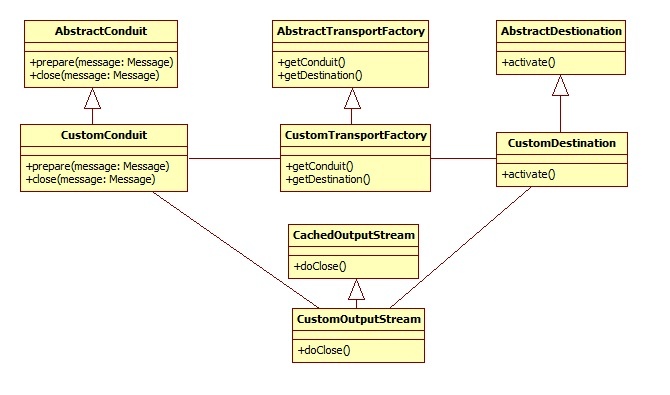
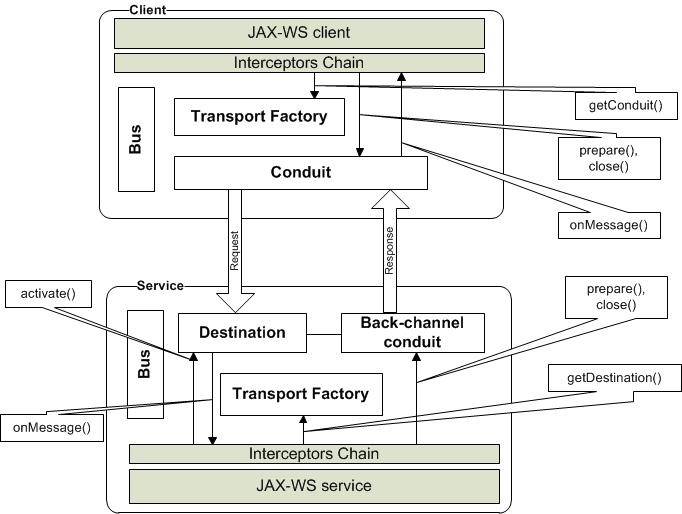
The transport functionality is based on two fundamental definitions: conduit and destination. Conduits are responsible for sending a message to recipients and destinations for receiving a message from the sender. In order to send a response, a destination needs its own back-channel conduit (in case of request-response communication). Conduits and destinations are created by a TransportFactory. CXF selects the correct TransportFactory based on the transport URL. SOAP is also considered a high level transport and has its own conduit and destination in CXF.
To send a message into a physical channel, the conduit should access the message context. Normal practice in this case would be to use a subclass of OutputStream extending CachedOutputStream. The custom stream will be fed the message and provided the possibility to access context in streaming or buffered form depending on the transport requirements. CachedOutputStream is configured to keep message in memory only up to a predefined size. If this size is exceeded, the message is swapped to disk.
A class diagram of TransportFactory, Conduit, Destination and OutputStream is shown below:
Interaction between JAX-WS client and service using CXF transport is represented in the following figure:
        URL wsdlURL = this.getClass().getResource("/HelloWorld.wsdl");
        HelloWorldService service = new HelloWorldService(wsdlURL, SERVICE_NAME);
        HelloWorld hw = service.getHelloWorldPort();
        String result = hw.sayHi(TEST_REQUEST); }}
|
	HelloWorldImpl serverImpl = new HelloWorldImpl();
	Endpoint.publish("udp://localhost:9000/hello", serverImpl);
|
There are two ways to register a transport factory: programmatically or via Spring configuration.
To register transport factory programmatically it is necessary to execute the following code:
     Bus bus = BusFactory.getThreadDefaultBus();
     DestinationFactoryManagerImpl dfm = bus.getExtension(DestinationFactoryManagerImpl.class);
     CustomTransportFactory customTransport = new CustomTransportFactory();
     dfm.registerDestinationFactory(TRANSPORT_IDENTIFIER, customTransport);

     ConduitInitiatorManager extension = bus.getExtension(ConduitInitiatorManager.class);
     extension.registerConduitInitiator(TRANSPORT_IDENTIFIER, customTransport);
|
TRANSPORT_IDENTIFIER is unique transport id (normally in form “http://apache.org/transports/PROTOCOL_PREFIX”).
For Spring configuration, the following could be used instead:
<bean class="org.company.cxf.transport.CustomTransportFactory" lazy-init="false"> <property name="transportIds"> <list> <value>TRANSPORT_IDENTIFIER</value> </list> </property> </bean> |
As far as binding TransportFactory is found, CXF looking for protocol TransportFactory responsible for physical network communication. In this case important is method TransportFactory.getUriPrefixes(). This method returns list of protocol prefixes supported by this TransportFactory.
When CXF client or service try to communicate using URL with specified protocol prefix (http://, https://, jms://, local://), CXF looks into registered transport factories map and gets the right one for this prefix. If no TransportFactory for this protocol is found, CXF throws corresponded exception.
Client configuration:
<jaxws:client id="FlightReservationClient" xmlns:serviceNamespace="http://www.apache.org/cxf/samples/FlightReservation" serviceClass="org.apache.cxf.samples.flightreservation.FlightReservation" serviceName="serviceNamespace:FlightReservationService" endpointName="serviceNamespace:FlightReservationSOAP"> address="http://localhost:8040/services/FlightReservationService"> </jaxws:client> … |
TransportFactory class:
…
    private static final Set<String> URI_PREFIXES = new HashSet<String>();
    static {
        URI_PREFIXES.add("http://");
        URI_PREFIXES.add("https:");
    }
    public Set<String> getUriPrefixes() {
        return URI_PREFIXES;
    }
|
Destinations are normally created by service on startup and released by shutdown. Conduits can be either recreated for each request or cached based on endpoint information for whole client life time. Clients can make concurrent calls to endpoints using different protocols and bound them to different conduits.
Conduit and destination objects can by concurrently accessed by multiple threads. Implementations should care about thread safety of the class.
It is strongly recommended to don’t break streaming in Conduit and Destination implementations, if physical protocol supports it. CXF is completely streaming oriented – it causes high performance and scalability.
What is the start point to understand the CXF transport layer and implement own transport? It makes sense to read CXF documentation CXF transports overview and analyze source code of existing CXF transports (Local and JMS once are more straightforward). They are located into packages: org.apache.cxf.transport.local and org.apache.cxf.transport.jms correspondingly.