This page describes how to make a release of Apache Bigtop. Most of the content is shamelessly stolen from the the Whirr release process – thanks Whirr team!
Apache Bigtop is following a predictable "train model" of releases popularized by the Ubuntu Linux. Currently releases happen every quarter. A release of Bigtop is a culmination of a quarter of development activities and also a testament to the particular state of the Hadoop ecosystem at the time. IOW, what are the most cutting edge versions of the components that still work together as an integrated system.
All release activities are coordinated by a volunteer release manager (RM) who is chosen during the release planning. If you happen to be a first time RM here's what you need to do in order to be able to carry out the mechnics of the release
If you are not already a member of the Web Of Trust (WOT) it would be a good idea to do so. (contact one of the prior release managers, e.g. Rvs, Cos, etc...). You can read more about key signing here.
Ensure that you have setup your ssh keys on people.apache.org, otherwise you'll have to enter your login password a number of times (best use ssh-agent for this as well). A good overview of this process can be found here (ssh-copy-id and ssh-agent in particular)
Workaround: an open issue BIGTOP-1499 requires that the release repo is clean. You can either make a new clone; or remove everything non-related to the repo (including files and directories listed in .gitignore file
Please make sure that you have correct configuration for scm-plugin SVN Provider condifuration. Create $user.home/.scm/svn-settings.xml with the following content
<svn-settings> <user>your apache user id</user> <password>your LDAP password</password> </svn-settings> |
set the permissions on the directory and the file to 700 as it contains your clean-text password (DANGER!)
See http://stackoverflow.com/questions/3618330/what-is-the-format-of-svn-settings-xml-for-use-with-maven-scm-plugin how to change your scm:svn: url and provide a password.
Done with the above? Proceed with the rest of the steps:
3-4 weeks before a committed release date a release manager (RM) for a given release is supposed to start a process of scrubbing the JIRAs. This involves:
This only needs doing if this is the first release in a series (X.Y.0).
Update CHANGES.txt in master to replace with Release X.Y.0 (unreleased)Release X.Y.0 (YYYY-MM-DD). Commit:
git add CHANGES.txt git commit -m "Preparing for release X.Y.0" |
Create a branch for the release series (ensure origin/master is up-to-date with the ASF repo before running it):
git checkout -b branch-X.Y origin/master |
Switch back to master and add A.B.C-SNAPSHOT (unreleased) to CHANGES.txt.
git checkout - (edit CHANGES.txt) |
Bump the version number in the master branch:
./gradlew setversion -Pnextversion="A.B.C-SNAPSHOT" |
Commit these changes to the master and push.
git add CHANGES.txt (and other updated files) git commit -m "Bumping up the version to A.B.C-SNAPSHOT" git push upstream master (assuming that ASF repo is referred to as 'upstream') |
Checkout the release branch
git checkout branch-X.Y |
Update the release branch's version information: the version number in the release branch ends in -SNAPSHOT, but we need to remove this for the release. For example, 0.8.0-SNAPSHOT needs to be changed to 0.8.0.
./gradlew setversion -Pnextversion="X.Y.Z" |
Rename docker images and repo URLs:
grep -R --color :trunk- * | grep yaml grep -R --color "http://repos.bigtop.apache.org/releases/X.Y.Z" * grep -R --color "http://repos.bigtop.apache.org/releases/x.y.z" * (where "x.y.z" is the previous version of "X.Y.Z". Just in case) (replace the occurrences found by the above commands) |
Commit these changes to the release branch and push
git add (updated files) git commit -m "Changing version to X.Y.Z" git push upstream branch-X.Y (assuming that ASF repo is referred to as 'upstream') |
Also, update the default version of Bigtop (and your code signing key ID, if needed) defined in hieradata on master and the release branch. For example:
$ git checkout master (edit bigtop-deploy/puppet/hieradata/bigtop/repo.yaml) $ git diff diff --git a/bigtop-deploy/puppet/hieradata/bigtop/repo.yaml b/bigtop-deploy/puppet/hieradata/bigtop/repo.yaml index 48c8a4ae..0d6a9126 100644 --- a/bigtop-deploy/puppet/hieradata/bigtop/repo.yaml +++ b/bigtop-deploy/puppet/hieradata/bigtop/repo.yaml @@ -1,5 +1,5 @@ bigtop::bigtop_repo_gpg_check: true -bigtop::bigtop_repo_apt_key: "BB95B97B18226C73CB2838D1DBBF9D42B7B4BD70" +bigtop::bigtop_repo_apt_key: "01621A73025BDCA30F4159C62922A48261524827" bigtop::bigtop_repo_yum_key_url: "https://downloads.apache.org/bigtop/KEYS" -bigtop::bigtop_repo_default_version: "1.4.0" +bigtop::bigtop_repo_default_version: "1.5.0" $ git add bigtop-deploy/puppet/hieradata/bigtop/repo.yaml $ git commit -m "Update default values in hieradata for release 1.5.0" [master 9715ca7a] Update default values in hieradata for release 1.5.0 1 file changed, 2 insertions(+), 2 deletions(-) $ git push upstream master $ git checkout branch-1.5 $ git cherry-pick -x 9715ca7a $ git push upstream branch-1.5 |
git cherry-pick which leads to discrepancies in the commit hash-codes and makes the branch look untidy and hard to follow.For a patch release, just do the following four items on the branch-X.Y, instead of doing all of the items above:
JIRA has the ability to generate release notes automatically (this is why it is so important to keep the fix version number accurate).
https://issues.apache.org/jira/secure/ConfigureReleaseNote.jspa?projectId=12311420
Manually check this list for accuracy, since JIRA can be updated after step 1, even if it's unintentional. Also, I've repeatedly seen closed bugs that were not fixed (i.e., duplicate) marked with a fix version, so that they incorrectly show up in this list. Find those, edit them to remove the fix release (only actually fixed bugs should have a fix release) and re-run the report. A better way to deal with it is to run
fixVersion = X.Y.Z AND project = BIGTOP AND resolution = Duplicate ORDER by priority DESC |
Select the correct version. Ask for both plain text and HTML formats.
Paste the plain text notes to the top of CHANGES.txt. Paste the HTML version into src/site/xdoc/release-notes.xml. Check this into master and the branch.
Wrap the title ("Release Notes - Bigtop - Version X.Y.Z") inside an <h3> element.
Tag, and push the changes and the tag to git:
git tag release-x.y.z-RC0 -m "Bigtop X.Y.Z release." git push upstream release-x.y.z-RC0 |
Create a release specific job to build images such as Docker-Puppet-x.y.z, Docker-Toolchain-x.y.z and Docker-Toolchain-x.y.z-pull by copying existing jobs:
Make sure there is enough free space on the disk of Jenkins worker nodes. Remove workspaces and Docker images for old releases if you need to reclaim the free space.
Make sure all the built images are uploaded to Dockerhub after running the job.
Make sure all the built images are downloaded on docker-slave-06 and docker-slave-07 (by Docker-Toolchain-x.y.z-pull).
Create a release specific job to build packages:
https://ci.bigtop.apache.org/view/Releases/job/Bigtop-1.4.0/
Download all built packages via archive download feature provided by Jenkins on a machine that you want to proceed the signing:
PLATFORM=amd64
#PLATFORM=aarch64  # enable when running on the ARM platform
#PLATFORM=ppc64le  # enable when running on the PowerPC platform

# Download artifacts for all OS supported in Bigtop.
# Note that you should run this on each platform (x86_64, ARM, and PowerPC), because
# you will sign the artifacts and create repository in Docker container later,
# which are dependent on the platform.
for DISTRO in centos-7 fedora-26 opensuse-42.3 debian-9 ubuntu-16.04; do
  curl -L https://ci.bigtop.apache.org/view/Releases/job/Bigtop-1.4.0/DISTRO=${DISTRO},PLATFORM=${PLATFORM}-slave/lastSuccessfulBuild/artifact/*zip*/archive.zip -o ${DISTRO}.zip
done

# Extract the downloaded archive. If you come across the
# "invalid zip file with overlapped components (possible zip bomb)"
# error, use other tools than unzip, e.g., `jar xf "${i}.zip"`
for i in centos-7 fedora-26 opensuse-42.3 debian-9 ubuntu-16.04; do
  unzip "${i}.zip"
  mkdir "${i}"
  mv archive/output/* "${i}"
  rm -rf archive
done |
Ref:
Startup a docker images that is RPM based system:
cd ~/ # Change the image for AARCH64 or PPC64LE docker run -ti --rm -v $PWD:/work bigtop/puppet:1.4.0-centos-7 bash |
Prepare the environment for signing:
yum install -y rpm-sign createrepo pinentry gpg --import YOUR_CODE_SIGNING_SECRET_KEY echo "%_gpg_name YOUR_CODE_SIGNING_KEY_ID" > ~/.rpmmacros |
Signing:
cd /work
OS=centos-7

# Sign all RPM packages (This step required to input passphrase, so don't copy and paste the entire script here)
rpm --addsign `find ${OS} -name \*rpm`

# Recreate the metadata for repository
createrepo ${OS}

# Armor the metadata
gpg --detach-sign --armor ${OS}/repodata/repomd.xml |
[OPENSUSE ONLY]
gpg --armor --export evansye@apache.org > opensuse-42.3/repodata/repomd.xml.key for i in `find opensuse-42.3/repodata -name *.xml.gz` opensuse-42.3/repodata/repomd.xml.key ; do gpg --detach-sign --armor $i ; done |
Ref: , https://manpages.debian.org/jessie/dpkg-sig/dpkg-sig.1.en.html
Startup a docker images that is DEB based system:
cd ~/ # Change the image for AARCH64 or PPC64LE docker run -ti --rm -v $PWD:/work bigtop/puppet:1.4.0-debian-9 bash |
Prepare the environment for signing:
apt-get update apt-get install -y gpg libterm-readkey-perl dpkg-sig reprepro gpg --import YOUR_CODE_SIGNING_SECRET_KEY |
Signing:
cd /work
VERSION=1.4.0
OS=debian-9
ARCH=amd64
#ARCH=arm64
#ARCH=ppc64el
SIGN_KEY=B7B4BD70
export GPG_TTY=$(tty)

# Sign DEB packages (This step required to input passphrase, so don't copy and paste the entire script here)
# dpkg-sig --cache-passphrase --sign builder --sign-changes force_full `find ${OS}/ -name \*deb`
#
# On Ubuntu 24.04 or Debian 12, dpkg-sig is not available any more
# https://bugs.debian.org/cgi-bin/bugreport.cgi?bug=995113
# debsigs can be used instead.
find ${OS} -name '*.deb' | xargs debsigs --sign=origin -k ${SIGN_KEY}

# Build signed apt repository
mkdir -p conf
cat > conf/distributions <<__EOT__
Origin: Bigtop
Label: Bigtop
Suite: stable
Codename: bigtop
Version: ${VERSION}
Architectures: ${ARCH} source
Components: contrib
Description: Apache Bigtop
SignWith: ${SIGN_KEY}
__EOT__

cat > conf/options <<__EOT__
verbose
ask-passphrase
__EOT__

rm -rf ${OS}/apt
# Note that this command creates the apt repository (db, dists, pool)
# in the current directory, so you can't ran it for multiple distros in parallel.
reprepro --ask-passphrase -Vb . includedeb bigtop `find ${OS}/ -name \*deb`
rm -rf ./${OS}/*
mv conf db dists pool ${OS} |
The easiest way to upload artifacts to S3 is via your own AWS account. Add your account(email) to bigtop's bucket in the section "Access for other AWS accounts":
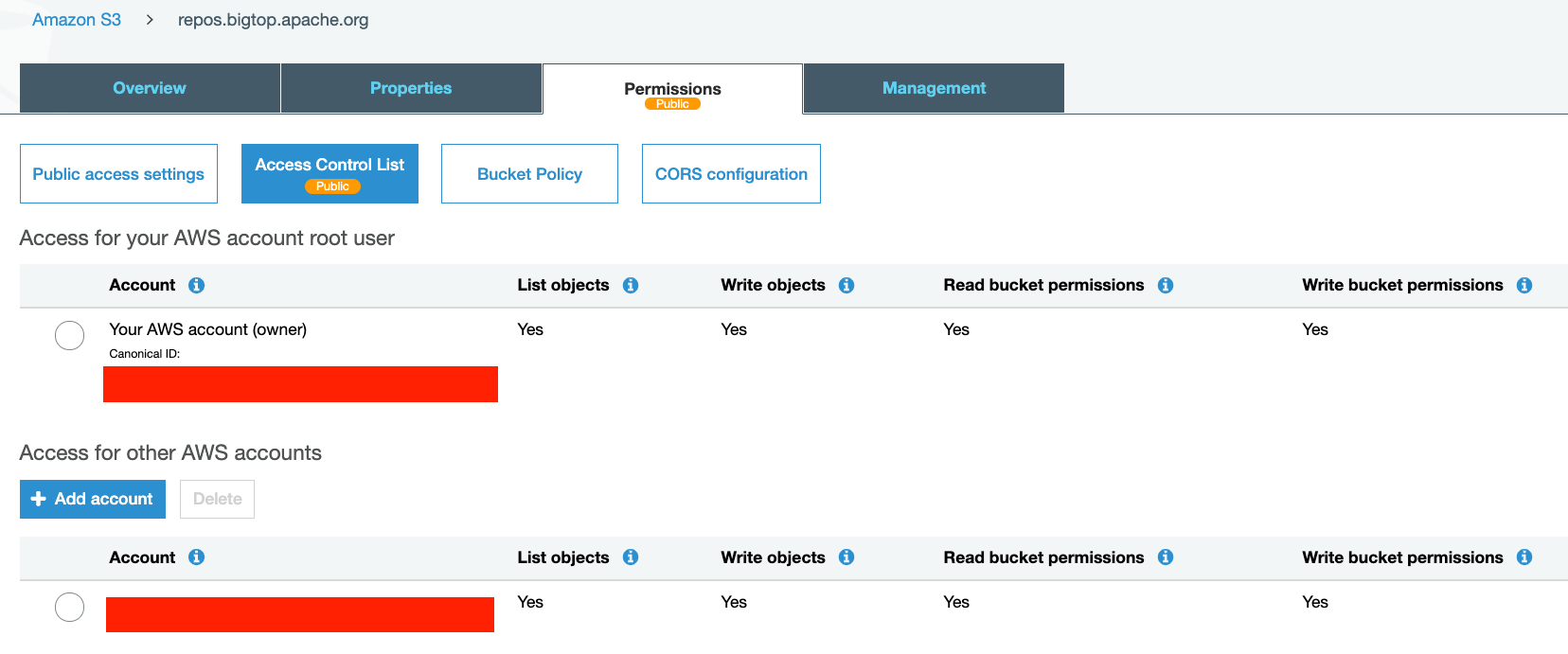
Once permission granted, you're able to use your account's access key and secret key with aws s3 sync command for upload, like:
# In case of CentOS 7 aws s3 sync --acl public-read ./centos-7/ s3://repos.bigtop.apache.org/releases/1.4.0/centos/7/x86_64/ # for x86_64/amd64 aws s3 sync --acl public-read ./centos-7/ s3://repos.bigtop.apache.org/releases/1.4.0/centos/7/aarch64/ # for aarch64/arm64 aws s3 sync --acl public-read ./centos-7/ s3://repos.bigtop.apache.org/releases/1.4.0/centos/7/ppc64le/ # for ppc64le/ppc64el # In case of Ubuntu 16.04 aws s3 sync --acl public-read ./ubuntu-16.04/ s3://repos.bigtop.apache.org/releases/1.4.0/ubuntu/16.04/amd64/ # for x86_64/amd64 aws s3 sync --acl public-read ./ubuntu-16.04/ s3://repos.bigtop.apache.org/releases/1.4.0/ubuntu/16.04/arm64/ # for aarch64/arm64 aws s3 sync --acl public-read ./ubuntu-16.04/ s3://repos.bigtop.apache.org/releases/1.4.0/ubuntu/16.04/ppc64el/ # for ppc64le/ppc64el |
The directory layouts on S3 bucket looked like the following:
repos.bigtop.apache.org/releases/1.4.0/centos/7/x86_64 repos.bigtop.apache.org/releases/1.4.0/fedora/26/x86_64 repos.bigtop.apache.org/releases/1.4.0/opensuse/42.3/x86_64 repos.bigtop.apache.org/releases/1.4.0/debian/9/amd64 repos.bigtop.apache.org/releases/1.4.0/ubuntu/16.04/amd64 |
For YUM repos, upload files /work/centos-7/* into repos.bigtop.apache.org/releases/1.4.0/centos/7/x86_64/. For example:
repos.bigtop.apache.org/releases/1.4.0/centos/7/x86_64/alluxio repos.bigtop.apache.org/releases/1.4.0/centos/7/x86_64/ambari ... repos.bigtop.apache.org/releases/1.4.0/centos/7/x86_64/repodata ... |
For APT repos, upload files /work/debian-9/* into repos.bigtop.apache.org/releases/1.4.0/debian/9//. For example:
repos.bigtop.apache.org/releases/1.4.0/debian/9/amd64/conf repos.bigtop.apache.org/releases/1.4.0/debian/9/amd64/db repos.bigtop.apache.org/releases/1.4.0/debian/9/amd64/dists repos.bigtop.apache.org/releases/1.4.0/debian/9/amd64/pool |
Create one for each of our Distro. Following are examples for YUM and APT:
export VERSION=1.4.0
export RC_NUMBER=0
export DIR=bigtop-${VERSION}-RC${RC_NUMBER}/repos
mkdir -p ${DIR}
cd ${DIR}

# YUM
for OS in centos-7 fedora-26 opensuse-42.3; do
  cat > bigtop.repo <<__EOT__
[bigtop]
name=Bigtop
enabled=1
gpgcheck=1
baseurl=http://repos.bigtop.apache.org/releases/${VERSION}/${OS/-/\/}/\$basearch
gpgkey=https://dist.apache.org/repos/dist/release/bigtop/KEYS
__EOT__
  gpg --detach-sign --armor bigtop.repo
  mkdir "${OS//\/}"
  mv bigtop.repo* "${OS//\/}"
done

# APT
for OS in debian-9 ubuntu-16.04; do
  cat > bigtop.list <<__EOT__
deb http://repos.bigtop.apache.org/releases/${VERSION}/${OS/-/\/}/\$(ARCH) bigtop contrib
__EOT__
  gpg --detach-sign --armor bigtop.list
  mkdir "${OS//\/}"
  mv bigtop.list* "${OS//\/}"
done |
Add your signed armored GPG key to repos directory to ease the key import for the users
gpg --armor --export <your name> >> GPG-KEY-bigtop gpg --detach-sign --armor GPG-KEY-bigtop |
Result looks like below:
GPG-KEY-bigtop GPG-KEY-bigtop.asc centos7/ debian9/ fedora26/ opensuse42.3/ ubuntu16.04/ |
Create a release specific job to deploy and run smoke test with the uploaded packages.
You may have to rerun the job several times to stabilize the result due to download failure. Leverage the "Matrix Reloaded" plugin so as to rebuild only unstable and failed combinations.
https://ci.bigtop.apache.org/view/Test/job/Bigtop-trunk-smoke-tests-1.4.0/
Summarize its result on the Wiki.
https://cwiki.apache.org/confluence/display/BIGTOP/Overview+of+Bigtop+1.4.0+Support+Matrix
First we need to prepare a build environment. Mac OS X is unlikely supported because we'll run through some tests that depends on the OS. Here I'm running on Ubuntu-18.04 (There's an issue for running on 16.04 traced by BIGTOP-2830).
cd ~/ docker run -ti -u jenkins -v $PWD:/work bigtop/slaves:trunk-ubuntu-18.04 bash -l # The subsequence commands should be executed inside the docker container cp -r /work/.gnupg ~/ |
Create a maven settings file ~/.m2/settings.xml with the following content:
<settings>
   <servers>
      <server>
         <id>apache.snapshots.https</id>
         <username>APACHE-ID</username>
         <password>APACHE-PASSWORD</password>
      </server>
      <server>
         <id>apache.staging.https</id>
         <username>APACHE-ID</username>
         <password>APACHE-PASSWORD</password>
      </server>
      <server>
         <id>apache.releases.https</id>
         <username>APACHE-ID</username>
         <password>APACHE-PASSWORD</password>
      </server>
   </servers>
   <profiles>
      <profile>
         <id>gpg</id>
         <properties>
            <gpg.executable>gpg</gpg.executable>
            <gpg.passphrase>GPG-PASSWORD</gpg.passphrase>
         </properties>
      </profile>
   </profiles>
   <activeProfiles>
      <activeProfile>gpg</activeProfile>
   </activeProfiles>
</settings>
|
Build the artifacts:
mvn clean site mvn -Prelease package assembly:single |
The following command deploys the binary release artifacts for iTest, tests and other helper files, checksums, and signatures (you will need to enter a GPG passphrase. If you got a "gpg: signing failed: Inappropriate ioctl for device" error, try `export GPG_TTY=$(tty)`) to the Apache Staging repo.
mvn deploy -Prelease -f pom.xml mvn deploy -Prelease -f bigtop-test-framework/pom.xml mvn deploy -Prelease -f bigtop-tests/test-artifacts/pom.xml HADOOP_CONF_DIR=/etc/hadoop/conf HADOOP_HOME=/usr/lib/hadoop mvn deploy -Prelease -f bigtop-tests/test-execution/pom.xml -DskipITs |
For the last step to succeed you'd need to export HADOOP_HOME and HADOOP_CONF_DIR (BIGTOP-1464): the values don't matter - it is just a workaround. Also, the -DskipITs option for the last step should be removed in the future by resolving BIGTOP-3461.
If the deployment step fails with an Access denied error check that you have the required permissions on Nexus.
If you have multiple keys, the build process seems to pick up the first one w/o asking. Make sure you're using the CODE SIGNING KEY by explicitly specifying it. For example:
mvn deploy -Prelease -f pom.xml -Dgpg.keyname="Evans Ye (CODE SIGNING KEY) <evansye@apache.org>" mvn deploy -Prelease -f bigtop-test-framework/pom.xml -Dgpg.keyname="Evans Ye (CODE SIGNING KEY) <evansye@apache.org>" mvn deploy -Prelease -f bigtop-tests/test-artifacts/pom.xml -Dgpg.keyname="Evans Ye (CODE SIGNING KEY) <evansye@apache.org>" mvn deploy -Prelease -f bigtop-tests/test-execution/pom.xml -Dgpg.keyname="Evans Ye (CODE SIGNING KEY) <evansye@apache.org>" |
Login to https://repository.apache.org using your Apache SVN credentials. Click on Staging on the left. Then click on orgapachebigtop in the list of repositories. In the panel below you should see an open repository that is linked to your username and IP. Select this repository and click Close. This will close the repository from future deployments and make it available for others to view.
BIGTOP-1463 is open to track the improvements of the release process.
The artifacts that end up in the distribution directory are the source distributions (along with their checksums and signatures), so they need to be copied from the Maven repo to a release candidate directory on apache dist, so the vote can begin:
export VERSION=X.Y.Z
export RC_NUMBER=n
export REPOSITORY_ID=xxxx # Should be a number, for example 1013. Find the number in NEXUS staging repository: orgapachebigtop-1013

svn checkout https://dist.apache.org/repos/dist/dev/bigtop bigtop-dist-dev
cd bigtop-dist-dev

mkdir bigtop-${VERSION}-RC${RC_NUMBER}
cd bigtop-${VERSION}-RC${RC_NUMBER}
# md5 and sha1 are out-of-date and should not be used, see: http://www.apache.org/dev/release-distribution#sigs-and-sums
wget --no-check-certificate https://repository.apache.org/content/repositories/orgapachebigtop-${REPOSITORY_ID}/org/apache/bigtop/bigtop/${VERSION}/bigtop-${VERSION}-project.tar.gz
wget --no-check-certificate https://repository.apache.org/content/repositories/orgapachebigtop-${REPOSITORY_ID}/org/apache/bigtop/bigtop/${VERSION}/bigtop-${VERSION}-project.tar.gz.asc
# manually generate sha256 and sha512
sha256sum bigtop-${VERSION}-project.tar.gz > bigtop-${VERSION}-project.tar.gz.sha256
sha512sum bigtop-${VERSION}-project.tar.gz > bigtop-${VERSION}-project.tar.gz.sha512

cd ..
svn add bigtop-${VERSION}-RC${RC_NUMBER}
svn ci -m "Apache Bigtop ${VERSION}-RC${RC_NUMBER}" |
export VERSION=X.Y.Z
export RC_NUMBER=n

cd /work
git clone https://gitbox.apache.org/repos/asf/bigtop.git -b release-${VERSION}-RC${RC_NUMBER} --depth 1
wget --no-parent --recursive --reject='index.html*' -e robots=off https://dist.apache.org/repos/dist/dev/bigtop/bigtop-${VERSION}-RC${RC_NUMBER}/

# make sure that the source code tree and the release tarball are identical except for .git/CI/site releated files
tar xf dist.apache.org/repos/dist/dev/bigtop/bigtop-${VERSION}-RC${RC_NUMBER}/bigtop-${VERSION}-project.tar.gz
diff -r bigtop bigtop-${VERSION}

# make sure that the signature and checksums are correct
cd dist.apache.org/repos/dist/dev/bigtop/bigtop-${VERSION}-RC${RC_NUMBER}
gpg --verify bigtop-${VERSION}-project.tar.gz.asc bigtop-${VERSION}-project.tar.gz
diff <(sha256sum bigtop-${VERSION}-project.tar.gz) bigtop-${VERSION}-project.tar.gz.sha256
diff <(sha512sum bigtop-${VERSION}-project.tar.gz) bigtop-${VERSION}-project.tar.gz.sha512

# make sure that all files exist and their signatures are correct
for i in $(find repos -not -name '*.asc' -type f); do echo ${i}; gpg --verify ${i}.asc ${i}; done |
Run the vote on the dev@bigtop.apache.org
Here is an example email:
To: "Bigtop Developers List" <dev@bigtop.apache.org>
Subject: [VOTE] Release Bigtop version 1.1.0

This is the vote for release 1.1.0 of Apache Bigtop.

It fixes the following issues:
        https://issues.apache.org/jira/secure/ReleaseNote.jspa?projectId=12311420&version=12324841

The vote will be going for at least 72 hours and will be closed on Wednesday,
February 3rd, 2016 at noon PDT.  Please download, test and vote with

[ ] +1, accept RC1 as the official 1.1.0 release of Apache Bigtop
[ ] +0, I don't care either way,
[ ] -1, do not accept RC1 as the official 1.1.0 release of Apache Bigtop, because...

Source and binary files:
        https://dist.apache.org/repos/dist/dev/bigtop/1.1.0-rc1

Maven staging repo:
		https://repository.apache.org/content/repositories/orgapachebigtop-[YOUR REPOSITORY ID]

The git tag to be voted upon is release-1.1.0

Bigtop's KEYS file containing PGP keys we use to sign the release:
        https://dist.apache.org/repos/dist/release/bigtop/KEYS
|
The release needs 3 +1 votes from the PMC.
Assuming the vote passes, the release can be rolled out as follows:
TODO Update the instructions as per new use of apache dist
This step makes the artifacts available on the mirrors.
export VERSION=X.Y.Z #Example: 1.3.0
export CANDIDATE=C #Example: RC2
svn co https://dist.apache.org/repos/dist/release/bigtop
cd bigtop
svn mv https://dist.apache.org/repos/dist/dev/bigtop/bigtop-${VERSION}-${CANDIDATE} https://dist.apache.org/repos/dist/release/bigtop/bigtop-${VERSION}
rm stable
ln -s bigtop-${VERSION} stable
svn commit
|
The last line is to remove the previous version, since only the most recent version on a particular branch should be in the dist directory (older versions are archived automatically, see http://archive.apache.org/dist/bigtop/ and http://www.apache.org/dev/mirrors.html).
Log in to https://repository.apache.org, click on Staging on the left. Select the repository that you closed earlier, and click Release, using a description like "Apache Bigtop X.Y.Z artifacts". This will make the artifacts publicly available.
You'll get an email from "Apache Reporter Service" asking to update the release info. If you aren't a member of the PMC, ask someone to log in and enter the release name and date.
Create permanent release tag under rel/
export GPG_TTY=$(tty) export VERSION=X.Y.Z #Example: 1.3.0 export CANDIDATE=C #Example: RC2 git checkout release-$VERSION-$CANDIDATE git tag rel/$VERSION -u <signing key ID> git push upstream rel/$VERSION |
It takes up to 24 hours for all the mirrors to sync, so don't announce the new release just yet.
We had to wait 24 hours before, but it's not true now since ASF adopted CDN instead of mirror sites. According to the FAQs of the ASF infra:
Apache uses a global content distribution network (CDN) which collects new releases almost as soon as you post them.
The files therefore become available for download almost immediately. You probably don't need to wait more than fifteen minutes before announcing a release.
Update files under src/site by referring to past commits such as https://github.com/apache/bigtop/commit/678375eb75f7367f9114a3ad8087ba40f21444b6 or https://github.com/apache/bigtop/commit/d5c45a2879f8e3a8d29a36386ad8904a4e71a274. Commit into master and push them.
Login to the Jenkins server provided by ASF Infra. Open our website publishing pipeline and run it from the "Build Now" menu. It checks out the master branch with your update from our git repository, runs mvn site, copies generated webpages into the asf-site branch, and commits them. It automatically updates our website thanks to .asf.yaml.
(If the above process doesn't seem to work correctly just like , you can generate a website locally and push it to the asf-site branch directly as a workaround.)
As said in , remove old releases to reduce the loading for apache mirror. The older releases are available in Apache archive server(older versions are archived automatically, see http://archive.apache.org/dist/bigtop/ and http://www.apache.org/dev/mirrors.html).
VERSION=X.Y.Z #Example: 1.2.1 svn co https://dist.apache.org/repos/dist/release/bigtop cd bigtop svn delete bigtop-$VERSION svn commit |
TODO: Add a news section to the website.
Send an email to announce@apache.org (the from: address must be @apache.org). E.g.
To: announce@apache.org, user@bigtop.apache.org, dev@bigtop.apache.org
Subject: [ANNOUNCE] Apache Bigtop X.Y.Z released

The release is available here:
    https://bigtop.apache.org/download.html#releases

A few highlights of this release include:
    <LIST-OF-ITEMS-TO-BE-HIGHLIGHTED>


With Bigtop X.Y.Z the community continues to deliver the most advanced big data stack to date. More details about X.Y.Z release are here:
    https://bigtop.apache.org/release-notes.html

Deploying Bigtop is easy: grab the repo/list file for your favorite Linux distribution:
  https://www.apache.org/dyn/closer.lua/bigtop/bigtop-X.Y.Z/repos/
and you'll be running your very own bigdata cluster in no time!

We welcome your help and feedback. For more information on how to report problems, and to get involved, visit the project website at:
https://bigtop.apache.org
|
Please be noted that for download page it should be updated with following compliance:
Add the next version number (e.g. 0.2.0 after 0.1.0) to JIRA using this
link: https://issues.apache.org/jira/plugins/servlet/project-config/BIGTOP/administer-versions?status=unreleased
In JIRA mark the released version as "released" on the "manage versions" page. Be sure to fill in a date if not already specified.