Apache Knox is designed to be a unified authentication and access control solution for cluster services. It authenticates users at the cluster's edge and can integrate with various identity management systems for authentication. It also offers service-level authorization at the perimeter.
Knox is typically set up on a virtual machine to secure access to cluster services. With the shift towards Kubernetes, this proposal suggests using Apache Knox as an external authorizer for services running in the Kubernetes cluster.
Authentication and authorization in Kubernetes production deployments present several challenges and pain points, primarily due to the complexity and dynamic nature of Kubernetes environments.
Following are some of the pain points:
Apache Knox can be used to address these issues by acting as a centralized gateway for accessing services, which can simplify the management of authentication and authorization. It can serve as a single point of enforcement for security policies, making it easier to manage access in complex Kubernetes environments.
Apache Knox supports various authentication mechanisms such as LDAP, Kerberos, SAML, and OAuth. This flexibility can make it easier to integrate Kubernetes with existing authentication systems, providing a consistent and secure authentication experience.
Knox can simplify the setup of RBAC in Kubernetes. Knox allows for more granular control over user access, helping enforce the principle of least privilege by restricting access to only what is necessary.
Examples:
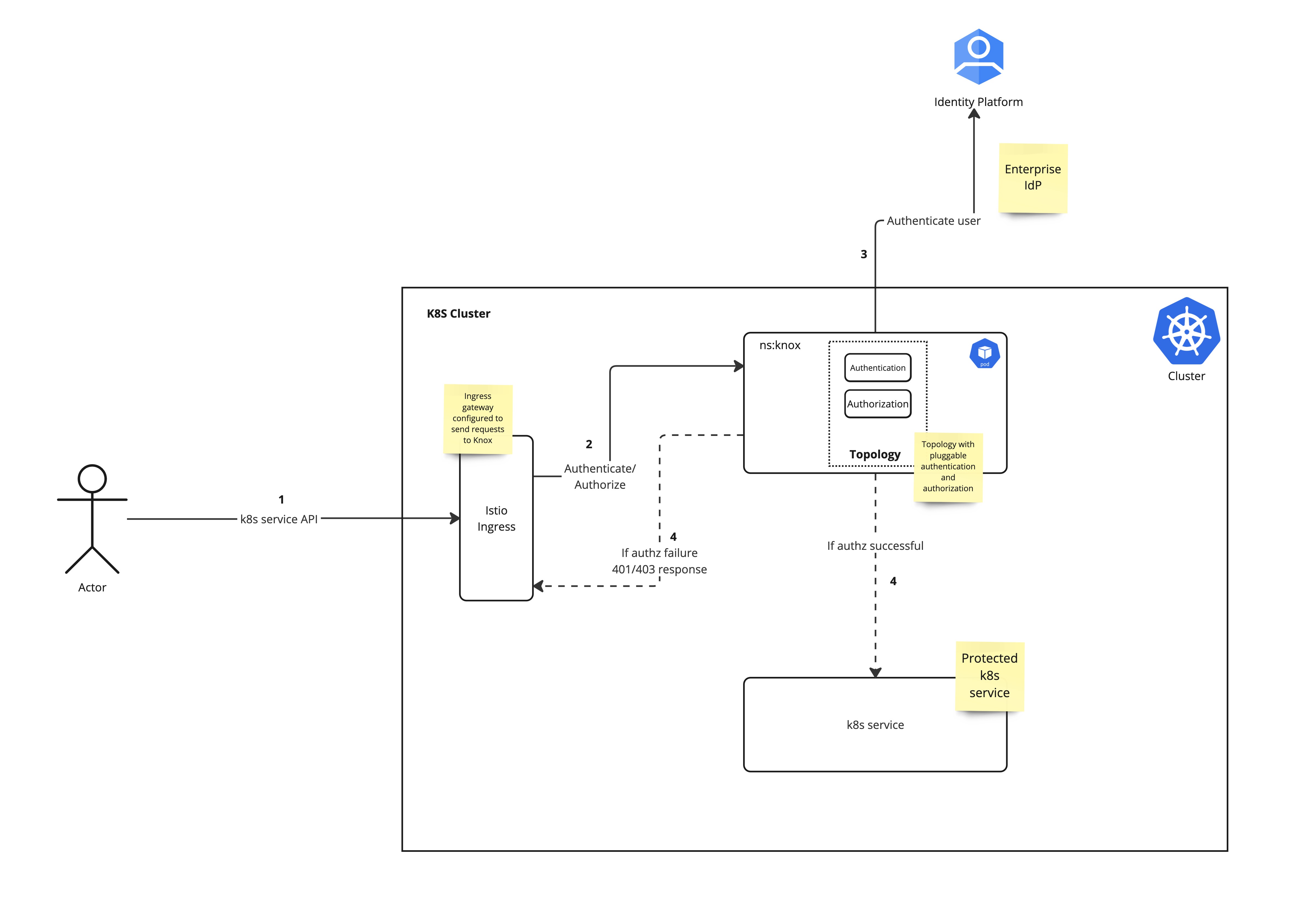
Knox can be added as an external authorizer by following istio’s External Authorizer guide. The diagram above shows a high level design.
This section talks about API that are needed in Knox to support the described design.
For Knox to work as an external authorizer, Knox needs to support Envoy ext_authz API. This is done by the endpoint `auth/api/v1/pre` as part of Knox Auth Service. Knox Auth Service will forward authenticated and authorized requests to the intended k8s service. Based on the configured options (described here) Knox will populate the forwarded request with following headers:
This REST API endpoint, when configured, populates the HTTP “Authorization” header with the Bearer Token in the forwarded request. Bearer Token is obtained from an environment variable configured in topology. The current implementation assumes that the token is not rotated as it never gets exposed to the end-user. By default, the BEARER_AUTH_TOKEN environment variable is expected to hold the Bearer token. This can be customized by configuring the `auth.bearer.token.env` service parameter to the desired value. This api is part of Knox Auth Service.
This is an authorization configuration unlike an api endpoint. This configuration will be part of a new authorization provider.
Here, authorization to the downstream services will be done based on the request path. Just like AclsAuthz, authorization will be based on username, groups or ipaddress. This will allow Knox to enforce authorization on different endpoints in k8s cluster allowing for a more fine grained service level authorization.
Example:
Path | user | group | ipaddress |
|---|---|---|---|
/foo | user | * | * |
/foo/**,/bar/** | user1 | group1 | * |
/foo/*/bar | * | * | 164.25.25.16 |
For authentication we can use the same flow used in previous usecases.
Currently, Knox does not have a way to enforce path based authorization. We will need a new acls extension (similar to AclsAuthz) to support this functionality. Following, is an example of how this might look.
<param>
       <name>path.KNOX-AUTH-SERVICE.acl</name>
       <value>/foo/* [, *|path...];username[,*|username...];group[,*|group...];ipaddr[,*|ipaddr...]</value>
</param> |
This new extension (`path` in the above example) will work with CompositeAuthz and follow the same pattern as AclsAuthz provider.
JIRA: https://issues.apache.org/jira/browse/KNOX-2998
Refer to the Implementation section for details on how to configure Knox as an external authorizer.
This usecase allows external actors to make api calls with JWT as a bearer token. Knox will authenticate the JWT token. Knox can also be configured to look up groups that the authenticated user is part of. Authorization can be performed based on these groups. This allows dynamic authorization (group membership changes are picked up dynamically by Knox by talking to IdP) as opposed to static authorization where groups and users are enforced using static authorization policies.
Knox will pass groups and principal as headers to the downstream services for more fine grained authorization.
Knox will Authenticate the JWT (issued by a trusted IdP or by Knox) based on configured JWKS url or by using the provided token verification PEM property (using authentication provider JWTProvider). If authentication is successful then authorization will be attempted (if configured) else 401 will be returned.
Hadoop Group Lookup Provider can optionally be configured to look up authenticated user’s group membership using any of the following options
Based on the principal and groups derived, authorization providers such as AclsAuthz can be used to authorize the request.
Knox Auth Service implements the Envoy ext_authz check API and needs to be configured for Knox to act as an external authorizer. Once configured, Knox Auth Service will forward all authenticated and authorized requests to the intended services. This service will also populate authenticated subject and groups in request headers for downstream services to act on in case of fine grained authorization decisions.
Topology example is included in Appendix (UC1 Topology example)
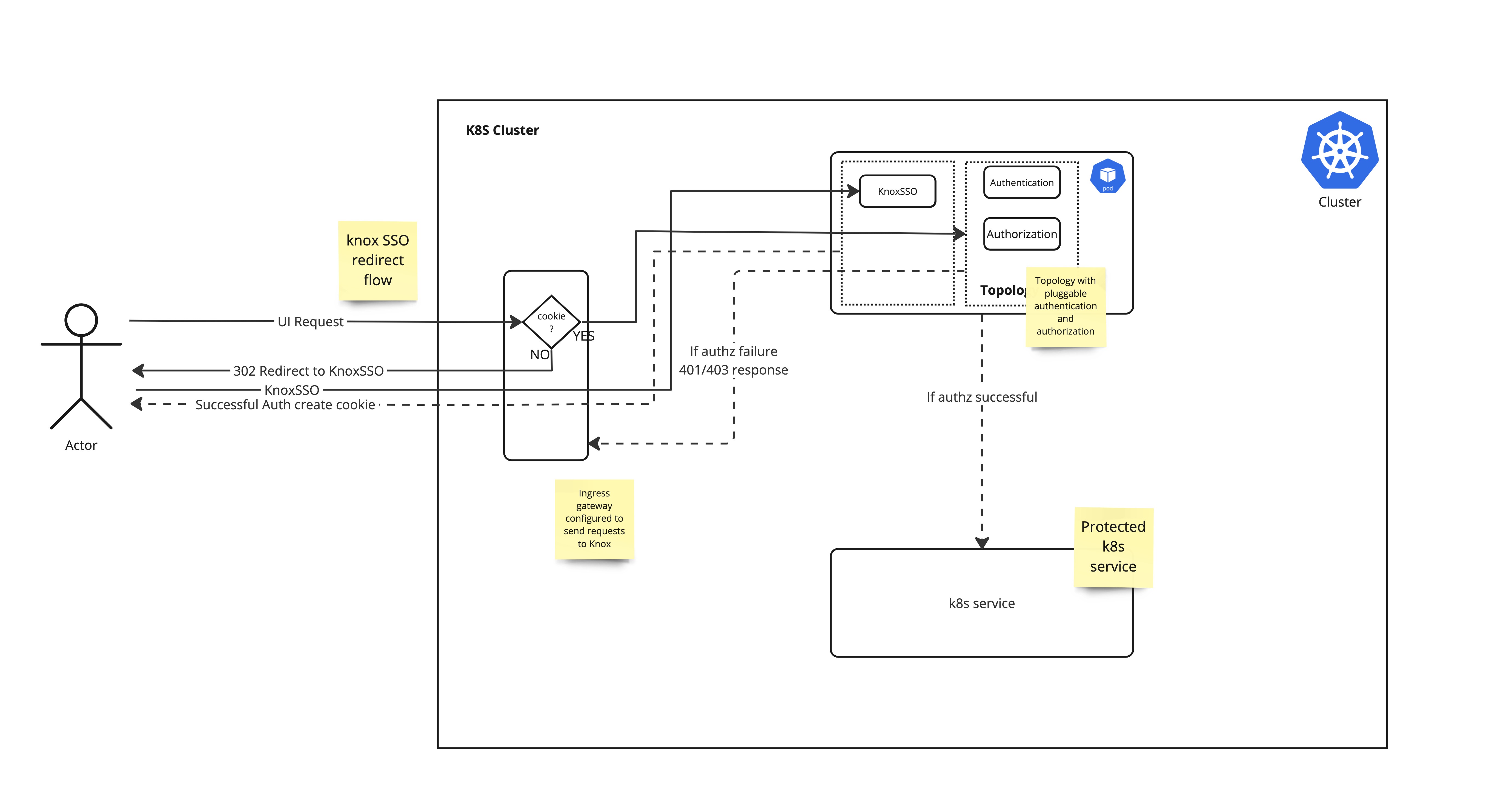
For interactive browser access to k8s services KnoxSSO can be used. To enable SSO, ingress needs to check for knox-issued cookie (hadoop-jwt) if the cookie is not present then ingress will redirect the request to Knox SSO topology. This topology asserts the user's identity by issuing a redirect to a configured SAML provider. Upon success, Knox adds a signed JWT token and redirects the browser back to the original requested endpoint.
Initial POC testing with Tornado - Demo Websockets App suggests that UIs with websocket work with Knox as an external authorizer. This is needed for applications such as Zeppelin.
gRPC protocol is not yet supported.
Apache Knox can also be used for service to service or cluster to communication.
For service to service authentication and authorization, services can rely on the headers that are added as part of initial Knox authentication. Headers include authenticated subject and groups. Services can use Istio’s Authorization Policy to check request headers for group info to enforce service level authorization.
For cluster to cluster communication Knox tokens can be used. For this to work both the clusters should have Knox configured and should either use the same signing keys or should expose JWT verification certs exposed as JWKS url to validate JWTs.
This usecase is very similar to UC1, instead of JWT for authentication userid and password will be used for authentication.
Examples of services that can currently be configured as Istio external authorizers include:
Apache Knox will be installed in the same k8s cluster under a different namespace (recommendation only, not a requirement).
Knox handles authentication and authorization by talking to an external identity provider / LDAP.
As there are too many configuration parameters a templated helm chart needs to be used for ease of deployment. This helm chart should have all the topologies needed. I am not sure if the helm chart should be part of the Knox repo or should be in the public helm repo. Keeping it alongside code will ensure that the chart will be in sync with the repo [TODO: file a jira].
We use istio external authorization model to configure Knox as an external authorizer. To achieve this we need Knox configured and running.
Knox pod needs to be labeled accordingly. The following example labels the namespace where Knox is installed (knox in this case).
kubectl label ns knox istio-injection=enabled
Next, update the istio config map to add the Knox as an external authorizer.
kubectl edit configmap istio -n istio-system
Update the config map with Knox specific settings. Things to note:
trustDomain: cluster.local
### Add following .... remove comment
extensionProviders:
- name: ext-authz-knox
envoyExtAuthzHttp:
service: knox.knox.svc.cluster.local
port: 8443
includeRequestHeadersInCheck: ["Authorization", "authorization"]
pathPrefix: /gateway/cdpauth/auth/api/v1/extauthz
#### Until here .. remove comment
meshNetworks: 'networks: {}'
kind: ConfigMap |
Add knox authorization policy on `istio-ingressgateway`
See appendix for details on Policy-knox-ext-authz.yaml
kubectl apply -f policy-knox-ext-authz.yaml
apiVersion: security.istio.io/v1beta1
kind: AuthorizationPolicy
metadata:
  name: ext-authz-knox
  namespace: istio-system
spec:
  selector:
	matchLabels:
  	app: istio-ingressgateway
  	#app: knox
  action: CUSTOM
  provider:
	# The provider name must match the extension provider defined in the mesh config.
	# You can also replace this with sample-ext-authz-http to test the other external authorizer definition.
	name: ext-authz-knox
  rules:
  # The rules specify when to trigger the external authorizer.
  - to:
	- operation:
paths: ["/*"] |
<topology>
	<gateway>
    	<provider>
        	<role>federation</role>
        	<name>JWTProvider</name>
        	<enabled>true</enabled>
        	<param>
            	<name>knox.token.use.cookie</name>
            	<value>false</value>
        	</param>
        	<param>
            	<name>jwt.expected.sigalg</name>
            	<value>RS256</value>
        	</param>
        	<param>
            	<name>knox.token.jwks.url</name>
            	<value>https://example.com/jwks</value>
        	</param>
        	<param>
            	<name>jwt.expected.audience</name>
            	<value>AUD123</value>
        	</param>
        	<param>
            	<name>jwt.expected.issuer</name>
            	<value>ISSUER123</value>
        	</param>
    	</provider>
    	<provider>
        	<role>identity-assertion</role>
        	<name>HadoopGroupProvider</name>
        	<enabled>true</enabled>
        	<param>
            	<name>CENTRAL_GROUP_CONFIG_PREFIX</name>
            	<value>gateway.group.config.</value>
        	</param>
    	</provider>
    	<provider>
        	<role>authorization</role>
        	<name>AclsAuthz</name>
        	<enabled>true</enabled>
        	<param>
            	<!-- The "preauth" prefix must match the service role below (case insensitive) -->
            	<name>knox-auth-service.acl.mode</name>
            	<value>AND</value>
        	</param>
        	<param>
            	<!-- The "preauth" prefix must match the service role below (case insensitive) -->
            	<name>knox-auth-service.acl</name>
            	<value>*;group1;*</value>
        	</param>
    	</provider>
	</gateway>
     <service>
    		<role>KNOX-AUTH-SERVICE</role>
    	<param>
        	<name>preauth.auth.header.actor.id.name</name>
        	<value>x-knox-actor-username</value>
    	</param>
    	<param>
        	<name>preauth.auth.header.actor.groups.prefix</name>
        	<value>x-knox-actor-groups</value>
    	</param>
    	<param>
        	<name>preauth.group.filter.pattern</name>
        	<value>[^\s]+</value>
    	</param>
	</service>
</topology> |