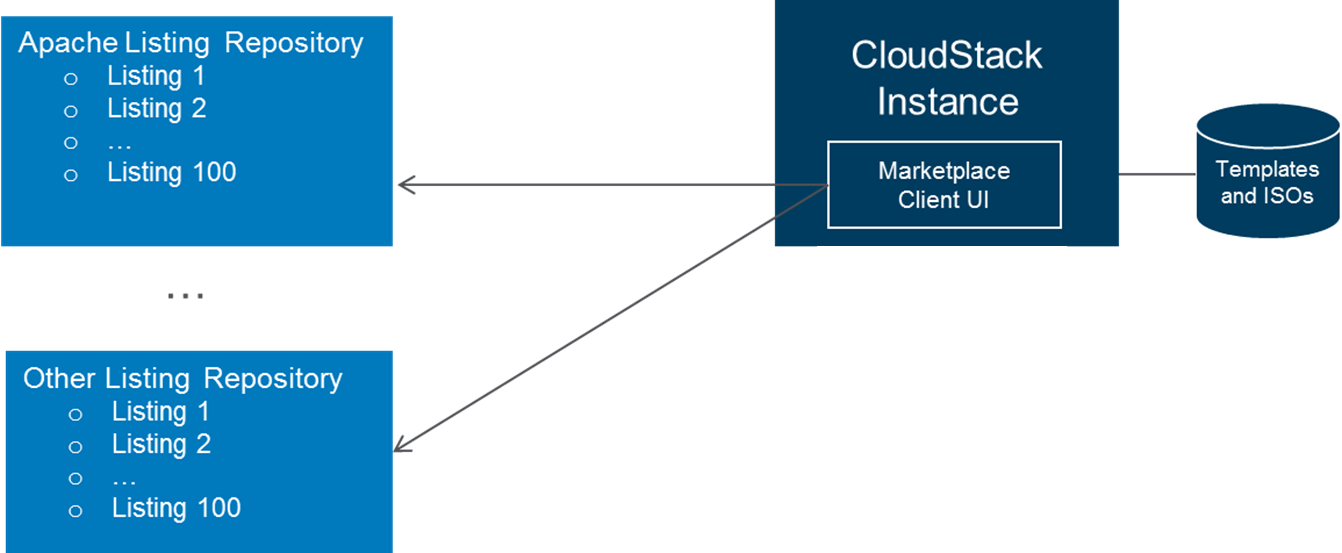
There are many ISVs, SaaS/PaaS vendors providing value-added products and services on IaaS clouds. Unlike public cloud hosting providers such as Amazon and Rackspace, CloudStack is not deployed by a single entity. There are multiple deployments of CloudStack by service providers, enterprises and individuals. It becomes a challenge for ISVs, SaaS/PaaS vendors to make their products visible and easily consumable by various CloudStack-based clouds. It also becomes a challenge for anyone who deploys CloudStack to know whose products and services work with CloudStack and how to get a hold of them.
This proposal is to introduce a new component called CloudStack Marketplace. It enables ISVs and SaaS/PaaS vendors to list their product and service offerings which can be viewed and easily consumed by any CloudStack deployments. The functionalities are broken down into two parts: version 1.0 (minimum viable product) and future enhancements.
The goal is to release version 1.0 with the subsequent release of CloudStack following v4.0. Below are core components of version 1.0:
Version 1.0 will support vendor products and services distributed in the forms of image templates, bootable ISOs, non-bootable ISOs, and SaaS/PaaS offerings.
Vendors place listing file, graphics and any associated template/ISO metadata files in the listing repository. For templates/ISOs, only metadata is stored in the listing repository, not the image. The Template/ISO metadata files should include URLs of where the images are located.
CloudStack Marketplace client is installed along with CloudStack management server. After installation, admins can see all listings in the listing repository URL. Admins can configure global settings for the Marketplace client:
For listings require admin intervention, admins can follow the instructions provided by vendors in the listing files to set up the services. Admins will then make these listings available to their users. For templates and ISOs, admins can import them into CloudStack so that when users create VMs from them, launch time is shorter.
For listings containing templates and ISOs only, users should be able to select the template or ISO, and create instance directly from the listing (or attach ISO to an existing VM). If the template or ISO is not yet imported by either the admins or the user, it will be imported first.
For SaaS and PaaS listings, the listing page should provide instructions or workflow for user to follow to use the service. Instruction/workflow could be in the form of text, URL or browser-compatible code.
The following are potential future enhancements: