Introduction
Purpose
This is a functional specification of the Inter-VLAN Routing feature of cloudStack. The feature is supported on following hypervisors (the priority is from highest to lowest)
References
Glossary
- *VPC - Virtual Private Cloud. *Container for 1-N Guest networks interconnected by Virtual Router. The Virtual Router provides S2S VPN termination.
- VR - cloudStack Virtual Router
- VpcVR - cloudStack VPC Virtual Router
- ACL - Access Control List
- VM - cloudStack User Virtual Machine
Use Cases
1) Deploy VM in 1-N network VPC. VM belonging to network N-1 can communicate with vm belonging to the network N via VR (if certain Network ACLs allowing that are applied)
2) Account1 creates VPC. Only networks of Account1 can participate in the VPC.
3) Admin creates a VPC for account1. Only networks of Account1 can participate in the VPC.
4) Admin/Users can add static routes (CIDR+Gateway) to direct traffic to the following destinations:
- VPN Gateway
- Private Gateway
5) Network ACLs - adding network rules defining allow/deny flows between Guest networks / Guest-Public networks inside the same VPC.
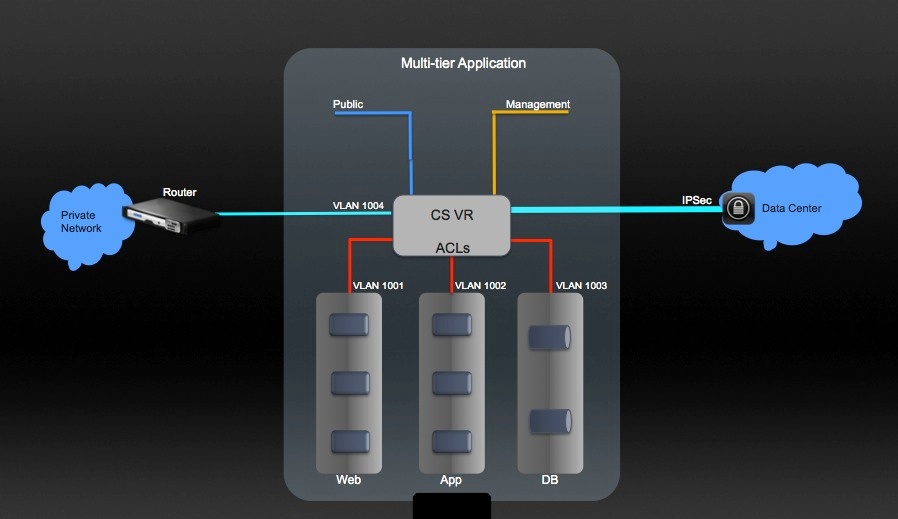
Feature Specifications
For all new API commands defined below, corresponding list* command will be provided as well.
Architecture and Design description
The document goes through architecture description based on use cases
Create VPC
New cloudStack objects:
VpcOffering
-
- name
- displayText
- supportedServices
- state (Enabled/Disabled)
- isDefault
- serviceOfferingId (offering used by Vpc Virtual Router)
Vpc
-
- name
- zoneId
- cidr
- state (Enabled/Inactive)
- vpcOfferingId
- networkDomain
- account/domainId
DB Schema changes
New tables
-
-
- vpc_offerings (id, uuid, unique_name, name, display_text, state, default, removed, created, service_offering_id)
-
-
- vpc_offering_service_map (id, vpc_offering_id, service, provider, created)
- vpc (id, uuid, name, display_text, cidr, vpc_offering_id, zone_id, state, domain_id, account_id, network_domain, created, removed)
Existing tables changes
-
-
- Added vpc_id field to networks table.
- Added vpc_id field to domain_router table;
- Added vpc_id field to user_ip_address table;
- network_id is no longer a part of domain_router table. As router can belong to more than 1 network now, to maintain 1->Many references, the new table was created:
router_network_ref (id, router_id, network_id, guest_type)
Java code changes
New client APIs
ApiName |
Request parameters |
Response parameters |
Available to regular user |
createVpcOffering |
-
- name (required)
- displayText (required)
- supportedServices (required)
|
-
- id
- name
- displayText
- created
- isDefault
- state
- Services - list of supported services
|
No |
updateVPCOffering |
-
- id (required) - the id of the offering to update
- name - new name
- displayText - new display text
- state (Enabled/Disabled) - new state. Disabled offering won't be available for the VPC creation.
|
-
- id
- name
- displayText
- created
- isDefault
- state
- Services - list of supported services
|
No |
deleteVPCOffering |
id (required) |
true/false |
No |
listVPCOfferings |
-
- id - list by id
- name - list by name
- displayText - list by display text
- isDefault
- supportedServices - list offerings by supoprted services. Example: supportedServices=Lb,Vpn
- state - list by state
|
List of VPCs, each has properties:
-
- id
- name
- displayText
- created
- isDefault
- state
- Services - list of supported services
|
Yes |
createVPC |
-
- name (required)
- displayText (required)
- zoneId (required)
- cidr (required)
- vpcOfferingId (required)
- account
- domainId
- networkDomain | Vpc response with fields:
- id (long)
- name (String)
- displayText (String)
- state (String)
- cidr (String)
- vpcOfferingId (long)
- zoneId (long)
- created (Date)
- networkDomain (String)
- restartRequired (boolean)
- services - list of services supported by vpc
- networks - list of Guest networks belonging to VPC.
Each network is represented as an API Network object
(the one you receive with listNetworks command) | Yes |
updateVPC |
-
- id (required) - the id of the VPC to update
|
- name - new name
- displayText - new display text | VPC response (see response fields in createVPC api) | Yes |
deleteVPC |
id (required) - id of the VPC to delete |
true/false |
Yes |
restartVPC |
id (required) - id of the VPC to restart |
VPC response (see response fields in createVPC api) |
Yes |
listVPCs |
|
- name - list by name
- displayText - list by display text
- cidr - list by cidr
- vpcofferingId - list by vpc offering is
- account - list by account. Must be specified with domainId
- domainId - list by domain id
- supportedServices (list) - list by supported services
- restartRequired (boolean) - if true, list all VPCs required restart. | List of VPC responses (see response fields in createVPC example) | Ye |
New classes for client APIs
-
-
- CreateVPCOfferingCmd.java
- DeleteVPCOfferingCmd.java
- ListVPCOfferingsCmd.java
- UpdateVPCOfferingCmd.java
- CreateVPCCmd.java
- DeleteVPCCmd.java
- ListVPCsCmd.java
- RestartVPCCmd.java
- UpdateVPCCmd.java
- VpcOfferingResponse.java
- VpcResponse.java
Changes to existing client APIs
-
-
- listNetworkOfferings - added new parameter "forVpc" (optional). When set to true, we list only offerings that can be used by the networks inside VPC
- listRouters - 1) added vpcId parameter to the request and response so it's possible to search for specific VPC's router. 2) Added forVpc parameter - if true, only VPC routers will be returned to the caller. Null by default, all VPC + non VPC routers being returned.
New NetworkElement - VpcVirtualRouterElement.java (extends VirtualRouterElements + implements 2 more new interfaces NetworkACLServiceProvider.java, VpcProvider.java)
. The provider
-
-
- extends functionality of regular Virtual Router minus redundant router support
- can service multiple Guest Networks
- has support for adding gateways, static routes and Network ACLs ingress/egress rules.
New objects interfaces:
-
-
- Vpc.java
- VpcOffering.java
New VO and Dao objects:
-
-
- VpcDao.java
- VpcDaoImpl.java
- VpcOfferingDao.java
- VpcOfferingDaoImpl.java
- VpcOfferingServiceMapDao.java
- VpcOfferingServiceMapDaoImpl.java
-
-
- RouterNetworkVO.java
- RouterNetworkDaoImpl.java
New services interfaces:
-
-
- VpcVirtualNetworkApplianceService.java
- VpcService.java
- NetworkACLService.java
New managers interfaces and implementation:
-
-
- VpcManager.java
- VpcManagerImpl.java
-
-
- VpcVirtualNetworkApplianceManager.java
- VpcVirtualNetworkApplianceManagerImpl.java
In vpcOffering you define which services you want to support in the VPC. When new Guest network is added to the VPC, we should check if its set of services/providers are within VPC service/providers list. As sourceNatService is required by the VPC, even when its not specified in serviceProviders list, we add it automatically (with the VpcVirtualRouter provider). Only VpcVirtualRouter can play a provider role inside the VPC.
VPC is created with Enabled state by default. VPC can be created in Advance zone only, and can't belong to more than one zone.
The VR should start when VPC is created. SourceNatIP address should be allocated along.
When VR fails to start, the VPC should fail to create (automatically mark VPC with Inactive state, and it should be cleaned up later with VPC GC thread). VPC GC thread runs every hour by default (configurable via "vpc.cleanup.interval" global config); the thread picks up all Inactive VPCs in the system and cleans them up.
During the creation of a VPC, if a failure occurs for any reason, we try to delete the VPC. If the deletion of the VPC fails for any reason, we mark the VPC’s state as “Inactive” and leave it for the VPC GC thread to pick up for deletion later (which is defined by the vpc.cleanup.interval). VPC GC thread picks up only those VPCs which are in “Inactive” state and are not removed from the setup(removed = null). The GC thread ignores the VPCs which were successfully deleted in the past (VPC state=”Inactive”, removed = timestamp).
VPC can gather Guest networks across physical networks.
Added resource limit for VPC controlling max number of VPCs account is allowed to have. As our other resource limits, can be defined per particular account/domain - using updateResourceLimit API. If not defined, then defaulted to the global config parameter max.account.vpcs (20 by default) if created per regular account, and max.project.vpcs (20 by default) if created per project.
Associate Public IP addresses to the VPC. PF/LB/StaticNat rules creation for Guest network inside VPC
In VPC setup as a result of associateIpAddress all ip addresses get allocated to VPC, not to the guest networks. The IP gets associated to the Guest network only when the first PF/LB/StaticNat rule is created for the IP/Network. IP can't be associated to more than one network at a time.
We remove the reference from IP to the guest network when the last rule for the IP gets removed. The IP address still belongs to VPC and can be picked up for any Guest network again. The IP gets released from VPC when disassociateIPAddress command is called.
DB schema changes
Existing schema changes
-
- Added vpc_id field to user_ip_address table
Java code changes
Changes to existing Client APIs:
-
-
- Added vpcId to the associateIpAddress command. Pass it always when associate ip address to vpc. The command can't be called with the networkId when the network belongs to the VPC
- Added vpcId to listPublicIpAddresses command to enable ip filtering by VPC.
- Added vpcId to ipAddress response object.
- Added networkId (optional) request parameter to the following commands:
a) enableStaticNat
b) createPortForwardingRule
c) createLoadBalancer
Before we used to extract networkId internally from the public ip address assuming that its already associated with the Guest network. Now as this is no longer the case, we have to explicitly add networkId to each of the commands above. If IP address already associated with some network, the networkId parameter will be ignored. If IP doesn't belong to any of the guest networks, the association will be performed on the fly.
-
-
- For the createPortForwarding/createLodBalancer calls openFirewall parameter (boolean) doesn't accept "true" value if the rule is created for VPC guest network. We support firewall rules only via NetworkACLs and networkACL has to be created explicitly, therefore no openFirewall is supported. If true value is passed in, the command should error out.
New agent APIs
-
-
- routing/IpAssocVpcCommand.java
- routing/SetSourceNatAnswer.java
- routing/SetSourceNatCommand.java
-
-
- routing/SetPortForwardingRulesVpcCommand.java
- routing/SetStaticRouteAnswer.java
- routing/SetStaticRouteCommand.java
SourceNatIP gets allocated to the VPC right after the VPC is created.
Public IP can be used for 1 purpose only. If it's a source nat, it can't be used for StaticNat/PF. It means that all Guest Networks that are part of VPC have to be created from the network offering having conserve_mode=0
Source NAT IP is getting released only when VPC is removed.
Limitations
-
- Once Ip address is assigned to the Guest network 1, it can't be used for PF/LB/Static nat rules for another Guest network inside the VPC.
- Public Ip address can't be used by more than one Guest network at a time inside the VPC. If you have network1/network2 and public IP1, you can create PF rule for either IP/network1 or IP/network2, but never for both.
Add Network to VPC
Only new networks can be added to VPC. Maximum number of networks per vpc is limited by vpc.max.networks Global Config parameter (3 by default, configurable)
DB schema changes:
Existing schema changes
-
-
- Add vpc_id field to networks table
Java code changes:
Client API changes:
-
-
- Added vpcId parameter to createNetwork API. Gateway/netmask become required parameters when vpcId is passed in as we have to validate the CIDR.
- Added vpcId parameter to listNetworks request and response. You can search for networks belonging to specific vpc now.
- Added forVpc parameter to listNetworks call. If set to true, only networks belonging to various VPCs will be returned to the caller
New Agent Apis:
-
-
- PlugNicAnswer.java
- PlugNicCommand.java
- SetupGuestNetworkAnswer.java
- SetupGuestNetworkCommand.java
- UnPlugNicAnswer.java
- UnPlugNicCommand.java
Backend changes:
-
- For each guest network, there is a corresponding NIC/IP in VR, VR can provide DCPH /DNS service through the IP.
- implement hot plug nic to the VR, this nic is the gateway for this guest network
- setup mac address for this nic
- setup QOS for this nic
- hot plug this nic to the VR
- implement udev script to handles nic plug event,
- add connect mark for all incoming package from this nic/dev device in PREROUTING chain of mangle table
- create a empty route table for this nic/dev, context of route table will be created by SetupGuestNetwork VR API
- add an ip rule to make sure all response packages with the connect mark use the route table created by #b
- implement SetupGuestNetwork VR API
- setup ip configuration for this nic
- fill the route table for this nic, add a route for this guest network
- setup dnsmasq for this nic/guest network, dnsmasq provides dns/dhcp service
- allow DNS/DHCP request from this nic
- set gateway in dnsmasq for this guest network
- set domain name prefix in dnsmasq for this guest network
- set DNS in dnsmasq for this guest network
- start dnsmasq for this this quest network
Network inside the VPC can be upgraded to the new network offering. The new network offering should fall under the same restrictions we apply when create a new network inside the VPC (Source nat service is enabled, only VpcVirtualRouter is supported as provider, etc)
Only Guest Isolated networks with Source Nat Service can be added to VPC. When no vpcId is provided in createNetwork command, the network is created outside of the VPC, and can never be a part of any VPC. It will act as a regular network.
Guest Isolated networks should have unique CIDR in VPC.
Guest network's CIDR should be within the VPC CIDR.
As VR is created per VPC, not per guest network, so never start the VR as a part of network implement when the network is a part of VPC. Network should never drive the VR behavior either.
The network can belong to one VPC only.
Network offerings the network is being deployed from, should have
-- VPCVirtualRouter as a the only one provider for all the services defined.
-- Redundant router = false
-- SourceNat service enabled
-- Guest type = Isolated
-- conserveMode = false
New Agent API command - PlugNic. Would plug Guest network nic to the VR.
Remove Network from VPC
Happens only on network removal (deleteNetwork API). Network can't be revoked from VPC and left around in the cloudStack.
Java code changes
-
- When network is being removed, only resources of the network are expunged (pf/lb/staticNat rules and ip a addresses associated to the VPC).
- Cleanup all Network ACLs (see more details in Network ACL section below) referencing the network-to-be removed - network cleanup thread is changed.
Backend changes
-
-
- implement DestroyGuestNetwork VR API
- remove ip configuration for this nic
- empty route table for this nic
- remove all setup for this nic in dnamasq, stop dnsmasq service for this nic
- implement udev script to handles nic unplug event
- remove the ip rule for this nic
- remove route table for this nic
- remove the connect mark for this nic
- it is a good place to clean up all setup in VR for this nic or IPs associated with this nic.
- implement hot unplug nic from the VR.
Delete VPC
The VPC can be removed 2 different ways:
-
-
- with new user API command - deleteVpc (vpc_id is the only one required request parameter)
- a part of domain removal.
- a part of account removal.
Java code changes
-
-
- When VPC is being removed, all VPC resources - networks, VR, Network ACLs, static routes - should be removed along. All public ip addresses associated to the VPC should be released.
- Implement periodic vpc cleanup thread. When vpc fails to be removed originally, it should be marked with Inactive state (it means it can't be used for new deployments and only deleteVPC operation is allowed on it), all Inactive VPCs should be picked up by the cleanup thread.
Private Gateway
VPC can have following gateways (one of a type max):
-
-
- Public (Internet)
- Private
- VPN
Public gateway is being added on the VR once the VR is created for VPC, and we don't expose it to the end user. You can't list it, you can't create any static routes for this type of the gateway.
For VPN gateway see S2S VPN functional spec.
So this section will cover only private gateway.
For each private gateway we create:
-
-
- new entry in cloud.networks table (if it's a Private gateway, Public network already exists) - created using special system hidden network offerings w/o any services. The network is assigned to the VPC owner; the record has a ref to cloud.vpc table (vpc_id).
- new entry in cloud.vpc_gateways table
- new entry in cloud.nics table
Private network has 1:1 relationship with gateway/nics tables.
Private gateway can be added by the ROOT admin only.
No gateways with duplicated vlan/ip are allowed in the same Data Center.
DB Schema changes
New tables
-
-
- New table - cloud.gateway (id, vpc_id, type, ip_address, netmask, gateway, vlan, state). Each gateway entry should be linked with the particular nic
Changes to existing tables
-
-
- Added 2 new system default network offerings - for VPN and Private networks.
Java code changes
New client APIs
ApiName |
Request parameters |
Response parameters |
Available to regular user |
createPrivateGateway |
-
- vpcId (required),
- gateway(required),
- netmask(required),
- ipaddress(required),
- vlan(required)
- physicalNetworkId
|
PrivateGateawayResponse
-
- id
- gateway
- netmask
- ipaddress
- zoneId
- zoneName
- vlan
- vpcId
- physicalNetworkId
- state (Creating/Ready/Deleting)
|
No |
deletePrivateGateway |
id (required) - id of the Private gateway to delete |
true/false |
No |
listPrivateGateways |
|
-
- list ofPrivateGatewayResponseobjects
|
Yes |
New classes for Client APIs
-
-
- CreatePrivateGatewayCmd.java
- CreatePrivateNetworkCmd.java
- DeletePrivateGatewayCmd.java
- ListPrivateGatewaysCmd.java
- PrivateGatewayResponse.java
When createPrivateGateway command is executed, we create
-
-
- Private network (traffic type Guest)
- Entry in the gateway table
- Add new Nic to the Virtual Router corresponding to the private network
Adding Private gateway to the VPC VR consists of 2 parts: 1) Plug the nic 2) Setup source nat for for the nic's ip address (SetSourceNatCommand)
When remove the Private gateway: 1) Unset source nat (SetSourceNat with add=false) 2) Unplug the nic
New object Interfaces and Implementation:
-
-
- VpcGateway.java
- PrivateGateway.java
- PrivateGatewayProfile.java
- PrivateIp.java
- PrivateIpAddress.java
New VO and Dao objects:
- PrivateIpVO.java
- VpcGatewayVO.java
- PrivateIpDao.java
- PrivateIpDaoImpl.java
- VpcGatewayDao.java
- VpcGatewayDaoImpl.java
New Managers interfaces and implementation:
- New guru for Private ip allocation - PrivateNetworkGuru.java
Create Static Route
User can add static route (CIDR+Gateway) to re-direct traffic. Static route can be added for Private gateway which is in Ready state only.
DB Schema changes
New tables
-
-
- cloud.static_route (id, vpc_id, gateway_id, cidr, state)
Java code changes
New client Apis
ApiName |
Request parameters |
Response parameters |
Available to regular user |
createStaticRoute |
-
- gatewayId (required) - the id of the Private or VPN
gateway the static route is being created for
- cidr (required) - Static route target CIDR
|
StaticRoute response
-
- id
- gatewayId
- vpcId
- cidr
- state
|
Yes |
deleteStaticRoute |
-
- id (required) - id of the static route to delete
|
|
Yes |
listStaticRoutes |
|
-
- list ofStaticRouteResponses
|
Yes |
New Classes for client APIs
- #* #** CreateStaticRouteCmd.java
- #** DeleteStaticRouteCmd.java
- ListStaticRoutesCmd.java
- StaticRouteResponse.java
New classes for agent APIs
-
-
- routing/SetNetworkACLAnswer.java
- routing/SetNetworkACLCommand.java
- to/NetworkACLTO.java
New objects interfaces
-
-
- StaticRoute.java
- StaticRouteProfile.java
New VO and Dao objects:
-
-
- StaticRouteVO.java
- StaticRouteDao.java
- StaticRouteDaoImpl.java
Backend changes:
-
-
- VR tracks all connections, except for default route table, VR have separate route table for each NIC device to make sure the response package will go through the same NIC as request package.
- will add a route in default route table in VR.
Limitations
-
-
- No static routes support for Public gateway. Static routes can be added for Private and VPN gateways only.
- Static Route cidr should be outside of CIDR defined for VPC (used by guest networks inside the VPC only) and outside of link local CIDR
Create Network ACL.
Network ACL will be used to allow incoming (ingress) or outgoing (egress) traffic for VPC network(s).
By default, all incoming traffic to guest networks is blocked. To open the ports, new network ACL has to be created. Network ACLs can be created for the Guest networks only when NetworkACL service is supported.
all outgoing traffic from guest networks is allowed, once you add an ACL rule for outgoing traffic, then only outgoing traffic specified in this ACL rule is allowed, the rest is blocked, allowing outgoing traffic only to this guest network itself means block all outgoing traffic.
DB Schema changes:
ACLs are stored in firewall_rules table.
Changes to firewall_rules table:
-
-
- ip_address_id can be NULL now, only when the rule type is NetworkACL
- new field - traffic_type (Ingress/Egress)
Java code changes
New Client APIs
ApiName |
Request parameters |
Response parameters |
Available to regular user |
createNetworkACL |
-
- networkId (required) - the network to apply the rule for. The network should belong to VPC (have not nul Vpc id)
- trafficType (optional) - can be ingress/egress (defaulted to ingress if not specified).
- cidrlist (optional) - List of the coma separated CIDRs for the rule. If not specified, defaulted to 0.0.0.0/0
- startPort (required)
- endPort (optional, defaulted to startPort if not specified)
- protocol (required). TCP/UDP/ICMP/ANY protocol types are supported.
- icmpType (optional) - type of the icmp message being sent
- icmpCode (optional) - error code for this icmp message
|
NetworkACLResponse
-
- id
- protocol
- startPort
- endPort
- trafficType
- state
- cidr
- icmpType
- icmpCode
|
Yes |
deleteNetworkACL |
-
- id (required) - id of the Network ACL to delete
|
|
Yes |
listNetworkACLs |
-
- networkId
- id
- trafficType (Ingress or Egress)
|
-
- list ofNetworkACLResponseobjects
|
Yes |
New classes for client APIs
- DeleteNetworkACLCmd.java
- CreateNetworkACLCmd.java
- ListNetworkACLsCmd.java
- NetworkACLResponse.java
New Managers interfaces and implementation:
- NetworkACLManager.java
- NetworkACLManagerImpl.java
As we support firewall rules via NetworkACLs for the VPC, regular createFirewallRule/deleteFirewallRule/listFirewallRule commands will be blocked; they can be executed only against non-vpc networks.
New firewall rule type - NetworkACL. New network service - NetworkACL
New service interface for provider - NetworkACLServiceProvider. Implemented only by VpcVirtualRouterElement.
Network ACLs are managed in NetworkACLManagerImpl.
Backend changes
- #* #** There is a NIC/IP for a guest network in VR.
- #** when create ACK for a guest network, CloudStack create two chains in filter table,
-
- ACL_INBOUND_$IP
- ACL_OUTBOUND_$IP
- CloudStack link these two chain into FORWARDING in filter table.
- iptables -A FORWARD -o $NIC -d $guestnetwork -j ACL_INBOUND_$IP
- iptables -A FORWARD -i $NIC -s $guestnetwork -j ACL_OUTBOUND_$IP
- make sure all inbound traffic to this guest network go through ACL_INBOUND_$IP chain
- make sure all outbound traffic from this guest network go through ACL_OUTBOUND_$IP chain
- by fault these two chains will drop all packages.
- add / remove rules in these two chains according to command sent from CloudStack.
- these two chains will be destroyed when this guest networ is destroyed.
Performance considerations
As Virtual Router is going to serve to multiple Guest networks, and there is no redundant router support, we should speed up things by using bigger Service Offering.
Logging and Debugging
All logs will go to vmops.log (dev setup) and management-server.log (RPM install setup)
Current limitations
-
- Implemented in Advance zone only
- Only Isolated networks with the Source Nat service can be a part of VPC.
- Only networks with conserve_mode=0 can participate in VPC as we can't use the public IP for more than one purpose inside the VPC.
- No redundant router support.
- No networks with duplicated subnets are allowed in the same VPC
- Network can be a part of one VPC only
- Number of nics is limited by the hypervisor
Edison/Frank, please add limitations for VmWare/KVM/OVM here.
- Vm can belong to only one VPC network
- Public Ip address can't be used by more than one Guest network at a timeinside the VPC. If you have network1/network2 and public IP1, you cancreate PF rule for either IP/network1 or IP/network2, but never for both.
- All networks inside the VPC should belong to the same account
- Only VPCVirtualRouter is supported as a provider for all VPC services.
- LB service can be supported only by one tier (network) inside the VPC
- Firewall rules support through Network ACLs only (no support for createFirewallRule/deleteFirewallRule/listFirewallRules commands)
- No remote access VPN support in VPC networks
- No public gateway exposure to the end user, therefore no Static Routes support for the public gateway
- Private gateway can be created by the ROOT admin only for the end user's VPC
- No routes blacklist (he can do firewall rules on his side of physical network devices)
UI flow
TBD