Cisco Virtual Network Management Center (VNMC) provides centralized multidevice and policy management for Cisco network virtual services.
When combined with the Cisco Nexus 1000V Switch, ASA 1000V Cloud Firewall, or the Cisco Virtual Security Gateway (VSG), it enables:
- CloudStack integration through XML APIs
- Support for ASA 1000v edge firewalls to enable:
- Adding and configuring edge firewalls
- Creating and applying edge security profiles that contain access control list (ACL) policy sets (ingress and egress), connection timeout, Network Address Translation (NAT) policy sets, TCP intercept, VPN interface policy sets, and more
- Site-to-site IPsec VPNs
Currently the 1000v series and the VSG are supported on VMWare hypervisors.
This would be the deployment model with CloudStack: 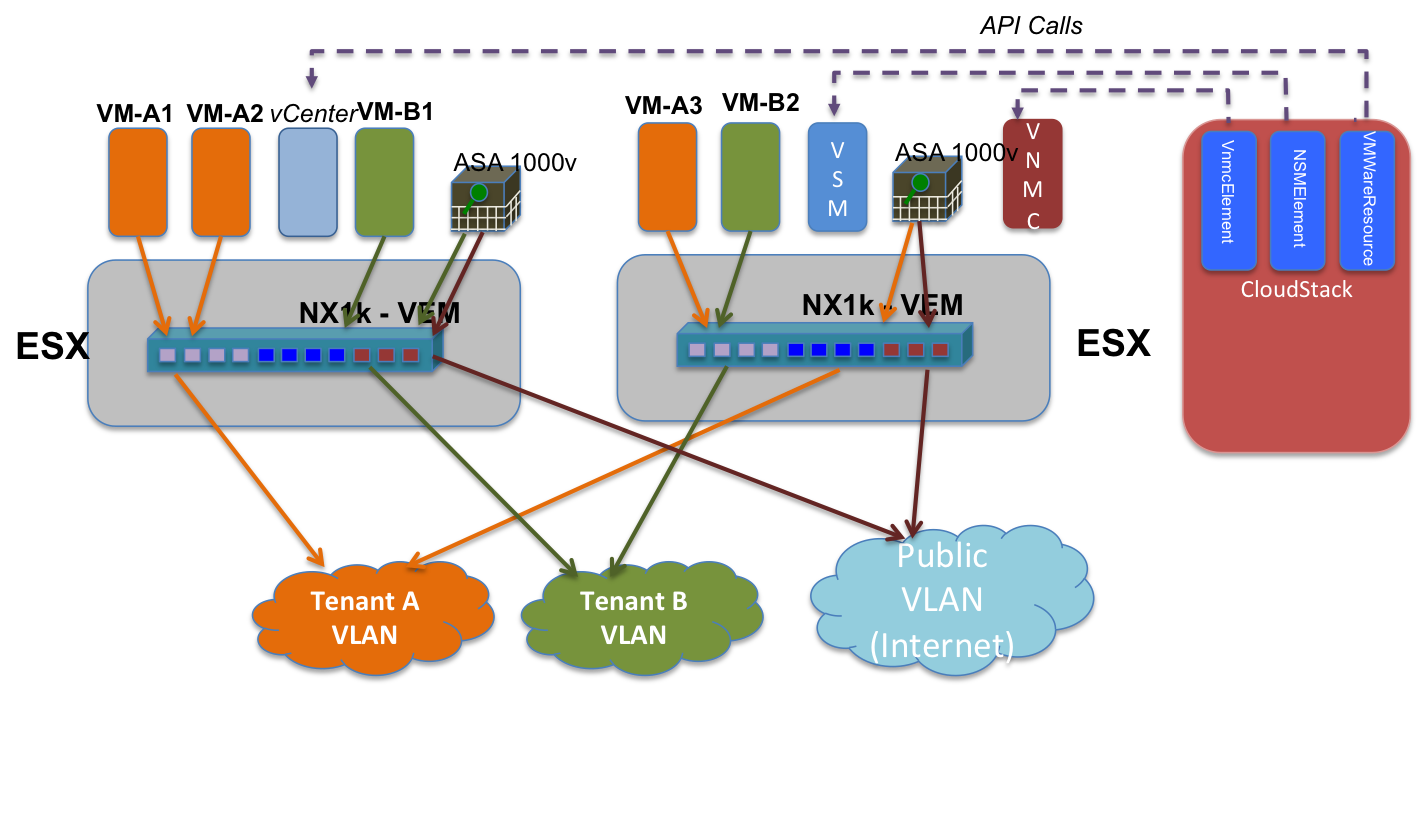
Use Cases / Flow
- Cloud operator adds VNMC as a network element using admin API addCiscoVnmcController, specifying username and password
- Cloud operator creates isolated guest network offering with source nat using ASA1000v as the service provider for firewall, source nat, port forwarding. CloudStack system vm is used for DHCP, userdata and metadata, password server
- Cloud operator creates VPC network offering with source nat using ASA1000v as the service provider for firewall, source nat, port forwarding, ACL and routing. CloudStack system vm is used for DHCP, userdata and metadata, password server.
- Network offerings as above, but using VXLAN as the isolation technology
- Network offerings as above, with LB added, and using Cloudstack System VM as LB provider
- Network offerings as above, with LB added, and using Netscaler VPX as LB provider
VNMC interaction
The VNMC controller is a VMWare appliance that presents an XML API to control the Cisco virtual appliance porfolio.
The GUI is a Flash-based web application that utilizes the XML API to interact with the controller. By enabling the flash debugger (see //s.apache.org/v5) we can capture the precise XML commands required by CloudStack.
Design details