Status
|
Motivation
Apache Airflow is primarily designed for time-based and dependency-based scheduling of workflows. However, modern data architectures often require near real-time processing and the ability to react to events from various sources, such as message queues. This proposal aims to introduce native event-driven capabilities to Airflow, allowing users to create workflows that can be triggered by external events, thus enabling more responsive data pipelines.
Proposal
Note. In this AIP we refer “asset” as a dataset in Airflow 2.10. We use “asset” because “dataset” is renamed “asset” in AIP 73.
Today in Airflow, you can build event-based workflows using either external task sensor, sensors/deferrable operators, REST API, and dataset (to be renamed as Assets). Scheduling using assets has recently gained popularity given the efficient execution, monitoring support and API capabilities. An Airflow asset is a logical grouping of data. Upstream producer tasks can update assets, and asset updates contribute to scheduling downstream consumer DAGs.
Example:
from airflow.datasets import Asset
with DAG(...):
    MyOperator(
        # this task updates example.csv
        outlets=[Asset("s3://dataset-bucket/example.csv")],
        ...,
    )
with DAG(
    # this DAG should be run when example.csv is updated
    schedule=[Asset("s3://dataset-bucket/example.csv")],
    ...,
):
... |
In this example, the first DAG sends an event (or updates) the asset, and the second DAG is scheduled upon asset update.
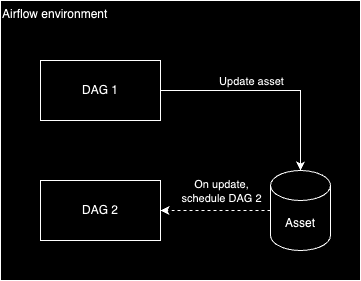
However, as illustrated in the example above, updating the asset is the user's responsibility. In the example above the user uses a DAG but other techniques such as using the “Create dataset event” Rest API are available to the user to update an asset. All these techniques are great but require some work from the user to set-up a pipeline in order to update the asset.
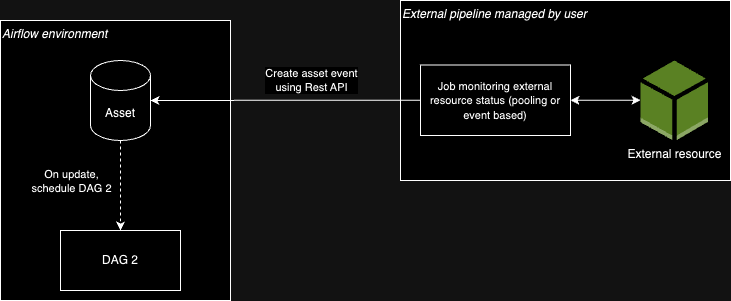
Ideally, there should be an end to end solution in Airflow to trigger DAGs based on external event such as:
- A message has been pushed in a message queue such as Google Pubsub, Amazon SQS, Azure Message Bus, Apache Kafka, ...
- A file has been created in a storage service
- A database has been updated
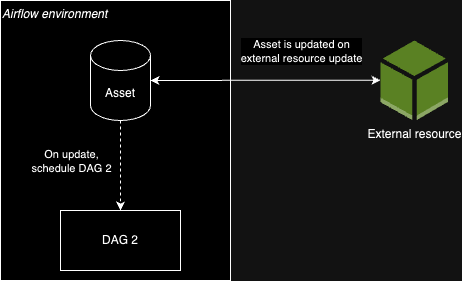
Design
The goal is to build a solution in Airflow to automatically update Assets based on external events. This scheduling can be categorized into two categories:
- Poll based event-driven scheduling
- Push based event-driven scheduling
Only the poll based event-driven scheduling is considered as part of this AIP. Some investigation has been done on the push based event-driven scheduling without leading to a satisfying solution. Therefore, it has been decided to focus on the poll based approach while continuing investigating on the push based event-driven scheduling. If it is decided later to move on with a push based event-driven scheduling (this proposal or another), it will be part of another AIP.
Poll based event-driven scheduling
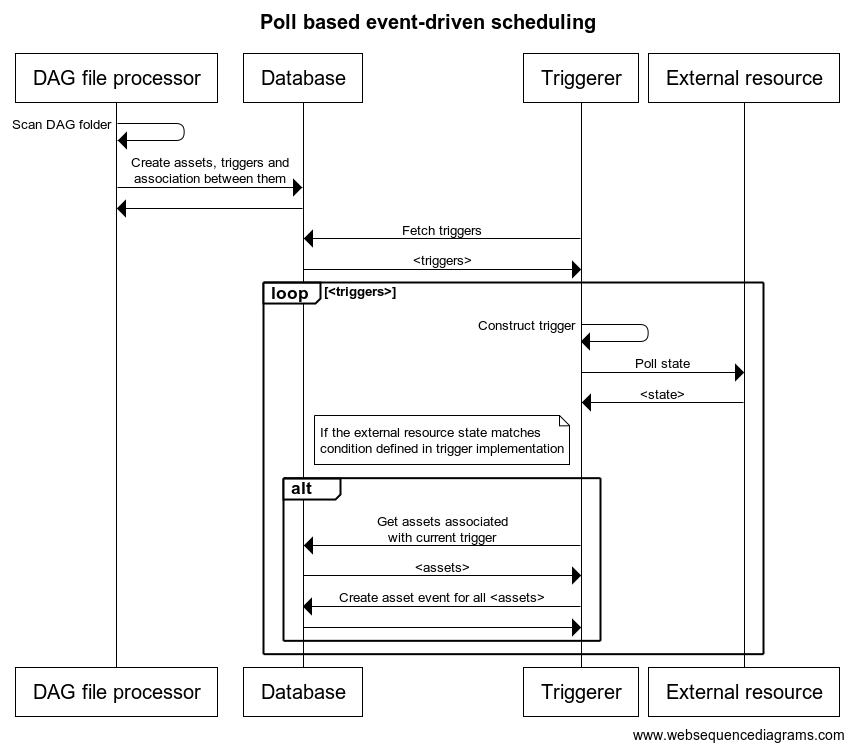
Airflow constantly monitors the state of an external resource and updates the asset whenever the external resource reaches a given state (if it does reach it). To achieve this, the plan is to leverage Airflow Triggers. Triggers are small, asynchronous pieces of Python code whose job is to poll an external resource state. Today, triggers are used exclusively for deferrable operators but the goal here would be to use them as well to update assets based on external conditions.
Today you could achieve this by using continuous scheduling and having one deferrable operator in the DAG you are continuously scheduling. he purpose of this solution is to achieve the same results without having one DAG that is continuously scheduled to run the deferrable operator.
DAG author experience
Below is an example of DAG triggered when a new message is pushed to an Amazon SQS queue.
trigger = SqsSensorTrigger(sqs_queue="<my_queue>")
asset = Asset("<my_queue>", watchers=[trigger])

with DAG(
    dag_id=DAG_ID,
    schedule=asset,
    start_date=datetime(2021, 1, 1),
    tags=["example"],
    catchup=False,
):
    empty_task = EmptyOperator(task_id="empty_task")

chain(empty_task) |
Sequence
Below is a simplified version of a sequence diagram describing what is going on in Airflow when DAGs such as above are present in an Airflow environment.
Avoid infinite scheduling
Current triggers implementation is perfectly suited for sensors and deferrable operators but is not compatible with DAG scheduling. The reason is most of the triggers are waiting for an external resource to reach a given state. Examples:
- Wait for a file to exist in a storage service
- Wait for a job to be in a success state
- Wait for a row to be present in a database
Scheduling upon these conditions would lead to infinite scheduling because once the condition is reached, it is very likely it will remain for quite some time. Example: if a DAG is scheduled when a specific job state reaches a success state, when it does, the job state will remain in this state. Therefore, scheduling a DAG using that condition will lead to infinite scheduling when the job reaches this state. Another example, S3KeyTrigger checks if a given file is present in a S3 bucket. Once this specific file is created in the S3 bucket, S3KeyTrigger will always exit successfully since the condition “is the file X present in the bucket Y” is True. In this case, the consequence would be to keep triggering any DAG scheduled based on that trigger every-time the triggerer execute the triggers (this interval is usually configurable in the trigger implementation).
To avoid this infinite scheduling loop, we want to only fire events if we have not done so since the last event update was received. For example, if a S3 file is updated, and we haven’t fired an event since this file updated time, then we trigger the event. As a result, we want to reuse the concept of triggers but we do not want to use the current implementation of triggers specific to deferrable operators and sensors. Therefore, there are two options:
- One trigger implementation should be specific to either deferrable operators/sensors or scheduling
- Introduce a new method in
BaseTrigger(e.g.schedule) similar to the existing methodrun.schedulewould be used to check scheduling decisions andrunwould be used to check defer decisions
We should mention that some triggers are compatible with both use cases. As an example, SqsSensorTrigger can be used to defer a DAG but also to schedule a DAG since it is waiting for new message in a queue, poll it when there is one and then delete it. For this reason, among the two options listed above, we might want to chose the first one.
Some other parameters could also be added to add control for the DAG author to configure how often a DAG can be scheduled based on these events. See more in the section “Additional considerations (future work)”.
Out of scope
Items below are out of scope of this AIP. However, I decided to keep them in this document because they might be useful to initiate a conversation if someone decides to work on one of these items once this AIP is completed.
Additional considerations (future work)
Airflow is not designed to handle 100s of event per second, and provide below optimization would allow users to tune the behaviour while keeping Airflow scheduling performant
- Configurable trigger behaviour: Allow DAG authors to specify whether they want the DAG to be triggered:
- For every event
- At a specified interval, processing batches of events
- When a certain number of events have accumulated
- Batch processing: Support batching of events
Some other features could also be built based upon this AIP. Example of such features: archive and replay of events. However, this is not part of the AIP and considered as a follow-up item.
Push based event-driven scheduling
As opposed to the poll based event scheduling, the push based event scheduling consists of an event sent from an external system to Airflow whenever this external system detects a change/activity. Examples:
- A user signed up to an external system
- A remote job has been successfully executed
- A file has been created in a storage service
- An OpenLineage event has been emitted
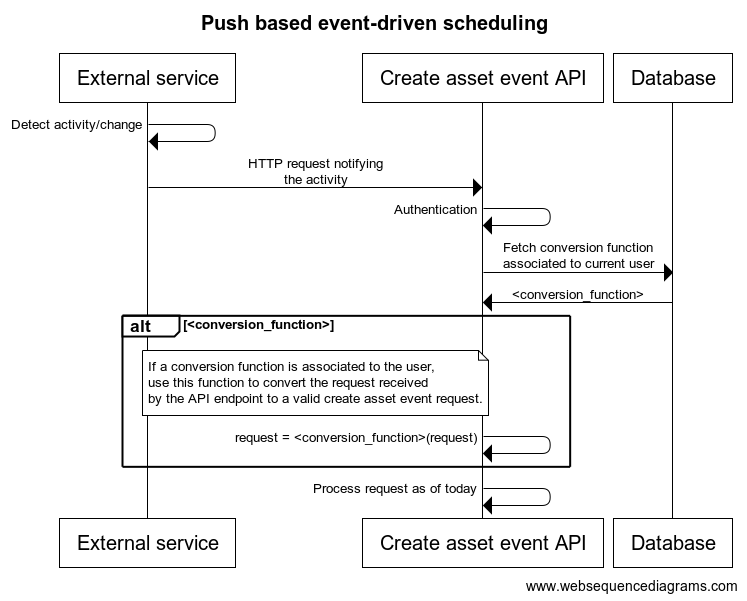
These events are fired by the external service (AWS, Google, ...) to notify such event. The external service needs to be configured to send such event/notification to the create asset event API endpoint of the Airflow environment. On Airflow side, this API endpoint needs to handle unknown incoming requests and convert it to valid create asset event API request.
To achieve this, here are the main changes we need to introduce in Airflow:
- Add an optional mapping mechanism in the create asset event API endpoint between the user (credentials used to call the create asset event API) and a method to convert the request coming from the external service to a valid create asset event API request. Example:
- Step 1. As a user I configure in my cloud provider to send an event whenever a remote job has been successfully executed. As part of this configuration, I specify the create asset event API endpoint of my Airflow environment as HTTP target. I also configure the event to use specific credentials I created in Airflow for this event (e.g. remote_job_success_user). When this step is done, whenever my remote job is successfully executed, my cloud provider will send an HTTP request to create asset event API endpoint of my Airflow environment.
- Step 2. As a user I associate a function to the user I used to call my Airflow environment (e.g. remote_job_success_user). This function would be responsible of converting the HTTP request sent by my cloud provider when a remote job is successfully executed to a valid create asset event API request. This function can be written by the user themself or use some of the functions available in providers (these functions do not exist today in Airflow providers). How this association between a user and a function will be done by the user will be determined during the implementation. We can think of using Airflow CLI to help the user make such association but this decision will be delayed to the implementation.
Note. The user might want to handle this conversion themself by using Lambda or any other computing layer between the event and the Airflow environment. This is possible today and will remain possible.
Sequence
Below is a simplified version of sequence diagram describing what is going on in Airflow when DAGs such as above is present in an Airflow environment.
Considerations
What problem does it solve?
- Lack of native support for event-driven workflows in Airflow
- Difficulty in integrating Airflow with real-time data sources and message queues
- Inability to trigger DAGs based on external events efficiently
Which users are affected by the change?
Only users who want to use this new feature. This change does not break any existing feature.
How are users affected by the change? (e.g. DB upgrade required?)
DB upgrade is required since some modifications to the DB is needed. These changes are only creation of new DB tables:
- New table to record association between assets and triggers
- New table to record event receivers
- New table to record association between event receivers and assets
What is the level of migration effort (manual and automated) needed for the users to adapt to the breaking changes? (especially in context of Airflow 3)
The migration effort is relatively low for existing workflows, as this proposal introduces new features without breaking existing functionality. However:
- DAG authors who want to leverage event-driven capabilities will need to modify their DAGs to use the new classes and related concepts
What defines this AIP as "done"?
Poll based scheduling as described in this AIP handled in Airflow.