Cisco Virtual Network Management Center (VNMC) provides centralized multidevice and policy management for Cisco network virtual services.
When combined with the Cisco Nexus 1000V Switch, ASA 1000V Cloud Firewall, or the Cisco Virtual Security Gateway (VSG), it enables:
- CloudStack integration through XML APIs
- Support for ASA 1000v edge firewalls to enable:
- Adding and configuring edge firewalls
- Creating and applying edge security profiles that contain access control list (ACL) policy sets (ingress and egress), connection timeout, Network Address Translation (NAT) policy sets, TCP intercept, VPN interface policy sets, and more
- Site-to-site IPsec VPNs
Currently the 1000v series and the VSG are supported on VMWare hypervisors.
This would be the deployment model with CloudStack: 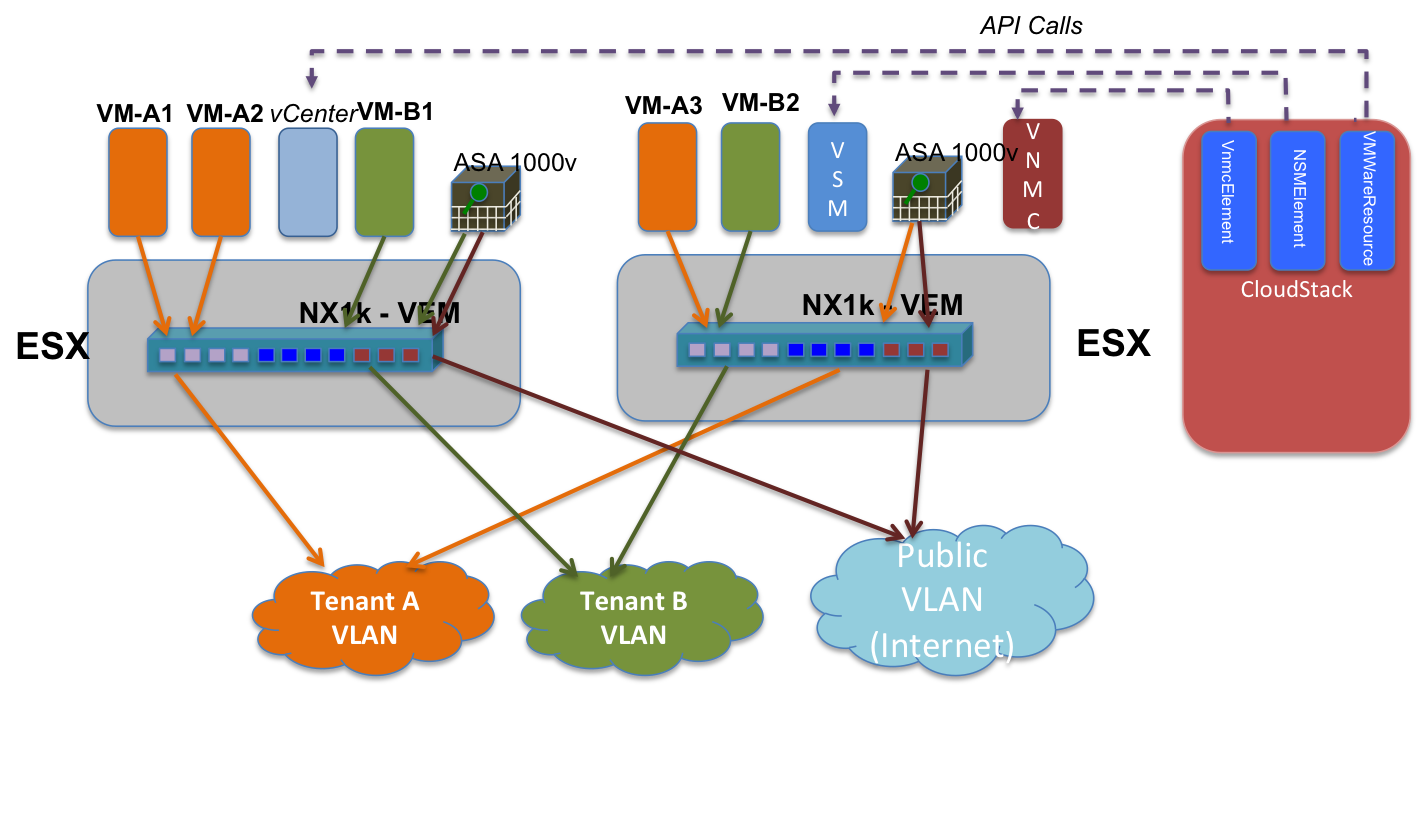
Use Cases / Flow
For 4.2
- Cloud operator adds VNMC as a network element using admin API addCiscoVnmcResource, specifying username and password
- Cloud operator adds ASA1000v appliances (one per guest network) using admin API addCiscoAsa1000vResource.
- Cloud operator creates isolated guest network offering with source nat using ASA1000v as the service provider for firewall, source nat, port forwarding and static NAT. CloudStack system vm is used for DHCP, userdata and metadata, password server
Beyond 4.2
- Cloud operator creates VPC network offering with source nat using ASA1000v as the service provider for firewall, source nat, port forwarding, ACL and routing. CloudStack system vm is used for DHCP, userdata and metadata, password server.
- Network offerings as above, with LB added, and using Cloudstack System VM as LB provider
- Network offerings as above, with LB added, and using Netscaler VPX as LB provider
VNMC interaction
The VNMC controller is a VMWare appliance that presents an XML API to control the Cisco virtual appliance porfolio.
The GUI is a Flash-based web application that utilizes the XML API to interact with the controller. By enabling the flash debugger (see http://s.apache.org/v5) we can capture the precise XML commands required by CloudStack.
Design details
CiscoVnmcResource
The resource translates abstract network configuration commands such as SetStaticNatRule into concrete XML api calls to the VNMC controller
CiscoVnmcElement
The network element participates in L2 orchestration by extending NetworkElement. When a network is created, the element needs to
- create a tenant and tenant vdc in VNMC if not already created
- create the following policies / objects if not already created inside the tenant VDC
- Edge static route policy
- Edge static route
- Source NAT pool
- Edge security profile to deny all incoming traffic
- Create an edge firewall
- Associate an unused ASA1000v appliance to the edge firewall
The Cisco ASA1000v can function as a DHCP server, however it cannot guarantee a specific ip<->mac address mapping. Therefore the CloudStack systemvm will be used for this purpose.
The CiscoVnmcElement also implement the IpDeployer and various service provider interfaces to satisfy the requirements of the network offering.
Additionally the following are also provided:
- Allows cloud operator to provision the VNMC controller into CloudStack
- Allows cloud operator to register ASA1000v appliances into CloudStack
Nexus 1000v + VNMC + ASA 1000v deployment model
Prereqs
- Nexus 1000v appliance is setup and configured in CS (when adding Vmware cluster)
- VNMC appliance is configured and added to CS (separate lifecycle commands will be provided). A single VNMC is sufficient for managing the ASA1000v appliances
- ASA1000v appliances are setup/configured outside of CS and then added to CS (separate lifecycle commands will be provided)
Deployment model
In current CS there is a 1:1 mapping between Vmware cluster and n1kv switch. This model will be used by asa1kv appliances as well as they also need n1kv. There can be multiple asa1kv appliances associated with the same Vmware cluster (and corresponding n1kv).
There will be a 1:1 mapping between guest network and asa1kv appliance. This guest network can span multiple Vmware clusters (multiple n1kv switches). (Note: The scenario where a guest network spans multiple Vmware clusters with n1kv is not a tested scenario currently.)
HV limitation
Since asa1kv works with n1kv and this is available only for Vmware HV, guest networks with asa1kv will only be supported on Vmware only.
VNMC setup (external to CS)
VNMC appliance needs to be setup externally and then registered with CS using admin API.
ASA setup (external to CS)
ASA1000v appliance needs ot be setup externally and then registered with CS using admin API. Typically admin will create a pool of ASA1000v appliances and register them with CS.
Following inputs to be provided for setting up ASA:
- ESX host
- Standalone/HA mode
- Port profiles for mgmt. and ha n/w interfaces (pre-created on n1kv switch, can be same or different)
- Port profiles for inside/outside n/w interfaces (pre-created on n1kv switch, updated appropriately while implementing guest n/w)
- Mgmt. IP for ASA, specify g/w such that VNMC IP is reachable
- Admin password
- VNMC IP and other parameters
Inside port profile configuration on Nexus1000v
- in_port_profile
port-profile type vethernet %asa-in-port-profile%
vmware port-group
switchport mode access
no shutdown
state enabled
Outside port profile configuration on Nexus1000v
- out_port_profile
port-profile type vethernet %asa-out-port-profile%
vmware port-group
switchport mode access
switchport access vlan %vlanid-of-outside%
no shutdown
state enabled
After the ASA instance is powered on the VNMC needs to be registered from ASA console
- ASA1000V(config)# vnmc policy-agent
- ASA1000V(config-vnmc-policy-agent)# registration host vnmc_ip_address
- ASA1000V(config-vnmc-policy-agent)# shared-secret key where key is the shared secret for authentication of the ASA 1000V connection to the Cisco VNMC
ASA limitation
- ASA inside and outside interfaces cannot act as trunk interfaces to support multiple VLANs. What this mean for CS is that multiple guest networks cannot be trunked to the inside interface. So in order to support VPC, some alternate needs to be thought out for deploying ASA. The same applies to outside interface as well implying that a single public subnet can be used with ASA deployments.
- ASA outside interface ip cannot be used in any NAT rule. This means that source NAT ip allocated to a guest network in CS cannot be used as ASA outside ip.
Guest network implement() logic
Guest network gets implemented when first guest VM is deployed
Guest network implementation
- VirtualRouterElement creates the VR for DHCP, userdata and metadata, password server
- CiscoVNMCElement::implement() does the following:
- Create tenant and policies in VNMC. There will be helper methods in VnmcResource class for all these operations (currently assuming one VNMC appliance per zone).
- Tenant creation - tenantName format vlan-%vlanid%
- Edge device profile - name format edsp-%tenantName%. This will have the routing policies. Static routes will be configured for all gateways specified along with public IP ranges associated with the zone.
- Edge security profile - name format esp-%tenantName%. This will have the NAT, PF and ACL policies.
- Logical edge firewall - name format efw-%tenantName%
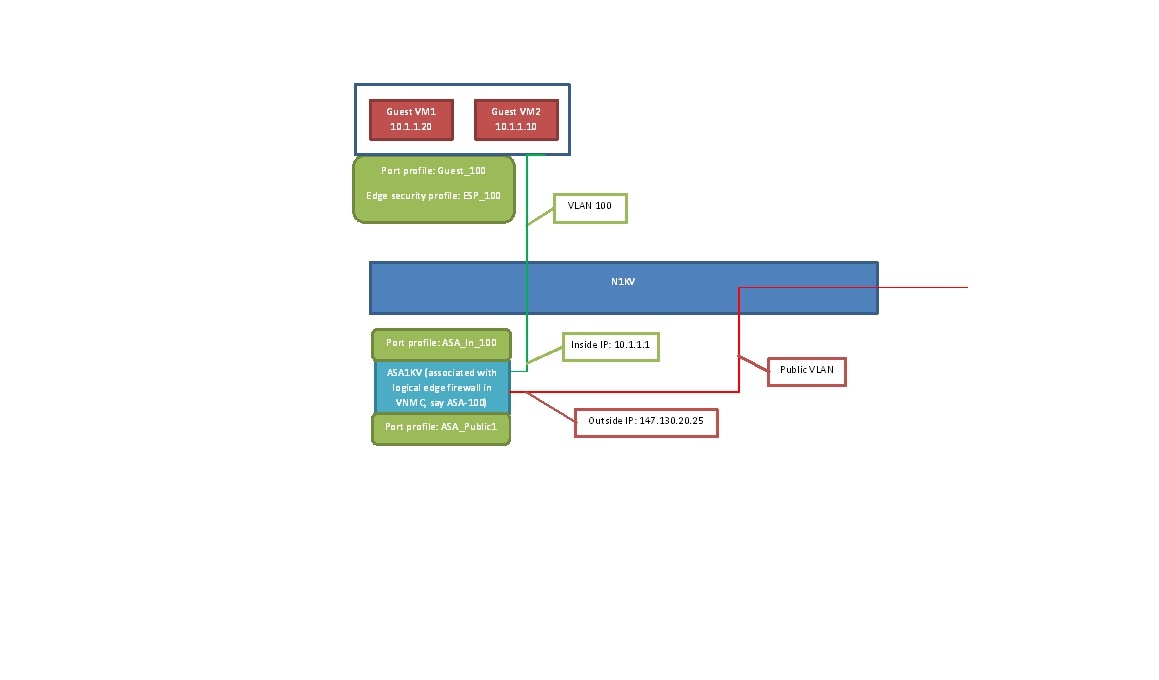
- Create vservice_node and update inside port profile for ASA in n1kv VSM for the Vmware cluster. This is again done using VnmcResource class (internally will call VsmCommand)
- vservice_node (below commands for doing it on CLI)
vservice node ASA-%vlanid% type asa
ip address 10.1.1.1
adjacency l2 vlan %vlanid%
fail-mode close
- in_port_profile
port-profile type vethernet %asa-in-port-profile%
vmware port-group
switchport mode access
switchport access vlan %vlanid%
no shutdown
state enabled
- Associate ASA1000v appliance with edge firewall (in VNMC). IP address of ASA is required for this. This is again done using VnmcResource.
All the above steps will be idempotent.
For guest VM the following change is required while creating the port profile in VSM
Create port profile for guest VM and associate edge security profile created as part of implement() of network element
- guest_port_profile
port-profile type vethernet Guest-%vlanid%
vmware port-group
switchport mode access
switchport access vlan %vlanid%
org root/%tenant%
vservice node ASA-%vlanid% profile %edge_security_profile%
no shutdown
state enabled
API changes
VNMC lifecycle APIs
- addCiscoVNMCResource
- Request parameters
- physical n/w id (required) - id of the physical n/w to which VNMC is associated with; validation - check that physical network id is valid
- mgmt. ip (required) - IP address for connecting to VNMC; check ip address format is valid
- username (required) - Username for connecting to VNMC; no validation
- password (required) - Password for the above username; no validation
- Response
- resource id
- physical n/w id
- provider name
- resource name
- deleteCiscoVNMCResource
- Request parameters
- resource id (required) - unique id of VNMC; validation - check that resource id is valid. Deletion would fail if there are one or more ASA appliances attached to the physical network to which this VNMC belongs.
- Response
- boolean (success/failure)
- listCiscoVNMCResources
- Request parameters
- resource id (optional) - unique id of VNMC
- physical n/w id (optional) - id of physical n/w to which VNMC is associated with
- Response
- resource id
- physical n/w id
- provider name
- resource name
ASA lifecycle 1000v APIs
Typically lifecycle of ASA is tied to the associated guest network. But since ASA setup requires license check, CLI configurations it is not possible to spin it up as part of guest network creation. The list of ASA1000v appliances needs to be provisioned into CloudStack using admin APIs. During network creation available ASA instance is assigned to it from the list and released when network gets destroyed. The pool will be created using lifecycle APIs
- addCiscoASA1000vResource
- Request parameters
- physical n/w id (required) - id of the physical n/w to which ASA1000v is associated with; validation - check that physical network id is valid
- mgmt. ip of ASA (required) - IP address for connecting to ASA; check ip address format is valid
- cluster id (required) - CS cluster id (Vmware cluster only) this appliance is tied to; validation - check that cluster id is valid and Vmware cluster
- inside port profile name (required) - name of Nexus port profile associated with ASA inside interface; no validation
- Response
- resource id
- physical n/w id
- mgmt. ip
- inside port profile name
- guest n/w id
- deleteCiscoASA1000vResource
- Request parameters
- resource id (required) - unique id of ASA; validation - check that id is valid. Deletion would fail if the appliance is associated with a guest network. Association will be removed when the network gets destroyed.
- Response
- boolean (success/failure)
- listCiscoASA1000vResources
- Request parameters
- resource id (optional) - unique id of ASA1000v
- physical n/w id (optional) - id of physical n/w to which ASA1000v appliance is associated with
- Response
- resource id
- physical n/w id
- mgmt. ip
- inside port profile name
- guest n/w id
As part of response, if the ASA is associated with a guest network, the uuid for the same is also returned. From this the cloud operator can find out if the appliance is available or not.
DB changes
- table for storing VNMC details.
_CREATE TABLE `cloud`.`external_cisco_vnmc_devices` (
`id` bigint unsigned NOT NULL AUTO_INCREMENT COMMENT 'id',
`uuid` varchar(255) UNIQUE,
`physical_network_id` bigint unsigned NOT NULL COMMENT 'id of the physical network in to which cisco vnmc device is added',
`provider_name` varchar(255) NOT NULL COMMENT 'Service Provider name corresponding to this cisco vnmc device',
`device_name` varchar(255) NOT NULL COMMENT 'name of the cisco vnmc device',
`host_id` bigint unsigned NOT NULL COMMENT 'host id coresponding to the external cisco vnmc device',
PRIMARY KEY (`id`),
CONSTRAINT `fk_external_cisco_vnmc_devices__host_id` FOREIGN KEY (`host_id`) REFERENCES `host`(`id`) ON DELETE CASCADE,
CONSTRAINT `fk_external_cisco_vnmc_devices__physical_network_id` FOREIGN KEY (`physical_network_id`) REFERENCES `physical_network`(`id`) ON DELETE CASCADE
) ENGINE=InnoDB DEFAULT CHARSET=utf8;_
- table for storing asa1kv details.
_CREATE TABLE `cloud`.`external_cisco_asa1000v_devices` (
`id` bigint unsigned NOT NULL AUTO_INCREMENT COMMENT 'id',
`uuid` varchar(255) UNIQUE,
`management_ip` varchar(255) NOT NULL COMMENT 'mgmt. ip of cisco asa1kv device',
`cluster_id` bigint unsigned NOT NULL COMMENT 'id of the Vmware cluster to which cisco asa1kv device is attached (cisco n1kv switch)',
`in_port_profile` varchar(255) NOT NULL COMMENT 'inside port profile name of cisco asa1kv device',
PRIMARY KEY (`id`)
) ENGINE=InnoDB DEFAULT CHARSET=utf8;_
- table to store mapping between guest network and asa1kv.
_CREATE TABLE `cloud`.`network_asa1000v_map` (
`id` bigint unsigned NOT NULL AUTO_INCREMENT COMMENT 'id',
`network_id` bigint unsigned NOT NULL UNIQUE COMMENT 'id of guest network',
`asa1000v_id` bigint unsigned NOT NULL UNIQUE COMMENT 'id of asa1000v device',
PRIMARY KEY (`id`),
CONSTRAINT `fk_network_asa1000v_map__network_id` FOREIGN KEY (`network_id`) REFERENCES `networks`(`id`) ON DELETE CASCADE,
CONSTRAINT `fk_network_asa1000v_map__asa1000v_id` FOREIGN KEY (`asa1000v_id`) REFERENCES `external_cisco_asa1000v_devices`(`id`) ON DELETE CASCADE
) ENGINE=InnoDB DEFAULT CHARSET=utf8;_
An entry need to be created in physical_network_service_providers table. I saw that currently these entries are created from the UI using API addNetworkServiceProvider (for e.g. for JuniperSRX).
A network offering needs to be created for using for using CiscoVNMC to provide firewall, source nat, port forwarding.
UI changes
A new provider needs to be added for Cisco VNMC (similar to SRX). This will provide services for firewall, source nat, port forwarding and static nat. Rest of the services will be provided by VR.
There will be APIs to manage lifecycle of VNMC appliances (add, delete, list). These also needs to be plugged to the UI. Also there will be APIs to manage lifecycle of ASA appliances.
Open items (for future support if required)
VSG
The VSG can be used to provide security group isolation.
There is an alternate feature proposal where SG isolation for Vmware will be done using PVLANs. Needs to be re-visited if there is no need for VSG integration.
VXLAN support
VXLAN based network isolation.
Links
http://www.cisco.com/en/US/docs/security/asa/quick_start/asa1000V/setup_vnmc.html