Bug Reference: CLOUDSTACK-763
Currently only ACL allow rules are supported as part of Network ACLs. Default is to block all incoming and all outgoing traffic between tiers and between tiers and various gateways (including Public). ACL deny rules will be supported through this feature. New fields "number" and "action"will be added to rules to resolve conflicting rules.
NetworkACLList will be introduced to manage NetworkACLs (NetworkACLItems).
ACL is Access Control List. So ACL container is kind of redundant. Instead we use the below terminology:
NetworkACLItem - Individual ACL Entry (was NetworlACL earlier). Should we call it NetworkAclEntry instead?
NetworkACL - Group of Network ACL Items. API will use the term NetworkACLList to differentiate from the existing NetworkACL APIs
NetworkACL is a numbered list of NetworkACLItems that are evaluated in order, starting with the lowest numbered rule, to determine whether traffic is allowed in or out of any tier associated with the network ACL.
Instead of adding NetworkACLItems directly to the tier, NetworkACLItems will be added to the NetworkACL. Tier will be associated with a NetworkACL at all times (default NetworkACL will be used when no ACL is associated. Default behavior will be deny all).
ACL is associated with a VPC and can be assigned to multiple VPC tiers within the VPC. Each tier can be associated with only one ACL.
Add/Remove networkACLItem to NetworkACL
NetworkACLItems can be added or removed from the NetworkACL using APIs createNetworkACLItem and deleteNetworkACLItem APIs. Changes to ACL (add/update/remove aclItems) will be applied to all associated networks.
Tier will be associated with default network acl when no ACL is associated. Default network ACL cannot be removed or modified. Contents of default network ACL:
Rule # |
protocol |
traffic_type |
action |
cidr |
|---|---|---|---|---|
1 |
all |
Ingress |
deny |
0.0.0.0/0 |
2 |
all |
Egress |
deny |
0.0.0.0/0 |
Creating Tier with default acl and assigning a custom acl later
Create Tier with custom acl in 1 step
createNetworkAclItem (Aliased to createNetworkACL) - async
Adds a networkACLItem to the specified ACL.
New parameters
For backward compatibility, if network_id is specified instead of acl_id, networkACLItem will added to the ACL assigned to the network.
deleteNetworkACLItem (Aliased to removeNetworkACL) - async
Deletes specifed network acl item from network ACL. No changes to the params.
createNetwork
In VPC case, createNetwork is used to create a tier within VPC. Tier can be associated with a ACL during creation. If acl_id is not specified default ACL will be used. Network creation with acl_id will fail if ACL service is not present.
New parameters
updateNetworkACLItem (aliased to updateNetworkACL) - async
Updates an existing NetworkACLItem
Parameters:
createNetworkAclList - sync
Creates network ACL
Parameters:
Response:
deleteNetworkAclList - sync
Deletes network ACL. If the container is assigned to any network, deletion will fail. ACL should not contain any ACLItems for deletion to succeed.
Parameters:
Response:
listNetworkAclList - sync
ACLs can be listed by id or tier
Parameters:
Response:
replaceNetworkACLList - async
Assigns specified ACL to a tier (network)
Parameters:
Response:
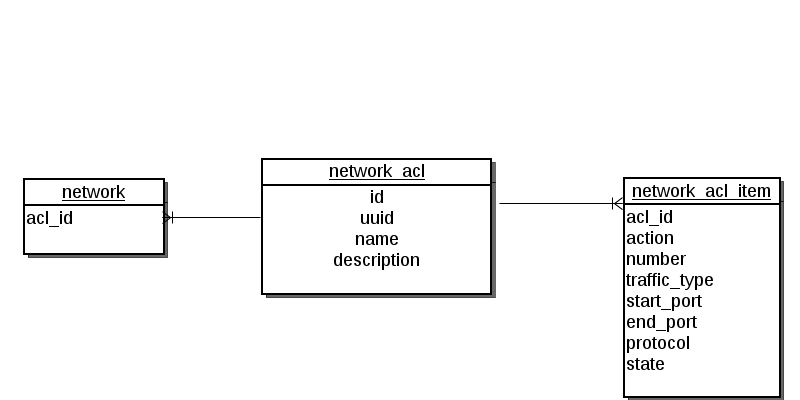
1. network_acl
2. network_acl_item
1. networks
vpc_acl.sh will be modified to support ACL deny rules. iptables rules will ACCEPT or DROP based on the ACL action. iptables rules will added in the order of the number starting from the lowest.
UI changes are required to:
For each tier, a new network acl is created during the upgrade, All ACLItems that were assigned to this tier, will be part of the newly created network acl. If there are no ACLs for any tier, it'll be associated with the default ACL.
All existing rules in firewall_rules table of type NetworkACL will be moved to network_acl_item table and will have action "allow". Rule number will be sequentially assigned for all rules in each tier.