
Introduction
Having explored the mechanism of the Material Requirements Planning (MRP) engine in Apache OFBiz, it’s time to apply that knowledge. This guide demonstrates how to run the MRP engine to generate requirements for a skateboard manufacturing scenario. The MRP engine calculates requirements by considering variables such as sales orders, inventory levels, and production schedules, saving time and effort.
Using the skateboard example, we’ll walk you through the steps to set up and run the MRP engine, generate internal and external requirements, and balance supply and demand throughout the production process.
Note: In Apache OFBiz, external requirements are referred to as "product requirements."
1) Prerequisites for Running MRP
If you haven’t set up the skateboard and its Bill of Materials (BOM) in Apache OFBiz, refer to the BOM setup guide for instructions.
Before running the MRP engine, ensure the Bill of Materials (BOM) for the skateboard is configured, add facility and supplier information for all components.
Suppliers must be assigned to components that are procured externally, and facilities must be set for both internally produced and externally procured components.
1.1) Setting Up Facilities
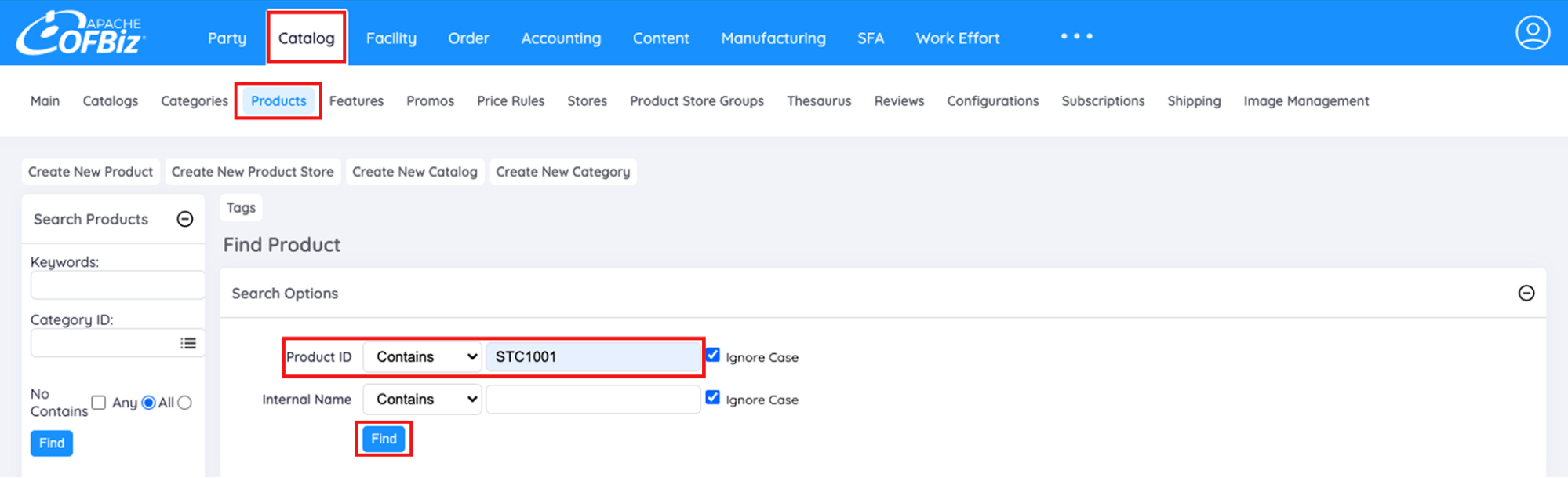
- Navigate to Catalog > Products.
- Enter the Product ID or Internal Name and click Find.
- On the Products screen, click the Facilities tab.
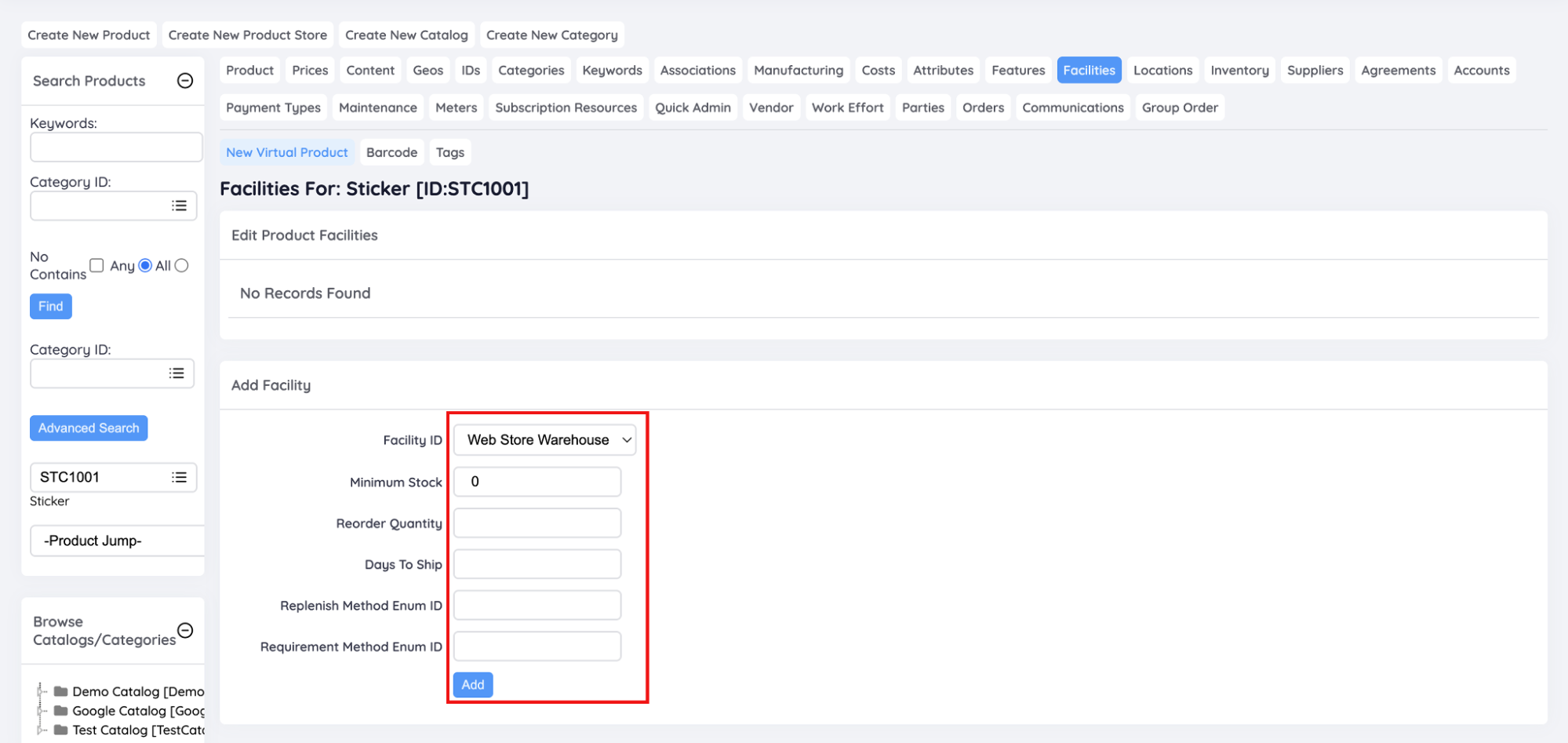
- Set Facility, Reorder Quantity and Minimum Stock:
- Select the Facility ID from the dropdown (For e.g. Web Store Warehouse)
- Set Minimum Stock: 0
- Set Reorder Quantity
- Click Add.
Note: Setting minimum stock and reorder quantities is optional and depends on business preferences.
1.2) Adding Suppliers
Go to the Suppliers tab on the same Products screen.
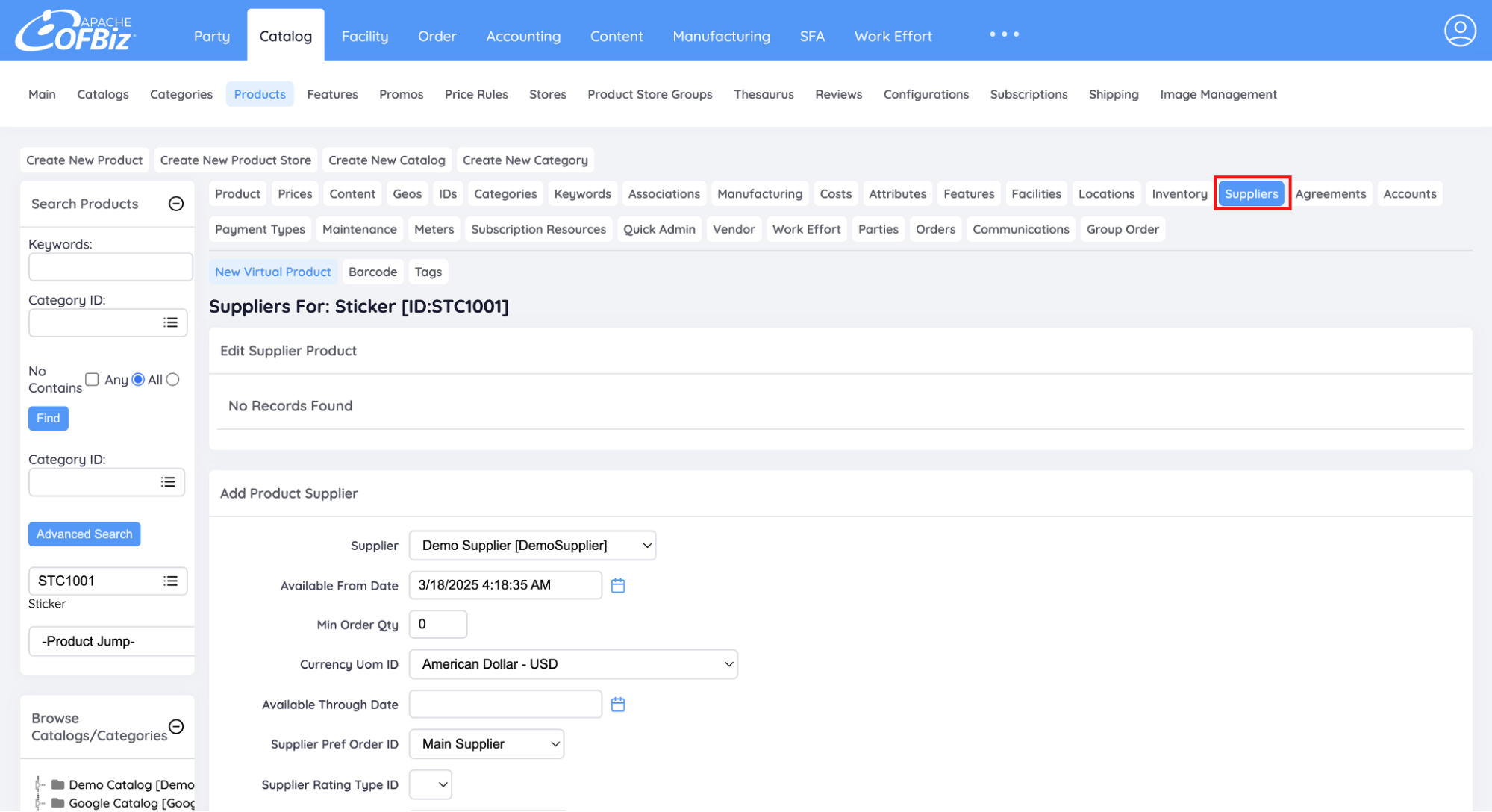
- Enter supplier details:
- Select the Supplier Name from the dropdown: Demo Supplier.
- Enter the Supplier Product ID (mandatory).
- Enter the Last Price (mandatory).
- Click Create.
Similarly, add the facility and inventory details for the other components as well.
After adding facility and supplier details for the components, you’re ready to run the MRP engine on the specified facility (Web Store Warehouse) to calculate requirements.
2) Executing the MRP Engine in Apache OFBiz
This section outlines how to calculate requirements for a sales order of 100 skateboards with an estimated delivery date of August 16, 2025, by running the MRP engine on June 16.
Each skateboard takes 30 minutes to produce, and each deck takes 15 minutes. The machine operates 8 hours a day, Monday to Friday, with Saturdays and Sundays as non-working days.
2.1) Running the MRP
- Navigate to Manufacturing > MRP > Run MRP.

- Fill in the MRP Run details as shown below:
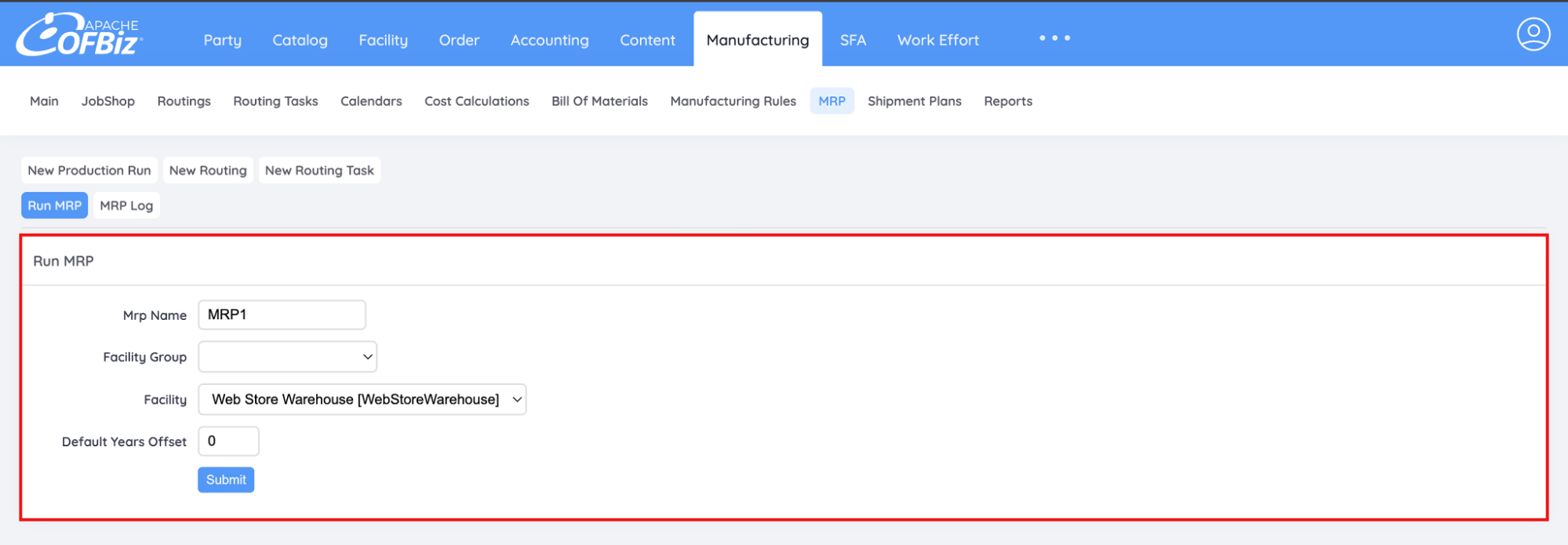
- MRP Name: MRP1
- Facility Group: Leave blank
- Facility: Web Store Warehouse
- Default Years Offset: 0
Note: The Default Years Offset setting is useful only when the system contains orders without any estimated delivery dates, typically created due to data imports from external sources.
- If the offset is set to 1, orders without any estimated delivery dates are treated as low priority and pushed one year into the future.
- If the offset is set to 0, orders without any estimated delivery dates are treated as urgent and scheduled for immediate fulfillment.
- If the offset is set to 0, orders without any estimated delivery dates are treated as urgent and scheduled for immediate fulfillment.
- Click Submit to start the MRP run.
2.2) Checking the Logs
- Once the MRP is executed, go to Manufacturing > MRP > MRP Log.

- View the status of MRP runs :
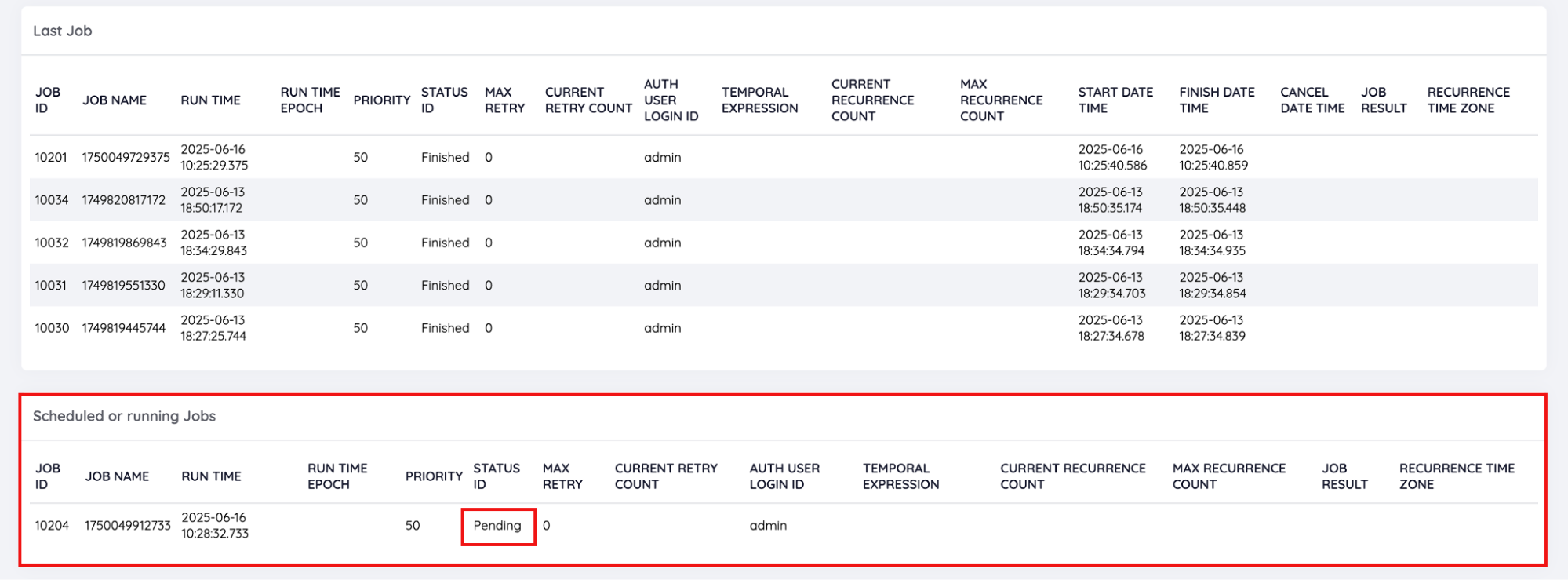
- Last Job: Completed MRP run with status Finished.
- Scheduled or Running Jobs: MRP run currently in progress with status Pending.
Refresh the page until the STATUS ID changes from Pending to Finished, indicating that the MRP engine has successfully generated the requirements plan.
3) Viewing Requirements Generated by MRP
After the MRP run completes, review the generated requirements:
- Navigate to Order > Requirements > Requirements.

- Click Find to view all generated requirements.
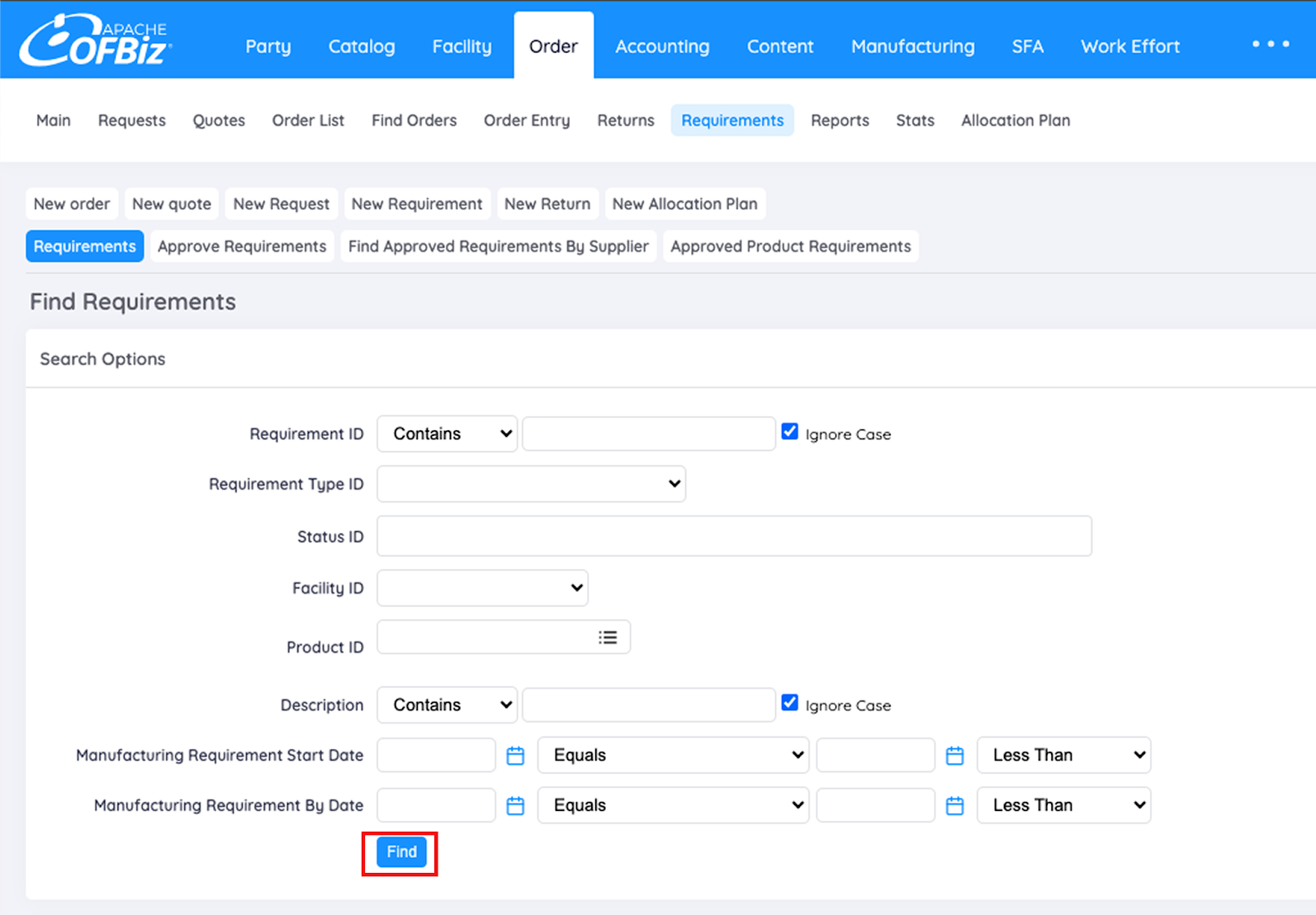
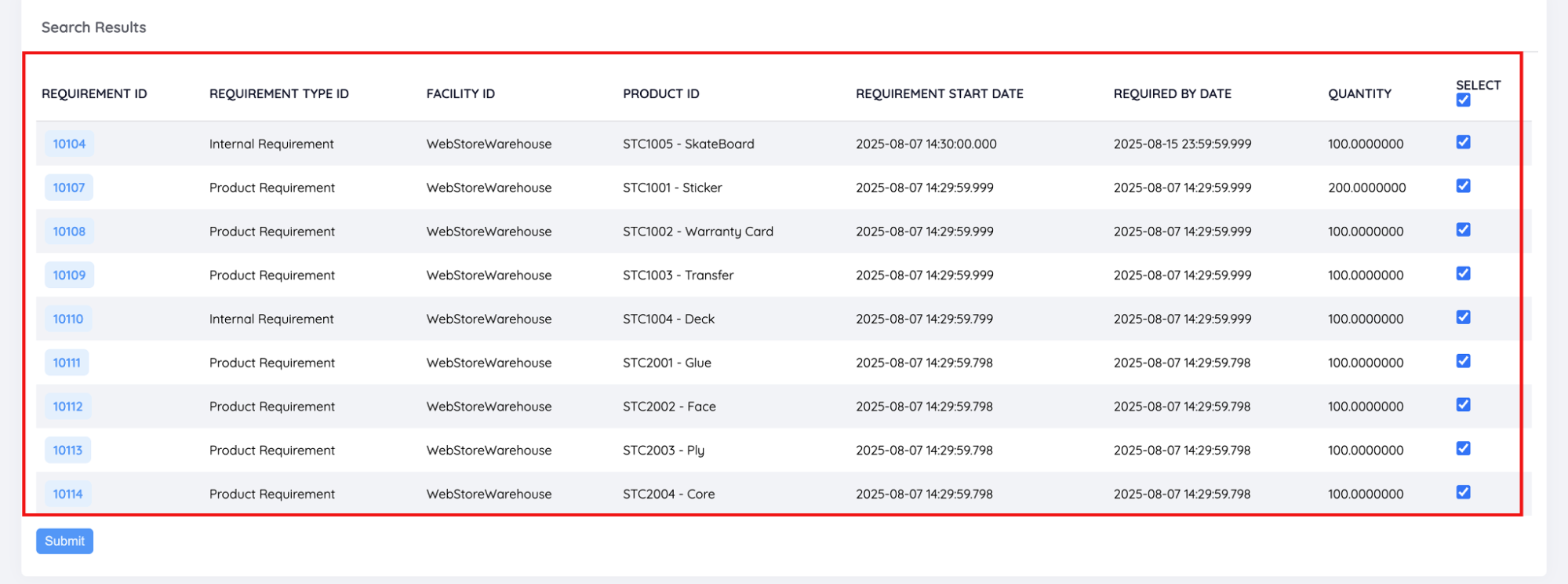
The requirements from the MRP run will appear with a STATUS ID of Proposed.
Let’s check the calculations done by the MRP Engine in Apache OFBiz for the requirements generated above.
The MRP engine uses the following formula to calculate requirement quantities: Requirement Quantity = MAX(Reorder Qty, (Minimum Stock - Simulated Stock)) Where, where:
For a detailed explanation of the formulas, refer to the guide on the internals of the MRP Engine in Apache OFBiz. |
Internal Requirements
- For Skateboard
- QOH = 0
- PO Qty = 0
- Incoming Job Qty = 0
- SO Qty = 100
- Outgoing Job Qty = 0
- Minimum Stock = 0
- ROQ = 0
Simulated Stock = 0 – 100 = –100
Requirement Quantity = MAX(0, 0 – (–100)) = 100 units
- For Deck
- QOH = 0
- PO Qty = 0
- Incoming Job Qty = 0
- SO Qty = 0
- Outgoing Job Qty = 100
- Minimum Stock = 0
- ROQ = 0
Simulated Stock = 0 – 100 = –100
Requirement Quantity = MAX(0, 0 – (–100)) = 100 units
Product Requirements
- For Sticker
- QOH = 0
- PO Qty = 0
- Incoming Job Qty = 0
- SO Qty = 0
- Outgoing Job Qty = 200
- Minimum Stock = 0
- ROQ = 0
Simulated Stock = 0 – 200 = –200
Requirement Quantity = MAX(0, 0 – (–200)) = 200 units
- For Warranty Card, Transfer, Glue, Face, Ply, Core
- QOH = 0
- PO Qty = 0
- Incoming Job Qty = 0
- SO Qty = 0
- Outgoing Job Qty = 100
- Minimum Stock = 0
- ROQ = 0
Simulated Stock = 0 – 100 = –100
Requirement Quantity = MAX(0, 0 – (–100)) = 100 units
Understanding Required-By Date and Requirement Start Date
For the skateboard
- Required By Date
Since 16 August 2025 falls on a Saturday, Apache OFBiz shifts the Required By Date to the previous working day: 15 August 2025 (Friday)
- Requirement Start Date
Total production time = 100 × 0.5 hours = 50 hours
Working capacity = 8 hours/day → 7 working days needed (approx).
Counting back 7 working days from 15 August (excluding weekends), we get: 07 August 2025 (Thursday)
For the deck
- Required By Date
The deck must be completed before skateboard production begins. Therefore, the Required By Date is aligned with the skateboard’s Requirement Start Date: 07 August 2025 (Thursday)
- Requirement Start Date
Deck production takes 3 working days (approx).
Counting back 3 working days from 07 August , we get: 04 August 2025 (Monday)
This is how Apache OFBiz calculates the timeline to ensure production is completed just in time for delivery.
4) Approving the Requirements
After the MRP engine generates the requirements, the production manager reviews and approves them.
Once the product requirements are approved, a Purchase Order can be created to procure the necessary items from the supplier.
Similarly, after approving the internal requirements, a production run is automatically created to fulfill the Sales Order. To learn more about this process, refer to the detailed guide
- Go to Order > Requirements > Approve Requirements
- Select all the necessary components
- Click on Submit

To learn how to manage procurement and create a Purchase Order in Apache OFBiz, refer to the Purchase Order Workflow Explained: Managing Procurement with Apache OFBiz guide.
Conclusion
Material Requirements Planning (MRP) Engine of Apache OFBiz serves as a cornerstone in modern manufacturing enabling businesses to optimize inventory management, streamline production processes, and meet demand more effectively.
By understanding how it works, especially in real-world scenarios, businesses can eliminate manual planning, improve accuracy, and respond to changing demands. Mastering MRP isn’t just about better planning, it’s about creating a more agile, cost-efficient, and competitive operation.