This document describes how to run the Basic example and provides details about what it does. For information on the business use case, please refer to: Use Case for Basic.
The Basic example illustrates the following:
The source code for the Basic example is located in the ServiceMix installation directory under the examples\basic\src\main\resources directory in the servicemix.xml file. It is recommended that you refer to the source code while reading this document.
There are several components in the servicemix.xmlfile. One component sets off a trigger to send messages to a source destination. Then those messages are consumed by another component and sent to a different output destination. A trace component displays the messages as they arrive.
From a command shell, go to the Basic example directory:
Then type:
This example starts an ActiveMQ JMS Broker, so be sure to stop any ServiceMix server already running.
To terminate the Basic example type "CTRL-C" in the command shell in which it is running.
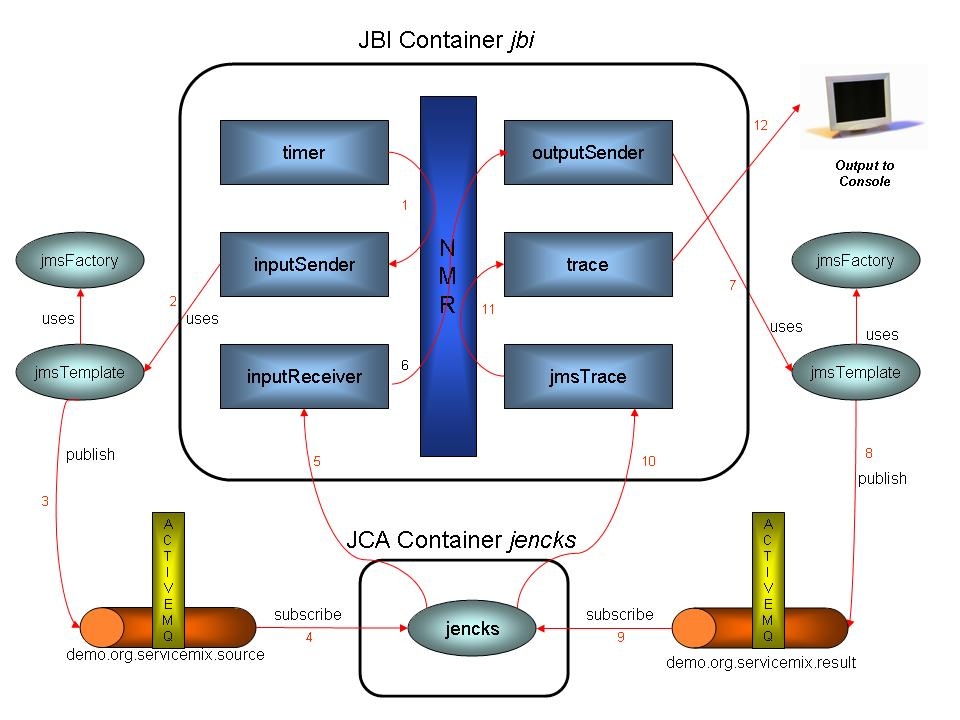
The diagram below illustrates the flow of messages through the Basic components.
Messages flow through the components as follows:
Every 5 seconds logging information is written to the console, followed by information from the trace component. Note, that the triggers' property values of "name", "My Example Job", "group", and "ServiceMix" are displayed along with a timestamp. Typical output looks like the following:
The following table provides more details about the function of each component and bean in the servicemix.xml file.
Component or Bean ID |
Description |
|---|---|
jbi |
jbi is the "id" of the JBI container and provides the basic infrastructure services for the following components: timer, inputSender, inputReceiver, outputSender, jmsTrace, and trace. During initialization, several singletons are instantiated: transactionManager, broker, jencks, jmsFactory, and jbi. After initialization, the components in the jbi container are activated, starting with the timer component. |
timer |
The timer component shows the use of the QuartzComponent class. Every 5 seconds, until the program is terminated, the timer component kicks off an instance of a SimpleTrigger, which is associated with an instance of JobDetail. The job has a property called "name" with a value of "My Example Job" and another property called "group" with a value of "ServiceMix." The resulting message is converted to a normalized message and routed through the NMR. |
inputSender |
This is a component inside the JBI container. It receives the normalized message (the message from the trigger), converts it to a JMS message, and publishes it to the topic called demo.org.servicemix.source. It uses the jmsTemplate(1) bean to handle the publish. |
inputReceiver |
This component uses jencks , the JCA container, to listen on port 61616 for a JMS message on the topic called "demo.org.servicemix.source." inputReceiver subscribes to the demo.org.servicemix.source topic. It takes the message, normalizes it, and routes it to outputSender via the NMR. This component combined with outputSender and supporting beans creates a JMS bridge between two topics. |
outputSender |
This component receives a normalized message from the NMR, marshals it into a JMS message using jmsTemplate, then publishes it on the ActiveMQ (JMS) topic called "demo.org.servicemix.result." |
jmsTrace |
This component uses jencks to subscribe to the "demo.org.servicemix.result" topic and get messages. It then marshals the message into a normalized message and routes it via the NMR to the trace component. |
trace |
Receives normalized messages from jmsTrace via the NMR. It transforms the normalized message into a string and logs it to the console. |
jencks |
The jencks bean defines a JCA container. The JCA container allows you to configure thread pool size, configure a transaction manager, and configure a resource adapter. In this example, the resource adapter is an ActiveMQ adapter, however, another JMS listener could be configured instead. This adapter listens on port 61616 for JMS messages. |
broker |
The broker bean uses the |
transactionManager |
This bean is configured to be the default transaction manager for the jbi container. jencksis configured to use the default transaction manager. This transaction manager provides transactional services between the resource adapter (in this case the ActiveMQ resource adapter provided by the jencks JCA container) and components the jbi container. |
jmsFactory |
This bean listens on port 61616 and provides a pooled ActiveMQ connection. |
1. jmsTemplate: JmsTemplate is a Spring component which hides the low level details when sending JMS messages. For additional information see: JmsTemplate. jmsTemplate is not a component in the jbi container. It is used by inputSender and outputSender.
ServiceMix is an Enterprise Service Bus (ESB) that is based on the Java Business Integration (JBI) standard JSR 208. The JBI-based design specifies a standards-based pluggable architecture with a JVM-based runtime component called the Normalized Message Router (NMR). The Basic example demonstrates how applications communicate via the ServiceMix ESB, and the role that the NMR can play in that communication. Similar techniques could be used to plug any external 1 application or service into ServiceMix (e.g. SAP, Peoplesoft, spreadsheets, POJOs, Webservices and EJBs) and allow it to communicate with other external applications or components using ServiceMix itself.
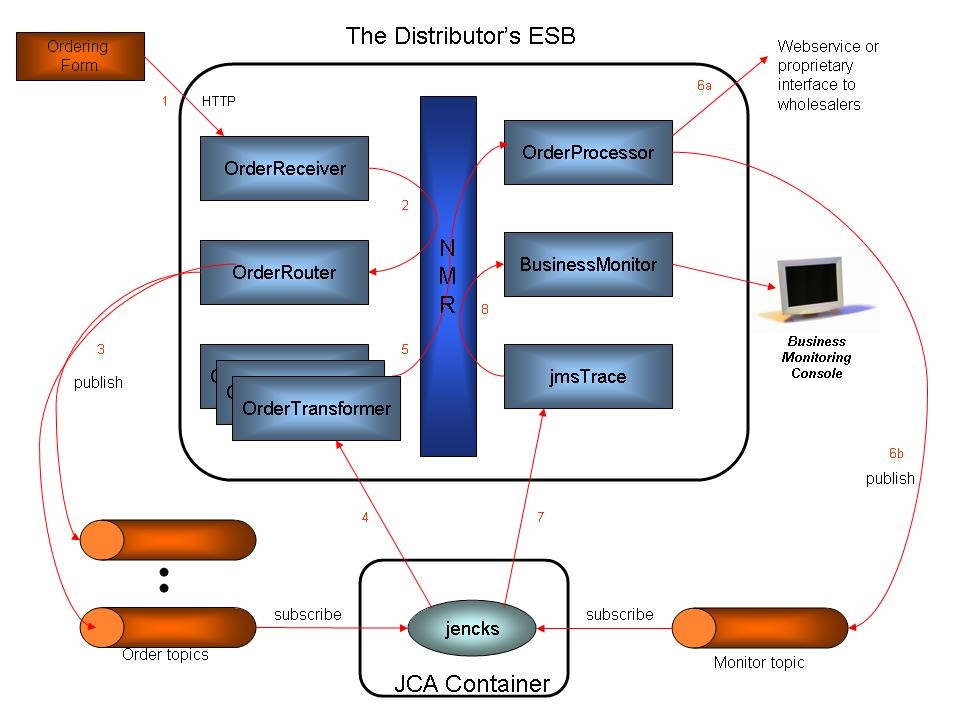
A hypothetical business scenario, which extends the Basic Example, is that of a department store distributor. This distributor sells products from multiple wholesalers (suppliers) to various retailers (customers). The distributor presents a common interface for product ordering to each of its department store customers. However, the distributor must work with a different ordering interface for each wholesale suppliers for the products they are buying.
Using an ESB, the distributor has developed a number of components to receive department store orders and then dynamically route and transform these orders to the appropriate wholesaler. The order processing flow is described as follows:
The following diagram illustrates this:
For more information on the following topics please see:
For a brief explanation of the XML tags in the servicemix.xml file, please see: