This document describes how to run ServiceMix's BPEL example and provides details about what it does. For information on the business use case, please refer to: Use Case for BPEL.
The BPEL example illustrates the following:
The XML code for the BPEL example is located in the ServiceMix installation directory under the examples\bpel directory in the servicemix.xml file. It is recommended that you refer to the servicemix.xml file while reading this document.
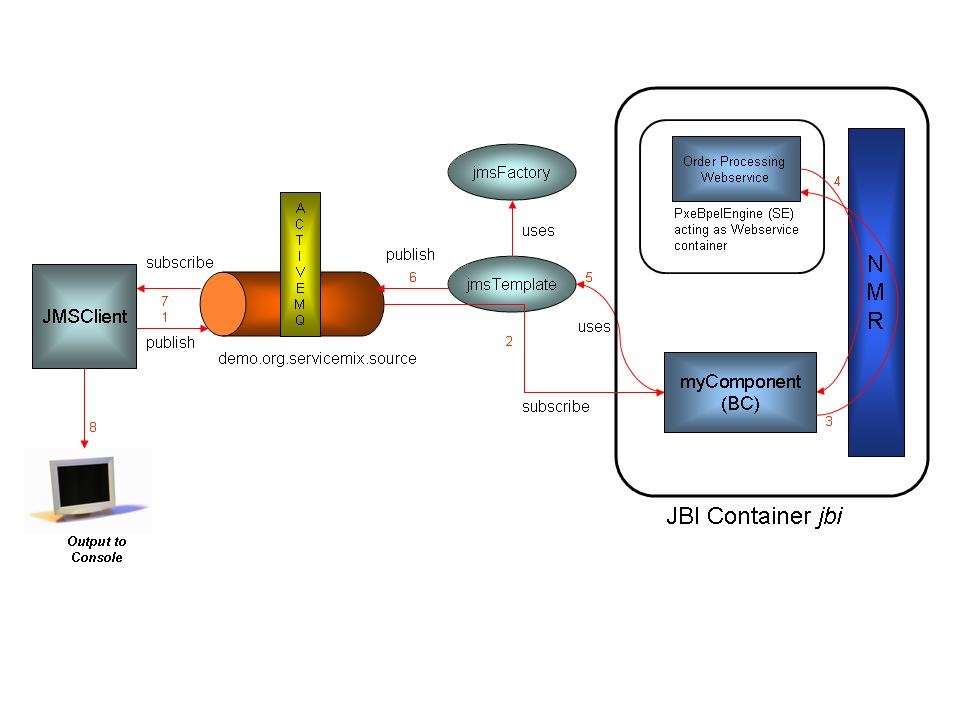
This example has a client application, JMSClient, which sends a SOAP message to a ServiceMix binding component called myComponent. myComponent forwards the request to the PXE BPEL engine and waits for a response. In other words, JMSClient places a book order and myComponent receives the order and then sends it to the Webservice that takes orders. The client, JMSClient, and the binding component, myComponent, communicate via JMS; this communication is external to the ServiceMix JBI. myComponent and the PXE BPEL service engine communicate internally over the Normalized Message Router (NMR).
The following must be installed to run this example:
|
NOTE: ServiceMix works on any Java SE 1.4 or later environment; however to use PXE a Java SE 5 or later platform is required. Before running this example, use Java 1.5 to start up ServiceMix. |
Before running this example, the following setup must be done. PXE has a JBI component and deployment unit, which can be auto-deployed in any JBI compliant container, in this case ServiceMix. To use PXE with ServiceMix, the PXE deployment unit must be placed in the install directory so it will be auto-deployed in ServiceMix. NOTE: The PXE deployment unit has already been placed into the install directory for you - take a look at the servicemix_install_dir\examples\bpel\install directory to see the PXE jar file.
Perform the following steps to run the BPEL example:
cd [servicemix_install_dir]\examples\bpel |
servicemix_install_dir is the directory in which ServiceMix was installed.[servicemix_install_dir]\bin\servicemix servicemix.xml OR ..\..\bin\servicemix servicemix.xml |
servicemix_install_dir\examples\bpel. To run the JMS client type:
ant |
|
Add $SERVICEMIX_HOME\bin directory to $PATH variable to simplify execution of the example. |
To terminate the BPEL example type "CTRL-C" in the command shell in which it is running and answer "y" to the "Terminate batch job (y/n)?" question.
The diagram below illustrates the logical flow of the program through the BPEL components:
|
|
The logical flow of the program is:
message.soap file.servicemix.xml file.Typical output looks like the following:
ServiceMix ESB: 1.0

Loading ServiceMix from file: servicemix.xml
[INFO] XmlBeanDefinitionReader - -Loading XML bean definitions from file C:\exist\servicemix\servicemix-1.0.1\examples\bpel\servicemix.xml]
[INFO] CollectionFactory - -JDK 1.4+ collections available
[INFO] CollectionFactory - -Commons Collections 3.x available
[INFO] FileSystemXmlApplicationContext - -Bean factory for application context
[org.springframework.context.support.FileSystemXmlApplicationContext;hashCode=110
2920]: org.springframework.beans.factory.support.DefaultListableBeanFactory defining beans
[jndi,broker,transactionManager,jmsFactory,jbi];
 root of BeanFactory hierarchy[INFO] FileSystemXmlApplicationContext - -5 beans defined in application context
 [org.springframework.context.support.FileSystemXmlApplicationContext;hashCode=1102920]
[INFO] FileSystemXmlApplicationContext - -Unable to locate MessageSource with name 'messageSource': using default
[org.springframework.context.support.DelegatingMessageSource@18e2b22]
[INFO] FileSystemXmlApplicationContext - -Unable to locate ApplicationEventMulticaster with name 'applicationEventMulticaster':
using default [org.springframework.context.event.SimpleApplicationEventMulticaster@13caecd]
[INFO] DefaultListableBeanFactory - -Pre-instantiating singletons in factory
 [org.springframework.beans.factory.support.DefaultListableBeanFactory
defining beans [jndi,broker,transactionManager,jmsFactory,jbi]; root of BeanFactory hierarchy]
[INFO] DefaultListableBeanFactory - -Creating shared instance of singleton bean'jndi'
[INFO] DefaultListableBeanFactory - -Creating shared instance of singleton bean 'broker'
[INFO] SpringBrokerContainerFactory - -Loading ActiveMQ broker from configuration: class path resource [activemq.xml]
[INFO] ActiveMQBeanDefinitionReader - -Loading XML bean definitions from class path resource [activemq.xml]
[INFO] ActiveMQBeanFactory - -Creating shared instance of singleton bean 'broker'
[INFO] ActiveMQBeanFactory - -Creating shared instance of singleton bean 'memoryManager'
[INFO] ActiveMQBeanFactory - -Creating shared instance of singleton bean 'derby-ds'
[INFO] ActiveMQBeanFactory - -Creating shared instance of singleton bean 'mysql-ds'
[INFO] BrokerContainerImpl - -ActiveMQ 3.1-M6 JMS Message Broker (ID:el2tong-1095-1129854563062-0:0) is starting
[INFO] BrokerContainerImpl - -For help or more information please see: http://www.logicblaze.com
[INFO] JDBCPersistenceAdapter - -Database driver recognized: [apache_derby_embedded_jdbc_driver]
[INFO] DefaultJDBCAdapter - -Could not create JDBC tables; they could already exist. Failure was:
CREATE TABLE ACTIVEMQ_MSGS(ID INTEGER NOT NULL, CONTAINER VARCHAR(250), MSGID VARCHAR(250), MSG BLOB, PRIMARY KEY ( ID ) )
Message: Table/View 'ACTIVEMQ_MSGS' already exists in Schema 'APP'. SQLState: X0Y32 Vendor code: 20000
[INFO] DefaultJDBCAdapter - -Could not create JDBC tables; they could already exist. Failure was:
CREATE TABLE ACTIVEMQ_TXS(XID VARCHAR(250) NOT NULL, PRIMARY KEY ( XID )) Message: Table/View 'ACTIVEMQ_TXS' already exists in Schema 'APP'. SQLState: X0Y32 Vendor code: 20000
[INFO] DefaultJDBCAdapter - -Could not create JDBC tables; they could already exist. Failure was:
CREATE TABLE ACTIVEMQ_ACKS(SUB VARCHAR(250) NOT NULL, CONTAINER VARCHAR(250) NOT NULL, LAST_ACKED_ID INTEGER, SE_ID INTEGER,
SE_CLIENT_ID VARCHAR(250), SE_CONSUMER_NAME VARCHAR(250), SE_SELECTOR VARCHAR(250), PRIMARY KEY (
 SUB, CONTAINER )) Message: Table/View 'ACTIVEMQ_ACKS' already exists in Schema 'APP'. SQLState: X0Y32 Vendor code: 20000
[INFO] DefaultJDBCAdapter - -Could not create JDBC tables; they could already exist. Failure was:
ALTER TABLE ACTIVEMQ_MSGS ADD EXPIRATION BIGINT Message: Column 'EXPIRATION' already exists in Table/View 'APP.ACTIVEMQ_MSGS'. SQLState: X0Y32 Vendor code: 20000
[INFO] JournalPersistenceAdapter - -Opening journal.
[INFO] JournalPersistenceAdapter - -Opened journal: Active Journal: using 2 x 20.0 Megs at: ..\var\journal
[INFO] JournalPersistenceAdapter - -Journal Recovery Started.
[INFO] JournalPersistenceAdapter - -Journal Recovered: 0 message(s) in transactions recovered.
[INFO] TcpTransportServerChannel - -Listening for connections at: tcp://el2tong:61616
[INFO] BrokerConnectorImpl - -ActiveMQ connector started: TcpTransportServerChannel@tcp://el2tong:61616
[INFO] BrokerContainerImpl - -ActiveMQ JMS Message Broker (ID:el2tong-1095-1129854563062-0:0) has started
[INFO] DefaultListableBeanFactory - -Creating shared instance of singleton bean 'transactionManager'
[INFO] DefaultListableBeanFactory - -Creating shared instance of singleton bean 'jmsFactory'
[INFO] DefaultListableBeanFactory - -Creating shared instance of singleton bean 'jbi'
[INFO] ActiveMQConnection - -channel status changed: Channel: TcpTransportChannel: Socket[addr=localhost/127.0.0.1,port=61616,localport=1096] has connected
[INFO] BrokerContainerImpl - -Adding new client: ID:el2tong-1095-1129854563062-5:0 on transport: TcpTransportChannel: Socket[addr=/127.0.0.1,port=1096,localport=61616]
[INFO] JBIContainer - -ServiceMix JBI Container (http://servicemix.org/) name: defaultJBI running version: ServiceMix.
[INFO] JBIContainer - -Activating component for: [container=defaultJBI,name=myComponent,id=myComponent]
 with service: {uri:fivesight.com/examples/AsyncProcessJBI}JmsService component: org.servicemix.components.jms.JmsServiceComponent@1b82d69
[INFO] ComponentContextImpl - -Component: myComponent activated endpoint: {uri:fivesight.com/examples/AsyncProcessJBI}JmsService : myComponent
|
The following table provides more details about the function of each component and bean in the servicemix.xml file:
Component or Bean ID |
Description |
|---|---|
jbi |
jbi is the "id" of the JBI container and provides the basic infrastructure services for myComponent. During initialization, several singletons are instantiated: transactionManager, broker, jmsFactory, and jbi. Also, take note of the properties installationDirPath and deploymentDirPath defined in |
JMSClient |
This Java standalone program, through the ActiveMQConnectionFactory, connects to topic "demo.org.servicemix.source." It then creates a text message from the file |
myComponent |
This JMS service component subscribes to the "demo.org.servicemix.source" topic via its defaultDestinationName property specified in the |
jndi |
This bean loads up database and transaction manager resources, which will be used by the other components in the system. More importantly, the JNDI context must be configured so that PXE can be deployed. |
Pxe-install.jar |
This jarfile is located in the |
AsyncProcess-sa.jar |
This jarfile is located in the |
broker |
The broker bean uses the |
transactionManager |
This bean is configured to be the default transaction manager for the jbi container. This transaction manager provides transactional services between the resource adapter (in this case the ActiveMQ resource adapter provided by the jencks JCA container) and components in the jbi container. |
jmsFactory |
This bean listens on port 61616 and provides a pooled ActiveMQ connection. |
For more information on the following topics please see:
For a brief explanation of the XML tags in the servicemix.xml file, please see: