This document describes how to run the Quartz example in ServiceMix and provides details about what the Quartz example does. For information on the business use case, please refer to: Use Case for Quartz.
The Quartz example illustrates the following:
The source code for the Quartz example is located in the ServiceMix installation directory under the examples\quartz-binding directory in the servicemix.xml file. It is recommended that you refer to the source code while reading this document.
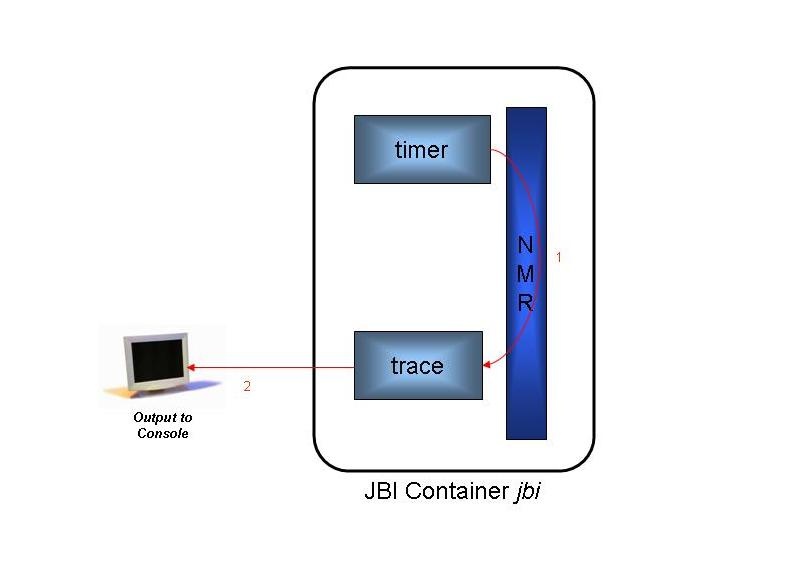
This example shows how to use a Quartz component to set off a trigger, that sends messages to a trace component. The trace component logs the messages to the console as they arrive
From a command shell, go to the Quartz example directory:
cd [servicemix_install_dir]\examples\quartz-binding |
Then type:
[servicemix_install_dir]\bin\servicemix servicemix.xml |
where servicemix_install_dir is the directory in which ServiceMix was installed.
|
Add $SERVICEMIX_HOME\bin directory to $PATH variable to simplify execution of the example. |
To terminate the Quartz example type "CTRL-C" in the command shell, in which it is running and answer "y" to the "Terminate batch job (y/n)?" question.
The diagram below illustrates the flow of messages through the Quartz components.
|
|
Messages flow through the components as follows:
[INFO] TraceComponent - -Exchange: org.servicemix.jbi.messaging.InOnlyImpl@4fdf11 received IN message:
org.servicemix.jbi.messaging.NormalizedMessageImpl@1be0369{properties: {org.servicemix.jms.message=ACTIVEMQ_TEXT_MESSAGE:
id = 0 ActiveMQMessage{ , jmsMessageID = null, bodyAsBytes = org.activemq.io.util.ByteArray@1d1fc02,
readOnlyMessage = true, jmsClientID = 'ID:Lisas-2828-1126207917359-23:0' ,
 jmsCorrelationID = 'null' , jmsDestination = demo.org.servicemix.result, jmsReplyTo = null, jmsDeliveryMode = 2,
 jmsRedelivered = false, jmsType = 'null' , jmsExpiration = 0, jmsPriority = 4, jmsTime
stamp = 1126207938593, properties = {}, readOnlyProperties = true, entryBrokerName = 'ID:Lisas-2828-1126207917359-0:0' ,
entryClusterName = 'default' , consumerNos = [0], transactionId = 'null' , xaTransacted = false,
consumerIdentifer = 'ID:Lisas-2828-1126207917359-14:0' , messageConsumed = false, transientConsumed = true,
sequenceNumber = 7, deliveryCount = 1, dispatchedFromDLQ = false, messageAcknowledge = org.activemq.ActiveMQSession@1de7497,
jmsMessageIdentity = null, producerKey = ID:Lisas-2828-1126207917359-29: }, text = <?xml version="1.0" encoding="UTF-8"?>
<timer><name>My Example Job</name><group>ServiceMix</group><fullname>ServiceMix.My Example Job</fullname><description/><fireTime>
Thu Sep 08 12:32:18 PDT 2005</fireTime></timer>}}
|
The following table provides more details about the function of each component and bean in the servicemix.xml file.
Component or Bean ID |
Description |
|---|---|
timer |
The timer component shows the use of the QuartzComponent class. Every 5 seconds, until the program is terminated, the timer component kicks off an instance of a SimpleTrigger, which is associated with an instance of JobDetail. The job has a property called "name", with a value of "My Example Job" and another property called "group", with a value of "ServiceMix." The resulting message is converted to a normalized message and then routed through the NMR. |
trace |
Receives normalized messages via the NMR. It transforms the normalized message into a string and logs it to the console. |
The ServiceMix 2.0.2 distribution has a known logging bug, so output is not logged to the console, currently. There are two ways to fix this problem. The first solution is to upgrade to 2.0.3 or greater. Please see Download for the latest releases. If 2.0.2 is still the latest/current release, then download a developer's release of 2.0.3.
The other solution is to replace the jencks-all-1.1.1.jar with the jencks-all-1.1.2.jar file. Note: This can only be done for the source version of ServiceMix 2.0.2. To apply the fix, perform the following steps:
cd [servicemix_src_install_dir]\assembly\target\servicemix-2.0.2\bin\servicemix-2.0.2\bin ..\..\bin\servicemix servicemix.xml |
NOTE: It is not necessary to build the source distribution if you have done so previously. If ServiceMix has not been built, execute the steps above, before building. The procedure on how to build the source distribution can be found here.
For more information on the following topics please see:
For a brief explanation of the XML tags in the servicemix.xml file, please see: