This document describes how to run ServiceMix's File Binding example and provides details about what it does. For information on the business use case, please refer to the last section: use case.
The File Binding example illustrates the following:
The XML code for the File Binding example is located in the ServiceMix installation directory under the examples\file-binding directory in the servicemix.xml file. It is recommended that you refer to the servicemix.xml file while reading this document.
The File Binding XML file, servicemix.xml, contains two components and a supporting bean. One component waits for a file to be deposited into the the inboxdirectory, retrieves it, creates a normalized message that contains the file, then sends the message to the Normalized Message Router (NMR). The NMR routes the file to the other component, which deposits it into an outbox directory. Please be aware that for the out-of-the-box example the input and output files are not necessarily binary identical as their XML DOM is processed; so for instance comments will be lost. The bean provides a thread pool to enhance the performance of the reading and processing of the files. Details about the components and bean are discussed below.
The file to be transmitted from the inbox to outbox must be in XML format.
From a command shell, go to the File Binding example directory:
where servicemix_install_dir is the directory in which ServiceMix was installed.
Before running the example, copy a test file into the inbox directory:
You need to download additional jars by running:
Then type:
After a few seconds, the sample_xxx.xml file will appear in the outbox directory. To see this open another command window and do a directory listing on the outbox directory, for example:
If you would like to see more files moved from inbox to outbox, copy another file into the inbox directory. The file binding program continually polls (every 1000 ms) for new files, so any new file placed in inbox, will be transmitted to outbox.
Add $SERVICEMIX_HOME/bin directory to $PATH variable to simplify execution of the example.
To terminate the File Binding example type "CTRL-C" in the command shell in which it is running and answer "y" to the "Terminate batch job (y/n)?" question.
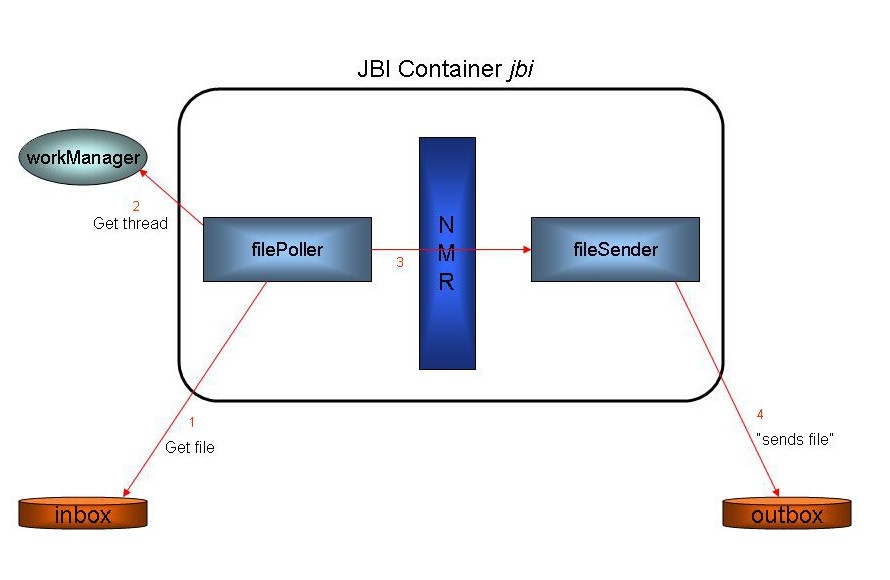
The diagram below illustrates the logical flow of the program through the file binding components.
The logical flow of the program is:
inbox directory every 1000 ms looking for a file.inbox directory, the filePoller gets a thread from the workManager. The thread will be used to process the file.outbox directory.Logging information is written to the console as files are transmitted. Typical output looks like the following:
The following table provides more details about the function of each component and bean in the servicemix.xml file.
Component or Bean ID |
Description |
|---|---|
filePoller |
This component periodically checks the "inbox" directory looking for files. If there is a file or directory present, it adds the file to the "workingSet", which is a collection of files to be processed. The workManger is invoked to schedule the work of processing the file from the workingSet. Another thread is created and the processing of the file begins. Processing consists of marshalling the file (streaming it from disk into a normalized message). The normalized message is sent over the NMR to the fileSender component per the specified "destinationService". The destinationService is specified in the |
fileSender |
This component is the "destinationService" for the filePoller. It receives normalized messages from filePoller. The messages it receives are the files that filePollerhas transferred to it via the NMR. It converts the normalized message to its original file format and sends it to the destination directory, the |
workManager |
This bean is used by the filePoller to increase the throughput of the application. The workManager is a thread pool whose size can be adjusted declaratively in the |
This section describes the start-up sequence and how the ServiceMix container interacts with the File Bindingapplication. The Java class files are located in the servicemix-1.0.1.jar file in the ServiceMix installation directory. To look at the Java source code, unjar and decompile the .class files or download the source code. Please note: the downloadable source code is slightly different than the compiled binary code.
Viewing the Java source code is recommended for understanding the information in this section.
filePoller Details
servicemix.xml file and sees it needs to instantiate a FilePoller.servicemix.xml file.Eventually, one of the threads that is polling (see step G) for a file in the inbox directory will see a one. It will use workManager's thread pool to get a thread for processing the file. Processing the file consists of streaming it from inbox, creating a normalized message, and sending the message to the NMR.
workManager Details
workManager is a property of the FilePoller object. This property is defined by a local reference, the "ref" attribute in the servicemix.xml file. The local reference is a bean which instantiates org.activemq.work.SpringWorkManager.
The SpringWorkManager is a Spring bean. By default when a Spring bean starts, the properties are set, and then the afterPropertiesSet() method is called by the container.
The workManager is used to allocate threads. The FilePoller asks for threads from the workManager for two operations:
inbox directory for files.Summarizing, when the ServiceMix container instantiates an MBean it firsts sets the property values if there are any, then calls the init() method of the class and its' parent classes, if applicable. Then it calls the start() method of the class. When a Spring bean starts up, the properties are set and then the afterPropertiesSet() method is called.
The file binding example shows how components of ServiceMix can interact with the file system. This is important because there are applications that write files out to a directory on disk and other applications that may need access to those files. This is a simple example of how a ServiceMix component can read a file from the disk, process it into a normalized message, then send it via the NMR to another ServiceMix component. The receiving component can process the message (which contains the file) and write it out to another location on disk.
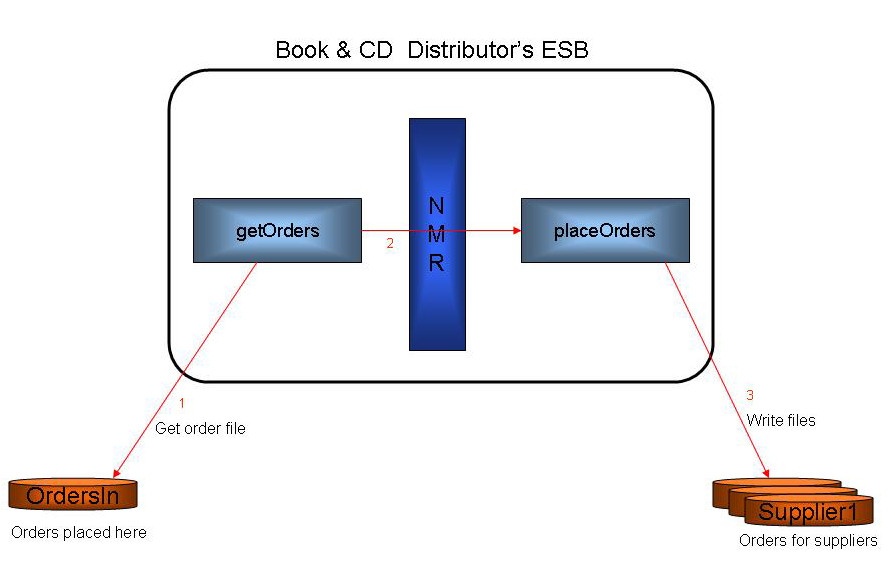
A hypothetical business scenario: An online wholesale distributor of books and music CDs, receives a nightly order from a retail store. The nightly order is transmitted to the distributor as a file and placed in a particular directory on disk. There is a ServiceMix component (getOrders) that continually scans that directory looking for order files. When it sees a file, it reads it from the disk, then transforms it into a normalized message. It sends the message over the bus (NMR) to another component called "placeOrders." The placeOrders program divides the order into separate orders for its' suppliers, e.g., one order will be placed with the distributor's book supplier, one order will go to the CD supplier, etc. At some later point, the suppliers will log in and retrieve their order files - this is not shown here, but can have an automatic or manual implementation and this process could also be integrated with ServiceMix.
The following diagram illustrates this:
For more information on the following topics please see:
For a brief explanation of the XML tags in the servicemix.xml file, please see: