
Bug Reference
Branch
Master, patches will be submitted to the review board.
Introduction
Purpose
Currently CloudStack supports VM snapshots for VMware. This feature will add the support for VM Snapshots in Hyper-V.
References
Document History
| | |
|---|
| Anshul Gangwar | Initial revision. | |
Glossary
VM - virtual machine running on hypervisor
VM Snapshot - A Hyper-V snapshot is an encapsulation of a running VM’s state, data, and hardware configuration
Feature Specifications
VM Snapshot creation
- VM snapshots form a tree structure, each VM snapshot can have one(or zero) parent snapshot.
- A current snapshot refers to the most recent snapshot compared to the current state of the VM (although a domain might have snapshots without a current snapshot if snapshots have been deleted in the meantime)
- Two types of snapshots: disk, which takes a snapshot of all disks of specified VM; disk and memory, which takes CPU/memory snapshot in addition to disks snapshot.
- Support disk snapshot when specified VM is in running and stopped state
- Support disk and memory snapshot when specified VM is in running state
VM Snapshot limitations
- Detaching/attaching VM volume is not allowed if there are VM snapshots because any changes to the disk layout will break the semantics of VM-based snapshot
- VM's memory snapshots will be automatically discarded if VM's service offering is upgraded.
- VM snapshot operations and volume snapshot operations can not be performed concurrently.
- For one VM, only one VM snapshot operation is allowed at a time. (no concurrent operations)
- Customers should only use CS to take a snapshot. CS maintains the tree in database, out-of-band snapshots will not be tracked or sync to CS
- Limit per account not supported
- Recurring snapshot not supported
VM Snapshot deletion
- Deleting a snapshot should not have any impact to its subsequent snapshots
- Snapshots will be destroyed when VM is destroyed
VM Snapshot revert
- Revert VM from running/stopped to a disk+memory snapshot, result in running state
- Revert VM from running/stopped to a disk snapshot, result in stopped state
VM Snapshot List
- Can list with commonly used parameters, like vmId, account, domainId, state..etc
- Support query by keyword (unimplemented)
Performance consideration
- Both create and revert should be completed on the scale of seconds
- As the number snapshots for one VM grows, performance may downgrade. Users should have the awareness to control the length of VM snapshot chain.
Use cases
- Create snapshot for a specified VM
- Revert VM to a specified snapshot
- Delete a specified snapshot
- List snapshots for a specified VM
- Support creating of 'VM' snapshots (“preserve the state and data of a VM at a specific point in time.“) of both a powered on and powered off VM
- Able to provide choices for a) if memory state is needed b) if file system needs to be quiesced if the VM is powered on
- Remove a snapshot and delete any associated storage
- Remove all snapshots of a VM
- Revert to a snapshot
- Admin can place a limit on the number of stored snapshots per user
- Users can create snapshots manually or by setting up automatic recurring snapshot policies Snapshots can be created on an hourly, daily, weekly, or monthly interval. One snapshot policy can be set up per VM
- With each snapshot schedule, users can also specify the number of scheduled snapshots to be retained Older snapshots that exceed the retention limit are automatically deleted.
- This user-defined limit must be equal to or lower than the global limit set by the CloudStack administrator.
- The limit applies only to those snapshots that are taken as part of an automatic recurring snapshot policy. Additional manual snapshots can be created and retained
DB changes
will add as identified
Web Services APIs
Will use the following existing APIs
| | |
|---|
createVMSnapshot | | vmSnapshot |
deleteVMSnapshot | | jobid |
listVMSnapshot | - id (optional)
- domainid (optional)
- state (optional)
- accountId (optional)
- vmId (optional)
| vmSnapshot[] |
revertToVMSnapshot | | VM |
UI scenarios
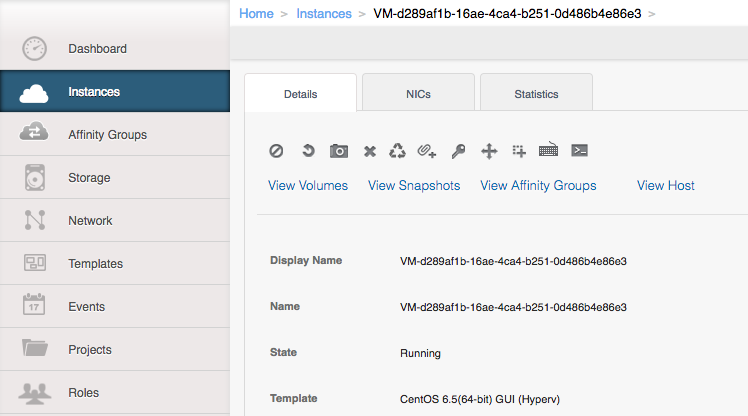
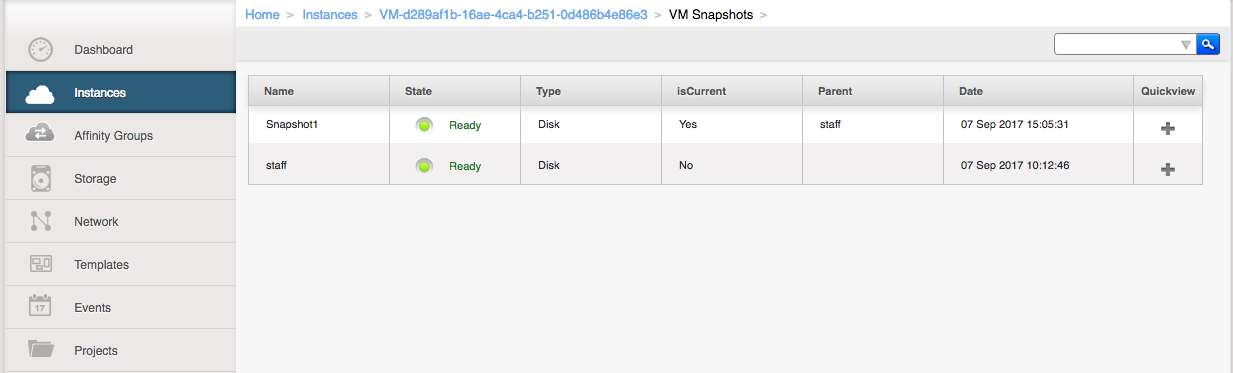
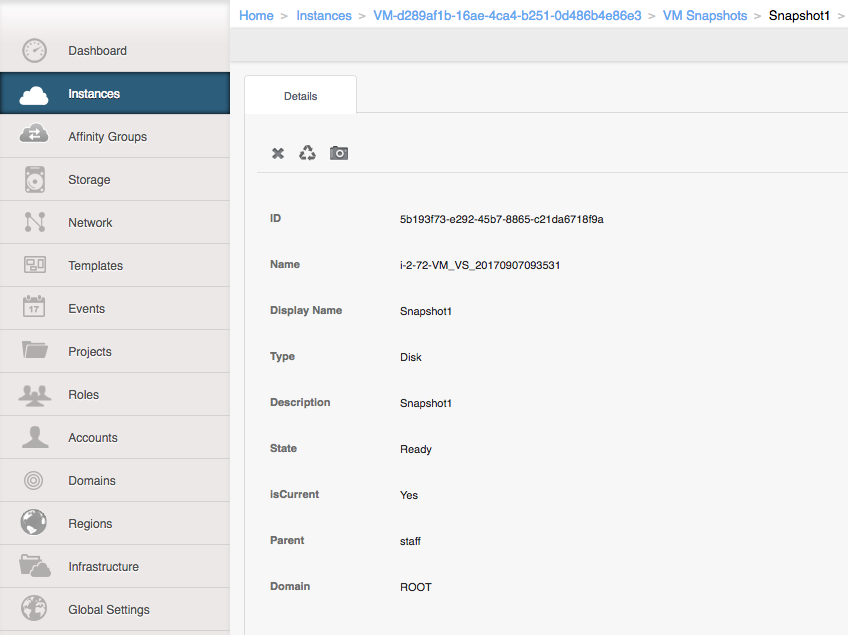
Will use the existing UI for VM snapshots
- Add snapshot action and [view snaptshots] in VM detail page
HighLevel WorkFlow
VMSnapshot state machine

createVMSnapshot:
Common workflow
- Check authority, concurrency, existence.
- Allocate VM snapshot entry in DB.
- Transit the VM and VM snapshot state to snapshotting/creating.
- Prepare TO object and CreateVMSnapshotCommand.
- Send the command to the agent.
- Update DB, like current/parent fields or volume table, depending on CreateVMSnapshotAnswer and TO object.
- Transit VM and VM snapshot state.
revertToVMSnapshot:
Common workflow
- Check authority, concurrency, existence.
- Call advanceStart or advanceStop first if revert will change VM's state; for example, when reverting a stopped VM to a DiskAndMemory snapshot, we will start this VM first and then revert it.
- Transit the VM and VM snapshot state to reverting.
- Prepare TO objects and send command.
- Update DB with information from Answer object.
- Transit VM and VM snapshot state.
deleteVMSnapshot:
Unlike VM expunging, VM snapshot deletion is designed as a sync operation, there is no daemon thread scanning and expunging them.
The implementation is fairly straightforward:
- Transit VM snapshot to expunging state.
- Prepare TO object and send command.
- Update snapshots tree.
- Mark as removed.
VMSnapshotSync:
- Add VM snapshot sync to fullSync and fullHostSync.
- It will check if there is any VM snapshot in transient states.
- The transient state found during host connection usually means mgmt server restart/outrage, or hypervisor cluster down. Because mgmt server has no idea if those tasks succeed or not, it will re-send the command in question
Enable/disable on a per hypervisor :
Add enable/disable by hypervisor_capabilities,
Add a new column ` vm_snapshot_enabled` in table `hypervisor_capabilities`, and change related VO/Dao
Set vm_snapshot_enabled = 1
Check hypervisor_capabilities when createVMSnapshot
Testing
Suggest following (but not limited) basic test scenarios
Create one VM snapshot with snapshotMemory (on, off) when VM is (running, stopped)
Revert to the previous snapshot when VM is (running, stopped)
Create multiple VM snapshot with snapshot memory (on, off, mixed) when VM is (running, stopped), the snapshots should form a tree hierarchy, such as:
A
/ \
B C
Revert to any snapshots in the tree when VM is (running, stopped)
Delete (current, any, all) VM snapshots
Attach/detach a volume to a VM when this VM has VM snapshots.
Upgrade VM service offering when VM has snapshots with snapshot memory (on, off)
take Volume Snapshot when associated VM has VM snapshots
Important
Do not delete .avhd files directly from the storage location.
considerations, when using snapshots
- The presence of a virtual machine snapshot reduces the disk performance of the virtual machine.
- When you delete a snapshot, the .avhd files that store the snapshot data remain in the storage location until the virtual machine is shut down, turned off, or put into a saved state.
- We do not recommend using snapshots on virtual machines that provide time-sensitive services, or when performance or the availability of storage space is critical.
Important questions:
When we stop VM from CloudStack, on Hyper-V that VM is destroyed. When VM gets destroyed all the associated VM snapshots also get destroyed.
To overcome this we can export the VM which also contains the snapshots information.
When to export the VM
Exporting VM is a costly operation, we can have following set of options
- Export VM when we are stopping the VM.
Pros
- In this case, we have to perform the costly export operation only when it is needed(when we cannot avoid).
- VM snapshots will be fast as then it needs to keep only differential data.
Cons- The stop operation will get affected, which we can make asynchronous and export VM only when the VM snapshots have been taken on that VM.
- What will be done if VM is started before the export operation has been completed?
- What will happen if primary goes down in middle of an export operation or export operation has not yet started?
- whenever host or primary comes up first export the VM then delete it, if it has snapshots
- What state of that VM will be returned in hostVMstatereport for vmsync?
- Export VM at every snapshot
Pros- The probability of stop operation being affected will be low. Will only be affected when stop operation occurs in the process of exporting VM.
Cons- VM snapshots will be slow
Note: Importing VM will not be costly operation assuming that exported will be kept on primary and then will be imported as in place
Failover Clustering and Hyper-V VSS
The Hyper-V VSS writer does not give any consideration to VMs that are part of a failover cluster. During both the "Saved State" method backups and all restores, the VM would be put into the saved state or deleted entirely. This would be seen as a failure by the clustering service and cause the applications on those nodes to be failed over to other nodes. To avoid this during "Saved State" backups, the VM state must be saved using the clustering service. To avoid this during a restore, the resources on the VM would need to be taken offline.