Implementation:
This feature enables CloudStack administrators to configure domain-specific OAuth2 providers. In multi-tenant environments, each domain (representing a customer, department, or team) can have its own OAuth2 provider configuration. This allows organizations to maintain separate OAuth credentials per domain, ensuring users authenticate against the correct identity provider for their team.
oauth2.enabled setting to control OAuth availability per domainStep 1: List Providers
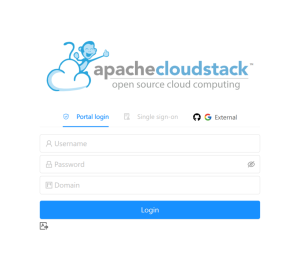
ListOAuthProvidersCmd gets called when the user hits the login page. It's sessionless, so it implements APIAuthenticator; the authenticate() hook lets it run without a session. It lists OAuth providers (global and domain-based), with oauth2.enabled checked per-domain to set the enabled flag on each provider.
darora@dell16plus:~$ cmk list oauthprovider
{
  "count": 1,
  "oauthprovider": [
    {
      "clientid": "Ov23liDRnt6bVJcoKwlP",
      "description": "GitHub OAuth for TestOAuthDomain",
      "domain": "TestOAuthDomain",
      "domainid": "fb0bc4d3-9928-42b0-bcd6-1829e09418c3",
      "enabled": true,
      "id": "73977fc9-e1c1-49ff-aebc-cf9b2198066e",
      "name": "github",
      "provider": "github",
      "redirecturi": "http://10.0.33.202:8080/client/#/verifyOauth",
      "secretkey": "ac6252ddaf4c99fb482b9b84c7aac6503cf79908"
    }
  ]
} |
Step 2: Redirect to GitHub
User clicks the provider button. Browser redirects to GitHub with the client_id. GitHub authenticates the user and redirects back with a one-time auth code. The secret_key never leaves the backend.
Browser GitHub │ │ │ GET /login/oauth/authorize │ │ ?client_id=Ov23liDRnt6bVJ │ │ &scope=user:email │ │──────────────────────────────────→│ │ │ │ User logs in, clicks "Allow" | │ │ │ 302 Redirect to: │ │ verifyOauth?code=AUTH_CODE │ │←──────────────────────────────────│ ▼ VerifyOauth.vue catches ?code=AUTH_CODE |
Step 3: Verify Code and Fetch Email
UI calls verifyOAuthCodeAndGetUser with the auth code, provider, and domain. VerifyOAuthCodeAndGetUserCmd resolves the domain via resolveDomainId(), then passes it to _oauth2mgr.verifyCodeAndFetchEmail() which looks up that domain's OAuth credentials from the DB, exchanges the auth code for an access token at GitHub's token endpoint, fetches the user's email, and returns it to the UI.
Step 4: Login
UI calls oauthlogin with the email, provider, auth code, and domain. OauthLoginAPIAuthenticatorCmd resolves the domain, checks oauth2.enabled for it, finds the CloudStack user by email, then calls loginUser(). On success, records OauthLogin=true and returns a session key. oauth2.enabled is checked in both Step 1 (hides buttons if disabled) and Step 4 (backend safety net against direct API calls).
OauthLoginAPIAuthenticatorCmd.authenticate() │ ├── resolves domain ├── checks oauth2.enabled for domain ├── finds user by email │ ├── _apiServer.loginUser(username, password=null, domainId) │ │ │ ▼ │ OAuth2UserAuthenticator.authenticate() │ ├── checks oauth2.enabled for domain (again) │ ├── calls GithubOAuth2Provider.verifyUser(email, code, domainId) │ │ ├── looks up domain credentials from DB │ │ ├── exchanges code with GitHub │ │ └── compares emails │ └── returns true → login succeeds │ ├── records OauthLogin=true └── returns session key → UI redirects to dashboard |
How loginUser() triggers GitHub verification: loginUser() doesn't know about OAuth; it delegates to accountMgr.authenticateUser(), which loops through all registered UserAuthenticator implementations. OAuth2UserAuthenticator sees provider=github and secretcode in the request params, picks it up, looks up GithubOAuth2Provider from the manager's map, and calls verifyUser(email, secretCode, domainId). The original HTTP request params flow through the entire chain as the thread connecting everything.
OauthLoginAPIAuthenticatorCmd.authenticate()
  → _apiServer.loginUser()
    → accountMgr.authenticateUser()
      → for (authenticator : _userAuthenticators)
        → OAuth2UserAuthenticator.authenticate()
→ GithubOAuth2Provider.verifyUser() |
Step 5: Login Page (External Tab) Behavior
response.listoauthproviderresponse.count > 0domain=<path>Admin commands — how providers get registered/updated/deleted
DB migration — schema changes (domain_id column, FK, unique key)
Config change — oauth2.enabled scope from Global to Domain
GitHub/Google provider internals — DAO lookup changed from findByProvider() to findByProviderAndDomainWithGlobalFallback()
New parameter:
domainid: optional UUID parameter to register the OAuth provider for a specific domain. If not provided, the provider is registered at the global level.New parameter:
domainid: optional UUID parameter to filter providers by domain. When specified, returns providers for that domain plus global providers.New response field:
domainid: indicates the domain association of the provider (null for global).New parameters:
domainid: optional UUID parameter to lookup provider for a specific domain.domain: optional string parameter to lookup provider by domain path (e.g., /ROOT/Engineering).If both are provided, domainid takes precedence.
No new parameters. Existing domain and domainid parameters will be used to determine which OAuth provider credentials to use during authentication.
cmk register oauthprovider \
    provider=github \
    description="Engineering GitHub" \
    clientid="Iv1.abc123" \
    secretkey="secret456" \
    redirecturi="https://cloudstack.example.com/client/oauth2" \
domainid=<domain-uuid> |
cmk list oauthproviders domainid=<domain-uuid> |
Table: oauth_provider:
ALTER TABLE `cloud`.`oauth_provider` ADD COLUMN `domain_id` bigint unsigned DEFAULT NULL; ALTER TABLE `cloud`.`oauth_provider` ADD CONSTRAINT `fk_oauth_provider__domain_id` FOREIGN KEY (`domain_id`) REFERENCES `domain`(`id`); ALTER TABLE `cloud`.`oauth_provider` ADD INDEX `i_oauth_provider__domain_id`(`domain_id`); ALTER TABLE `cloud`.`oauth_provider` ADD UNIQUE KEY `uk_oauth_provider__provider_domain` (`provider`, `domain_id`); |
domain_id = NULL indicates a global provider(provider, domain_id) prevents duplicate registrationsThe oauth2.enabled config key uses a new strictScope mode in ConfigKey.valueInScope() to prevent automatic inheritance from global to domain scope. Each domain must explicitly set oauth2.enabled=true to enable OAuth login.
| Global oauth2.enabled | Domain oauth2.enabled | OAuth enabled for domain? |
|---|---|---|
| false | not configured | No |
| false | true | Yes |
| false | false | No |
| true | not configured | No (no global fallback) |
| true | true | Yes |
| true | false | No |
Key difference from standard ConfigKey behavior: without strict scope, an unconfigured domain inherits the global value. With strict scope, unconfigured domains return null which is treated as disabled. This ensures domains must explicitly opt in to OAuth.